Shadow mode in practice: run an agent alongside human operators and measure agreement with kappa
An agent that agrees with operators 90% of the time may still have learned nothing. A few dozen lines of Python will tell you which kind yours is.

In brief
- In shadow mode the agent receives a copy of real requests, while users see only the output of the existing process.
- When one decision dominates, raw agreement is misleading. Kappa subtracts the overlap expected by chance.
- A shadow period ends with a promote, hold or rollback report. A human signs off; the system does not decide on its own.
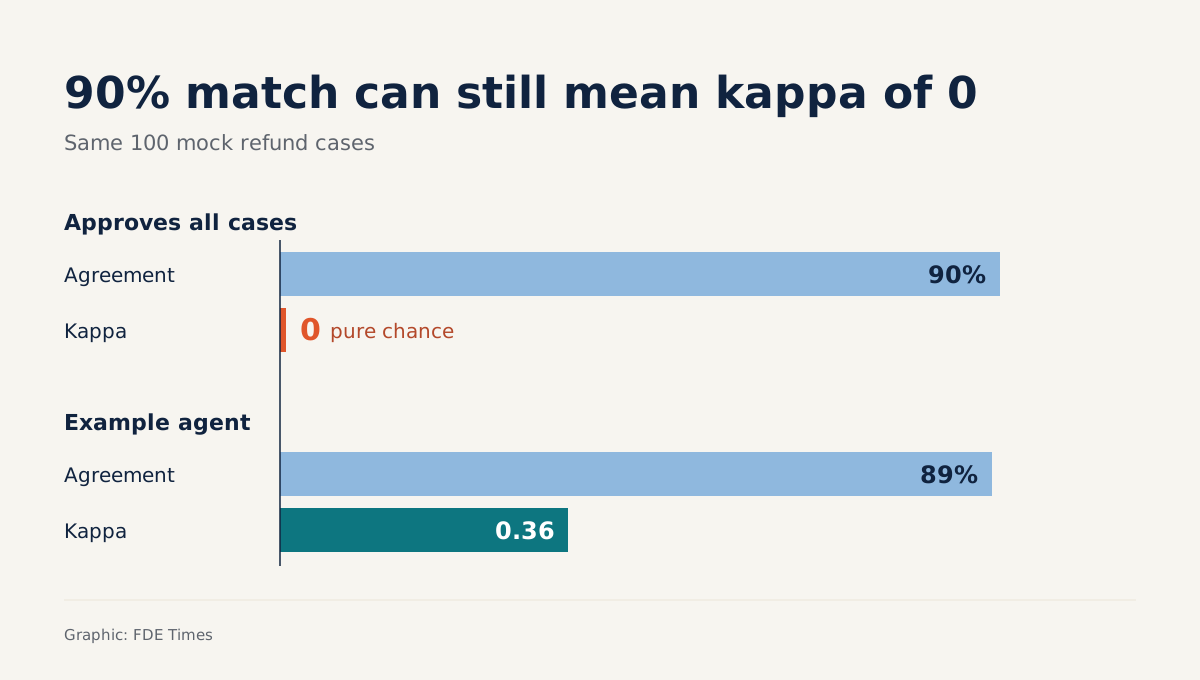
Suppose your refund-approval agent agrees with your operators on 90 of 100 cases. That sounds fine in a status report. But if the operators approved exactly 90 cases and the agent simply clicked “approve” on everything, it would still score 90% while having learned nothing.
So before an agent touches real decisions, you need a period of observing it, with a measure that a flattering number cannot fool. This guide walks through each step: setting up shadow mode for one operational decision, recording both sides, computing agreement and Cohen’s kappa, and writing the end-of-period report.
All you need is Python 3 and the built-in sqlite3 module. The code below is simplified for teaching. At a customer site, storage will be whatever database or queue their systems already use.
What is shadow mode, really?
Christopher Samiullah describes shadow mode as a technique in which production traffic and data are passed through a new version of a service or model. The new version runs for real, but its output never reaches users. AWS SageMaker’s shadow testing follows the same principle: the shadow model receives a copy of real requests, while the calling application receives only the production model’s response.
The same applies to agents. Operators carry on with their normal work, the agent makes its own decisions in the background, and everything is logged.
According to AWS, the purpose is to catch configuration and performance errors before they affect end users. A shadow test is followed by a controlled promotion, not a single flip of a switch.
Shadow mode is not free. Samiullah notes that it adds load to the system and that at peak times resource demand can double. Tell the customer this up front rather than letting them discover it on the invoice.
Step 1: fix one decision and one label set
Choose a single decision with discrete outputs. The example here is a refund request with two labels, approve and reject. If operators in practice also have an “escalate” option, add it as a third label. Do not squeeze a three-way decision into two labels.
Check: sit with an operator, show them 10 past cases and ask whether the label set covers every decision they make. If they find themselves explaining “approve, but…”, the label set is incomplete.
Step 2: one shared table for both sides
The AWS reference architecture logs requests and responses from both endpoints to DynamoDB for later comparison. You do exactly the same, except that one side is an agent and the other is a human.
import sqlite3
from datetime import datetime, timezone

db = sqlite3.connect("shadow.db")
db.execute("""
CREATE TABLE IF NOT EXISTS decisions (
  case_id TEXT PRIMARY KEY,
  agent_decision TEXT,
  agent_reason TEXT,
  agent_at TEXT,
  operator_decision TEXT,
  operator_at TEXT
)""")
db.commit()

def now():
    return datetime.now(timezone.utc).isoformat()
Check: run sqlite3 shadow.db ".schema" and see the decisions table. Keep the agent_reason column: when you read the disagreements, it is the first column you will open.
Step 3: wrap the agent so it cannot break the live flow
This is the step most likely to go wrong. The agent may be slow, fail or return garbage, but operators must never notice any of it.
def shadow_agent(case, run_agent):
    try:
        decision, reason = run_agent(case)
    except Exception as e:
        decision, reason = "ERROR", repr(e)
    db.execute("""
      INSERT INTO decisions (case_id, agent_decision, agent_reason, agent_at)
      VALUES (?, ?, ?, ?)
      ON CONFLICT(case_id) DO UPDATE SET
        agent_decision=excluded.agent_decision,
        agent_reason=excluded.agent_reason,
        agent_at=excluded.agent_at""",
      (case["id"], decision, reason, now()))
    db.commit()
    # Return nothing: the agent's result never goes back to the operator UI.
The code uses an upsert rather than INSERT OR REPLACE. An operator may finalise a decision before the agent finishes, and REPLACE would wipe their column. In production this function should run asynchronously through a queue, so that a slow agent cannot slow down the operator interface.
Check: make run_agent throw an exception on purpose, then confirm two things: the operator’s screen does not change, and the table contains an ERROR row.
Step 4: record the operator’s decision where they click the button
def record_operator(case_id, decision):
    db.execute("""
      INSERT INTO decisions (case_id, operator_decision, operator_at)
      VALUES (?, ?, ?)
      ON CONFLICT(case_id) DO UPDATE SET
        operator_decision=excluded.operator_decision,
        operator_at=excluded.operator_at""",
      (case_id, decision, now()))
    db.commit()
Call this function from the “finalised” event in the customer’s own system, not from a summary table exported at the end of the day. Operators must never see the agent’s decision before they finalise theirs. If they do, you are measuring how much the agent influences them, not agreement.
Step 5: why can 89% be merely “fair”?
Raw agreement is easy to compute: the number of cases where both sides chose the same label, divided by the total. Cohen’s kappa is generally considered a more robust measure because it removes agreement that could occur by chance. That matters most when one label dominates, as approve does in this example.
The formula is κ = (p_o − p_e) / (1 − p_e), where p_o is the observed agreement and p_e is the rate at which the two sides would coincide if each simply chose at random according to its own usual frequencies.
Try it on 100 hypothetical cases. Both sides approve 85 cases and both reject 4. In 5 cases the operator approves but the agent rejects, and in 6 cases the reverse. So p_o = 0.89. The operator approves 90 cases and the agent 91, so p_e = 0.90 × 0.91 + 0.10 × 0.09 = 0.828. Kappa = 0.062 / 0.172 ≈ 0.36.
The lazy agent from the opening, which approves everything, has p_o = 0.90 and p_e = 0.90. Its kappa is exactly 0: 90% agreement, yet no better than guessing with the majority.
To interpret kappa, many people use the Landis and Koch benchmarks: 0 to 0.20 is “slight”, 0.21 to 0.40 “fair”, 0.41 to 0.60 “moderate” and 0.61 to 0.80 “substantial”.
On this scale, the example’s 0.36 is only “fair”. These benchmarks are not universally accepted as a standard, so use them for orientation, not as rules.
rows = db.execute("""
  SELECT agent_decision, operator_decision FROM decisions
  WHERE agent_decision IS NOT NULL AND agent_decision != 'ERROR'
    AND operator_decision IS NOT NULL""").fetchall()
n = len(rows)
labels = {a for a, _ in rows} | {o for _, o in rows}
p_o = sum(a == o for a, o in rows) / n
p_e = sum((sum(a == l for a, _ in rows) / n) *
          (sum(o == l for _, o in rows) / n) for l in labels)
kappa = (p_o - p_e) / (1 - p_e) if p_e < 1 else float("nan")
print(f"n={n} agreement={p_o:.2f} kappa={kappa:.2f}")
Check: load exactly the 100 rows from the example above and confirm the script prints agreement=0.89 kappa=0.36. Then count the ERROR rows separately. Technical failure is a separate metric; do not let it quietly drop out of the denominator.
Step 6: the end-of-period report and who signs it
Foundry’s shadow-mode-runner skill defines shadow mode for agents as measuring the agreement_rate between humans and the agent. The skill ends a shadow period with one of three recommendations: promote_to_assisted, hold_in_shadow or rollback. It also states plainly that the skill does not decide on promotion itself; it only produces the report, and a human signs off.
Do the same. The report should include n, agreement, kappa, the error rate, the disagreement matrix and about 10 representative disagreements with their agent_reason. The signatory is the person accountable for that process on the customer’s side, not you.
Common mistakes
The first is reporting agreement alone. The example above shows that 89% can correspond to a kappa of just 0.36. The second is letting operators see the agent’s suggestion during the shadow period, so the two decisions are no longer independent.
The third is lumping the two kinds of disagreement together. An agent rejecting a case the operator approved carries very different risk from an agent approving a case the operator rejected.
The fourth is forgetting the cost: shadow mode itself, whatever service or model it runs for, adds load to the system, and at peak times resource demand can double.
How this skill shows up at customers
In a real deployment, the hardest question is usually not “does the agent work?” but “what gives us grounds to trust it?” Shadow mode answers with the customer’s own data, on their own staff, before the agent is allowed to intervene in anything.
On the career side, when reading FDE job descriptions, look for phrases such as “evaluation”, “rollout” or “human-in-the-loop”: this skill sits behind them. On a CV, a line such as “built shadow mode for decision X, reported agreement and kappa on N cases, customer signed off promotion to assisted mode” carries far more weight than “built AI agents”.
An agreement rate on its own is easy for a tough reviewer to pick apart. Kappa set beside a disagreement matrix is much harder to break, and that is the pair of numbers that belongs on your slide.
Was this article useful?
Thanks for the feedback!