Hands-on: build an agent that asks when a request is ambiguous, then measure whether asking pays off
An agent that asks too little gets things wrong, and one that asks too much drives users away. The only way to know which mistake yours makes is to measure it.

In brief
- Models tend to assume a single reading of an ambiguous request, and prompt tricks such as chain-of-thought or few-shot do little to fix this.
- In the Agent SDK, the agent asks through AskUserQuestion. If you restrict the tools list and forget to add this tool, the agent cannot ask.
- Measure under-asking and over-asking separately, then compare with a guessing baseline that cannot ask: asking is only worth it when results improve.
A customer types “make this month’s revenue report”, and your agent gets straight to work. It picks gross revenue, uses the server’s time zone, rolls up every region and returns a confident-looking number. What the person actually wanted was net revenue for a single branch.
This failure is common. The research team behind “Modeling Future Conversation Turns” (with authors from Google) found that today’s LLMs tend to respond by assuming an ambiguous request has only one reading. ClarifyMT-Bench, a benchmark of 6,120 multi-turn conversations, found that all ten LLMs tested tended to under-ask.
For an FDE this is an everyday problem, not a research one. Requests at a customer site almost always lack context. This guide walks through building an agent that asks clarifying questions, then building a small eval that answers a harder question: is the asking worth it?
Why isn’t fixing the prompt enough?
Many people’s first instinct is to add “if anything is unclear, ask” to the system prompt. The CLAMBER benchmark (ACL 2024) tested techniques such as chain-of-thought and few-shot prompting. The result: the ability to recognise ambiguous questions improved only slightly, and sometimes the models became overconfident.
CLAMBER also found that LLMs write poor clarifying questions, because they fail to handle the points where the possible readings conflict. So there are two separate skills: knowing when to ask, and asking the right thing. DiscoBench, a benchmark for search agents, also concluded that detecting ambiguity and asking effective clarifying questions are distinct abilities.
The right approach, then, is to build the asking mechanism into the agent’s infrastructure and measure each ability on its own. A better prompt is not enough.
What you will build, and what you need
You will build two things. The first is an agent written with the Claude Agent SDK that asks clarifying questions through the AskUserQuestion tool, with a cap on the number of rounds. The second is an eval script that scores the agent on a labelled set of requests.
You need a project with the Agent SDK installed, an existing agent (a read-only agent is enough) and 20 sample requests. The code below is a trimmed sketch meant to show the structure. Before running it, check function names and types against the “Handle approvals and user input” page in the SDK docs.
Steps 1–3: give the agent permission to ask, and intercept it when it does
Step 1. Add AskUserQuestion to the tools list. According to the SDK docs, Claude calls AskUserQuestion when it needs more direction on a task that has several valid approaches. If you have restricted the tools, for example to make the agent read-only, you must add this tool to that array. Without it, the agent cannot ask.
// Sketch — simplified
const options = {
  allowedTools: [...READ_ONLY_TOOLS, "AskUserQuestion"],
  canUseTool: handleTool,
};
Check: give the agent a deliberately ambiguous request, such as “summarise this month’s figures”, and look in the log for a call to AskUserQuestion.
Step 2. Intercept the call in canUseTool. Every time the agent calls AskUserQuestion, the SDK triggers your application’s canUseTool callback. This is where you show the question to the user, collect the answer and log it for the eval later.
// Sketch — simplified
let asks = 0;
const MAX_ASKS = 2;

async function handleTool(toolName, input) {
  if (toolName !== "AskUserQuestion") return allow(input);
  asks += 1;
  log({ type: "ask", round: asks, input });
  if (asks > MAX_ASKS) return answerWith(input, "Pick the most reasonable option and state your assumptions");
  const answers = await showToUser(input);
  return answerWith(input, answers);
}
Step 3. Set a stopping condition. Anthropic’s “Building effective agents” recommends stopping conditions, such as a maximum number of iterations, to keep control of an agent. The clarification loop needs one too. The two rounds above are your design choice, not an SDK default.
Once the rounds run out, the agent must decide for itself and record its assumptions so the user can check them.
Check: try a request that is ambiguous in three different places. The agent must stop asking after the second round, and the output must include a section listing its assumptions.
Three common mistakes when you turn on asking
The easiest mistake is letting a subagent ask. The SDK docs state that AskUserQuestion is not yet available in subagents. Every question therefore has to go through the main agent, so you need to design subagents to pass their clarification needs back to it.
Next is cramming too much into one question. Each call allows only 1–4 questions, each with 2–4 options. The limit actually helps: it forces the agent to offer a few concrete readings, such as “gross or net revenue?”, rather than a vague “what do you want?”.
Finally, there is the callback that hangs forever. The SDK docs note that the callback can wait indefinitely, and the agent sits idle until it returns. A customer might reply half a day later; for that case, the docs recommend a PreToolUse hook with a defer decision, so the process can exit and resume once the answer arrives.
Steps 4–5: measure under-asking and over-asking separately
Counting how often the agent asks tells you nothing. ClarifyMT-Bench found that models under-ask, but the same study also recorded the opposite: models often over-ask on inputs they should have refused. To know which way your agent leans, you have to measure both.
Step 4. Label the data. Each case contains the request, a should_ask label and an intent: the real intention a simulated user will draw on to answer when asked.
cases = [
    {"prompt": "Revenue report for this month", "should_ask": True,
     "intent": "net revenue, North branch"},
    {"prompt": "Count cancelled orders on 3 November in the orders table", "should_ask": False,
     "intent": None},
]
Step 5. Compute the two rates.
def score(results):
    amb = [r for r in results if r["should_ask"]]
    clear = [r for r in results if not r["should_ask"]]
    under = sum(not r["asked"] for r in amb) / len(amb)
    over = sum(r["asked"] for r in clear) / len(clear)
    return under, over
Imagine your 20 cases split evenly: 10 ambiguous, 10 clear. The agent asks on 6 of the ambiguous cases, missing 4, so the under-asking rate is 40%.
It also asks on 2 of the clear cases, an over-asking rate of 20%. These two numbers point to two different fixes. If you only counted the total, you would see 8 questions and have no idea what to fix.
Is asking worth it? Compare with an agent that can only guess
This is the step many teams skip. DiscoBench does not compare asking with guessing; it compares continuing to search instead of asking with guessing outright, and found that searching on was usually worse: an average success rate of 51.9% versus 56.5%. The lesson is that behaviour that looks careful does not necessarily produce better results.
No benchmark will run the asking-versus-guessing comparison on your customer’s data for you. You have to measure it yourself.
Step 6. Run the comparison. Run the same 20 cases in two configurations: one with AskUserQuestion and one with it removed from allowedTools. The second forces the agent to guess. Score both with the same pass/fail criterion based on intent.
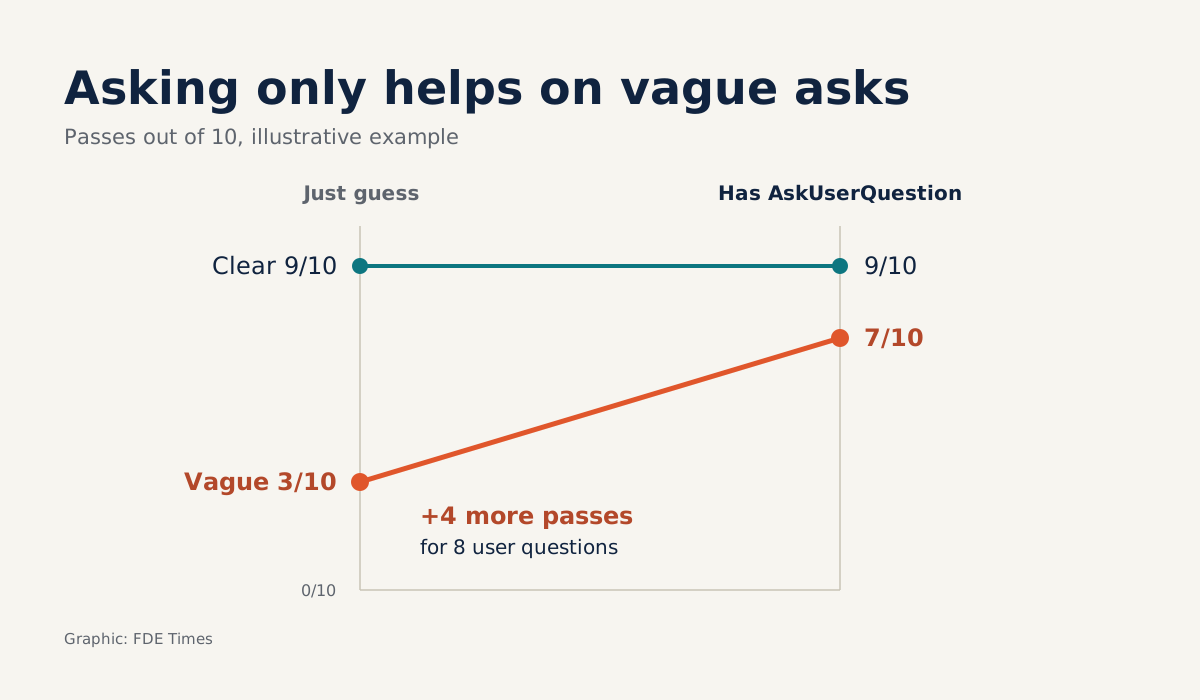
Continuing the hypothetical example above, the results table might look like this:
| Metric (20 cases, hypothetical numbers) | With AskUserQuestion | Guessing outright |
|---|---|---|
| Passes on 10 ambiguous cases | 7/10 | 3/10 |
| Passes on 10 clear cases | 9/10 | 9/10 |
| Total passes | 16/20 | 12/20 |
| Times the user had to answer | 8 | 0 |
How to read it: the asking version trades 8 interruptions for 4 extra passes, all of them in the ambiguous group.
But 2 of the 8 questions landed on clear cases without raising the pass rate there, so the first thing to fix is over-asking.
If the left column does not pass clearly more often, the cost of making users answer is not worth it.
Step 7. Score question quality. A good question is one where each option leads to a different course of action, and at least one option matches the real intent. A simple check: for each logged question, have the simulated user pick each option in turn, rerun the agent and compare the outputs.
# Sketch — simplified; normalize() depends on your data
def question_quality(case, ask, run_with_answer, matches):
    outputs = {opt: normalize(run_with_answer(case, opt))
               for opt in ask["options"]}
    branches = len(set(outputs.values())) > 1   # do the options change the output?
    on_target = any(matches(opt, case["intent"]) for opt in ask["options"])
    return {"branches": branches, "on_target": on_target}
For “gross or net revenue?”, the two options produce two different numbers and one of them matches intent, so the question passes both criteria. If the agent does exactly the same thing whichever option is chosen, branches is False: that question only slows the user down.
What this skill looks like at a customer site
This eval is something you can bring to a review with the customer. Instead of saying “the agent now knows how to ask clarifying questions”, you put the comparison table above on screen, with the customer’s real numbers in place of the hypothetical ones.
The best sample set comes from the customer’s own real tickets, because every company’s ambiguity lives in different terminology. A final exercise: run all seven steps on 20 of those tickets, fill in the table, and write one sentence concluding whether to keep or drop AskUserQuestion.
For your career, describe exactly how you measured in your CV and in interviews, rather than just listing features. A line such as “reduced the over-asking rate on the customer’s real requests, benchmarked against a guessing baseline” shows a hiring manager that you know how to evaluate agents.
When reading job descriptions, look for passages that mention agent evaluation or human review mid-task. That is where this eval is worth bringing up.
Anthropic describes agents as working independently but able to return to a human when they need more information or human judgement. When to return should not be left to the model’s instinct: let measurements on the customer’s data decide.
Was this article useful?
Thanks for the feedback!
6 sources
- Building effective AI agents (Anthropic) · 2024-12-19
- CLAMBER: A Benchmark of Identifying and Clarifying Ambiguous Information Needs in Large Language Models · 2024-05-20
- Modeling Future Conversation Turns to Teach LLMs to Ask Clarifying Questions · 2024-10-17
- ClarifyMT-Bench: Benchmarking and Improving Multi-Turn Clarification for Conversational Large Language Models · 2025-12-24
- When Search Agents Should Ask: DiscoBench for Clarification-Aware Deep Search
- Handle approvals and user input (Claude Agent SDK docs)