Build a fake MCP server that injects timeouts, 429s and schema changes to test agents offline
Your agent runs smoothly in the demo. Nobody yet knows what it does when a tool hangs for 30 seconds or returns a field that has been renamed.

In brief
- Under the MCP spec, tool errors travel through two channels: JSON-RPC protocol errors and execution errors with isError: true. A fake server must simulate both.
- The minimum fault set: a 429 with retry-after, a 429 without retry-after, a hung tool, a non-existent tool, and data returned in the wrong schema.
- A fixed script, no network and repeatable tests: this is what lets you prove to a customer that the agent can withstand failures.
The MCP spec gives just one short line to recommending that clients set timeouts on tool calls. That line is easy to skim past during a demo. Things change once a customer connects the agent to a real CRM: their API has rate limits, it sometimes goes down for maintenance, and the backend team may rename a data field without telling anyone.
This guide builds a fake MCP server in Python. It exposes the same tool names as the real system but fails according to a script you choose. The whole test suite runs on a laptop, needs no network and gives the same result every time.
Customers want to know what the agent does when their systems break. With a fault test suite in hand, you can answer with a test run in front of them, not just with words.
Understand the two error channels before writing any code
The MCP spec (version 2025-06-18) defines two mechanisms for tools to report errors. The first is a JSON-RPC protocol error: calling a tool that does not exist, for example, returns code -32602. The second is a tool execution error: the result comes back as normal but carries isError: true. API errors and business-logic errors fall into this category.
Because the two kinds of error arrive through different channels, your agent should have a separate branch for each. A sensible split is to pass execution errors to the model so it can decide whether to retry or change course, and to log protocol errors as integration bugs for a person to fix. This is a design suggestion, not something the spec requires.
The spec also includes a ready-made example of an execution error for rate limiting, with the text “Failed to fetch weather data: API rate limit exceeded”. You can borrow that sentence as the template for your fake 429 message.
What do you need?
You need Python 3.10 or later, pytest with a plugin for async tests, and the FastMCP library. The official MCP Python SDK lets you define a server with nothing more than functions with type hints and docstrings, each tool registered with a decorator. FastMCP also lets you wrap the server in a Client and test it in the same process, without opening a separate MCP Inspector.
The code below has been trimmed to teach the idea. Class names, parameters and exception mapping may differ between versions, so check against the documentation for the SDK version you install.
Step 1: write a server that reads its fault script from an environment variable
The principle is that the script must be deterministic. Instead of letting failures happen at random 10% of the time, you pass in a fixed sequence of faults, such as 429,ok: the first call is rate-limited and the second succeeds. That way, a test that passes today will pass tomorrow.
# fake_crm.py (trimmed)
import asyncio, os
from fastmcp import FastMCP
from fastmcp.exceptions import ToolError

mcp = FastMCP("fake-crm")
PLAN = [f for f in os.environ.get("FAULTS", "").split(",") if f]
state = {"n": 0}

def next_fault() -> str:
    i = state["n"]; state["n"] += 1
    return PLAN[i] if i < len(PLAN) else "ok"

@mcp.tool
async def get_order(order_id: str) -> dict:
    """Fetch an order by its ID."""
    fault = next_fault()
    if fault == "429":
        raise ToolError("API rate limit exceeded. retry-after: 2")
    if fault == "429cap":
        raise ToolError("API rate limit exceeded: monthly spend cap reached")
    if fault == "hang":
        await asyncio.sleep(3600)
    if fault == "drift":
        return {"orderId": order_id, "total": "12.5"}
    return {"order_id": order_id, "status": "shipped", "total": 12.5}
PLAN is read from FAULTS once, at import time. In tests, you override it with monkeypatch and reset the counter, so each test gets its own script without restarting the process.
Check: create test_fake_crm.py with a first “happy path” test and an empty script, then run pytest -q test_fake_crm.py.
# test_fake_crm.py (trimmed)
import pytest
from fastmcp import Client
from fake_crm import mcp, state

@pytest.mark.asyncio
async def test_no_fault(monkeypatch):
    monkeypatch.setattr("fake_crm.PLAN", [])
    state["n"] = 0
    async with Client(mcp) as client:
        r = await client.call_tool("get_order", {"order_id": "A1"})
        assert not r.is_error
This test must pass and return an order whose status is shipped. If this step does not work yet, do not go further.
Step 2: why do you need two kinds of 429?
The error patterns here are borrowed from the documentation of the Claude API, a real HTTP API. With an ordinary 429, the retry-after header says how many seconds to wait, and retrying sooner will fail.
Claude API rate limits work as a token bucket: capacity refills gradually rather than resetting at a fixed point. But a 429 caused by hitting a tier’s spend cap carries no retry-after, and no number of retries will succeed until access is restored.
To be clear: the tool in the fake server does not return an HTTP 429 and has no headers. It simply copies those two behaviour patterns into a text ToolError, with retry-after: 2 inside the error message. If the customer’s real backend is HTTP, the layer of your code that calls the API will see real headers, and you should mock that layer as well.
That is why the fake server has both 429 and 429cap. A good agent waits and retries on the first. On the second, it stops and tells the user instead of retrying pointlessly. Add this test to the same file:
@pytest.mark.asyncio
async def test_429_is_execution_error(monkeypatch):
    monkeypatch.setattr("fake_crm.PLAN", ["429", "ok"])
    state["n"] = 0
    async with Client(mcp) as client:
        r = await client.call_tool("get_order", {"order_id": "A1"},
                                   raise_on_error=False)
        assert r.is_error  # isError channel, not a JSON-RPC error
Check: the result must carry the error flag rather than raising a protocol exception. If the client raises an exception, you are mixing the two error channels.
Step 3: simulate a hung tool, then cancel the request
The hang scenario mimics an API that never answers. The spec recommends that clients set timeouts, so the test must assert that the agent gives up after a bounded time.
import asyncio

@pytest.mark.asyncio
async def test_hung_tool_is_cut_off(monkeypatch):
    monkeypatch.setattr("fake_crm.PLAN", ["hang"])
    state["n"] = 0
    async with Client(mcp) as client:
        with pytest.raises(asyncio.TimeoutError):
            await asyncio.wait_for(
                client.call_tool("get_order", {"order_id": "A1"}), timeout=5)
After the timeout there is one more easily missed detail. The spec on cancellation says the receiver of a cancellation notification should stop processing and not send a response for the cancelled request. The spec also acknowledges a race condition: the response may already have been sent before the cancellation arrives.
Write one more server scenario, “answer late, just after being cancelled”, and check that the agent ignores that answer instead of attaching it to a different conversation turn.
Step 4: protocol errors and schema drift
Protocol errors are the easiest part: call get_ordr (a deliberate misspelling). Under the spec, the expected result is a JSON-RPC error such as -32602. Check that your SDK maps it that way, and that the agent logs it as an integration error rather than stuffing it into the prompt.
Schema drift is harder to catch. The drift scenario renames order_id to orderId and turns total from a number into a string. This result reaches the agent as a successful call, with no isError and no JSON-RPC error, so it travels through neither error channel.
If a tool declares an outputSchema, the spec requires the server to return results that conform to it and recommends that clients validate them. The fake server deliberately breaks that rule to see whether the client catches the error, or whether the agent quietly adds the string “12.5” to an invoice.
The spec also has a mechanism for announcing that the tool list has changed: the server declares the listChanged capability and then emits a notifications/tools/list_changed notification. Add a scenario that emits this notification mid-session, then check that the agent calls tools/list again before its next tool call. Each SDK emits notifications differently, so this part depends on the library you choose.
The three most common retry mistakes
The first is stacking retries on retries. The official Claude SDKs retry transient errors twice by default, with exponential backoff, and respect retry-after.
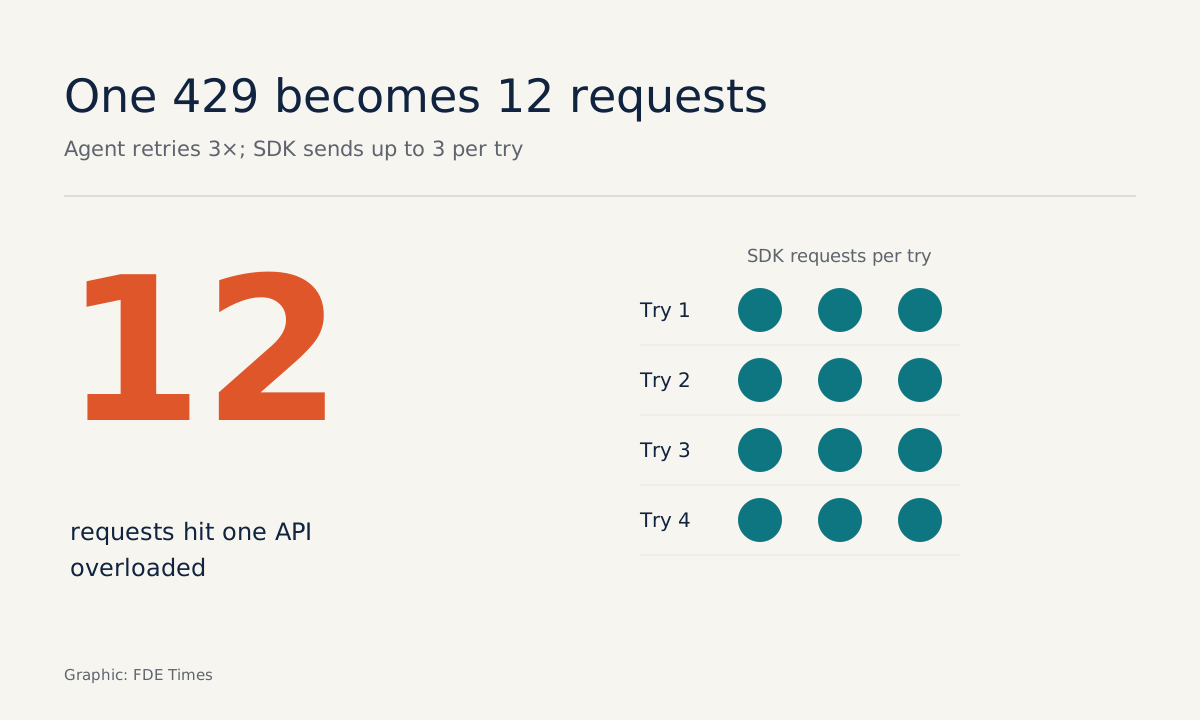
Do the arithmetic: your agent loop retries 3 times on its own, meaning 4 calls including the first, and each time the SDK sends up to 3 requests. A single 429 can turn into 12 requests piling onto an API that is already overloaded.
The second mistake is retrying at a fixed interval without reading retry-after. The third is lumping every 429 into one handling branch, so the agent keeps retrying forever when the spend cap has been hit. Your fault set should also include 504 timeout_error and 529 overloaded_error, two transient errors besides 429 listed in the Claude API documentation.
Where does this skill show up in customer work?
Picture your first week at a logistics company. You do not yet have access to the production API, and the staging environment only runs a few hours a day. A fake server lets you work in parallel.
Ask them for the documentation describing rate limits and schemas, build the fake to match it exactly, and by the time you get real access, the fault test suite is ready.
The first thing to do is ask the customer’s operations team three questions: what headers does the API send with a 429, what is the real-world timeout, and when was the last time the schema changed without warning? Each answer becomes a scenario in the FAULTS variable.
On your CV, do not just write “built agents using MCP”. Write that you built a fault-injection test suite with a given number of scenarios, and what bugs it caught before production. When reading FDE job descriptions, look for phrases such as “reliability”, “production readiness” or “integration testing”.
A good FAULTS set grows with every real incident: each time a customer’s system fails in a new way, you get another line for the script.
Was this article useful?
Thanks for the feedback!