Hands-on: syncing SharePoint and Confluence into RAG with a separate permissions job
Almost any team can sync content. Keeping up when a client takes away someone's read access is much harder, so this guide builds two separate jobs for the two tasks.

In brief
- Webhooks only tell you that something changed. The actual data comes from delta. Keep running delta on a schedule as a safety net.
- Track items by id, make upserts idempotent, remove items with the deleted facet, and always have a full resync path ready for a 410.
- Permissions need their own job: the change feed does not reliably reflect revocations, and Confluence space permissions do not show up in CQL.
Picture this: at 9am, an employee loses read access to the payroll folder in SharePoint. If your RAG pipeline only syncs content, the chatbot will keep quoting payroll documents to that person, because the files themselves have not changed.
Wavect’s analysis of RAG on SharePoint and Confluence makes exactly this point: permissions copied into an index do not update themselves when the source revokes them.
A single incident like that is enough for a client to halt a pilot outright. That is why the first question from a client’s security team will most likely be about access, not answer quality.
This guide builds two jobs. The content job uses delta queries to push file changes into the vector index. The permissions job runs separately, with its own signal sources and a fail-closed threshold. The code below is simplified Python pseudocode written for readability, not a ready-to-run SDK.
What do you need before writing the first line of code?
You need an app registered in the client’s Microsoft 365 tenant, a Confluence Cloud account with an API token, and a vector index that supports upsert and delete by key. The hardest part is not technical. Microsoft’s guidance on scanning at scale says that to handle permissions correctly, the app needs the Sites.FullControl.All permission.
That permission is very broad, so the client’s admins usually need time to approve it. Request it in week one, with a one-page explanation of what the app reads, what it writes, and why without it the chatbot cannot filter documents by who is asking.
Step 1: the initial crawl and the deltaLink token
The first time you call delta with no parameters, Graph walks the entire drive. Results come back in many pages, each with an @odata.nextLink. Only the last page carries an @odata.deltaLink, and that is what you store for the next sync.
# Simplified: no retry, auth or parallel paging yet
def sync_drive(state, drive_id):
    url = state.get("delta_link") or f"{GRAPH}/drives/{drive_id}/root/delta"
    while url:
        body = graph_get(url).json()
        for item in body["value"]:
            handle_item(item)
        url = body.get("@odata.nextLink")
        if not url:
            state["delta_link"] = body["@odata.deltaLink"]
            save(state)
Check: save delta_link only once the last page has been processed. If you save it early and the job dies halfway through, the next run will skip the pages that were never processed.
Step 2: track by id, not by path
The delta feed returns only the latest state of an item, and an item can appear more than once. Microsoft advises always tracking items by id. The reason: when a folder is renamed, the feed does not return the child files inside it.
If you use the path as the key in your index, renaming a single folder creates a batch of orphaned records. Use id as the key and keep the path only as metadata for displaying citations.
def handle_item(item):
    doc_id = item["id"]
    if "deleted" in item:
        index.delete(doc_id)              # remove from local state
        return
    if item.get("@microsoft.graph.sharedChanged") == "True":
        permission_queue.put(doc_id)      # for the permissions job
    if "file" in item:
        content_queue.put(doc_id)         # download, chunk, embed, upsert
Note the two separate if statements. Because the feed only returns the latest state, a file whose content and permissions both changed may appear just once, carrying the sharedChanged annotation.
With an elif, that file’s new content would be silently dropped. Pushing it to both queues is safer, and the cost is one extra embedding, which is harmless if step 3 is done right.
Check: delete a file in SharePoint and run again. The item with the deleted facet must disappear from the index, not just from the metadata table.
Step 3: upserts must be safe to run repeatedly
Graph’s overview of delta queries states clearly that applications must tolerate replays, meaning the same change may come back in later responses. So the write to the index must be idempotent. Either delete all old chunks for a doc_id before writing the new ones, or key chunks as doc_id + sequence number.
Common mistake: appending chunks every time an item is seen. After a week, the same paragraph shows up three times in the top-k, and users complain that answers repeat themselves.
Step 4: 410 Gone is not an error to ignore
When a token is too old or has expired, Graph returns HTTP 410 Gone with a Location header containing a new nextLink to walk everything again from the start. That rewalk must be paired with a reconciliation against local state: any id in the index that does not appear in the full walk is a document that no longer exists at the source.
if resp.status_code == 410:
    url = resp.headers["Location"]
    state["full_resync"] = True       # at the end: compare id sets, delete the extras
    seen_ids.clear()
One more rule: on a 429 or 503, wait exactly as long as Retry-After says and pause all requests, not just the thread that was blocked. SharePoint throttles per application per tenant, so ten workers racing to retry only get the whole app blocked for longer.
Step 5: webhooks to learn early, delta to fetch data
Microsoft suggests a three-part pattern: crawl with delta, receive webhooks, and also run delta on a schedule, at most once a day, so no change is missed. A webhook only says “something just changed”. When you receive one, call delta with the stored delta_link. Never use the webhook payload as a data source.
Step 6: the permissions job is a separate system
By default, delta includes sharing information for every changed item, and you have to make extra calls to fetch each item’s permissions. The first header to add is Prefer: deltashowsharingchanges. It adds the sharedChanged annotation to items that appear because their permissions changed, but it is available only on SharePoint and OneDrive for Business.
The second header is Prefer: hierarchicalsharing, which Microsoft presents as a way to better understand how permissions have changed. Its practical purpose is to cut down the number of extra calls needed to fetch permissions item by item.
The permissions job takes ids from permission_queue, calls the API that lists a file’s permissions, then builds the ACL. Effective permissions are those granted directly plus those inherited from parent folders, and the inheritedFrom property shows where an inherited permission comes from.
# Simplified: list_permissions() wraps the API that lists a file's permissions
def permission_worker():
    while True:
        doc_id = permission_queue.get()
        acl = {"direct": [], "inherited": []}
        for perm in list_permissions(doc_id):
            if perm.get("inheritedFrom"):
                acl["inherited"].append(perm)
            else:
                acl["direct"].append(perm)
        index.set_acl(doc_id, acl)   # write only the ACL field, no re-embedding
Check: change the permissions on a parent folder that holds a few files. Every child file inheriting from that folder must have its ACL recomputed, not just the folder.
There is one more signal source: SharePoint and OneDrive have a dedicated webhook for security events, which fires when an item’s permissions change. Wire this webhook straight into the permissions job, not through the content queue, because a revocation should never have to wait behind a 200-page PDF queued for embedding.
Confluence: CQL cannot see space permissions
For Confluence, the content job can query CQL by lastModified. But an answer on Atlassian’s developer forum points out that space permission changes do not show up in CQL, because they are not content updates. To catch them, you need the Audit API or a scheduled permissions job.
At page level, the content restrictions endpoints in the Confluence REST API return the restrictions on each piece of content, which is enough to build a per-document ACL. On a 429, Atlassian recommends exponential backoff with jitter and honouring Retry-After.
| Content job | Permissions job | |
|---|---|---|
| SharePoint signals | File webhooks, scheduled delta | sharedChanged annotation, security webhook |
| Confluence signals | CQL lastModified | Audit API, scheduled restrictions scan |
| Writes to | Chunks and embeddings by id | Each document’s ACL field |
| When it falls behind | Stale answers | Data exposure: must fail closed |
The fail-closed threshold: if it is late, refuse
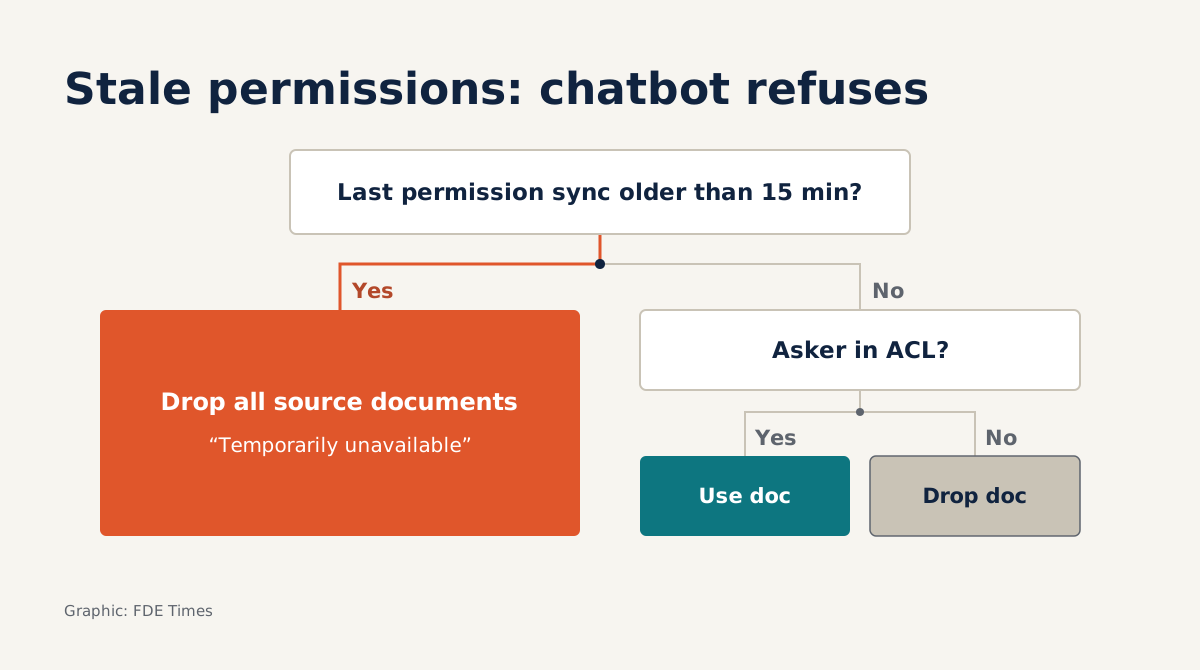
The change feed is only a signal, so you still need to reconcile permissions on a schedule and set a latency threshold. Say you choose 15 minutes: if a source’s last successful reconcile is more than 15 minutes old, retrieval drops all documents from that source rather than trusting a stale ACL.
Users will see “temporarily unavailable”, an outcome far easier to explain than a leaked payroll spreadsheet.
The threshold itself is a matter for agreement with the client. Let their security team choose it, then write it into the acceptance document.
Taking this skill to client sites and onto your CV
Back to the payroll folder scenario from the start: the hardest question at a client site will probably not be about recall, but “if I revoke A’s access, how long until the chatbot knows?” An FDE who can answer with a number, a mechanism and a clear behaviour for when the system lags will earn trust more easily.
When reading job descriptions, look for phrases such as “permission-aware retrieval”, “connectors” or “enterprise data sync”. On your CV, be specific: “Built SharePoint/Confluence connectors for RAG using delta queries, with a separate ACL job that fails closed when permissions lag past a threshold.” A demo repo with tests for replays, 410s and deleted items is more convincing than any adjective.
Content sync makes the chatbot answer correctly. The permissions job decides whether the client dares open the chatbot to the whole company.
Was this article useful?
Thanks for the feedback!
8 sources
- driveItem: delta - Microsoft Graph v1.0 | Microsoft Learn · 2026-06-06
- Best practices for discovering files and detecting changes at scale - OneDrive dev center | Microsoft Learn · 2025-10-02
- Use delta query to track changes in Microsoft Graph data - Microsoft Graph | Microsoft Learn · 2025-01-15
- List who has access to a file - Microsoft Graph v1.0 | Microsoft Learn · 2025-07-23
- Rate limiting
- How to get the space permission changes through CQL (or by any other event if possible) · 2022-02-02
- Content restrictions - Confluence Cloud REST API
- RAG sobre SharePoint, Confluence y Drive: permisos · 2026-06-11