Build an incremental pipeline on Snowflake two ways: Dynamic Tables, or Streams and Tasks
One SELECT statement, or four objects and a MERGE. Build both on a Snowflake trial account and you will know which to choose before the client asks.

In brief
- A dynamic table stores the result of a SELECT as a table and keeps it up to date automatically. In INCREMENTAL mode, each refresh processes only the rows that have changed.
- Streams and Tasks give you full control, but in return you have to manage offsets, schedules, the MERGE and stale streams yourself.
- Snowflake recommends dynamic tables for new SQL pipelines. Switch to streams and tasks only when you need MERGE, stored procedures or calls to external functions.
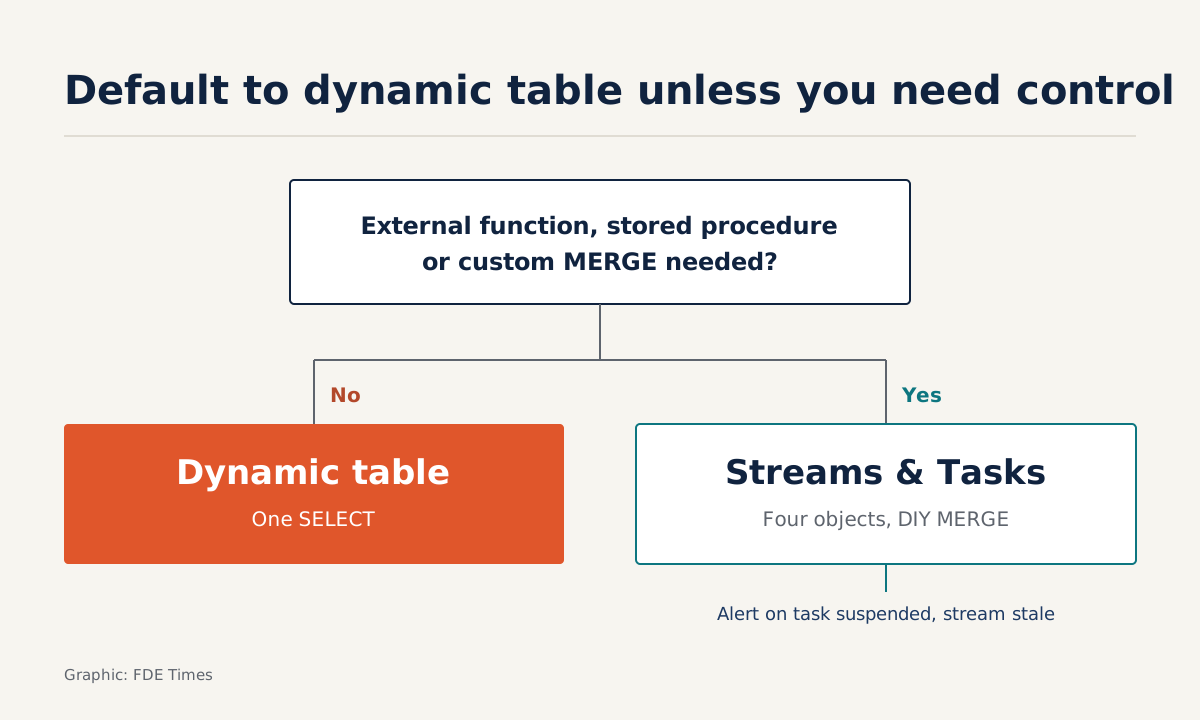
Snowflake’s decision guide says a dynamic table packs four objects and all the MERGE logic into a single SELECT definition. It sounds like marketing copy. The best way to test the claim is to build the same pipeline both ways and compare what each one leaves you to handle.
For an FDE, the situation is familiar. A client has an orders table that grows every hour and a revenue dashboard that is recomputed from scratch every night. They want fresher numbers without a bigger compute bill. By the end of this article you will have two versions of that pipeline and know which one to recommend.
What you need: a Snowflake account with permission to create tables, streams, tasks and dynamic tables; a small warehouse (called transform_wh here); and a source table raw_orders with the columns store_id, order_ts and amount. The scenario is hypothetical, and the code has been trimmed to keep it easy to follow.
Why does “incremental” decide the cost?
When Snowflake introduced Dynamic Tables in 2022, it named incremental processing as the biggest challenge. The reason: with incremental refresh, cost scales with the rate at which input data changes, not with the size of the table.
Take a hypothetical example. A table has 10 million rows and gains 20,000 rows an hour. A full recompute reads 10 million rows on every run. An incremental run processes only about 20,000 new rows. Ask the client for this number in your first working session.
Step 1: one SELECT, one dynamic table
According to Snowflake’s documentation, a dynamic table stores the result of a SELECT as a table and keeps that result up to date automatically. TARGET_LAG is the maximum amount of time the table’s contents may trail the source. WAREHOUSE is the warehouse that runs the refreshes.
CREATE OR REPLACE DYNAMIC TABLE daily_revenue
  TARGET_LAG = '5 minutes'
  WAREHOUSE = transform_wh
  REFRESH_MODE = INCREMENTAL
AS
SELECT store_id,
       DATE(order_ts) AS order_date,
       SUM(amount)    AS revenue,
       COUNT(*)       AS orders
FROM raw_orders
GROUP BY store_id, DATE(order_ts);
There are three refresh modes. INCREMENTAL processes only the rows that have changed since the previous refresh. FULL recomputes everything. In AUTO mode, the system tries incremental refresh by default. The example above states INCREMENTAL explicitly so you can see what you are choosing. If you would rather let the system decide, switch to AUTO.
How to check: insert a few rows into raw_orders, wait for the TARGET_LAG interval to pass, then SELECT from daily_revenue. Revenue for the relevant store should have gone up without you running any other command.
TARGET_LAG also accepts another value, DOWNSTREAM, which is useful once other dynamic tables start reading from daily_revenue. Before using it for a client’s chain of tables, read carefully how it works in the CREATE DYNAMIC TABLE documentation.
Step 2: rebuild it by hand with a stream
Now rebuild exactly the same logic without a dynamic table. A stream records DML changes on the source table, counted from an offset.
CREATE OR REPLACE STREAM raw_orders_stream ON TABLE raw_orders;

CREATE OR REPLACE TABLE daily_revenue_manual (
  store_id INT, order_date DATE, revenue NUMBER, orders INT
);
How to check, and the first trap: insert three rows into raw_orders, then run SELECT * FROM raw_orders_stream twice in a row. Both times you get the same three rows, because querying a stream does not move its offset. The offset advances only when the stream is used in a DML transaction, such as a MERGE or an INSERT.
Newcomers often assume they have “read” a stream simply because they ran a SELECT on it. In fact the data is still there, waiting for a DML statement to consume it.
Step 3: a task and a MERGE
A task can run on a schedule or be triggered by an event, for example when a stream has new data. Here we combine the two: the task is scheduled every 5 minutes but only actually runs when SYSTEM$STREAM_HAS_DATA returns true.
CREATE OR REPLACE TASK merge_daily_revenue
  WAREHOUSE = transform_wh
  SCHEDULE = '5 MINUTE'
  WHEN SYSTEM$STREAM_HAS_DATA('raw_orders_stream')
AS
MERGE INTO daily_revenue_manual t
USING (
  SELECT store_id, DATE(order_ts) AS order_date,
         SUM(amount) AS revenue, COUNT(*) AS orders
  FROM raw_orders_stream
  GROUP BY store_id, DATE(order_ts)
) s
ON t.store_id = s.store_id AND t.order_date = s.order_date
WHEN MATCHED THEN UPDATE SET
  revenue = t.revenue + s.revenue,
  orders  = t.orders + s.orders
WHEN NOT MATCHED THEN INSERT (store_id, order_date, revenue, orders)
  VALUES (s.store_id, s.order_date, s.revenue, s.orders);
This MERGE is simplified and assumes raw_orders receives only inserts. If the client has updates or deletes, you must write extra logic for each type of change yourself. That is precisely the work a dynamic table does for you.
The second trap: a newly created task is always suspended. It will not start running on schedule until you issue the command below.
ALTER TASK merge_daily_revenue RESUME;How to check: insert more data, wait one cycle, then compare daily_revenue_manual with daily_revenue from Step 1. The two tables should show the same numbers. Then SELECT from the stream again: this time the result should be empty, because the MERGE has advanced the offset.
The third trap only shows up in production
A stream goes stale when its offset falls outside the source table’s data retention period. Picture a task that stays suspended through a long holiday without anyone noticing. By the time people return, the offset may have slipped past the retention window and the stream has gone stale.
So if you choose streams and tasks for a client, put task state and stream staleness into the alerting from day one. Do not wait until the client’s dashboard freezes.
Which approach should you recommend to the client?
Snowflake’s decision guide is fairly clear. For new SQL pipelines with many tables, prefer dynamic tables. Choose streams and tasks when the pipeline needs stored procedures, MERGE or calls to external functions.
Snowflake’s 2022 blog post introducing Dynamic Tables adds one more criterion: choose streams and tasks when you need full control over incremental processing. An analysis on Data Engineer Academy sums up the trade-off: you give up some low-level control, and in return you build far less “plumbing”.
| Discovery question | If the client says “yes” |
|---|---|
| Is the logic only SELECT, JOIN, GROUP BY? | Dynamic table |
| Does any step need to call an API or external function? | Streams and Tasks |
| Is the operations team small and reluctant to maintain many objects? | Dynamic table |
| Do you need to decide exactly when and how the MERGE happens? | Streams and Tasks |
Open the first conversation with the client with two questions: how fast does the data change, and how stale can the numbers be? The answer to the second is almost exactly the TARGET_LAG value you will set.
Turn the exercise into evidence on your CV
Do not stop at writing that you “know Snowflake”. Show that you have weighed the options: put both versions in a repo, with a short README on the three traps and why you would choose each approach.
On a CV, a line such as “moved a pipeline from full recompute to incremental, with criteria for choosing between dynamic tables and streams–tasks” says more than a list of tools.
When reading job descriptions, look for phrases such as “incremental”, “CDC” or “data freshness”. They signal a role that will put you in front of exactly the choice you have just practised.
The next time a client asks for a “real-time dashboard”, you will have a more honest answer: real-time is often just a TARGET_LAG value both sides agree on.
Was this article useful?
Thanks for the feedback!
7 sources
- Dynamic tables (Snowflake Documentation)
- CREATE DYNAMIC TABLE (Snowflake Documentation)
- Introduction to Streams (Snowflake Documentation)
- Introduction to tasks (Snowflake Documentation)
- Decision guide for dynamic tables (Snowflake Documentation)
- Dynamic Tables: Delivering Declarative Streaming Data Pipelines · 2022-11-08
- Snowflake Dynamic Tables Explained for Data Engineers · 2026-06-07