Getting into a customer's AWS with a cross-account role: trust policies, ExternalId and fixing AccessDenied
The customer has created the role and sent the ARN, yet the first command still returns AccessDenied. The fault nearly always sits in one of six familiar places, from the Principal to the SCP. And ExternalId is not the password many people take it for.
In brief
- A cross-account assume-role needs permission on both sides: the trust policy in the customer's account and sts:AssumeRole in yours.
- ExternalId blocks the confused deputy. The vendor must generate it, with one value per customer, and pass it on every call. It is not a password.
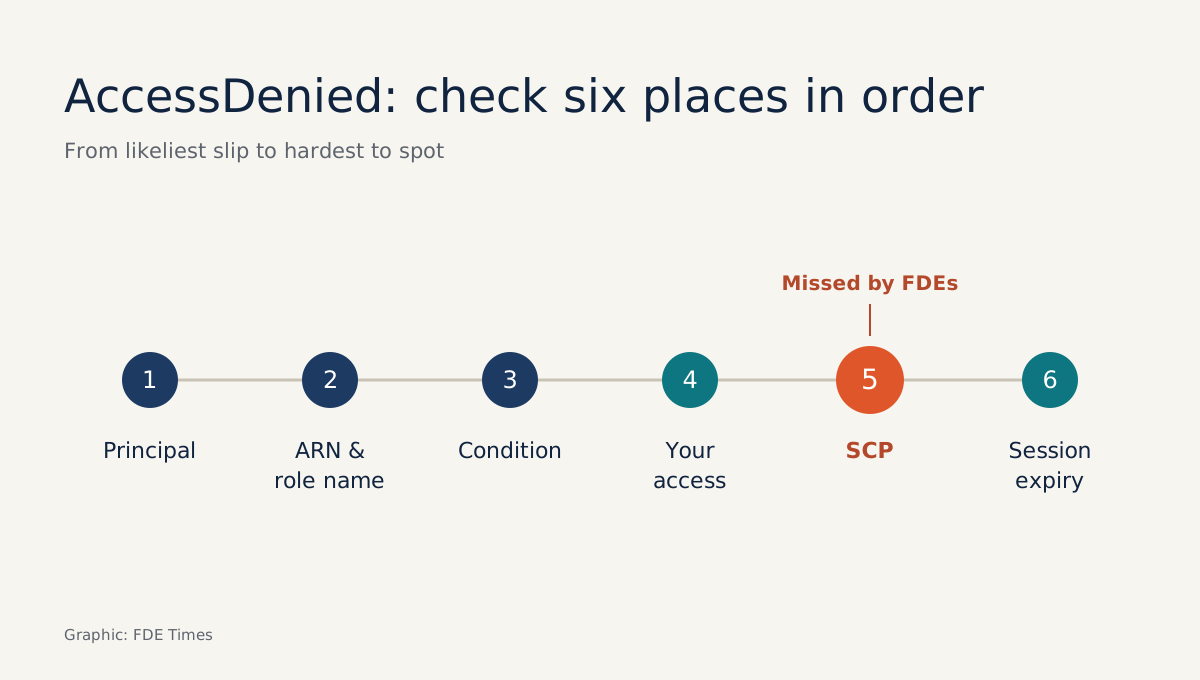
- On AccessDenied, check the Principal first, then the case-sensitive role name, the Conditions, your own permissions, Organizations SCPs, and finally the 1-hour limit on role chaining.
The customer has created the role and sent you the ARN on Slack with a note saying “all done”. You run your first assume-role command and get AccessDenied. The kickoff is in twenty minutes, and neither you nor the customer knows whose side the problem is on.
FDEs run into this all the time when integrating with customers on AWS. Almost every product needs to read data from the customer’s account, whether it is a data pipeline, an agent calling tools on the customer’s infrastructure or a monitoring tool.
The standard approach is a cross-account role. Once you understand how it works, you stop losing mornings like that one, and the customer can trust that you have not opened a back door into their systems.
Both sides have to say yes
The AWS STS API documentation states plainly that a user who wants to access a role in another account also needs permission from their own account. So there are two doors.
The first is the trust policy on the customer’s role, which defines who may assume it. The second is the IAM policy attached to your identity, which allows it to call sts:AssumeRole on that ARN.
If either door is shut, you get AccessDenied. Do not assume the error message will tell you which one. So when debugging, the first job is to work out whether the fault is on the customer’s side or yours, before reading any policy line by line.
ExternalId exists to stop the confused deputy
Imagine your company serves two customers, A and B. Customer B learns the ARN of customer A’s role and enters it in its own configuration.
Your system has legitimate permission to assume that role, so it obligingly reads A’s data and returns the results to B. AWS calls this the confused deputy: you are the party holding delegated authority, and you are tricked into using it in the wrong place.
According to the IAM documentation, the main purpose of ExternalId is to address and prevent exactly this problem. The mechanism is simple.
You assign each customer its own ExternalId, the customer writes that value into the trust policy, and your system always sends the ExternalId of the customer making the request.
When B enters A’s ARN, the call carries B’s ExternalId and A’s role rejects it.
For this to work, you must generate the ExternalId, one value per customer, and not let customers choose their own. The value is 2 to 1,224 characters long, made up of letters, digits and certain symbols, with no spaces.
This matters because AWS also notes that anyone with permission to view the role can read the ExternalId. So do not describe it to the customer’s security team as a “secret”. The accurate line is: ExternalId ensures your system uses this role only when it is serving that particular customer.
Example: setting up a connection from scratch
Say your vendor account is 111122223333, the customer’s account is 444455556666, and the ExternalId you generated for the customer is acme-7f3k9q2x. The customer creates a role VendorReadOnly with the trust policy below, following the pattern in the IAM documentation: the Principal is your account, the Action is sts:AssumeRole, with a StringEquals condition on sts:ExternalId.
{
  "Version": "2012-10-17",
  "Statement": [{
    "Effect": "Allow",
    "Principal": { "AWS": "arn:aws:iam::111122223333:root" },
    "Action": "sts:AssumeRole",
    "Condition": { "StringEquals": { "sts:ExternalId": "acme-7f3k9q2x" } }
  }]
}
On your side, the identity running the service (a user, an EC2 role or a container task) needs a policy allowing calls to this exact ARN:
{
  "Effect": "Allow",
  "Action": "sts:AssumeRole",
  "Resource": "arn:aws:iam::444455556666:role/VendorReadOnly"
}
Then you call it from the CLI, passing the ExternalId every time, as the AWS Security Blog recommends:
aws sts assume-role \
  --role-arn arn:aws:iam::444455556666:role/VendorReadOnly \
  --role-session-name acme-onboarding \
  --external-id acme-7f3k9q2x
Do not stop once that command works. Run the same command again without --external-id. If you can still assume the role, the trust policy is missing its condition, and AWS advises that in that case you should not store the customer’s ARN in your system. This reverse check belongs in your onboarding code, not in anyone’s memory.
One more practical point: Switch Role in the AWS Console only works with roles that do not require an ExternalId. If the customer wants you to “take a look in the console”, you will have to do it through the CLI or SDK. Say so in advance so nobody thinks the role is broken.
In what order should you fix AccessDenied?
The order below runs from the places most likely to be wrong and easiest to verify to the hardest to see.
Principal. The IAM troubleshooting documentation says that if your account number is not in the trust policy’s Principal element, you cannot assume the role, even if other policies allow it. Ask the customer to paste the full trust policy rather than just asking “have you added our account?”
ARN and role name. Role names are case-sensitive when assuming. VendorReadOnly and vendorreadonly are two different roles. Typos in ARNs sent over chat happen more often than you would think.
Conditions. Every condition in the trust policy must be met, whether ExternalId, source IP or time window. If the customer requires MFA and you send no TokenCode, or the wrong one, AssumeRole also returns access denied. If the customer restricts source IPs, confirm the command is running from an address they have allowed.
Your own permissions. If the first three checks pass, turn back to your side. Check whether the identity running the command really carries a policy allowing sts:AssumeRole on that ARN. You may well be using the wrong profile.
AWS Organizations SCPs. In multi-account organisations, Datadog’s documentation warns that SCPs can block AssumeRole even when both the IAM policy and the trust policy are correct. FDEs often miss this, because the person who created the role on the customer’s side is usually not the person who manages SCPs. Ask directly: “Is this account in an OU with an SCP that applies to STS?”
Session duration. If you are already in a role and then assume the customer’s role, that is role chaining, and the session is capped at 1 hour. Setting DurationSeconds above that makes the call fail. Long-running jobs need a way to refresh credentials.
The mistakes that cost customer trust
The worst mistake is letting customers set their own ExternalId, or using one value for every customer. Both defeat the protection against the confused deputy. Next comes asking for admin rights “to save time” instead of a tightly scoped read-only role: the customer’s security team will remember that far longer than any feature you demo.
A less obvious one is skipping the test of assuming without an ExternalId, and then storing an ARN with a loose trust policy. Once a second customer arrives, that hole becomes your problem, not the customer’s.
The skill also translates well to a CV. Instead of “familiar with AWS IAM”, write a line such as “designed a cross-account onboarding process with per-customer ExternalIds and automated trust-policy checks”, and keep the example above ready for when the interviewer follows up.
Next time AccessDenied appears before a kickoff, there is no need to guess. Open the trust policy, work through the list above step by step, and tell the customer which step the fault is in.
Was this article useful?
Thanks for the feedback!
7 sources
- The confused deputy problem - AWS Identity and Access Management
- Access to AWS accounts owned by third parties - AWS IAM
- AssumeRole - AWS Security Token Service API Reference
- Troubleshoot IAM roles - AWS Identity and Access Management
- IAM tutorial: Delegate access across AWS accounts using IAM roles
- How to use external ID when granting access to your AWS resources to a third party · 2014-12-23
- Amazon Web Services integration - Datadog Docs