Why Promise.all can wreck a customer data sync, and how to rewrite it
One bad record is enough to mark the whole batch as failed, while writes to the customer's system keep running with nobody watching them.

In brief
- Promise.all rejects on the first error but does not cancel the remaining operations, so writes to the customer's system keep going.
- For independent records, Promise.allSettled gives you the outcome of each record, so you can build a report and retry only the failures.
- p-limit only caps how many tasks run at once. A quota measured in requests per second needs a separate mechanism such as a token bucket, plus retries on 429.
Picture yourself in a customer’s office, running the first sync: 5,000 contacts moving from a legacy system into a new CRM. A few seconds later the terminal prints a single line: “sync failed”. The customer asks how many records made it across and how many failed. You cannot answer.
The fault usually is not in the customer’s API. It sits in a line of code that looks entirely harmless: await Promise.all(contacts.map(upsert)). Almost everyone new to asynchronous JavaScript has written it, and it works fine in a demo with 20 records.
For an FDE this is less a lesson about syntax than about how to do the job. When you integrate with a customer, you have to be able to say which records went across, which failed and why, and whether it is safe to run again. To answer those three questions, you need to understand exactly what each Promise function does.
Promise.all is designed to stop at the first error
According to MDN, Promise.all rejects as soon as any input promise rejects. This is fail-fast behaviour. If one of 5,000 contacts has a malformed email and the API returns 400, the whole await throws, and you lose the results of the other 4,999 records.
There is a more dangerous detail. MDN states plainly that rejecting the returned promise does not cancel the remaining operations. Your code has jumped into catch and logged “sync failed”, but thousands of requests are still writing to the customer’s CRM with nobody tracking them.
The result is customer data in a state nobody fully understands. You assume the batch failed and run it again, when in fact most records were already written. If the write is not idempotent, the re-run creates duplicates, and you end up cleaning the customer’s data instead of discussing the next step.
Independent records need a different tool
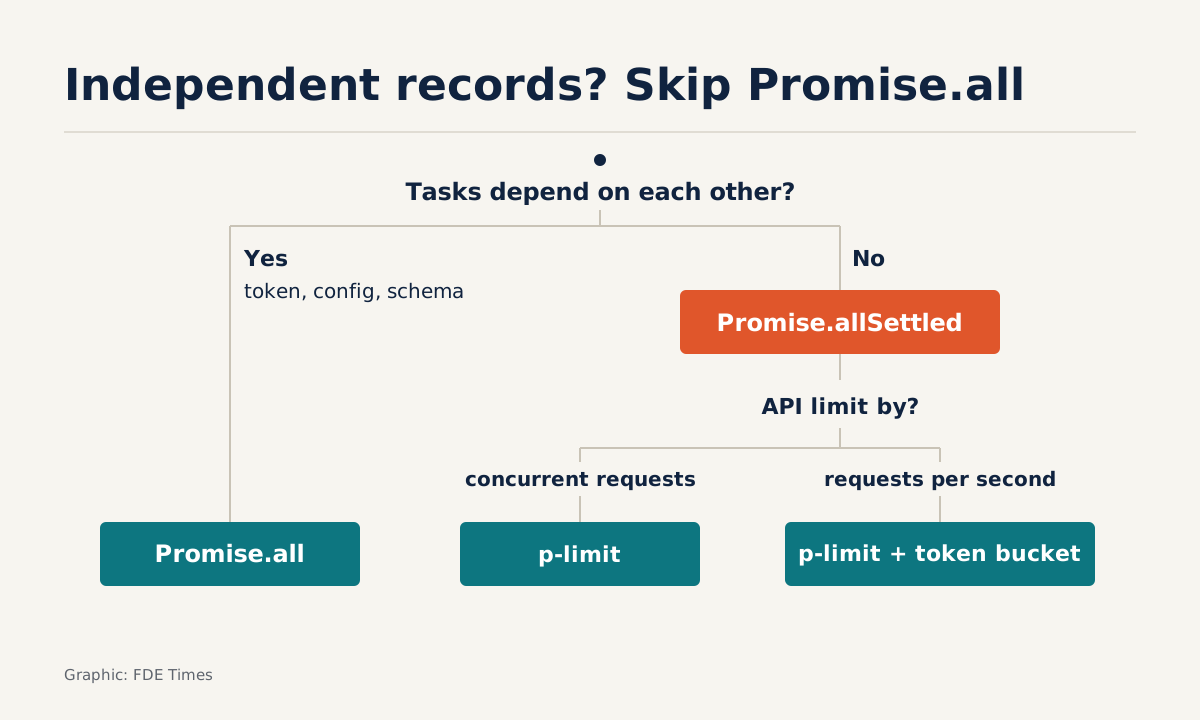
MDN draws a clear line. Promise.allSettled is typically used when the tasks do not depend on each other, or when you always want to know the outcome of each promise. Promise.all fits better when the tasks depend on each other, or when you want to stop as soon as one fails.
Most data syncs fall into the first group: contact A failing has no bearing on contact B. Promise.all still has its place, for example when you need both an authentication token and a configuration before starting, because without either one you cannot proceed.
Promise.all
- Rejects on the first error
- Remaining operations keep running, untracked
- Suits dependent steps: token, config, schema
- The batch must stop if one part is missing
Promise.allSettled
- Waits for every task to finish
- Returns status, value or reason for each task, in input order
- Suits independent records in a sync
- Lets you re-run only the failures
According to MDN, allSettled returns an array of results in input order. Each element has a status of “fulfilled” or “rejected”. Fulfilled results carry a value field; rejected results carry a reason field. Because the order is preserved, you can match each result to its source record by index, which gives you a per-record report straight away.
Switching to allSettled is not the whole fix
If you only swap all for allSettled, you still fire 5,000 requests at once. The customer’s API will return a flood of 429 errors, and your report will show thousands of failed records simply because you sent them too fast.
The common library for this is Sindre Sorhus’s p-limit, which runs async functions with limited concurrency. You wrap each task in limit(...) and collect the results with Promise.all or allSettled as usual.
But the p-limit README is clear that the library only limits how many tasks run at the same time. If the API’s quota is measured in requests per second, five concurrent requests that each return very quickly can still exceed it.
Anvil’s article on 429 limits also notes that many SDKs, including those from major API providers, do not handle rate limiting themselves, so this part is usually left to you.
Rewriting the sync script
Here is a rewritten version using p-limit, retrying on 429 and reporting results per record:
import pLimit from 'p-limit';

const limit = pLimit(5); // at most 5 requests running at once
const sleep = (ms) => new Promise((r) => setTimeout(r, ms));

function retryDelayMs(retryAfter, attempt) {
  if (retryAfter) {
    const value = String(retryAfter).trim();
    // Defensive: a value made only of digits is treated as seconds,
    // and never passed to the date parser
    if (/^\d+$/.test(value)) return Number(value) * 1000;
    // HTTP-date format (not ISO 8601),
    // e.g. "Wed, 21 Oct 2026 07:28:00 GMT"
    const at = Date.parse(value);
    if (!Number.isNaN(at)) return Math.max(0, at - Date.now());
  }
  return 2 ** attempt * 1000; // header unreadable: fall back to backoff
}

async function upsertWithRetry(contact, attempt = 0) {
  try {
    return await crm.upsertContact(contact);
  } catch (err) {
    if (err.status === 429 && attempt < 5) {
      await sleep(retryDelayMs(err.headers?.['retry-after'], attempt));
      return upsertWithRetry(contact, attempt + 1);
    }
    throw err; // 400 or data error: do not retry, record it in the report
  }
}

const settled = await Promise.allSettled(
  contacts.map((c) => limit(() => upsertWithRetry(c)))
);

const report = settled.map((r, i) => ({
  id: contacts[i].id,
  status: r.status,
  reason: r.status === 'rejected' ? String(r.reason?.message ?? r.reason) : null,
}));

const failedIds = report.filter((x) => x.status === 'rejected').map((x) => x.id);
console.log(`OK: ${report.length - failedIds.length}, failed: ${failedIds.length}`);
A few small details hold this script together. Because allSettled preserves order, contacts[i] always matches settled[i]. A 429 is retried but a data error is not, because resending a malformed email will fail however many times you try.
The retryDelayMs function is written defensively. According to Anvil, dates in Retry-After use the HTTP-date format, not ISO 8601, so the function only parses a date after setting aside values that look like a number, and it always has a fallback backoff.
Do not blindly trust a date parser’s output on unusual input: a miscalculated delay can make the client hammer the API with retries at exactly the moment it is asking you to slow down.
Add a token bucket when the quota is per second
If the quota is measured in requests per second, Anvil argues that a token bucket is the best way to throttle on the client side. The idea is a “bucket” of tokens refilled at a fixed rate; each request must take a token before it is sent. Here is a minimal sketch:
// Token bucket sketch: at most `rate` requests per second
function createBucket(rate) {
  let tokens = rate;
  let last = Date.now();
  return async function take() {
    for (;;) {
      const now = Date.now();
      tokens = Math.min(rate, tokens + ((now - last) / 1000) * rate);
      last = now;
      if (tokens >= 1) { tokens -= 1; return; }
      await sleep(((1 - tokens) / rate) * 1000); // wait for a full token
    }
  };
}

const take = createBucket(10); // example: a quota of 10 requests per second
Call await take() just before crm.upsertContact(contact) inside upsertWithRetry, so that retries also have to queue for a token. p-limit still caps concurrency while the bucket controls the rate: the two layers complement each other rather than replace each other.
Anvil also suggests that the ideal solution hides the limit entirely. Wrap take() and the retry logic in a dedicated client, so the sync code simply calls upsertContact without worrying about quotas.
Steps to take when you sit down with the customer’s code
First, classify the work. Steps that depend on each other (authentication, reading the schema) keep Promise.all. The per-record sync moves to allSettled. Next, ask the customer or read the documentation to find out whether the quota counts concurrent requests or requests per second, then choose p-limit, a token bucket or both.
Then decide which errors deserve a retry. Retry 429s, with a capped number of attempts, and respect Retry-After. Data errors go into the report. Finally, write the report to a file and prepare a command that re-runs only failedIds, so the re-run never touches records that were written successfully.
Common mistakes
The first is wrapping Promise.all in try/catch and believing you are safe. A catch cannot stop requests already in flight. The second is treating p-limit as a rate limiter, then being surprised by 429s. The third is retrying every error, including 400s, so that one broken record drags out the whole sync.
The last is mentioned least but does the most damage: logging only “sync failed” with no per-record report. The customer does not care which Promise function you used. They care which 37 records did not make it across, and why.
Exercise: reproduce the failure before the customer does
Write a fake API with Express or a mock function: one record in every 100 returns 400, and more than 5 concurrent requests return 429 with Retry-After, sometimes as a number, sometimes as an HTTP-date.
Run the Promise.all version, count how many writes still happen after catch has run, then run the rewritten version above and compare the two reports.
The exercise also makes good material for your portfolio. In an FDE interview, explain how you found the bug, what you measured and how you fixed it.
On your CV, describe the work specifically, such as “data sync with per-record reporting, throttling and retry on 429”, rather than a generic line like “proficient in JavaScript”.
When you read a job description that mentions integration, have this story ready to tell.
At a customer site, trust does not come from a sync that never fails. It comes from a sync where, when something does fail, you can say exactly which records failed and why.
Was this article useful?
Thanks for the feedback!