Never alter a live column when changing a client's schema
Split a breaking change into small deploys, each one reversible until the contract phase, and do not skip the final clean-up.
In brief
- Do not modify a column that is in use. Add the new structure alongside it, write to both, and only then switch the read path.
- Each step is a separate deploy, backward compatible with the step before, so you can roll back right up to the contract phase.
- Skip the contract phase and the system can end up worse off than before you started.
Picture yourself at a client’s office. They need to push customer data into a new system, and that system wants first and last names in separate fields. The customers table has a single name column, read by the main app, a nightly reporting job and an ETL pipeline owned by another team.
The approach that comes to mind first is to write one migration: split the column, rename it, change the code and deploy once. But during a rolling deploy, old instances of the app are still running and still looking for the name column. Tonight’s reporting job knows nothing about your change either.
This situation is especially hard for FDEs. You are working on someone else’s database, where you do not know everyone who reads what, and you cannot ask the whole company to stop and wait for you. The technique for this situation is called expand–contract.
The idea: never change what is running
Martin Fowler calls it parallel change: a way to introduce a backward-incompatible change to an interface safely. A database schema is an interface too, and every SQL query running against it is a client.
The pattern has three phases. In the expand phase, you widen the interface so it supports both the old and new versions at once. In the migrate phase, you gradually move each client using the old version over to the new one. In the contract phase, you remove the old version.
Pete Hodgson puts the benefit plainly: instead of one risky deploy, you have a series of independent deploys, and every change in the series stays compatible.
Because each stage is backward compatible with the one before it, different parts of the system can sit at different stages. Old and new versions of the app run side by side without breaking each other.
Splitting the name column, one deploy at a time
Prisma’s guide to expand–contract uses exactly this example: when you need to split name into first_name and last_name, add both new columns rather than modifying name. Stripe, describing how it runs online migrations at scale, breaks the work into four steps.
It dual-writes to the old and new structures, moves every read path to the new structure, writes only to the new structure, and then removes data that still depends on the old model.
Applied to the client’s table, the first step touches only the schema:
-- Step 1: expand. Only add; do not modify or drop.
ALTER TABLE customers ADD COLUMN first_name text NULL;
ALTER TABLE customers ADD COLUMN last_name  text NULL;
The new columns allow NULL, so the old app can keep inserting as usual. If anything goes wrong, you simply drop the two columns you added and nobody is affected.
The second step changes the write code. As Prisma describes it, in this phase the client writes to both the original structure and the new one, while the read path still uses the original:
def save_customer(conn, cid, full_name, first, last):
    conn.execute(
        """UPDATE customers
           SET name = %s, first_name = %s, last_name = %s
           WHERE id = %s""",
        (full_name, first, last, cid),
    )
Dual writes keep only new records in sync. Millions of old rows still have an empty first_name. Stripe handles this with a backfill: filling in what is missing in the new store so both sides hold identical information.
-- Step 3 (a separate deploy or a separate job): backfill in batches, repeat until no rows remain
UPDATE customers
SET first_name = split_part(name, ' ', 1),
    last_name  = substr(name, length(split_part(name, ' ', 1)) + 2)
WHERE id IN (
  SELECT id FROM customers
  WHERE first_name IS NULL
  ORDER BY id LIMIT 5000
);
The query above assumes the first word is the given name and the rest is the family name. For Vietnamese data such as “Nguyen Van An”, where the family name comes first, that rule produces a completely wrong result. This is not a technical bug but a business decision, and the person who makes it must be the client, not you.
Check before you switch the read path
The read path is where mistakes are most likely, because errors there show up directly in front of users. Stripe used GitHub’s Scientist library to verify read paths before switching them. You do not need that exact library, only the idea: read from both sides, compare, log when they differ, but still return the result from the old side.
def display_name(row):
    old = row["name"]
    if row["first_name"] is None:
        return old  # row not yet backfilled: nothing to compare, avoid false mismatch logs
    new = f'{row["first_name"]} {row["last_name"] or ""}'.strip()
    if old != new:
        log.warning("name_mismatch", extra={"id": row["id"]})
    return old  # keep trusting the old structure until the logs are clean
Be clear about this function’s limits. Joining first_name and last_name almost exactly rebuilds the original string, so it cannot detect “Nguyen” being put in the given-name field by mistake. It catches only technical errors such as lost characters, wrong whitespace or rows where the dual write failed.
To catch business errors, compare against something the client has approved: a sample of a few hundred rows where the client’s own staff split the names by hand, or a signed-off rule for splitting family names. Divergence from that sample is the real signal that the backfill is getting the meaning wrong.
Run this for a few days on the client’s real traffic. When the logs show no more mismatches, or every mismatch has been explained, only then deploy the version that reads from first_name and last_name. After that, one more deploy switches to writing only the new columns.
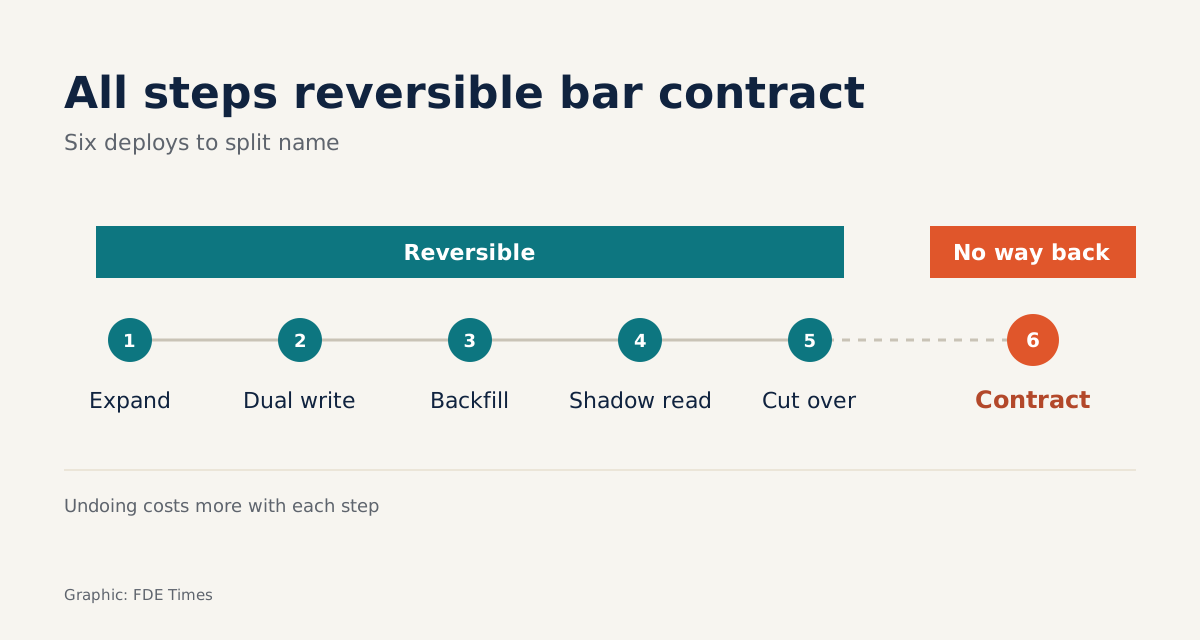
The table below belongs in the handover document for the client. It shows, at each step, how to roll back if you have to:
| Step | Writes to | Reads from | How to roll back |
|---|---|---|---|
| 1. Expand | name |
name |
Drop the two new columns |
| 2. Dual write | both | name |
Revert to code that writes only name |
| 3. Batched backfill | both | name |
Stop the job; old data is untouched |
| 4. Comparison read | both | name, log on mismatch |
Turn off the comparison |
| 5. Switch reads, then write only new columns | both, then new columns | new columns | Point reads back at name while still dual-writing |
| 6. Contract | new columns | new columns | No cheap way back |
The further down the steps you go, the more expensive a rollback becomes, and by the contract step there is almost no way back. That is why contract must be the very last step and needs its own sign-off.
The contract phase: the step most often forgotten
Once everything is running smoothly, the biggest temptation is to stop there. Fowler warns that if you skip the contract phase, you can end up in a worse state than when you started: two parallel columns, code that writes twice, and a successor who does not know which column to trust.
-- Final step: contract. Run only when no client still reads name.
ALTER TABLE customers DROP COLUMN name;
“No client still reads it” is something you must prove, not guess. In the client’s environment, look at the database query logs, ask the team that owns the ETL, and check the dashboards. The nightly reporting job is the first thing to break the next morning.
In a client’s environment, everything is slower
Hodgson estimates that a team able to deploy to production at any time, once practised, can finish an expand–contract cycle in an hour or two. Client environments are rarely like that: there may be a fixed release schedule, a change board, and another team owning half the clients. The whole process then takes much longer.
So in the very first working session, ask the client how often they can deploy and who approves it. The answer determines how you bundle the steps. If there is only one release window a month, you may have to combine expand and dual write in the same release, but never combine contract with any other step.
Common mistakes
The most common mistake is running ALTER COLUMN or RENAME directly on a column in use, skipping the expand phase entirely. The second is backfilling with a single UPDATE across the whole table, holding locks for a long time and slowing the very system you were trying not to disturb. The third is switching the read path before the backfill is finished, so users see empty names.
Two more mistakes tend to surface later. One is forgetting clients that do not live in your repository. The other is abandoning the contract phase and leaving the project, handing the client a schema that is harder to understand than when you arrived.
For your career, this is a skill worth stating precisely on a CV. Instead of “performed database migrations”, write that you changed the schema of a client’s production table through a series of backward-compatible deploys, with comparison reads and a rollback plan for every step.
When an FDE interview asks about incidents, do not only tell firefighting stories. Prepare one like this as well: how you planned a change so it went through without stopping the system, and how each step could be rolled back.
This week’s exercise: pick a real column in the project you are working on, write a plan following the six steps in the table above, and give it to a colleague to read. If they cannot point to a step where the system breaks, your plan is ready to take to a client.
Was this article useful?
Thanks for the feedback!