With Vault AppRole, a Postgres password lives for just one hour
Every service gets its own account that expires by itself, and the SecretID that unlocks it can be used to log in exactly once.
In brief
- An application should not hold a privileged credential. It uses its Vault token to request a narrowly scoped Postgres account with an expiry.
- The RoleID and SecretID must travel over two different channels and meet only on the machine running the application.
- Wrap the SecretID with response wrapping and set secret_id_num_uses=1, so that even a leaked SecretID is close to useless.
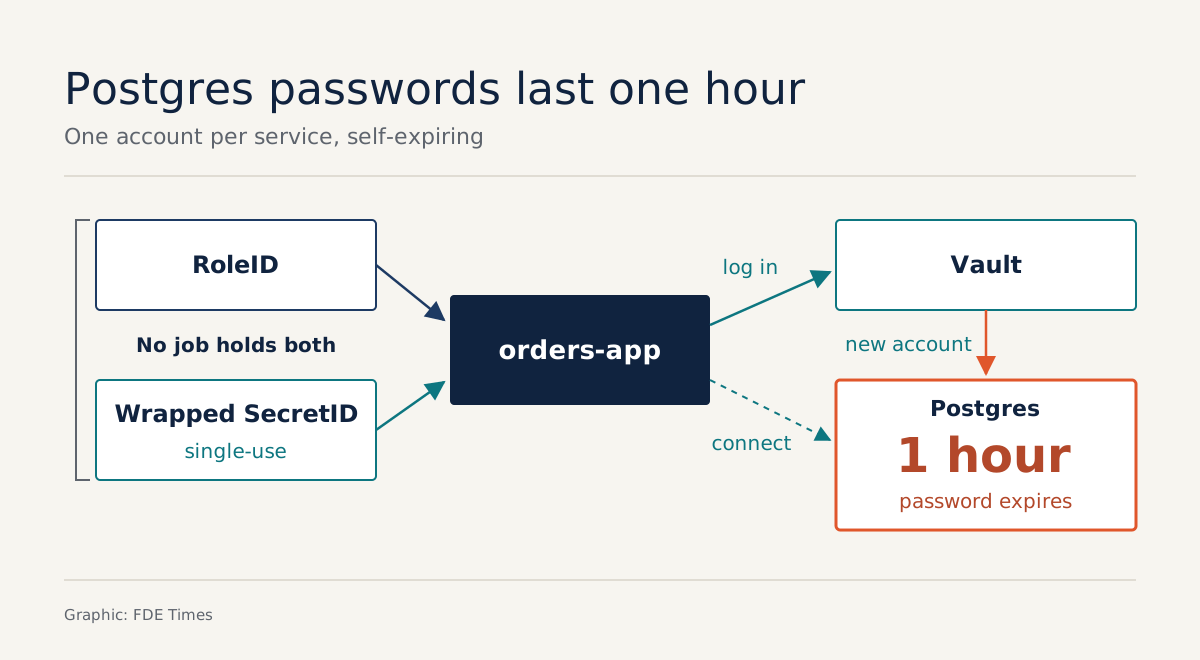
The Postgres account your application uses today may still be valid three years from now, and it is quite possibly sitting in the same .env file as five other services. With HashiCorp Vault’s dynamic secrets, that account is created at the moment the application starts and expires by itself after an hour.
This guide rebuilds that flow on a laptop. The application logs in to Vault with AppRole, receives a short-lived token, then uses that token to request its own Postgres account: narrowly scoped, with an expiry.
What you will build, and what you need
The end result: a service called orders-app (a hypothetical name) that can read tables in the orders database, with no database password anywhere in its code or configuration.
You need a Vault server running in dev mode, a Postgres instance (a container is enough), and the vault and psql CLIs. The commands below are trimmed down for a lab. Parameter names and paths can differ between versions, so check them against Vault’s AppRole and PostgreSQL documentation for the version the customer is running.
Step 1: Vault holds the database keys, the application does not
Aiven’s guide states the underlying principle: an application should not hold a privileged credential. Vault holds it. The application only uses its own Vault token to request lower-privileged, time-limited accounts.
vault secrets enable database

vault write database/config/orders-db \
  plugin_name=postgresql-database-plugin \
  connection_url="postgresql://{{username}}:{{password}}@localhost:5432/orders" \
  allowed_roles="orders-readonly" \
  username="vault_admin" password="temp-password"
Then rotate the root password straight away, so the one you just typed into the terminal is worthless. Vault’s documentation has a dedicated rotate root credentials endpoint for this.
vault write -f database/rotate-root/orders-dbCheck: log in again with psql using temp-password. This time it must fail. From now on, only Vault knows the password for vault_admin.
Step 2: one role maps to one SQL statement
Vault’s PostgreSQL documentation describes a role as a mapping from a name in Vault to the SQL statement used to create the credential. The documentation’s example sets default_ttl to 1h and max_ttl to 24h; this guide keeps both numbers.
vault write database/roles/orders-readonly \
  db_name=orders-db \
  creation_statements="CREATE ROLE \"{{name}}\" WITH LOGIN PASSWORD '{{password}}' VALID UNTIL '{{expiration}}'; GRANT SELECT ON ALL TABLES IN SCHEMA public TO \"{{name}}\";" \
  default_ttl=1h max_ttl=24h
Work through what those numbers mean. Suppose a credential ends up in a log. With a static password, whoever picks it up can use it until someone remembers to change it.
With the role above, the credential expires after 1 hour unless renewed, and even with renewals it cannot live beyond 24 hours. The flip side is that a service running for three days straight must request new credentials, so its connection code has to cope with the password changing.
Next, write a policy that allows reading only this path:
# orders-app.hcl
path "database/creds/orders-readonly" {
  capabilities = ["read"]
}
vault policy write orders-app orders-app.hclStep 3: AppRole with batch tokens and single-use SecretIDs
AppRole uses the RoleID to select a role. By default, login also requires a SecretID. Like a token, a SecretID has a usage limit, a TTL and an expiry time. HashiCorp’s best-practice page is explicit: for maximum security, set secret_id_num_uses to 1. The AppRole documentation also recommends batch tokens.
vault auth enable approle

vault write auth/approle/role/orders-app \
  token_type=batch \
  token_policies=orders-app \
  token_ttl=20m \
  secret_id_num_uses=1 \
  secret_id_ttl=10m
token_ttl=20m and secret_id_ttl=10m are values chosen for the lab, not recommendations from the documentation. At a customer, set them according to the service’s real start-up time.
Step 4: send the two halves of the key over two channels
This is the step most often done wrong, because a single place that can hold both pieces defeats the whole mechanism. HashiCorp recommends delivering the RoleID and the SecretID over different channels, so that they meet only on the machine running the application. The first channel carries the RoleID:
vault read -field=role_id auth/approle/role/orders-app/role-idThe SecretID goes over the second channel and must not be sent in plaintext. With response wrapping, Vault stores the SecretID in the cubbyhole of a new token with a use count of 1, and returns that token.
vault write -wrap-ttl=60s -f auth/approle/role/orders-app/secret-idThe command returns a wrapping token. On the machine running the application, unwrap it and log in:
vault unwrap -field=secret_id <wrapping_token>

vault write auth/approle/login \
  role_id=<role_id> secret_id=<secret_id>
HashiCorp’s blog post on AppRole explains why the wrapping is worth the effort: a token that can be used only once does little harm if it leaks, and if someone has unwrapped it first, the application knows immediately, because it can no longer unwrap it. The post also stresses that the SecretID should reach the application only when it is needed, usually at start-up.
Check: run the login command again with the SecretID you just used. This time it must be refused. If the login still succeeds, secret_id_num_uses has not been applied.
Step 5: request a Postgres account and watch it expire
VAULT_TOKEN=<client_token> vault read database/creds/orders-readonlyVault returns a username, a password and a lease duration. Use that pair to log in with psql, run \du, and you will see a role with a Vault-generated name and a VALID UNTIL timestamp.
The database secrets engine documentation points to a benefit few people notice: every service reaches the database with its own credential, so auditing suspicious access becomes much easier. Picture 12 services sharing a single app user.
The Postgres log shows that app read the customer table at 3am, and there is no way to tell which service it was. When every credential request produces a unique name, that question has an answer.
The mistakes that leave the system looking good only on paper
The first mistake to avoid: giving a CI worker permission to fetch both the RoleID and the SecretID. HashiCorp’s best-practice page calls this out directly as going against best practice, because anyone who takes over the worker holds both halves of the key. Instead, whatever delivers the SecretID should be allowed only to generate wrapped SecretIDs, while the RoleID arrives through a different channel.
The second mistake is skipping wrapping and putting a plaintext SecretID into a job’s environment variables. The third is leaving secret_id_num_uses unlimited. The SecretID then effectively becomes a static password under another name.
The fourth is common in older systems: dynamic secrets are configured, but the application keeps the root credential “just in case”. If some legacy users cannot be retired yet, Vault has static roles that rotate the passwords of existing users automatically. That is a far more sensible transition than a root password sitting in a configuration file.
What this skill looks like at a customer site
Rarely will anyone ask you to “implement AppRole”. More often you will hear something like “the security team won’t approve your agent connecting directly to the database”.
HashiCorp’s blog post calls the root of this the secret zero problem: an application needs a first secret in order to obtain every other secret. AppRole solves it with a trusted broker, a trusted system responsible for delivering the SecretID.
So the first thing to do at a customer is to map who holds which piece: which channel carries the RoleID, which system delivers the SecretID, and whether any job can get hold of both. That one-page diagram often wins over the security team faster than any demo.
On a CV, describe the outcome, for example “replaced static Postgres credentials with 1h-TTL dynamic secrets, single-use SecretIDs and one account per service for auditing”.
A password nobody has to keep is a password nobody can leak. At a customer site, that is often what decides whether you are allowed near real data.
Was this article useful?
Thanks for the feedback!
6 sources
- AppRole auth method | Vault | HashiCorp Developer
- Best practices for AppRole authentication | Vault | HashiCorp Developer
- How (and Why) to Use AppRole Correctly in HashiCorp Vault · 2021-08-30
- Database secrets engines | Vault | HashiCorp Developer
- PostgreSQL database secrets engine | Vault | HashiCorp Developer
- Secure your database access with HashiCorp Vault