Make the client's machine tell the truth before you install
A read-only bash script grades each check PASS, WARN or FAIL, and only a FAIL may stop the installation.
In brief
- Elasticsearch refuses to start in production mode if a bootstrap check fails, but in development mode the same failure is only a warning. A preflight script should grade severity the same way.
- Every FAIL message should state the measured value, the required threshold and the fix, much as Leapp's report spells out why an upgrade is blocked.
- Allow waivers for individual checks by name, as kubeadm downgrades errors from named checks to warnings, but never accept a waiver for everything.
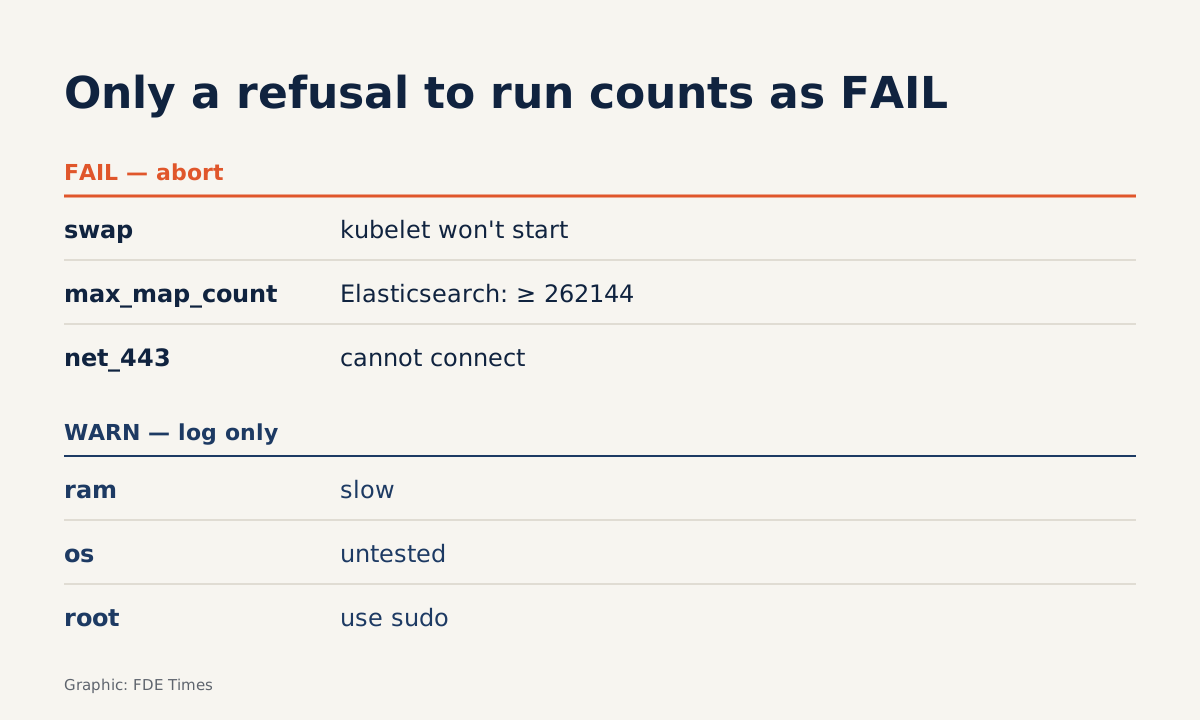
If a bootstrap check fails while Elasticsearch is in production mode, it refuses to start. In development mode, the same failure shows up only as a warning in the log. You may never have installed Elasticsearch for a client, but the rule is worth taking to every deployment.
Picture an install at a client site: the installer gets halfway, then errors out, and only then does it emerge that swap is on, a kernel parameter was never set or a firewall is blocking a port. A preflight script brings all of these findings forward, before the install starts. It also sets clear rules for which findings may stop the install and which only need to be recorded.
This guide walks through building such a script in bash. To try it, you need a Linux machine or VM with sudo access. The commands that read RAM, swap and network ports are simplified and assume Linux: before real use, test them again on the client’s exact distro.
Severity needs rules, not whims
Each finding is graded by one question: if it is ignored, will the component being installed refuse to run, or merely run badly? Refusing to run is a FAIL. Running badly, or not being sure, is a WARN.
The Kubernetes documentation supplies a clear FAIL: by default, the kubelet will not start if it detects swap on the node. By contrast, an OS version you have never tested with your product is not necessarily broken, so it only merits a WARN.
Note the words “the component being installed” in that question. Swap is a FAIL because of the kubelet, not because of all software. Each check only matters when its component is on the install list, and the script below enables checks by component.
Step 1: one report function owns every result
Every check goes through a single function. That function applies the run mode and the waiver list.
#!/usr/bin/env bash
# preflight.sh — read-only, changes nothing on the client's machine
MODE="${MODE:-production}"   # production | development (test VMs only)
WAIVE="${WAIVE:-}"           # checks downgraded from FAIL -> WARN, e.g. "swap,net_443"
FAILS=0; WARNS=0

if [ "$WAIVE" = all ]; then
  echo "WAIVE=all is not accepted: list each check by name"; exit 2
fi

report() {  # report <id> <PASS|WARN|FAIL> <message>
  local id="$1" level="$2" msg="$3"
  if [ "$level" = FAIL ]; then
    if [ "$MODE" = development ] || [[ ",$WAIVE," == *",$id,"* ]]; then
      level=WARN; msg="$msg (downgraded to WARN)"
    fi
  fi
  case "$level" in FAIL) FAILS=$((FAILS+1));; WARN) WARNS=$((WARNS+1));; esac
  printf '%-5s %-14s %s\n' "$level" "$id" "$msg"
}
development mode mimics the way Elasticsearch downgrades errors to warnings. WAIVE borrows from kubeadm: the preflight phase that runs before an upgrade has an --ignore-preflight-errors flag, which takes a list of checks whose errors are shown only as warnings. This script deliberately rejects the value all, so that every waiver has to name its check.
There is a catch: MODE=development downgrades every FAIL to a WARN, so in practice it is also a way of ignoring everything. That mode is therefore reserved for your own test VMs and never runs on a client’s production machine. There, only production applies, plus a WAIVE that lists each check by name.
Check: call report demo FAIL "test" with WAIVE=demo and run again. That run should print WARN with the note “downgraded to WARN”.
Step 2: resources, with the threshold stated in the message
MIN_RAM_KB="${MIN_RAM_KB:-2097152}"   # assumed threshold; replace with your product's recommendation
check_ram() {
  local kb; kb=$(awk '/^MemTotal:/ {print $2}' /proc/meminfo)
  if [ "$kb" -ge "$MIN_RAM_KB" ]; then report ram PASS "MemTotal=${kb}kB"
  else report ram WARN "MemTotal=${kb}kB, recommended at least ${MIN_RAM_KB}kB"; fi
}
check_swap() {
  local kb; kb=$(awk '/^SwapTotal:/ {print $2}' /proc/meminfo)
  if [ "$kb" -eq 0 ]; then report swap PASS "no swap"
  else report swap FAIL "swap=${kb}kB, kubelet will not start by default"; fi
}
check_max_map_count() {
  local v; v=$(sysctl -n vm.max_map_count 2>/dev/null || echo 0)
  if [ "$v" -ge 262144 ]; then report max_map_count PASS "vm.max_map_count=$v"
  else report max_map_count FAIL "vm.max_map_count=$v, needs >= 262144, fix with sysctl"; fi
}
Each threshold belongs to a product. Swap is a Kubernetes matter, because the kubelet will not run with swap on. Setting vm.max_map_count via sysctl to at least 262144 is an Elasticsearch requirement, so a client installing only Kubernetes has no reason to be blocked by this check.
RAM is graded WARN because too little RAM usually makes a system run badly rather than refuse to run. The MIN_RAM_KB threshold in the example is an assumption: take the figure from the documentation of the product you are installing and cite the source in the README.
There is a small trap: the MemTotal figure a machine reports can be lower than the RAM on paper, so a “2 GB” VM can still fall below the threshold and get an unfair WARN. Before settling on a number, run it on the client’s actual machines and see what they report.
Check: on a VM with swap enabled and COMPONENTS=kubernetes, you should see a FAIL on the swap line.
Step 3: version, network and permissions
check_os() {
  . /etc/os-release
  case "$ID-$VERSION_ID" in
    rhel-8*|rhel-9*) report os PASS "$PRETTY_NAME" ;;   # example list
    *) report os WARN "$PRETTY_NAME is not on the tested list" ;;
  esac
}
check_port() {  # check_port <host> <port> — outbound TCP connection from the machine running the script
  if timeout 3 bash -c "</dev/tcp/$1/$2" 2>/dev/null; then
    report "net_$2" PASS "connected to $1:$2"
  else report "net_$2" FAIL "could not open a connection to $1:$2"; fi
}
check_root() {
  if [ "$(id -u)" -eq 0 ]; then report root PASS "running as root"
  else report root WARN "not root, fix steps will need sudo"; fi
}
The OS list in the example is an assumption. Replace it with the list you have actually tested with your product, and keep unfamiliar OSes at WARN.
check_port only checks the outbound direction: whether this machine can open a TCP connection to an endpoint, such as a registry. To check the inbound direction, such as port 6443 for the Kubernetes API server, run the same function from another machine on the client’s network. The Kubernetes documentation also suggests netcat for this.
Connecting via /dev/tcp is a shortcut. It tells you whether a connection can be opened, but it is no substitute for asking the client about proxies and firewalls. If the client builds several VMs from the same template, also compare MAC addresses and product_uuid across nodes: the kubeadm documentation warns that duplicate values can make installation fail.
Step 4: choose checks by component, then return an exit code
COMPONENTS="${COMPONENTS:-kubernetes}"   # e.g. "kubernetes,elasticsearch"
has() { [[ ",$COMPONENTS," == *",$1,"* ]]; }

check_os; check_root; check_ram
has kubernetes && check_swap
has elasticsearch && check_max_map_count
check_port registry.example.com 443   # replace with the real endpoint
echo "Total: $FAILS FAIL, $WARNS WARN"
[ "$FAILS" -eq 0 ]
The COMPONENTS variable keeps each check in its place: swap only blocks when the kubelet is involved, and vm.max_map_count only blocks when Elasticsearch is. The last line turns the result into an exit code, so the installer, Ansible or CI stops without anyone having to read the output.
On a test VM with swap on, run as an ordinary user, the output looks something like this. It is illustrative output: the OS name and kB figures are assumptions, and your machine will report different numbers.
PASS  os             Red Hat Enterprise Linux 9
WARN  root           not root, fix steps will need sudo
WARN  ram            MemTotal=1863000kB, recommended at least 2097152kB
FAIL  swap           swap=2097148kB, kubelet will not start by default
PASS  net_443        connected to registry.example.com:443
Total: 1 FAIL, 2 WARN
Check: run bash preflight.sh; echo $?. If any FAIL remains, the result is non-zero. On a test VM, MODE=development bash preflight.sh; echo $? should return 0, even when the machine has problems.
The mistakes that cost a preflight its credibility
The worst mistake is letting the script fix the machine itself, for example by calling sysctl -w. kubeadm init opens with a series of preflight checks to validate the system state before making changes. And the preflight phase of kubeadm upgrade apply has a --dry-run mode that only prints what it would do without changing state.
The value of a preflight lies in not touching anything yet; fixing is the job of the client’s IT team, following their own process.
The next mistake is vague messages. The rule to remember: every FAIL line must carry the measured value, the required threshold and the fix, like the max_map_count line in Step 2.
Leapp, the RHEL upgrade tool, is a model worth studying. It calls blocking findings inhibitors, states plainly which problems are blocking the upgrade, such as a kernel driver that has been removed, and writes its report to files in /var/log/leapp.
According to Microsoft Learn, inhibitors must be resolved before the upgrade can proceed, so they are exactly your FAIL; save the output to a file, for instance via tee, so the client can review it.
Two more mistakes. Marking everything as FAIL, including checks for products the client is not installing, trains the client to ignore it, and before long everyone wants to waive everything. And an exit code that is always 0 lets the pipeline carry on as if nothing happened.
At the client site, the script opens the conversation
The most effective approach is to send the script to the client’s IT team a few days before the install, ask them to run it in production mode and paste back the output. Each FAIL line becomes a ticket with an owner. Each waiver through WAIVE is recorded with the name of whoever approved it. By install day, you already know which machines are not ready.
For anyone hoping to move into an FDE role, this is a compact portfolio project that shows exactly what employers want. Put the script in a repo, with a sample output and a table explaining why each check is a WARN or a FAIL.
On your CV, describe it as a tool for reducing risk when deploying to client infrastructure. In interviews, be ready to explain why swap is a FAIL while low RAM is only a WARN: that answer shows you can weigh risk, not just write commands.
What clients tend to remember is not how fast the installer ran. They remember that you pointed out which machines were not ready, before anything had a chance to break.
Was this article useful?
Thanks for the feedback!
7 sources
- Bootstrap checks | Elastic Documentation
- Maximum map count check | Elasticsearch Guide 8.19
- kubeadm upgrade apply phase preflight | Kubernetes v1.34
- kubeadm init | Kubernetes
- Installing kubeadm | Kubernetes
- Running Leapp pre-upgrade analysis: take unknowns out of your next RHEL upgrade · 2024-04-24
- Upgrade RHEL pay-as-you-go virtual machines using Leapp - Virtual Machines | Microsoft Learn · 2026-08-21