Your agent's URL fetcher is a proxy into the client's network
Deny-lists will not save you; only a fetch path that pins the resolved IP and routes through an egress proxy closes the door.
In brief
- An agent with a URL fetch tool running inside a client's network lets anyone who controls the prompt reach internal services and the metadata service.
- Deny-lists and hand-written IP checks are easy to bypass; use an allow-list, pin DNS, check every redirect and add an egress proxy.
- On AWS, the default hop limit of 1 stops containers getting an IMDSv2 token; raising it to 2 opens a path for the sandbox to reach credentials.
Picture your third week at a client. The internal support agent is running well, and users ask for one small feature: “paste a link, the agent reads it and summarises it”. You add a fetch_url tool in about twenty lines of code, the demo goes smoothly, and everyone is happy.
But the agent runs on a virtual machine inside the client’s VPC. That machine can see the internal wiki, admin dashboards, databases and the cloud metadata service.
Now anyone who can type into the chat box, or plant an instruction in a web page the agent will read, can send requests from inside the firewall. Those twenty lines gave them that power.
The bug is called SSRF. FDEs are almost certain to run into it, because the job is to put agents close to a client’s real data. What follows covers how the attack works, what a safe fetch path looks like, and the most common mistakes.
Why do agents make SSRF worse?
In a traditional web application, an attacker has to find an exposed URL parameter. With an agent, the URL is chosen by a language model, and that model follows text, including text planted by someone else.
The Model Context Protocol’s security best practices document describes exactly this scenario. Its list of consequences includes a line every FDE should know by heart: a server-side MCP client becomes a proxy that bypasses network perimeter controls.
This has already happened in the wild. A May 2026 security bulletin from CraftedSignal on the auth-fetch-mcp package showed that an SSRF flaw in its fetch tool allowed the server to be forced to load internal resources, cloud metadata endpoints or loopback addresses.
The most valuable target sits on the machine itself
In the cloud, the machine running an agent usually carries an IAM role. Anyone who obtains an IMDSv2 session token can use it to read that role’s temporary credentials from the metadata service. At that point they no longer need the agent: they hold the machine’s permissions and can call the client’s APIs directly.
AWS designed IMDSv2 to add a layer of defence for cases where a firewall is wide open, a reverse proxy is misconfigured or an application has an SSRF flaw. The key mechanism: the response carrying the token has its TTL reduced to 0 before it leaves the instance, so only the instance itself can receive the token. According to AWS documentation, the default hop limit for this response is 1.
When the agent runs in a container or sandbox on the instance, that number decides whether the sandbox can get a token. AWS explains that entering a container counts as an extra hop, so with a hop limit of 1 the container may receive no response at all.
The consequence: the default of 1 stops a container one hop away from the instance from getting a token, while raising it to 2, as AWS itself suggests for container environments, lets the sandbox reach the machine’s credentials.
If someone has raised the hop limit “to make it work”, find out why. AWS also describes an alternative: pass settings such as the Region straight into the container instead of opening the metadata service to it.
What a safe fetch path looks like
The first question for the client is always: does the agent really need to read any URL? If users only paste the company’s Confluence and GitHub links, use an allow-list. But a domain allow-list on its own does not stop DNS rebinding.
The reason is a timing gap that the MCP document calls DNS TOCTOU. When you check, the domain points to a public IP; by the time you connect, the HTTP library may resolve it again and get an internal IP.
OWASP warns that a second, unchecked resolution between validation and connection can bypass those checks.
The 2026 advisory on MCP Atlassian is a real example: after validation, requests.get resolved DNS a second time and got 169.254.169.254, the metadata address. The fix MCP suggests is to pin the resolution result: resolve once, check that IP, then connect to exactly that IP.
Here is the core of the check, in Python:
import ipaddress, socket
from urllib.parse import urlparse

class BlockedDestination(Exception):
    pass

def resolve_and_check(url: str):
    parsed = urlparse(url)
    if parsed.scheme not in ("http", "https"):
        raise BlockedDestination(f"scheme {parsed.scheme}")
    host = parsed.hostname
    ips = {ipaddress.ip_address(info[4][0])
           for info in socket.getaddrinfo(host, None)}
    for ip in ips:
        if ip.version == 6 and ip.ipv4_mapped:
            ip = ip.ipv4_mapped
        if (ip.is_private or ip.is_loopback or ip.is_link_local
                or ip.is_reserved or ip.is_multicast or ip.is_unspecified):
            raise BlockedDestination(f"{host} -> {ip}")
    return host, sorted(ips, key=str)[0]  # IP to pin for the connection
Three details matter. The function uses the standard library rather than slicing IP strings by hand, because the MCP document warns that attackers evade hand-written parsers by writing IPs in octal, hexadecimal or IPv4-mapped IPv6 form.
The function refuses if any of the domain’s IPs falls in a private, loopback or link-local range. And it returns the IP so the next step connects straight to it, without resolving again.
The hard part is that very step of “connecting straight to the IP” when the URL is HTTPS. You open a socket to the pinned IP, but the SNI in the TLS handshake, certificate verification and the Host header must still carry the original domain, or the server will return the wrong page or the certificate will be rejected.
OWASP notes that not every SDK has this kind of check built in, so developers have to handle the edge cases themselves.
The advisory on datamodel-code-generator shows the cost: the guard checked the IP once and then let httpx resolve DNS on its own, so nothing bound the connection to the IP that had passed the check.
So treat the function above as an early filter in the application, and leave IP pinning to the egress proxy described below.
Next comes the redirect loop. Turn off the HTTP library’s automatic redirect following, for example with allow_redirects=False. On every 3xx response, take the Location header, call resolve_and_check again and stop after a few hops, because the first URL may be clean while the third points inside.
Good code is still not the main line of defence
The function above is an application-level guard. It holds only if every path that sends a request goes through it, including browser tools, third-party MCP servers and webhooks. A single path that forgets to call it is enough to break through.
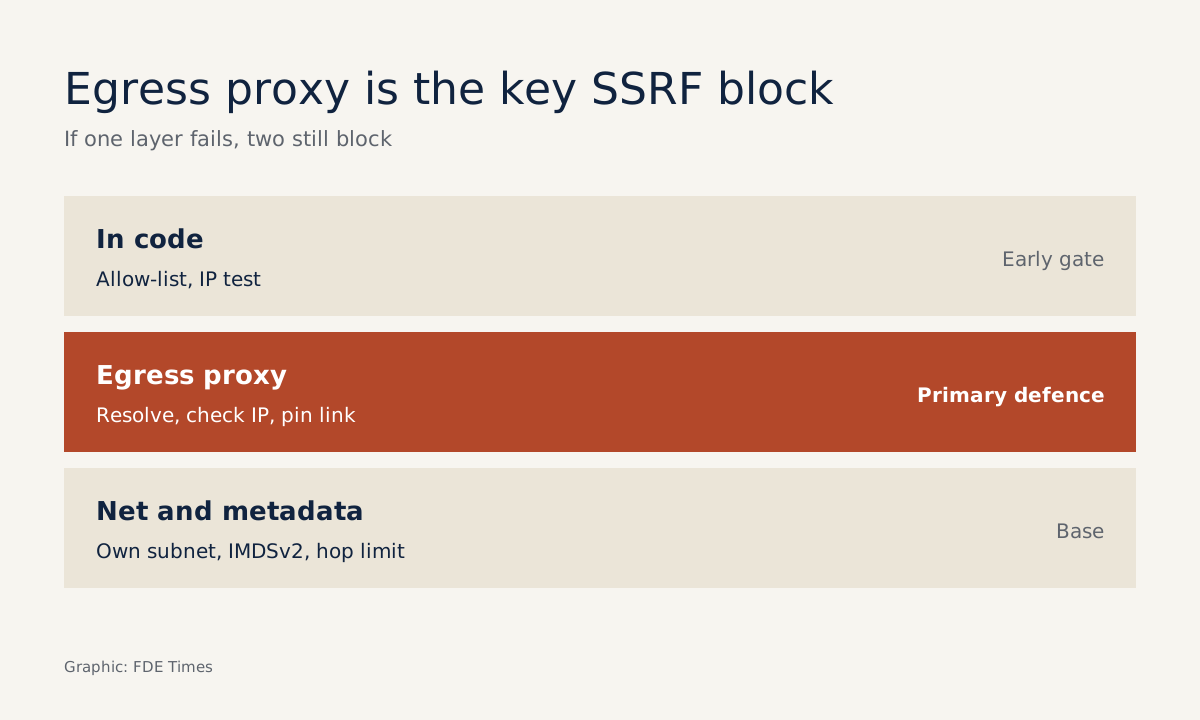
That is why the MCP document advises server-side deployments to use an egress proxy such as Smokescreen, a proxy designed to prevent SSRF, rather than patching each adapter. The proxy itself resolves the domain, checks the IP and opens the connection, so the gap between check and use is closed in one place instead of being scattered across every tool.
At a client site, a sensible setup is to put the agent in a subnet whose only route to the internet is through the proxy, with no route to databases, IMDSv2 enforced and the hop limit kept at a level that stops the sandbox reaching a token.
When presenting to the client’s security team, draw three layers: the allow-list and IP check in code, the egress proxy in the middle, and network segmentation plus metadata configuration at the bottom. If one layer fails, the others still hold. A diagram like that usually gets you through security review far faster than the sentence “we validate URLs”.
Common mistakes
The most common mistake is writing a deny-list such as “block the strings localhost and 127.”. Those addresses can be written in many ways, and this is precisely the hand-rolled check the MCP document says to avoid. The second is checking the URL once at the start and then letting the HTTP library follow redirects and re-resolve DNS on its own.
The third is thinking only about users typing malicious URLs. With an agent, a URL can sit in an email, a ticket or a web page the agent has been asked to read. The fourth is trusting the cloud to handle metadata, when a hop limit change “to get the container running” can reopen exactly that door.
One diagram that fixes bugs and wins jobs
This week’s exercise: take the network diagram of your most recent deployment, mark the machine running the agent, then draw every arrow to which that machine can send a request. Any arrow you cannot explain to the client is work to do before the next demo.
That diagram, together with the list of arrows you cut, is also the best evidence you can bring to a job search. If a posting mentions deploying in customer infrastructure or working with security teams, tell exactly that story in the interview: which machine, which arrow, which layer blocked it.
On a CV, a line such as “designed egress policy and SSRF protection for agents running in customer networks, passed security review” says more than three lines listing frameworks. People hiring FDEs need to know you see the arrows others miss.
Was this article useful?
Thanks for the feedback!
8 sources
- Server Side Request Forgery Prevention - OWASP Cheat Sheet Series
- Security Best Practices - Model Context Protocol
- Use the Instance Metadata Service to access instance metadata
- Access instance metadata for an EC2 instance
- Add defense in depth against open firewalls, reverse proxies, and SSRF vulnerabilities with enhancements to the EC2 Instance Metadata Service
- datamodel-code-generator vulnerable to SSRF protection bypass via DNS rebinding · 2026-08-04
- MCP Atlassian: SSRF via DNS Rebinding in Header-Based Authentication Flow · 2026-09-22
- auth-fetch-mcp SSRF brief (CraftedSignal) · 2026-05-19