Three invisible bytes that quietly break a client's CSV file
Excel adds a byte-order mark so Vietnamese text displays correctly; a small Python parser and a golden test turn that bug, and two other silent ones, into failing tests.
In brief
- The three BOM bytes 0xef 0xbb 0xbf corrupt the first column name if you decode with plain utf-8; utf-8-sig skips them automatically.
- Python's csv module does not complain about malformed rows by default, and errors='replace' silently inserts replacement characters, so both must be switched to strict mode.
- A golden test stores the parser's normalised output, so any change in encoding or delimiter handling shows up as a diff for you to review.
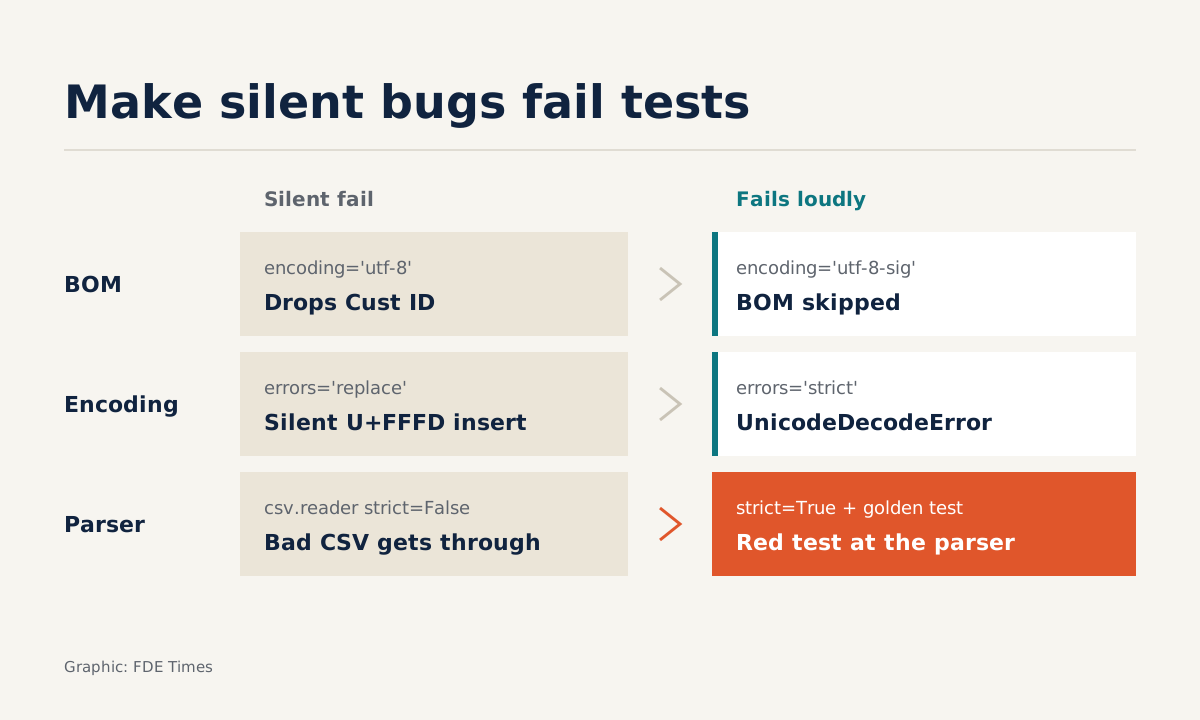
Just three bytes, 0xef 0xbb 0xbf, at the start of a file are enough to stop your pipeline from finding the “Customer ID” column. The code raises no exception. It quietly produces a column name with an invisible character at the front, and every lookup by that name fails.
Work as an FDE long enough and you will hit this. A client exports data from Excel, from an old accounting package or from a third party’s system, and sends you a CSV file. Vietnamese text, or any language with diacritics, exposes three classic bugs: encoding, the BOM and the delimiter.
This guide walks through a small parser built on Python’s standard library that handles all three, then locks its behaviour in place with a golden test. You need only Python 3 and pytest. The code is trimmed for readability, so add logging and error handling before using it in a real project.
Why do client files so often carry a BOM?
According to the Python documentation, the BOM is the byte sequence 0xef 0xbb 0xbf. It is a UTF-8 variant that originated with Microsoft’s Notepad, and Python calls its codec utf-8-sig. Clients do not add the BOM themselves. Their software does.
The culprit is Excel. In a 2014 post, Chase Seibert noted that Excel 2007, 2010 and 2013 do not recognise a UTF-8 file unless it has a BOM.
Without one, Vietnamese text shows up with garbled diacritics, so export tools insert a BOM to make Excel display it correctly. The result is that files reaching you often carry a BOM, while files without one tend to show broken characters when the client opens them in Excel.
The same post points to another trap. If a file has both a BOM and a sep=, line at the top, Excel on Windows ignores the BOM. The post dates from 2014, so check the behaviour on the Excel version your client actually uses. Even so, whenever you see a sep= line at the top of a file, this bug should be the first thing that comes to mind.
Step 1: build a sample file that looks like the client’s
Start with a file that contains all the hard cases: a BOM, semicolon delimiters and an address with a line break inside double quotes.
# make_fixture.py
from pathlib import Path

FIX = Path("tests/fixtures")
FIX.mkdir(parents=True, exist_ok=True)
text = ('Customer ID;Full name;Address\r\n'
        'C01;Anna Wałęsa;"12 Ly Thuong Kiet Street\r\nWard 7"\r\n')
(FIX / "bom_semicolon.csv").write_bytes(text.encode("utf-8-sig"))
Check: run python -c "print(open('tests/fixtures/bom_semicolon.csv','rb').read(3))". The output must be b'\xef\xbb\xbf'. For files in legacy encodings, do not fabricate a sample: ask the client for a real file and anonymise it. The closer the sample is to real data, the more the test is worth.
Step 2: read the bytes first, then guess the encoding
The most common mistake is opening the file with encoding="utf-8" and assuming all is well. With a BOM file, the BOM character stays glued to the start of the first column name. According to the Python documentation, the utf-8-sig codec skips the three BOM bytes if they are the first three bytes of the file, so that is the direct fix.
If the file is not valid UTF-8, Python ships a cp1258 codec, that is windows-1258, for Vietnamese. Python’s standard encodings table has neither TCVN nor VISCII. If the client uses one of those, you will need a separate converter.
# customer_csv.py
CANDIDATES = ("utf-8-sig", "cp1258")

def detect_encoding(raw: bytes) -> str:
    for enc in CANDIDATES:
        try:
            raw.decode(enc, errors="strict")
            return enc
        except UnicodeDecodeError:
            continue
    raise ValueError("Could not decode the file with any known encoding")
The important detail is errors="strict". According to the Python documentation, this is the default, and it raises an error on invalid bytes. errors="replace", by contrast, silently inserts the character U+FFFD where the damage is. The parser keeps running, but the data pushed into the client’s system now has little boxes in place of accented letters.
The order in which you try encodings matters too. UTF-8 has a strict structure, so a file written in another encoding will very likely make it fail.
A single-byte code page such as cp1258 is far more forgiving: most byte sequences decode, even when the result is gibberish. You can see this in one line by taking the UTF-8 bytes of a name and decoding them as cp1258 by mistake:
>>> "Wałęsa".encode("utf-8").decode("cp1258")
'Wałęsa'
No exception, just a mangled name. So always try utf-8-sig first, and let the golden test in Step 5 catch any case where cp1258 is chosen wrongly.
Step 3: open the file with newline=‘’
The csv module documentation is explicit: if newline='' is not specified, newlines embedded inside quoted fields will not be interpreted correctly. An address that breaks from “12 Ly Thuong Kiet Street” onto “Ward 7” is exactly that case. Without this parameter, one customer can be split into two broken rows.
import csv

def parse_file(path, expected_cols: int) -> list[list[str]]:
    raw = open(path, "rb").read()
    enc = detect_encoding(raw)
    with open(path, encoding=enc, errors="strict", newline="") as f:
        sample = f.read(4096)
        f.seek(0)
        dialect = csv.Sniffer().sniff(sample, delimiters=",;\t|")
        rows = list(csv.reader(f, dialect, strict=True))
    check_columns(rows, expected_cols)
    return rows
Check: run print(parse_file("tests/fixtures/bom_semicolon.csv", 3)). You should get exactly two rows. The first cell must be 'Customer ID' with no '' in front of it, and the address cell must contain a line break.
Step 4: do not trust Sniffer completely
csv.Sniffer guesses a file’s format. The documentation lets you pass a delimiters argument to restrict which characters may serve as delimiters, here the comma, semicolon, tab and pipe. That stops Sniffer from picking some stray character in the data.
But Sniffer still has a weak spot. According to the documentation, when both , and ; split every row consistently, Sniffer chooses according to the order of preference in its preferred attribute, regardless of how often each character appears.
Picture a distributor’s file with a price column written as “125,5” and semicolon delimiters. If every row has the same number of price cells, the comma splits each row just as consistently as the semicolon, and Sniffer may choose wrongly.
So you need an independent check, based on something you know for certain from discovery with the client: the number of columns.
def check_columns(rows, expected_cols):
    for i, row in enumerate(rows):
        if len(row) != expected_cols:
            raise ValueError(f"Row {i}: {len(row)} columns, expected {expected_cols}")
The strict=True argument to csv.reader is not redundant either. According to the documentation, the default Dialect uses a comma and sets strict=False, so malformed CSV passes through without complaint. With strict on, the error stops at the parser instead of corrupting data further downstream.
Step 5: lock the parser’s behaviour with a golden test
The parser now works. The problem is that next week a colleague may add errors="replace" to “cut down on errors”, or change the order in which encodings are tried.
The TensorFlow Federated documentation defines a golden test as the kind of test to use when you want developers to know that their code has changed a function’s output.
The normalised output of a CSV parser is a natural fit.
# tests/test_golden.py (trimmed)
import json, os
from pathlib import Path
import pytest
from customer_csv import parse_file

HERE = Path(__file__).parent

@pytest.mark.parametrize("name", ["bom_semicolon.csv"])
def test_golden(name):
    rows = parse_file(HERE / "fixtures" / name, expected_cols=3)
    actual = json.dumps(rows, ensure_ascii=False, indent=2)
    gold = HERE / "golden" / f"{name}.json"
    if os.environ.get("UPDATE_GOLDEN"):
        gold.parent.mkdir(exist_ok=True)
        gold.write_text(actual, encoding="utf-8")
    assert actual == gold.read_text(encoding="utf-8")
The first time, run UPDATE_GOLDEN=1 pytest to create the reference file, then open the JSON and read every cell. If you would rather not write this yourself, the pytest-goldie plugin provides a golden fixture and an update_goldens flag to overwrite the stored output.
The most common mistake with golden tests is updating the reference file without reading it. The TensorFlow Federated documentation stresses that after regenerating golden files you must review the diff for unexpected changes. A “Wałęsa” turning into “WaÅ‚Ä™sa” in the diff is exactly the wrong-cp1258 bug that Step 2 warned about.
How does this skill play out on a client site?
On your first day with a client, before writing a single line of transform code, ask for three to five sample files from each source system. Put every one in tests/fixtures, broken ones included, and create a golden test for each.
When the client sends a new file that breaks the parser, add it to the fixtures, fix the code and read the diff. Every incident becomes a new test.
When reading FDE job ads, watch for lines about integrating or ingesting client data: where they appear, this is the work. On your CV, do not just write “CSV processing”.
Be more specific: for example, that you built a golden test suite for client data imports and caught encoding bugs before the data reached production. A small repo with real, anonymised fixtures is more convincing than even that description.
Client data will always contain bugs you have never seen. Golden tests make sure that every bug you have fixed does not quietly come back.
Was this article useful?
Thanks for the feedback!