Ten requests a minute: pulling Zendesk tickets clean enough for evals
You need a loop that knows how to wait, a saved cursor and 300 tickets labeled by expected outcome rather than by wording.
In brief
- Zendesk's incremental export endpoints allow only 10 requests a minute, or 30 if the customer has the High Volume add-on, and the limit is shared across the whole group.
- Use cursor-based export, stop on end_of_stream, deduplicate by id and drop deleted tickets before building evals.
- A first golden set runs to about 300 tickets, stratified, with PII masked at the moment of inclusion and every change recorded per version.
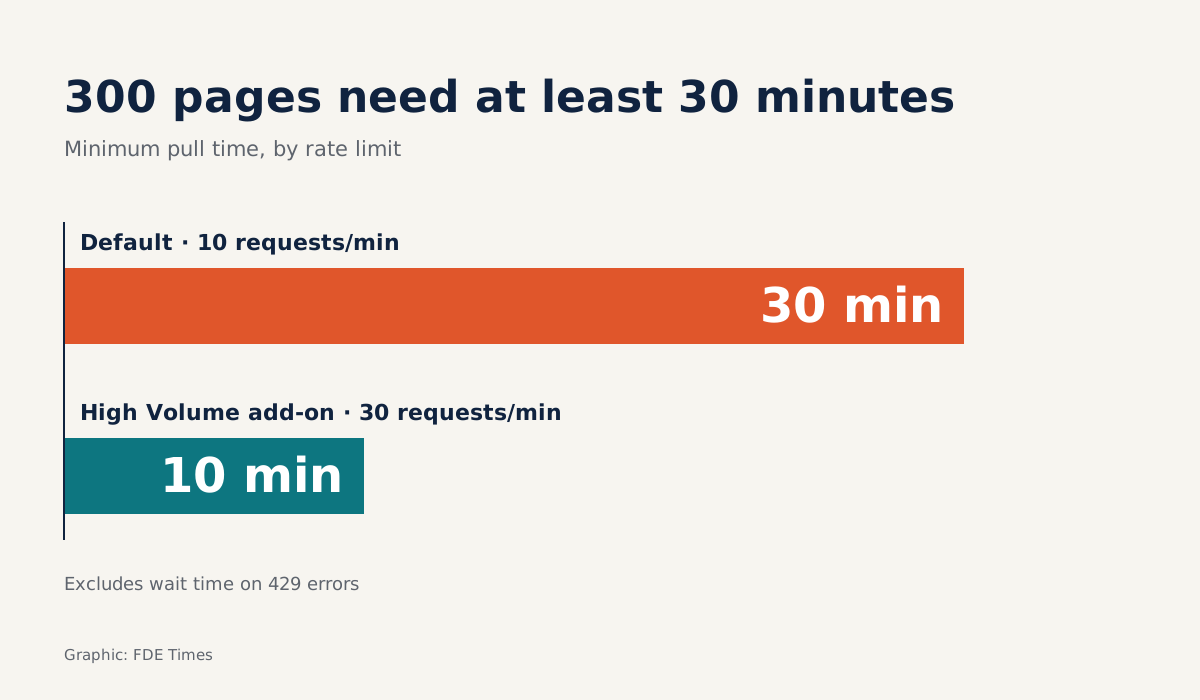
Zendesk gives you 10 requests a minute on its incremental export endpoints, and that limit is shared across the whole group of endpoints. The High Volume add-on raises it to 30. That ceiling determines how long it takes to get hold of a customer’s real support history.
That history is the raw material of every customer-service agent project. When a client asks an FDE to build an agent that answers support email, their first question is “will it be right?”, and the only way to answer is with an eval set built from real tickets. That means pulling the tickets out without getting blocked, without missing data and without counting anything twice.
What follows takes each job in turn: a cursor-driven Python puller, a pacer, 429 handling, and the step that turns raw tickets into a first golden set.
What you will build, and what you need first
The end result is two files. tickets.jsonl holds deduplicated, filtered tickets; golden.jsonl holds about 300 labeled eval cases. Alongside them sits cursor.txt, so the next run pulls only what is new.
You need Python 3 with the requests library, a Zendesk account with API access (a sandbox is best) and that account’s subdomain. The code below is simplified: authentication assumes you already have a requests.Session carrying credentials, and the endpoint name and cursor parameters should be checked against the Incremental Exports page before a real run.
Step 1: Do the arithmetic before you run
Minimum run time depends only on the number of pages to pull, because each page costs one request. Do a trial run on the sandbox to see how many tickets a page actually holds, then divide the total ticket history by that number.
Work it through for a history that needs 300 pages: at 10 requests a minute, you need at least 30 minutes; if the client has High Volume, at least 10. That is a floor, before any waits forced by 429s.
Because the limit is shared across the whole Incremental Exports group, ask the client before running whether any other integration calls these endpoints. If one does, your puller and their system will compete for the same 10 requests a minute, and the estimate above has to stretch.
Give the client this number before you start. A 30-minute data pull that nobody was warned about is easily mistaken for a hung machine.
Step 2: Write an API call that knows how to wait
When you exceed the limit, Zendesk returns a 429 with a Retry-After header saying how many seconds to wait before trying again. The puller needs to read that header and sleep for exactly that long.
import time, requests

BASE = "https://SUBDOMAIN.zendesk.com"
# Cursor-based endpoint for tickets; check the path on the Incremental Exports page
PATH = "/api/v2/incremental/tickets/cursor.json"
MIN_GAP = 60 / 10  # 6 seconds per request; change to 60/30 with High Volume

def get_page(session, params):
    while True:
        r = session.get(BASE + PATH, params=params, timeout=60)
        if r.status_code == 429:
            time.sleep(int(r.headers.get("Retry-After", "60")))
            continue
        r.raise_for_status()
        return r.json()
The 60-second default when the header is missing is a cautious choice made by this code, not a Zendesk rule. Check: deliberately drop MIN_GAP to 0 on the sandbox. You should see 429s appear, then the loop recover on its own without crashing.
Step 3: Paginate with the cursor, stop on end_of_stream
Zendesk recommends cursor-based export. The start_time parameter is used only on the first request, and it must be more than a minute in the past to avoid missing data; from the second request on, you send only the cursor. The exclude_deleted parameter drops deleted tickets at the source.
def pull(session, start_time=None, cursor=None):
    params = {"exclude_deleted": "true"}
    if cursor:
        params["cursor"] = cursor
    else:
        params["start_time"] = start_time  # must be older than now - 60 seconds
    tickets = {}
    while True:
        t0 = time.monotonic()
        data = get_page(session, params)
        for t in data.get("tickets", []):
            tickets[t["id"]] = t  # overwrite by id: keep the latest version
        if data.get("end_of_stream"):
            return tickets, data.get("after_cursor")
        params = {"exclude_deleted": "true", "cursor": data["after_cursor"]}
        wait = MIN_GAP - (time.monotonic() - t0)
        if wait > 0:
            time.sleep(wait)
The stop condition is end_of_stream, exactly as Zendesk’s guidance says. Do not infer the end from a page that looks short: that is a guess, while the flag is the official signal.
When the loop finishes, write the last cursor to cursor.txt. The next run calls pull(session, cursor=...) and receives only tickets that have changed. Check: run it twice in a row; the second run should return very few tickets or none.
Why deduplicate and filter anyway?
Zendesk’s documentation warns that time-based export can contain duplicates and advises deduplicating by ID plus timestamp. Cursor-based export avoids duplicate records when many items share a timestamp, but the dictionary keyed on id is still worth keeping: a ticket edited many times should occupy only one row in the eval set.
Deleted tickets are the second trap. Their records still exist, so they can still show up in an export, and if they slip into the eval set they become cases nobody can verify any more. Add a safety filter on status:
clean = [t for t in tickets.values() if t.get("status") != "deleted"]Print the counts before and after filtering. If the share removed is unusually high, that is a question worth taking to the meeting with the client’s support team.
Step 4: Label the outcome each ticket needed
From clean, sample about 300 tickets. Robylon’s guide puts 300 to 600 labeled tickets as a workable first golden set for a team handling a few thousand emails a month. The same source advises stratified sampling and having two people label an overlapping subset independently, to find out whether your own labels are consistent.
Labels should record the expected outcome along each dimension. A support email can be answered correctly in many wordings, so matching text against a model answer penalizes correct replies unfairly:
| Field | Example value | How it is scored |
|---|---|---|
expected_actions |
["issue_refund"] |
Did the agent call the right action |
expected_facts |
["order delivered on date X"] |
Does the reply state the right facts |
should_escalate |
true |
Did it hand off to a human at the right moment |
Report a separate number for each row in the table rather than averaging them. Separate scores for actions and for escalation show the client exactly where to fix things; a single combined score hides it.
One ticket becomes one line of golden.jsonl
Take an illustrative ticket, cut down to a few fields; real tickets carry many more, and field names should be checked against the client’s export:
{"id": 4821, "status": "solved",
 "subject": "My order arrived broken, I want a refund",
 "description": "Order #A-1093 arrived yesterday and the ceramic vase was broken in two. I want a refund, not a replacement."}
Ground truth usually comes from how the support agent resolved the ticket: here, a refund, repeating the order number, no escalation needed. The eval line records exactly that:
{"ticket_id": 4821,
 "input": "Order #A-1093 arrived yesterday and the ceramic vase was broken in two. I want a refund, not a replacement.",
 "expected_actions": ["issue_refund"],
 "expected_facts": ["order number A-1093", "customer wants a refund, not a replacement"],
 "should_escalate": false,
 "labeled_by": "support_agent"}
An agent that writes “very sorry about the problem” or “apologies for the inconvenience” scores correct either way; an agent that offers a replacement fails on expected_facts. Check: reread the first 20 lines and ask whether two different graders would reach the same result.
Before writing any line to golden.jsonl, mask names, email addresses, phone numbers and street addresses in input. Tian Pan writes that PII masking has to happen at the moment a ticket enters the eval set, not later at publication. An eval set is customer data with the answers attached, and it will be copied to more places than you expect.
The mistakes that quietly corrupt the data
The hardest to spot is setting start_time too close to the present. Zendesk requires it to be more than a minute in the past, and the API also holds back the most recent minute of data to avoid race conditions, so a timestamp that is too fresh drops tickets without any error.
The next is ending the loop on page size instead of waiting for end_of_stream. One unusually short page in the middle is enough to make the rest of the history vanish from the dataset.
The third is retrying immediately after a 429 and ignoring Retry-After, which leaves the loop burning requests on attempts that are certain to be refused.
The last lives in the eval set itself: leaving the golden set frozen. Tian Pan suggests archiving cases that have stayed green for ninety days and have a duplicate elsewhere in the suite.
OneUptime’s guide recommends versioning the dataset. Each time you release the golden set, record the cases added, the cases dropped, the duplicates removed and the known limitations.
Adding new cases is cheap, too. The cursor you saved in Step 3 means the next run pulls only tickets that have changed.
What to bring to the first client meeting, and what to put on your CV
Before asking for permission to run against live data, bring the client’s IT team three numbers from the sandbox run: the page count, the number of 429s and the estimated time for the full history, using the arithmetic from Step 1. Bring the question about integrations sharing the Incremental Exports limit as well.
Those three numbers show them your puller will not choke their system. They are also exactly the numbers that belong on your CV.
A template to fill in with your own figures: “Pulled N Zendesk tickets via cursor-based export under a 10 requests/minute limit, handling 429s with Retry-After; built a 300-case PII-masked golden set scoring actions, facts and escalation separately.” If an interviewer follows up, be ready to explain why the loop stops on end_of_stream and why start_time must be more than a minute old.
An agent is only as trustworthy as the eval set behind it. And the eval set is only as trustworthy as the loop that feeds it, which cannot afford to miss a single ticket.
Was this article useful?
Thanks for the feedback!
8 sources
- Rate limits | Zendesk API reference
- Incremental Exports | Zendesk API reference
- Using the Incremental Exports API | Zendesk Developer Documentation
- Zendesk API incremental export: A complete developer guide
- Evals for Email Agents: Building a Golden Set From Real Tickets
- The Support Ticket to Eval Case Pipeline Nobody Builds · 2026-05-14
- Eval Datasets Are Customer Data With a Right Answer Attached · 2026-05-10
- How to Build a Golden Evaluation Dataset from Real LLM Production Failures · 2026-08-31