Why a client's revenue doubles after a single JOIN
A correct primary key is not enough: to stop the error, aggregate data to the grain of each measure before you join the tables.
In brief
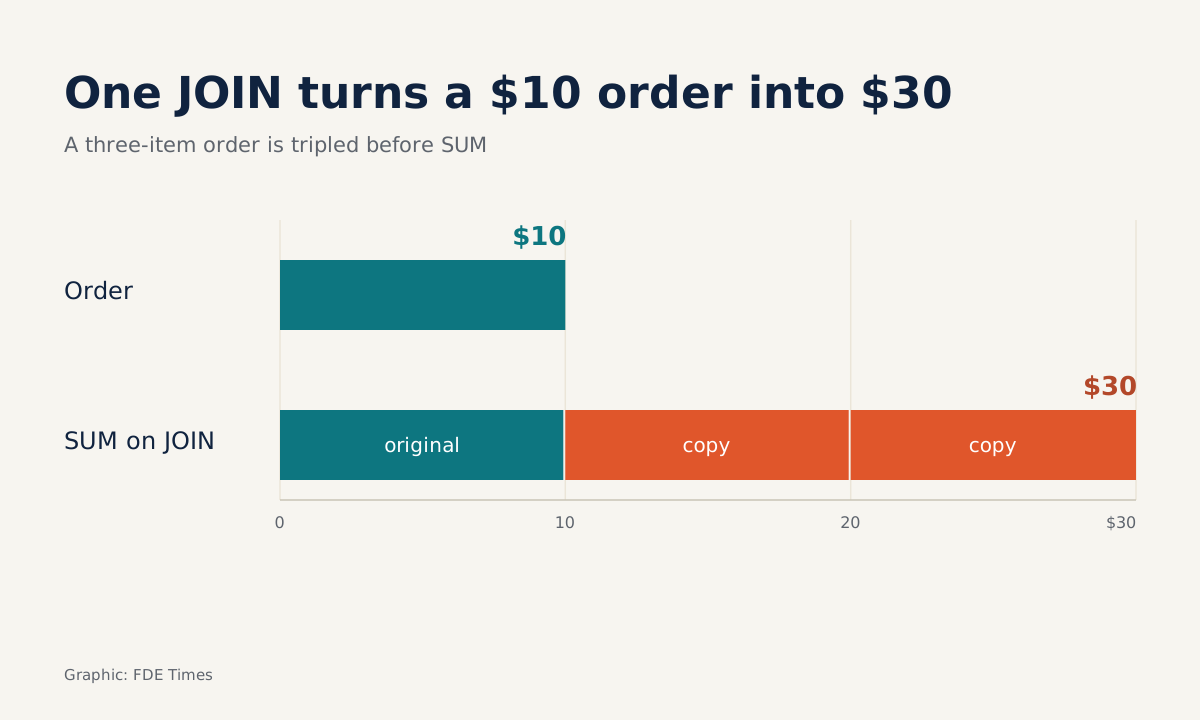
- Fan-out occurs when a one-to-many JOIN repeats rows on the "one" side, so SUM double-counts: a $10 order with three products becomes $30.
- Kimball calls failing to declare the grain at the outset the most common design mistake; unique and not_null tests keep the primary key true to the grain.
- The safe fix is to aggregate at the measure's grain and only then JOIN, rather than patching with DISTINCT at the end.
dbt Labs once recounted an incident every data practitioner dreads: one Monday, historical revenue suddenly doubled because of fan-out. Duplicate or null primary keys can cause rows to be dropped or miscounted, and users often discover the broken report before the tests have had a chance to run.
For an FDE, this scenario is more dangerous than it is for an in-house data engineer. You are joining tables you did not design, in a schema you first saw last week, and the first dashboard you ship will be checked by the client’s finance team against the books. One discrepancy can cost trust for the whole engagement.
The good news is that the error has a clear mechanism, and preventing it can be trained into a reflex. Everything starts with one question to answer before every JOIN: what does a single row in this table represent?
Grain must be stated before anything else
Kimball, the name attached to dimensional modeling, defines grain as the exact meaning of a single row in a fact table. The grain must be declared before choosing dimensions or facts.
Ralph Kimball also wrote that the most common design mistake, by a wide margin, is failing to declare the grain of the fact table at the start of the design process. On the client side you rarely get to design from scratch, but you can still declare the grain of each table before writing your first line of SQL.
The primary key is how that declaration becomes something a machine can check. If order_id really is unique and never null, the orders table genuinely is “one row, one order”. If not, every count downstream is suspect.
How a $10 order becomes $30
Holistics’ documentation defines fan-out as a JOIN duplicating rows on the “one” side of a one-to-many relationship, after which aggregate functions treat the copies as real data. Sigma calls one form of this error a fan trap: the amount on the order header is repeated for every product in the order when it is joined to the line-item table.
Take a familiar schema. The orders table has the grain “one row is one order”, with an order_total column; the order_items table has the grain “one row is one product within an order”.
A $10 order containing three products will appear three times after the JOIN, and SUM reports it as $30. The client wants revenue and product counts per customer, and the first query many people write looks harmless:
-- WRONG: order_total is repeated for every order_items row
SELECT o.customer_id,
       SUM(o.order_total)  AS revenue,
       COUNT(i.product_id) AS n_products
FROM orders o
JOIN order_items i ON i.order_id = o.order_id
GROUP BY o.customer_id;
n_products is correct, because it sits at the grain of order_items. revenue is wrong, because order_total sits at the grain of orders but has been dragged down to a finer grain.
Each order is multiplied by its own number of products, so customers with large baskets are inflated the most. The error is not a fixed multiplier, and it is hard to spot if you only glance at the total.
Fix it by aggregating to the right grain before the JOIN
An independent analysis on SystemCraftPress offers a neat fix: aggregate the “many” side separately, before the JOIN, so the multiplication never touches the main total. OWOX makes the same point for cases where both tables carry measures: aggregate to a common grain, then join.
WITH items_per_order AS (
  SELECT order_id,
         COUNT(product_id) AS n_products
  FROM order_items
  GROUP BY order_id          -- the grain is now one order
)
SELECT o.customer_id,
       SUM(o.order_total)  AS revenue,
       SUM(i.n_products)   AS n_products
FROM orders o
LEFT JOIN items_per_order i ON i.order_id = o.order_id
GROUP BY o.customer_id;
After the CTE, both sides of the JOIN share the same grain, the relationship becomes one-to-one, and no row is multiplied. n_products is still the number of product rows, just counted in advance at the order level. LEFT JOIN keeps orders that have no products yet, which a plain JOIN would silently drop.
Note that in this example both tables have valid primary keys and still suffer fan-out. OWOX sums up the situation: the keys are right, the grain is not. Primary key tests guarantee each table matches its declared grain; aggregating before the JOIN is what stops the multiplication.
When the JOIN chain gets longer, say customers to orders to order_items in a single statement, every customer-level measure can be multiplied twice in a row. The principle holds: each layer is aggregated to the grain of the layer above before it is joined.
BI tools have their own answers. Holistics restructures the query so fan-out never happens rather than patching it with arithmetic, while Omni uses symmetric aggregates so the aggregation is always correct. But when you write raw SQL in a client’s warehouse, that layer of protection is absent.
A routine to take to every client
The first step is to write the grain of each table you will use as one sentence, then ask the client’s data owner to confirm it. A sentence such as “one row is one payment, including refunded payments” often exposes misunderstandings that column names hide.
The second step is to check that sentence against the data. The query SELECT order_id, COUNT(*) FROM orders GROUP BY 1 HAVING COUNT(*) > 1 must return nothing. Because duplicate keys and null keys both cause miscounted rows, if the project uses dbt, encode both conditions as tests so the machine checks them next time:
models:
  - name: orders
    columns:
      - name: order_id
        tests: [unique, not_null]
The third step, before every JOIN, is to note the direction of the relationship and the grain of each measure you plan to sum. Any measure on the “one” side must be aggregated first or pass through a mechanism such as symmetric aggregates.
The final step is reconciliation. SystemCraftPress makes a point that is easy to overlook: confirm row counts, not just totals. Count rows before and after each JOIN, then compare the result with a number the client already trusts, such as one month’s total revenue in the accounting system, before anyone sees the dashboard.
Patches that make the error harder to see
The most common patch is SUM(DISTINCT o.order_total). It produces the right number on a test sample, then quietly understates revenue whenever two different orders have the same total, because DISTINCT deduplicates by value, not by key.
Another trap is trusting column names. A column called id in a client’s table is not necessarily unique, and tables that are reloaded many times are where duplicate rows slip in most easily. Only a test will tell you.
Nor should you assume the error only affects revenue. Holistics’ example uses the same orders and order_items: SUM(orders.delivery_attempts) counts an order several times and returns an inflated figure. Any order-level column, from delivery fees to delivery attempts, suffers the same fate when dragged down to product grain.
How to answer “find the bug in this query”
If the FDE job postings you are targeting mention data modeling or dbt, rehearse with a mock interview. Ask a friend to hand you the wrong query above along with the complaint “revenue per customer is higher than the accounting books, where’s the bug?”, then answer out loud in this order: grain, relationship, fix, check.
A model answer sounds like this:
“In
ordersone row is one order; inorder_itemsone row is one product in an order. Joining onorder_idis one-to-many, soorder_totalrepeats once per product: a $10 order with three products is counted as 30.COUNT is still right; only SUM is wrong.
The fix is to aggregate
order_itemsbyorder_idfirst, then LEFT JOIN. Not SUM DISTINCT, because two orders with the same total would be merged into one. Then count rows before and after the JOIN, and compare one month’s total with the accounting figure.”
The second half of that answer is what marks out someone who has done the work for real. Once you can deliver it fluently, put on your CV one occasion when you did exactly this with real data, along with the reconciliation result.
Next time a revenue number looks unusually good, hold off on celebrating. Count the rows before and after the JOIN.
Was this article useful?
Thanks for the feedback!
9 sources
- What's a Primary Key and Why Do We Test Them? · 2021-11-29
- Fan-out and how Holistics resolves it
- How Holistics handles joins
- Resolving The Fan Trap with Sigma and Snowflake UDF
- Grain (Kimball Dimensional Modeling Techniques)
- Declaring the Grain · 2003-03-01
- Handling fan out with symmetric aggregates
- Your JOIN is quietly doubling your numbers · 2026-09-25
- Why Your Totals Are Silently Wrong after a Join: Finding Fan-Out before the Number Ships · 2026-11-10