Go-live plans usually die in the client's column
Count back from the go-live date, and give every stage two named owners and a finish line that can be checked in the product itself.
In brief
- Onboarding stalls more often because ownership is unclear than because a feature is missing
- Each stage needs one person on your side and one on the client's, named as people, never as teams
- When a stage slips, move the later stages back but keep the original dates on the plan
According to Valuecase, customer onboarding stalls because nobody is clearly responsible more often than because any feature is missing. That sounds obvious, yet plenty of FDEs have lived it: the code runs, the demo looks good, and three weeks later nobody on the client side has granted read access to the production database.
Valuecase pinpoints the gap more precisely: client-side tasks with no owner are the most common reason a rollout stalls. That gap sits in the half of the plan you do not directly control.
If you are the one carrying a deployment to go-live, treat filling that half as your job. A mutual action plan, written properly, is the cheapest tool for keeping a deployment from drifting.
A plan written for both sides to read
A mutual action plan (MAP) is a roadmap written for the client to read, unlike the seller’s internal documents. Because the client holds the plan too, it has to say clearly who owns what and when the key milestones fall.
It must also list the milestones the buyer itself commits to, not just the seller’s tasks. A plan made up entirely of your own tasks is a personal to-do list, not a shared plan.
A MAP drawn up before signing should not be filed away once the contract is signed either: Dock recommends that it become an input to the onboarding process. For an FDE, that is the handover point: what the client promised in the MAP becomes the first rows of the deployment plan.
Count back from go-live
The schedule starts at the go-live date and runs backward. If the client settles on July 1, put July 1 at the bottom of the plan and work upward. This forces every earlier deadline to fit the date the client chose, rather than letting go-live drift with progress.
A post-signature plan should have 5–7 stages. A stage counts as done only when it meets a condition that can be verified in the product or the account, not when some activity has taken place. “Met with the IT team” is an activity. “The service account can read the orders table in production” is a condition: anyone can open a laptop and check.
Each stage has one person on the seller’s side and one on the client’s, both specific people, never team names. The RACI rule for onboarding follows the same logic: each task has exactly one accountable person, never two.
Six stages for a July 1 go-live
Take a hypothetical deployment: an agent that answers order questions for a customer support team, with go-live set for July 1. Working back from that date, the plan has six stages:
| Stage | Deadline | Your owner | Client owner | Done when |
|---|---|---|---|---|
| 1. Agree success criteria | May 9 | Lead FDE | Support team lead | Criteria document signed by the team lead |
| 2. Access and environments | May 16 | Lead FDE | Designated IT engineer | Service account can query the production orders table |
| 3. Data pipeline running on a sample | May 30 | Lead FDE | Client data engineer | Sync job runs nightly with no errors in the logs |
| 4. Integration into the support tool | June 13 | Integration engineer | Support tool administrator | Agent replies in real tickets in staging |
| 5. User acceptance | June 24 | Lead FDE | Client champion | Acceptance question set meets the threshold agreed in stage 1 |
| 6. Go-live | July 1 | Lead FDE | Support team lead | Agent switched on for every shift |
In a real plan the owner columns must hold full names; job titles appear here only to keep the example readable. Look at the client column: every stage has someone, and stage 5 belongs to the champion. The champion handles the client’s side of the work day to day, so that is the first person you message when one of their rows turns red.
When a stage slips, do not quietly change the date
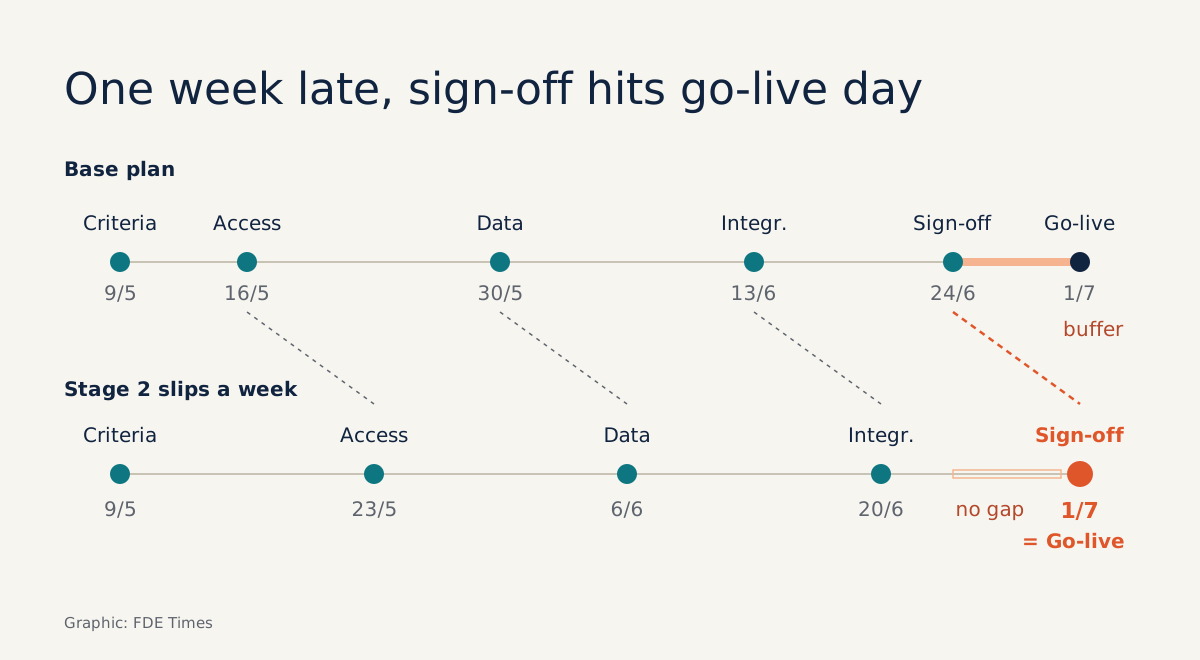
Say stage 2 slips a week, from May 16 to May 23, because the client’s security team needs to approve the service account. The later stages move with it: stage 3 to June 6, stage 4 to June 20, stage 5 to July 1. Acceptance now lands on go-live day.
Whenever a stage slips, push back every date that follows but keep the original dates visible. With both columns on the plan, the support team lead can see for themselves that go-live is under threat. The conversation shifts from “why is your team slow” to “which stage do we compress, or do we move go-live”.
If you quietly tidy the dates, you will be delivering bad news in the last week of June, when there is nothing left to trade. With the original dates on the plan, neither side has to argue about when the schedule started to drift.
Doing it on your own project
Start by asking the client for the go-live date and why it is that date. Then split the time backward into 5–7 stages, and write the “done when” column before the task column: the clearer the finish condition, the more obvious the work becomes.
Next, find a name for every client-side cell, and treat the plan as finished only once the champion has read it and accepted their rows.
If the plan comes from sales, check it against the pre-signature MAP. Every commitment the client made when buying needs a place in the plan, or it will vanish in the first week.
Four mistakes that leave a tidy plan and a stalled project
The most common mistake is writing a team name. “Client IT” means nobody, and when a task slips you do not know whom to message. Close behind it is a vague finish condition such as “complete the integration”, which anyone can declare done.
Two people jointly accountable for one task are just as dangerous, because each assumes the other is on it. The hardest mistake to spot is a plan containing only your side’s tasks: it looks diligent, but it leaves empty exactly the part most likely to stall a rollout, the client-side tasks nobody has picked up.
A CV line that shows this skill
FDE recruiters struggle to believe “works well with customers”.
A line built from your own plan is more convincing, for example: “Built a six-stage deployment plan with one owner on each side for every stage; when access provisioning slipped a week, moved the schedule back openly and agreed a fix with the client before go-live.” In an interview, open that plan and walk through exactly that delay.
Next time a deployment stalls, open the plan before you open the logs. The blockage is quite likely a cell with nobody’s name in it.
Was this article useful?
Thanks for the feedback!