The script logged 'Backup OK' every night. The backup was empty
Four lines in a typical handoff script fail without a word, from a cd into an unmounted directory to an rm -rf that can wipe the root filesystem.
In brief
- Without pipefail, a failure in the first command of a pipeline is ignored: pg_dump breaks, but gzip still writes a file and returns 0.
- set -e is only a safety net: it does not fire inside an if test or in && and || lists, and calling a function from a conditional is a documented trap.
- ShellCheck uses standard exit codes, so it plugs straight into CI and catches missing quotes, rm -rf on an empty variable and failed cd commands.
Three weeks into a deployment, the client’s operations team restores from the backup script left behind for them. Cron has run it every night, and every morning the log has said “Backup OK”. The compressed file they open is empty.
The script never crashed. It simply kept going after a step had failed, which is the most dangerous thing bash does. For an FDE, a handoff script will run long after the engagement ends, on machines nobody on the team manages, against data nobody on the team has seen.
So the skill that matters here is not elegant bash. It is bash that stops and reports the error clearly the moment something goes wrong, rather than pressing on from a broken state.
Four failures in one script, and not one error message
This is the “works fine on my laptop” version everyone has written at some point:
#!/bin/bash
BACKUP_DIR=/data/backups
cd $BACKUP_DIR
rm -rf $STAGING_DIR/*
pg_dump "$DB_URL" | gzip > nightly.sql.gz
echo "Backup OK"
Line 3 is the first failure. If /data/backups has not been mounted, cd fails and the script carries on regardless. The ShellCheck wiki (code SC2164) warns about precisely this case: everything that follows happens in the wrong directory.
Line 4 is worse. A client’s cron usually does not load the environment variables your shell does, so STAGING_DIR may be empty. The command then becomes rm -rf /*, and the SC2115 wiki page says plainly that it will delete everything under the root directory.
The unquoted variables also trip SC2086: file names containing spaces or glob characters, which are common in client data, will break the script.
Line 5 is why the backup file is empty. If pg_dump fails on a wrong password, gzip still compresses an empty stream and exits with 0. A pipeline’s return status is that of its last command, so line 6 still prints “Backup OK”.
What the three options at the top do, and what they don’t
The first line of defense is set -euo pipefail. According to the Bash Reference Manual, -e (errexit) makes the shell exit when a pipeline, list or compound command returns a non-zero status. -u treats the use of an unset variable as an error, writes a message to stderr and, in a non-interactive shell, exits, so a mistyped variable name is caught at once.
pipefail fixes the failure on line 5. The manual notes that the option is off by default. When it is on, a pipeline’s return status is that of the last (rightmost) command to exit with a non-zero status; without it, set -e ignores failures in every command of a pipeline except the last.
These three options are no insurance policy, though. The same manual lists the places where set -e does not fire: in the test of an if, and in any command of an && or || list except the one following the final && or ||. BashFAQ/105 on Wooledge describes these rules as extremely convoluted, and they change between Bash versions.
That FAQ also names a particularly dangerous trap: combining set -e with functions called in a conditional. A script that wraps all of its main logic in if run_backup; then ... is exactly the kind that falls into it, so do not count on errexit to protect anything happening inside the function.
The FAQ author’s own advice is to handle errors properly and not rely on a set -e that cannot be trusted.
A rewrite in which every failure speaks up
The right approach is to use set -euo pipefail as a safety net, then add explicit checks at every step that could damage data:
#!/usr/bin/env bash
set -euo pipefail

: "${DB_URL:?DB_URL is not set}"
: "${STAGING_DIR:?STAGING_DIR is not set}"
BACKUP_DIR="/data/backups"

cd "$BACKUP_DIR" || { echo "cannot cd to $BACKUP_DIR" >&2; exit 1; }

tmp="$(mktemp "$BACKUP_DIR/nightly.XXXXXX")"
trap 'rm -f "$tmp"' EXIT

rm -rf "${STAGING_DIR:?}"/*

if ! pg_dump "$DB_URL" | gzip > "$tmp"; then
  echo "pg_dump failed, keeping previous backup" >&2
  exit 1
fi

mv "$tmp" nightly.sql.gz
echo "Backup OK"
The two : lines at the top check the configuration variables at startup. If DB_URL is missing, the script stops with a message the operations team can understand, instead of dying halfway through. ${STAGING_DIR:?} in the rm command is the fix SC2115 recommends: if the variable is empty, the command fails and can never expand to /*.
cd ... || exit is the SC2164 fix. It is written explicitly even with set -e in place, because safety should not depend on the convoluted rules above.
The file-writing step is the part people tend to skip. Data goes into a temporary file created with mktemp, and only if the pipeline succeeds does mv replace the old copy.
BashFAQ/062 stresses that the tool must actually create the file atomically, not merely hand over an unused name, and mktemp does exactly that. Creating the temporary file inside the target directory keeps the mv on the same filesystem.
trap '...' EXIT removes the temporary file however the script ends. When pg_dump fails, last night’s backup stays intact, no debris is left behind, and cron receives exit code 1 to raise the alarm. Note that if ! switches off errexit for that pipeline, so the explicit check here is required, not decorative.
Let ShellCheck read it before the client does
However careful you are, you will still forget a quote. ShellCheck is a static analysis tool for bash/sh scripts. It follows standard exit-code conventions, so adding a shellcheck command to the workflow is enough for CI to go red whenever it raises a warning.
Run shellcheck backup.sh on the old version and warnings appear on exactly the lines analyzed above, such as SC2086 for unquoted variables and SC2164 for an unchecked cd.
Each code has a wiki page explaining the reason and the fix, and reading those pages, including SC2115 on rm -rf with an empty variable, is the fastest way to learn defensive bash.
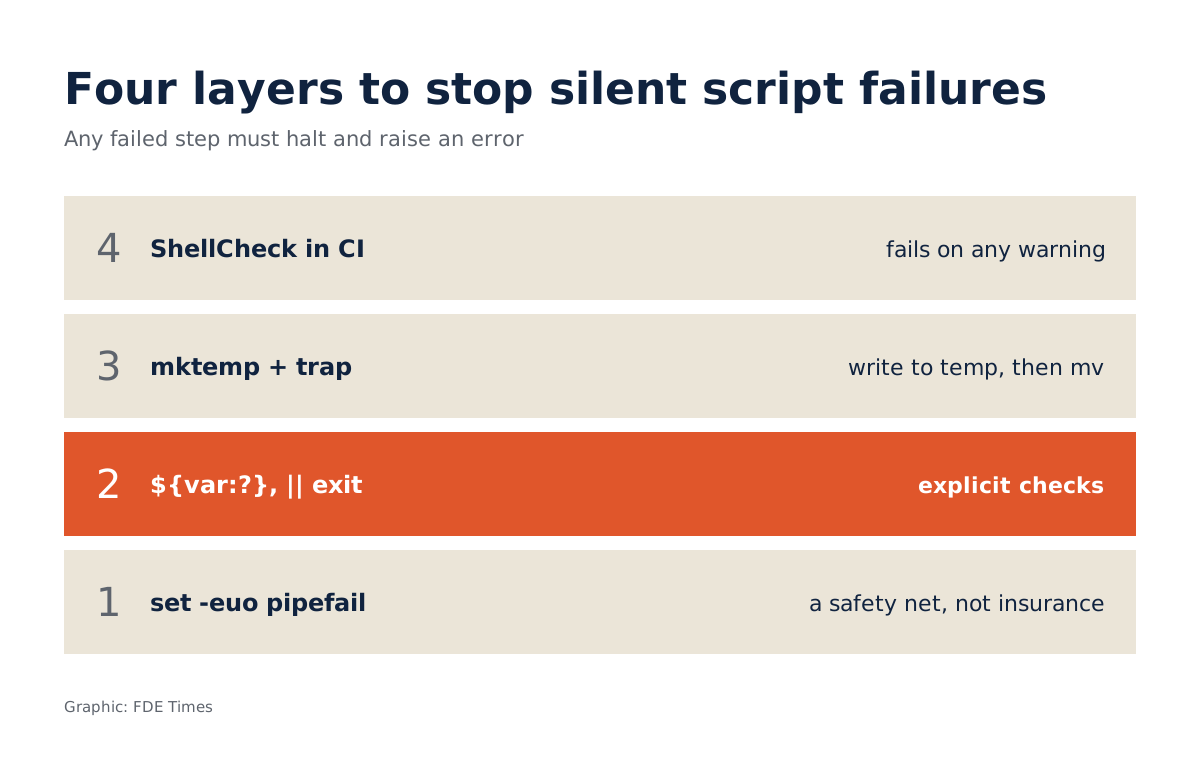
The routine for every script before handoff has four steps, matching the four layers in the figure at the top. Start with set -euo pipefail. Then add explicit checks: ${var:?message} for every configuration variable at the top of the file, and || exit for cd and any command whose failure would corrupt the next step.
The third step is to write to a temporary file and then rename it, with a cleanup trap. Finally, run ShellCheck in the handoff repo’s CI.
Mistakes that let a “safe” script still destroy data
The most common is trusting set -e completely and then wrapping the main logic in a function called from an if, precisely the trap BashFAQ/105 warns about. If you need to branch on a function’s result, check errors inside the function with || return 1.
Another is testing only on your own machine, where every environment variable is already set. Run it with env -i bash backup.sh to simulate the empty environment cron provides. And do not silence ShellCheck warnings just to get the job done instead of reading the wiki and fixing them.
For your career, this detail belongs on a CV or in a portfolio: “handoff scripts with ShellCheck in CI, clear exit codes on failure, no data overwritten on error”.
In an FDE interview, if you get the chance to explain how you keep what you leave behind from breaking after you leave, point to the work itself. A small repo containing both versions of the script above, with a commit fixing each warning, says more than any self-description.
This week’s exercise
Take a script you have handed off, remove a configuration variable, make the first command of a pipeline fail, and run it again. If the log still reports success, your client is trusting a line of text that is not true.
Was this article useful?
Thanks for the feedback!
7 sources
- The Set Builtin (Bash Reference Manual)
- BashFAQ/105 - Why doesn't set -e (or set -o errexit, or trap ERR) do what I expected?
- koalaman/shellcheck: ShellCheck, a static analysis tool for shell scripts
- ShellCheck wiki: SC2086 - Double quote to prevent globbing and word splitting
- ShellCheck wiki: SC2115 - Use "${var:?}" to ensure this never expands to /*
- ShellCheck wiki: SC2164 - Use cd ... || exit in case cd fails
- BashFAQ/062 - How do I create a temporary file in a secure manner?