The free Linux course to take before you SSH into a client's server
More than a million people have enrolled in LFS101, and six of its chapters map to the steps for debugging an agent gone silent on bare Linux.

In brief
- The Linux Foundation's LFS101 is free, with about 60 hours of material and 90 days of access, written for people new to Linux
- The six chapters most worth studying for FDEs: Command Line, Processes, File, Network, Bash scripting, Local Security
- Practise on a VM of your own as you go, then move on to LFS201 if you want to go deeper into system administration
In 2020 the Linux Foundation announced that its free Linux course on edX had passed one million enrolments. A large number of learners does not by itself mean a course teaches well. But it does show that Introduction to Linux (LFS101) is a familiar starting point for a great many engineers before they touch a real server.
For an FDE, the real server is usually the customer’s. Picture yourself SSHing into a VM on a customer’s internal network: no familiar IDE, no DevOps colleague beside you, and a deployment that has to work before this afternoon’s demo. At that point, knowing the command line is no longer a nice-to-have.
Who made the course, and who is it for?
LFS101 is built by Linux Foundation Education. It is a beginner-level, self-paced online course. On edX it is listed as “LinuxFoundationX: Introduction to Linux”. Its stated goal is to give learners enough knowledge to work with Linux, through both the graphical interface and the command line.
The course is written for people who are comfortable with computers but have little or no experience of Linux. That describes many software engineers: strong coders on macOS or Windows who deploy at the push of a button on a cloud platform, then struggle when they have to work out for themselves why a service has died on a bare Linux machine.
According to the official page, the course is free, has about 60 hours of material and gives 90 days of access. The content is revised regularly: by September 2020 it had reached its sixth edition. In October 2024 the Linux Foundation added a Japanese version, LFS101-JP, also free and about 60 hours long.
Which chapters are really worth it for an FDE?
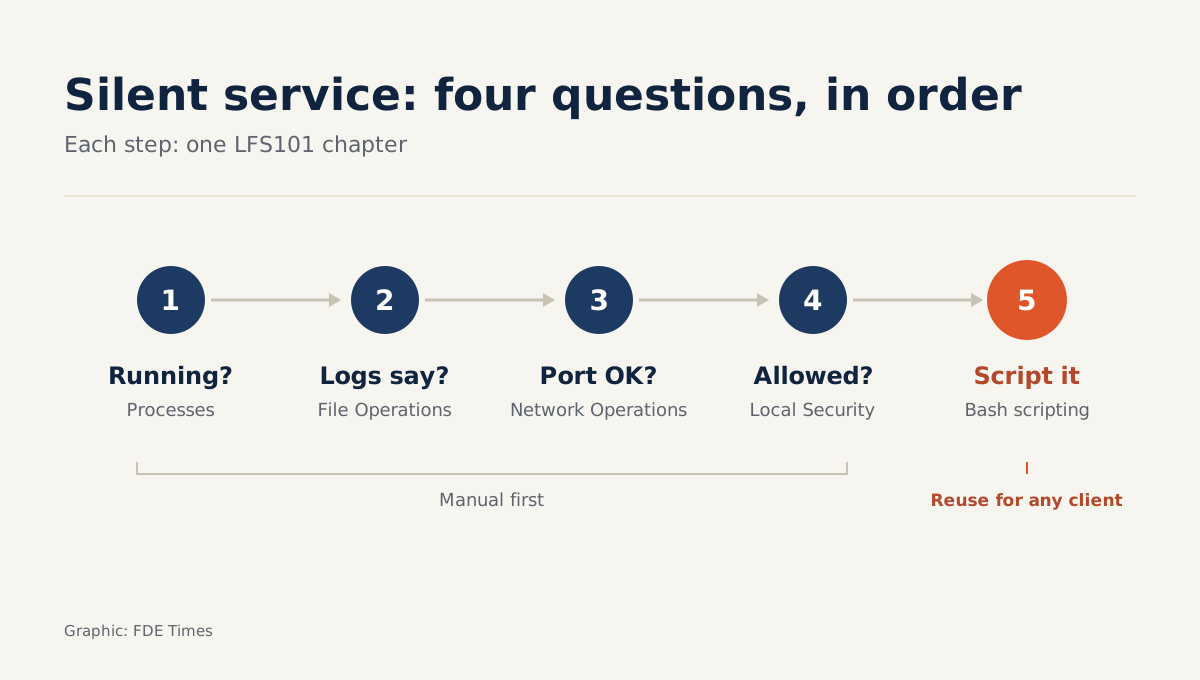
Six chapters in the syllabus map directly onto work at a customer site: Command Line Operations, Processes, File Operations, Network Operations, Bash scripting and Local Security Principles. The easiest way to see when each one applies is to walk through a hypothetical incident, along with the commands you should know by heart.
You have just deployed a document-processing agent to a customer’s server, and the customer reports that the API is not responding. First question: is the process still running? That is the Processes chapter. ps aux | grep <service-name> tells you whether the process is alive, and systemctl status <service-name> shows its state and most recent restart if the service runs under systemd.
Next question: where are the logs, and has the config file been overwritten? That is File Operations. journalctl -u <service-name> -n 50 or tail -n 50 <log-path> gives you the last 50 log lines, and ls -l <config-file> shows when the file was last modified and by which account.
Final question: is the service listening on the right port, and is it being blocked? That is Network Operations. ss -tlnp lists open ports, and curl -v http://localhost:<port> tells you whether the service answers on the machine itself. If curl works locally but calls from outside fail, the fault most likely lies in the network or the firewall rather than the code.
If the customer gives you only a restricted account, Local Security Principles is the chapter to read closely. Run id to see which groups the account belongs to and sudo -l to see which commands you may run with elevated privileges, and only then ask for more access.
Once the fix is in, you will not want to type all those steps by hand on every update. That is when Bash scripting shows its value.
Three habits to build while you study
The course gives you tools. Turning those tools into a process is the part you have to build yourself over the 60 hours. The first habit: do every exercise through a terminal, ideally by SSHing into your own VM, because at a customer site that is almost the only access you will have.
The second habit: treat diagnosis as an ordered sequence of questions, not guesswork. Process, then files, then network, then permissions. After each chapter, write the matching step and a few commands like those above into a checklist of your own. By the end of the course, you will have a ready-made procedure to take with you.
The third habit: anything you have to do by hand a second time, turn into a script. A short Bash script that runs systemctl status, prints the last few log lines and then checks the port with ss is something you can reuse at one customer after another. It also keeps you calm when you are being rushed before a demo.
In what order, and over how long?
There are 60 hours of material and 90 days of access. Spread evenly over 12 weeks, that is about 5 hours a week. That is manageable for a working engineer, as long as you set a fixed schedule from the day you enrol.
Learners tend to make three mistakes. The most common is watching the videos without typing the commands, and forgetting most of it a week later. Next is spending many hours on the desktop and graphical-interface chapters, which are rarely used on a customer’s server. Last is cramming over a single weekend and then leaving it until the 90 days run out.
If you already open a terminal every day, you need not follow the order: skim the GUI and installation sections and go straight to the six chapters above. Either way, set up a Linux VM of your own and retype every command, including those you think you already know.
After LFS101, the next step the Linux Foundation itself suggests is LFS201, Essentials of Linux Systems Administration. That course has been on edX since 2015 and is aimed at people who have completed LFS101. If you have already run production Linux servers, LFS101 will be too basic; start directly with LFS201.
Turning the course into a hiring advantage
In 2020, completing the course cost nothing; a verified certificate was optional and paid. A certificate is nice to have, but proof that you can do the work is more persuasive. Put your diagnostic script on GitHub, with a README that describes an incident you simulated yourself and how you traced its cause.
When you read FDE job descriptions, look for phrases such as deploying in customer environments, on-prem, or proficiency with Linux. When you see them, add a specific line to your CV, for example that you wrote Bash scripts to diagnose services on Linux servers. That line carries more weight than the name of a course.
At a customer site, nobody asks which courses you have taken. All they see is whether it takes you five minutes or five hours to find out why a service is not running.
Was this article useful?
Thanks for the feedback!
5 sources
- Introduction to Linux (LFS101) - Linux Foundation - Education · 2026-05-28
- Free Intro to Linux Course Surpasses One Million Enrollments - Linux Foundation - Education · 2020-09-22
- LinuxFoundationX: Introduction to Linux | edX
- Linux Foundation and edX Offer New Course as Starting Point for In-Demand Linux Careers · 2015-06-03
- Linux Foundation、無料オンラインコース「Linux入門」の提供を開始 · 2024-10-24