W&B Weave: one Python decorator to trace, then turn customer failures into evals
When a customer asks why the agent gave a wrong answer yesterday, this tool gives you a record to open and a test to prove the failure is gone.

In brief
- Weave records the input, output and code of functions marked with @weave.op; supported LLM calls are traced automatically.
- A Dataset can be created from the calls you have traced, and each call to .evaluate() is one run of an Evaluation.
- The real value lies in the set of failures you collect at the customer, not in the decorator itself.
Picture the second week after your ticket-classification agent goes live at a customer. The head of operations sends a screenshot: a billing ticket was routed to the technical team by mistake, and she wants to know why. Without a trace, all you can do is guess.
With W&B Weave, the recording takes very little code: after one initialisation call, a decorator on a Python function saves its input, its output and the function’s code as well. From there you can build the loop every FDE needs: see the failure, keep the failure, then prove the failure is gone.
The official documentation describes Weave as an observability and evaluation platform; its PyPI page puts it more briefly, as a toolkit for tracing and evaluating AI agents. If you are bringing an LLM application into a customer’s environment, this is the kind of tool to have in place before the first meeting about quality, not after it.
When does an FDE need Weave?
Use this test: if a customer asks this afternoon about a call from yesterday and you cannot reopen its input and output, it is time for tracing. Weave fits when the application runs on Python 3.10 or later, the agent is already handling real requests, and the customer’s security team has agreed that this content may be recorded.
For the billing ticket above, the conversation shifts from “it’s probably the prompt” to a specific record, with input, output, latency and token usage, that both sides can read.
A one-session demo on fake data, by contrast, does not need it yet, because there are no real failures to keep. Evaluation becomes worth the investment once you have real failures and are about to change the prompt or model, because at that point you need to know whether the fix has broken anything else.
One line to initialise, one decorator
Start with tracing. weave.init takes a team/project path and creates the project if it does not exist.
import weave
from openai import OpenAI

weave.init("acme/ticket-triage")
client = OpenAI()

@weave.op
def classify_ticket(text: str) -> str:
    response = client.chat.completions.create(
        model=MODEL_NAME,
        messages=[{"role": "user", "content": PROMPT + text}],
    )
    return response.choices[0].message.content
The two capitalised names in the code are yours to fill in, and they must be defined before you run it. MODEL_NAME is the model your project uses, and PROMPT is the classification instruction, for example telling the model to return only a label such as billing or access.
The LLM call inside needs no decorator of its own if it is a supported one, because Weave traces those calls automatically. @weave.op is for your own code: pre-processing, retrieval, post-checks. Your first job at the customer is to put it on exactly the functions you will have to explain when something goes wrong.
From screenshot to test
A trace tells you what happened, but it does not stop it happening again. Weave’s documentation describes the examples in an evaluation set as typically being failure cases to test, much like unit tests. If you carry only one habit from Weave to other projects, make it this one.
A Dataset can be generated from the calls you have traced: select one or more calls in the interface, or use Dataset.from_calls in Python. A call gives you the input and output of the failed run, but you still have to add the correct answer yourself. Ask the head of operations to approve the labels, because someone who knows the business is usually more reliable than an engineer guessing at them.
The code below writes the rows by hand so the structure is easy to see, and it only sketches the main steps; check the function signatures against the documentation for the exact version you have installed. Each row has its own id, so it can be compared across runs later.
import asyncio

rows = [
    {"id": "case-01", "text": "Charged twice for September invoice", "expected": "billing"},
    {"id": "case-02", "text": "Cannot log in after SSO change", "expected": "access"},
]
dataset = weave.Dataset(name="ticket-failures", rows=rows)
weave.publish(dataset)

@weave.op
def exact_match(expected: str, output: str) -> dict:
    return {"correct": expected == output}

evaluation = weave.Evaluation(dataset=dataset, scorers=[exact_match])
asyncio.run(evaluation.evaluate(classify_ticket))
A scorer must have an output parameter and return a dictionary of scores. As for Evaluation, the documentation likens it to a blueprint, and each call to .evaluate() is one run. You keep the blueprint unchanged, change the prompt or model, and measure again.
The headline number can mislead you
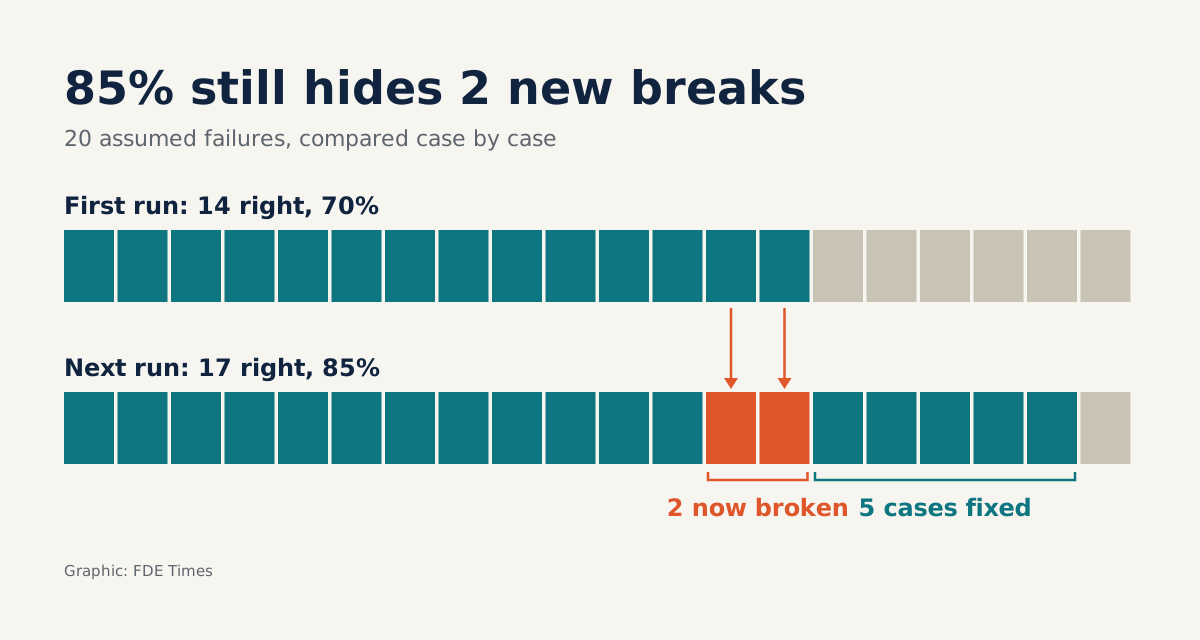
Suppose your evaluation set has 20 real failures, and the first run gets 14 right, or 70%. You fix the prompt and the next run gets 17 right, or 85%. Telling the customer that quality is up 15 percentage points sounds very good.
But read the scores case by case. You may have fixed 5 cases and broken 2 that used to be right: 14 plus 5 minus 2 still comes to 17. If those 2 are the type of ticket the customer cares about most, 85% is not enough to go to production.
So each run needs its own JSON file, with one key per case: the case’s id, paired with the correct value the scorer returned. The data comes from the Python SDK through client.get_calls; the interface can also export selected rows or all of them.
Two things need looking up on the Query and export calls page, checked against the exact version installed: how to filter the calls belonging to one run, and the names of the fields holding the id and the score. If you cannot find them yet, the fallback is to run classify_ticket and exact_match over each row yourself and write the file:
import json

results = {}
for row in rows:
    output = classify_ticket(row["text"])
    results[row["id"]] = exact_match(row["expected"], output)["correct"]

with open("run_1.json", "w") as f:  # run_2.json for the second run
    json.dump(results, f)
However you get the data, the two files must share the same format for the diff below to work.
import json

# run_1.json, run_2.json: {"case-01": true, "case-02": true, "case-03": false}
run_1 = json.load(open("run_1.json"))
run_2 = json.load(open("run_2.json"))
assert run_1.keys() == run_2.keys()  # both runs must cover the same cases

fixed = [c for c in run_1 if not run_1[c] and run_2[c]]
regressions = [c for c in run_1 if run_1[c] and not run_2[c]]
The regressions list is what to bring to the customer meeting, before you report the headline number.
The decorator does not do the hard part
The first limit lies in how it works: @weave.op records only the functions you mark, and automatic tracing applies only to supported LLM calls. If the customer uses an internal LLM gateway, test early whether it shows up in the trace rather than assuming it will.
The second limit is the bigger issue. A trace records input and output, which means the content of customer tickets, possibly including personal data, will sit inside it. Before turning it on for real data, work with the customer’s security team to establish where the data is stored and who can see it.
On vendor and version, two details matter. CoreWeave announced that it had completed its acquisition of Weights & Biases on 5 May 2025, and the Weave documentation now lives at docs.coreweave.com, so state this relationship clearly in the paperwork you send to the customer.
The weave package on PyPI requires Python 3.10 or later; pin the exact version you have tested, for example weave==0.54.0.
Finally, Weave measures only what your scorer measures. Exact matching suits a classification problem, but with free text, whether you use an LLM judge or a custom scorer, you still have to define what good means. That has to be agreed with the customer.
What to learn first, and what to put on your CV
Learn in the order of the loop: tracing first, then Dataset, then Evaluation with a simple scorer. Do not rush to write complex scorers before you have 20 real failures in hand; a good dataset helps more than a sophisticated scoring method on invented data.
When reading FDE or applied AI job postings, look for the keywords evals and observability, then prepare a story with numbers. A strong CV line says how many real failures you built the evaluation set from, what the scores were before and after, and which regression you stopped before it reached production. The tool’s name is a minor detail.
Exercise: build your own regression list
Take 20 failures in your dataset, do one run and save the per-case scores to run_1.json. Change one detail in the prompt, do a second run, save it to run_2.json, then diff the two files with the Python above.
Count the cases that went from wrong to right and those that went from right to wrong. To check your work, take the first run’s score, add the cases fixed and subtract the cases broken: the result must equal the second run’s score, just like 14 plus 5 minus 2 making 17 above.
Then write two sentences of reporting for the customer. The first gives the scores before and after; the second names the cases that just broke and what you will do about them.
The next time a customer sends a screenshot of a wrong answer, do not just fix the prompt. Add a row to the dataset, so the next measurement tells you whether that failure has come back.
Was this article useful?
Thanks for the feedback!