Unsloth: fine-tune a small model on one GPU, then run it inside the client's infrastructure
When a client won't let data leave its infrastructure, you need a model small enough to train on site and compact enough to run on the client's own machines.

In brief
- Unsloth's documentation says you can fine-tune on Colab, Kaggle or a personal machine with just 3GB of VRAM; QLoRA quantises the base model to 4-bit, saving about 75% of memory.
- A trained model can be exported to GGUF to run with Ollama or llama.cpp, or served with vLLM when many users need it.
- Before handing over to a client, check the chat template and the licence: the core is Apache 2.0, while Studio and the CLI are AGPLv3.
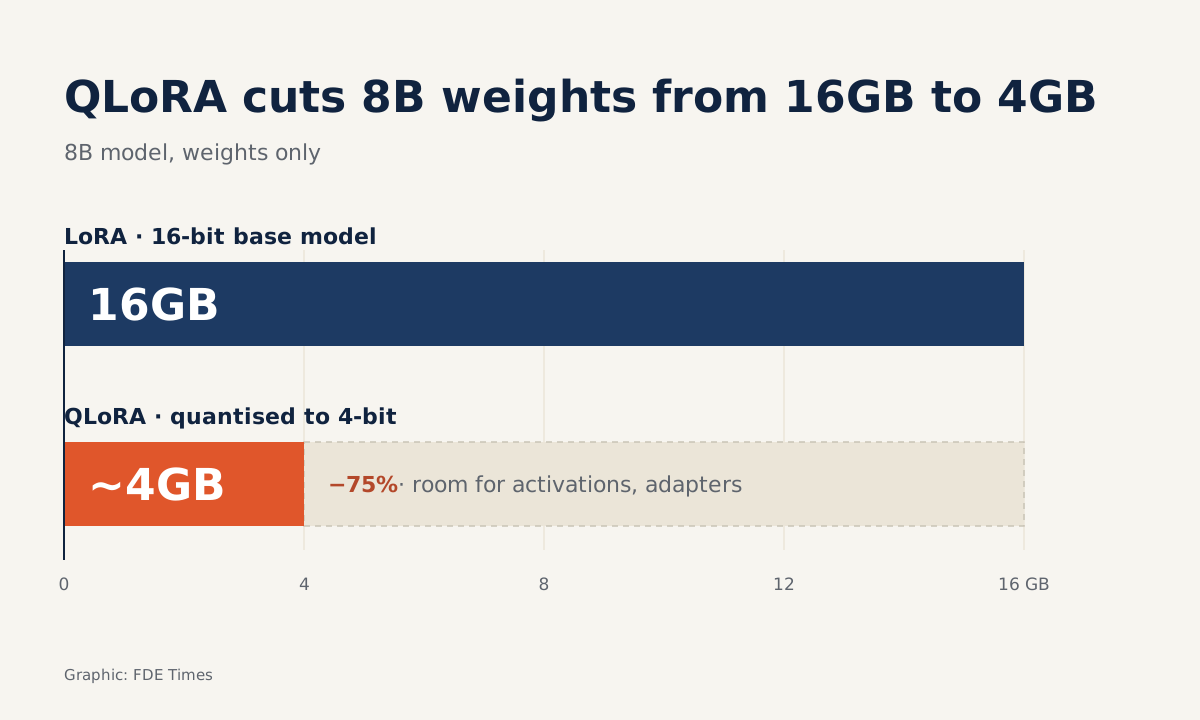
An 8B model with 16-bit weights takes up about 16GB, before counting any memory needed for training. If a client gives you only a mid-range card, that sum alone can stop a project in its first meeting. Unsloth targets exactly that bottleneck.
Unsloth’s official repository claims the tool trains twice as fast and uses 70% less VRAM, across LLMs, diffusion, TTS and even embedding models. NVIDIA, in a post in its RTX AI Garage blog series, calls Unsloth one of the world’s most widely used open-source frameworks for fine-tuning LLMs.
For a forward deployed engineer, the appeal is not speed. What matters more is that you can train inside the client’s infrastructure and export the model in a format their machines can run, without the data ever leaving.
When should you use it?
Picture a logistics company that wants to classify support tickets automatically. It has thousands of labelled tickets, but internal policy forbids sending that data to external APIs. It has a server with a single T4 card and wants the model to run on that machine.
This is the kind of case Unsloth suits. Prompt engineering on a large hosted model is ruled out because the data cannot leave. A small model without fine-tuning usually fails to understand how the client names its incident types. You need a small model that has learned the client’s vocabulary and runs on the hardware already there.
The first step is checking the hardware. Unsloth’s documentation requires a GPU with CUDA capability of at least 7.0: lines such as V100, T4, Titan V, RTX 20 and 50, A100, H100 and L40. The client’s T4 is on the list. If the client offers an older card, you need to know before promising anything.
The memory sum, by hand
The documentation distinguishes two approaches. LoRA keeps the base model in 16-bit, unquantised. QLoRA quantises the base model to 4-bit and saves about 75% of memory.
Apply that to the example: 8 billion parameters at 16-bit, 2 bytes each, comes to about 16GB for the weights alone. Cut 75% and you are left with about 4GB, leaving the rest of the card free for activations and the adapters being trained.
This rough calculation is enough to tell the client in the first meeting whether their hardware will work.
The documentation also advises beginners to start with a small instruct model such as Llama 3.1 (8B) and experiment from there. The advice suits FDEs for a practical reason: small models train quickly, so you can run several trial rounds in the first week rather than waiting days.
If you only need to test an idea, the documentation says you can fine-tune for free on Colab or Kaggle, or on a personal machine with just 3GB of VRAM.
The export format decides where the model lives
Unsloth’s repository says models can be exported to GGUF, NVFP4 and FP8. Which one is right depends on how the client will use the model.
The documentation splits this into two clear paths. If the model runs on a single device, you use llama.cpp to convert it to GGUF and run it in Ollama, llama.cpp or LM Studio. If many users call the model at once, as in an enterprise system, the documentation points you to vLLM.
In the logistics example, if only one support team uses the model on one server, GGUF running on Ollama is enough and easy to hand over. If the whole company later calls it through an API, you need to rethink with vLLM. Ask the client this question before you start training, because it determines both the export format and how you measure performance.
Two handover traps
The first trap is the chat template. Unsloth’s GGUF export guide stresses that inference must use the same chat template used in training. If they differ, results on Ollama or vLLM get worse.
This is the kind of bug that makes a model work beautifully on your notebook but answer nonsense on the client’s server, and it can cost you an afternoon to track down.
The second trap is the licence. Unsloth’s core is Apache 2.0, but files under studio/* and unsloth_cli/* are AGPLv3. When you package anything for a client, know exactly which parts you are using.
Talking to the client’s legal team before putting Studio or the CLI into a product is far cheaper than having to rip it out later.
Don’t trust the numbers; measure them yourself
The speed figures do not agree. The repository says twice as fast, while NVIDIA says Unsloth speeds up the Hugging Face transformers library by 2.5 times on NVIDIA GPUs. Both were measured under their own conditions, not on your client’s data and card.
So before putting any figure on a slide, run it once on the client’s actual hardware. Record VRAM, training time and quality on a fixed test set.
That is also what is most worth putting on a CV: a line such as “fine-tuned an 8B model with QLoRA on a single T4, exported to GGUF running on Ollama, classification accuracy up from X to Y” shows a hiring manager you have taken a project all the way from data to deployment.
Learn in this order: LoRA and QLoRA first, then chat templates, then export formats. The last part is where your model meets the client’s real infrastructure, so don’t let it be the part you rush.
Was this article useful?
Thanks for the feedback!