Great Expectations: turning a client's data assumptions into checks that run every night
Bad data at a client rarely crashes the pipeline. It flows quietly into the dashboard, and the client usually spots it before you do. GX Core is built to catch it at that point.

In brief
- Each Expectation is a verifiable assertion about data, like a unit test written for data.
- A Checkpoint is the main way to run checks in production. When it finishes, it runs Actions such as sending a Slack message or updating Data Docs.
- The Airflow provider has an operator that runs a Checkpoint; it needs GX 1.7.0+ and Python 3.10+. The nightly schedule is set in the Dag.
Picture this. A week after go-live, the delivery company you are working for calls because yesterday’s revenue on the dashboard has dropped by half. The pipeline is still green and no job has reported an error. Only when you trace it back do you find that the source system has started sending orders with an empty amount column.
FDEs run into this kind of incident all the time. Client data always comes with assumptions nobody has written down, and when an assumption breaks, your code keeps running as if nothing had happened. Great Expectations helps you write those assumptions down as automated checks, so that you find the problem before the client does.
What is GX Core, really?
Great Expectations describes GX Core as the engine at the heart of the GX data quality platform. GX Core is open source under the Apache 2.0 licence, published on PyPI, and new releases still ship regularly. The GitHub repo describes Expectations as unit tests for data, which is the easiest way to remember the idea.
The open licence means you can try GX on your own machine with an extract of the data from the first week. Before putting it into the client’s systems, though, ask about their internal rules on third-party libraries.
The concepts to know, in order
The GX documentation defines an Expectation as a verifiable assertion about data. “The order_id column is never null” and “the amount is always greater than or equal to 0” are both Expectations. You group several Expectations into a suite, usually one suite per client table.
According to the GX documentation, a Checkpoint is the primary way to validate data when GX runs in production. A Checkpoint runs Validation Definitions and passes the results to a list of Actions, and that list runs once for each Validation Definition. So alerts always arrive after the checks have finished.
A worked example with an orders table
Back to the delivery company. Every night they load an orders table into the data warehouse. In the discovery session, the client’s data engineer said four things: order IDs are unique, every order has an amount, the amount is never negative, and the status only takes a few fixed values.
Those four spoken statements become four Expectations. The snippet below sketches only the Checkpoint part, for GX 1.x, following the “Create a Checkpoint with Actions” page in the GX documentation. Creating the data source, the Expectation suite and the Validation Definitions is left as comments; follow the documentation for the exact version the client has installed.
The Slack channel is a placeholder for illustration, and the API has changed between 1.x releases, so check this snippet against that page before running it:
import great_expectations as gx
from great_expectations.checkpoint import SlackNotificationAction, UpdateDataDocsAction

# Assumes you already have:
#   context: the project's GX environment (from the environment setup step)
#   validation_definitions: Validation Definitions for the orders table,
#   using the four Expectations taken from the discovery session:
#     1. order_id is unique
#     2. amount is not null
#     3. amount is not negative
#     4. status belongs to a fixed set of values

# Actions run after validation finishes: alert Slack on failure, update Data Docs
actions = [
    SlackNotificationAction(
        name="slack_on_failure",
        slack_token="${SLACK_TOKEN}",
        slack_channel="#data-alerts",
        notify_on="failure",
    ),
    UpdateDataDocsAction(name="update_docs"),
]

checkpoint = gx.Checkpoint(
    name="orders_checkpoint",
    validation_definitions=validation_definitions,
    actions=actions,
)
context.checkpoints.add(checkpoint)

# The nightly run: results are passed to the Actions
results = checkpoint.run(batch_parameters={"dataframe": orders_df})
The second Expectation, that the amount must not be null, is the rule that catches the error from the start of this article. With notify_on=“failure”, your team gets a Slack alert on the very night the amount column goes empty. The code does not read any attribute of results. If you need to handle the results in code, read the documentation on result format first.
The most valuable part here is not any line of code. Each Expectation is one of the client’s assumptions recorded in a form that runs. The next time the client asks why the numbers are off, you have validation results that show which assumption broke.
Running it in Airflow
Many clients already orchestrate their pipelines with Airflow. Astronomer has a guide to using the GX provider to run checks inside a Dag. The provider has an operator that runs a Checkpoint, and that operator can trigger Actions such as sending Slack messages or email. Provider version 1.0.0 replaced the old GreatExpectationsOperator.
The nightly schedule is the Dag’s job, not GX’s. Before promising anything to the client, check their environment: the provider needs GX 1.7.0+ and Python 3.10+. If the client is still on an older Python, upgrading may take longer than writing the checks.
Which rules should not alert yet?
GX only checks what you write. It has no way of knowing that, at the client’s company, a valid order must have a warehouse code. The hardest part is still customer discovery: asking enough questions to learn what “correct” data means to them.
The opposite mistake is just as damaging: writing rules that are too strict. Suppose the status rule goes red every time the source system adds a new status, even though nothing is wrong with the data. After a few weeks, the client’s team gets used to ignoring alerts. By the night the amount column really is empty, nobody is reading them any more.
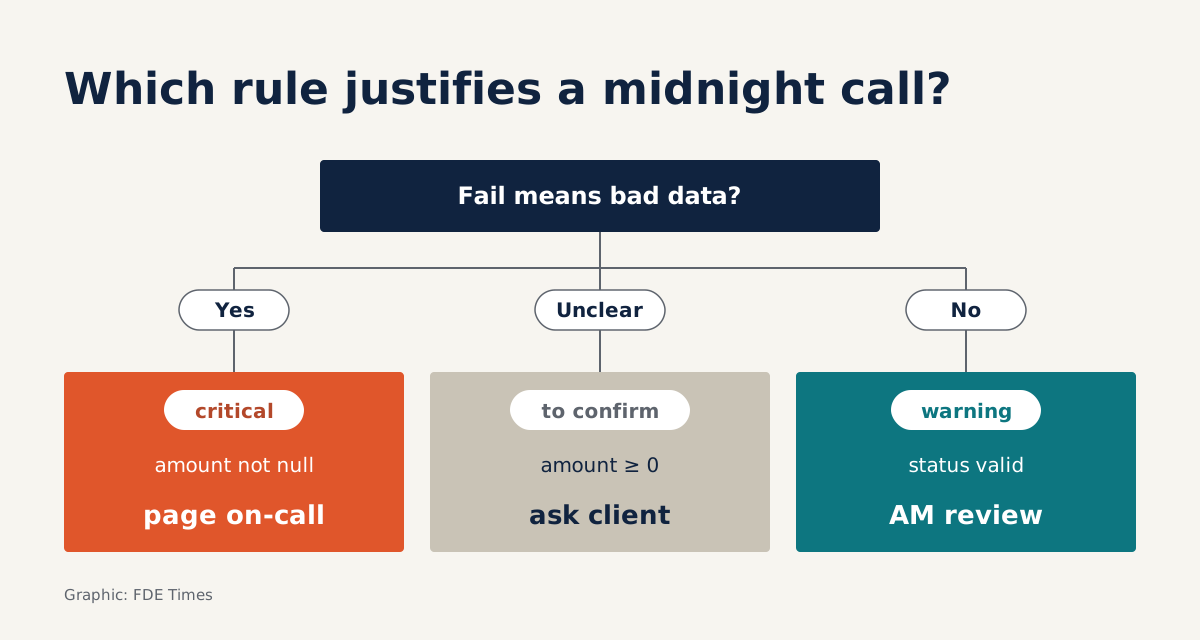
GX has two built-in tools for this. Every Expectation has a severity of critical, warning or info, with critical as the default.
Test yourself: of the four rules above, which would you not put on nightly alerting yet? One reasonable answer is to keep critical for unique order IDs and non-null amounts, because the client confirmed those as hard rules.
The status rule should drop to warning until the client settles the list of values. For the non-negative amount rule, ask again whether refunds are recorded as negative amounts before you let it wake anyone up.
What to learn first, and what to put on your CV
Learn the concepts of Expectation, Validation Definition, Checkpoint and Action first, and leave Airflow for later. When job hunting, look out for FDE job descriptions that mention data quality or data validation.
On your CV, don’t just write “used Great Expectations”. Say which dataset you wrote checks for, how you set severity, and what error those checks caught before it reached the client.
A good Expectation suite is also the most honest documentation of the client’s data that you leave behind when you move off the project.
Was this article useful?
Thanks for the feedback!
8 sources
- GX Core: Open Source Data Quality Platform | Great Expectations
- GitHub - great-expectations/great_expectations
- great-expectations · PyPI
- GX Core overview | Great Expectations
- Create a Checkpoint with Actions | Great Expectations
- Run a Checkpoint | Great Expectations
- Create an Expectation | Great Expectations
- Orchestrate Great Expectations with Airflow