Grafana for FDEs: one dashboard for every customer site, alerts only when users are hurt
Once you have deployed to twelve customer sites, the question is no longer whether you have monitoring. It is whether anyone can still keep track of 48 dashboards copied from one original.
In brief
- One dashboard with a site variable replaces dozens of copies and keeps dashboard sprawl in check
- RED (Rate, Errors, Duration) shows what users are experiencing, while USE examines CPU, memory and network
- Alert on symptoms, label alerts by site and route them with notification policies so people are paged only when it matters
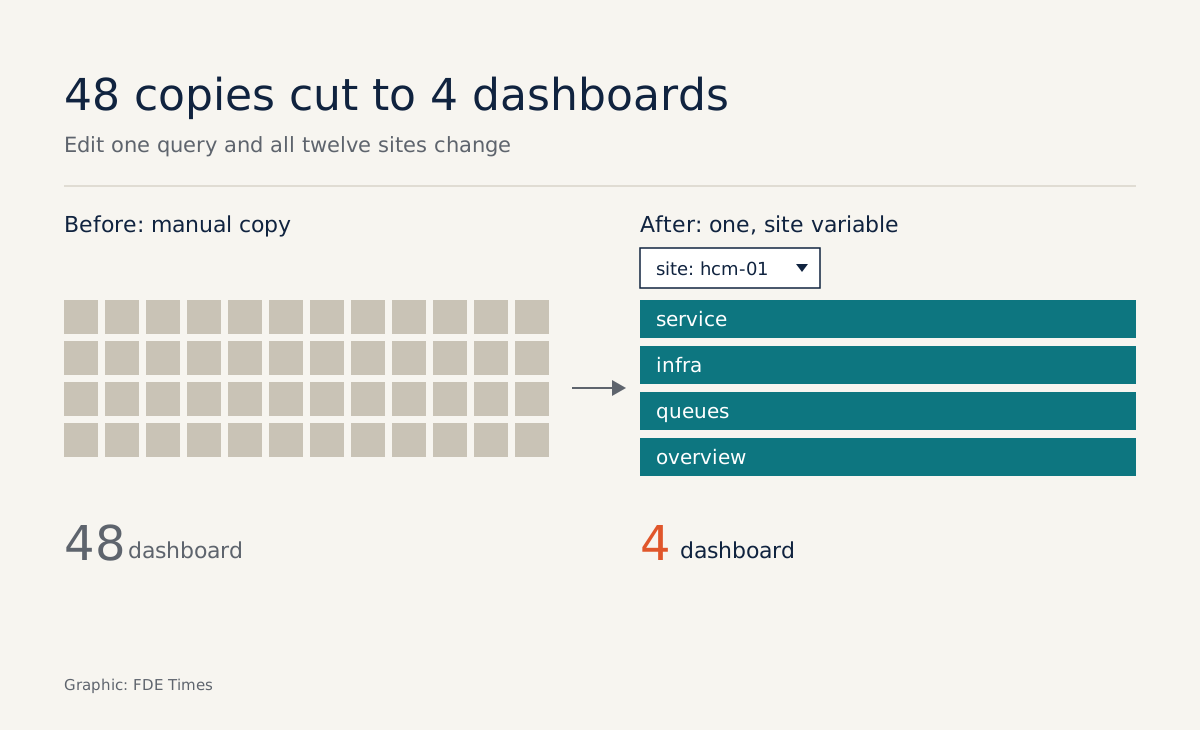
Imagine you have just rolled your system out to twelve sites for the same customer. Each site needs four dashboards: service, infrastructure, queues and overview. Copy them by hand and you have 48 dashboards. Every time you change a query, you will almost certainly miss a few of the copies.
This is when FDEs turn to Grafana. The appeal is not the charts. Grafana gives a multi-site deployment the two things it needs: a single view of health across every site, and an alerting system that tells the right person at the right time.
One dashboard, twelve sites
Grafana’s documentation is explicit about the approach: build one dashboard, then use variables to change what you are looking at. A variable is defined once and reused across the dashboard, so a single site selector at the top is enough to switch every panel.
Grafana’s own best-practice guide recommends templates and variables to reuse dashboards and keep them consistent. The same guide warns about dashboard sprawl, meaning an uncontrolled growth in the number of dashboards.
For an FDE, sprawl is more than clutter. When the customer asks why site 7 is slow, you need to be sure the panel for site 7 measures exactly the same thing as the panel for site 1.
Take a minimal example. Suppose the service exports a Prometheus metric called http_requests_total with the labels site and status. The site variable takes its list of values from that label:
label_values(http_requests_total, site)The error-rate panel then uses the variable instead of a hard-coded site name:
sum(rate(http_requests_total{site="$site", status=~"5.."}[5m]))
/
sum(rate(http_requests_total{site="$site"}[5m]))
In this example, 48 copies shrink to 4 dashboards, each with a site variable. Fix a query once and all twelve sites are fixed. The first job at the customer is therefore to agree on the site label name in the metrics from the day of deployment, because variables only work when the data is labelled consistently.
Which panels come first?
Grafana suggests RED dashboards for the service layer: Rate, Errors, Duration. The method was introduced by Tom Wilkie of Grafana Labs in a 2018 post, with Rate being requests per second. Grafana’s documentation calls a well-designed RED dashboard a proxy for user experience.
But a customer site also has real servers underneath. The USE method, according to Grafana, is best suited to hardware resources such as CPU, memory and network devices. A good site dashboard therefore usually has two layers: RED at the top to show what users are experiencing, USE below to find out why.
If you want a checklist, Google’s SRE book lists four golden signals: latency, traffic, errors and saturation. The first three map to RED, the last is close to USE. The first row of panels for each site should answer all four.
Alerting: page on symptoms, not causes
In Grafana Alerting, an alert rule is a set of conditions that decides when an alert fires. The hard part is not the syntax but choosing the conditions. The Prometheus guidance recommends alerting on symptoms rather than causes to reduce noise.
Take site 7. A rule of “CPU above 90%” is a cause-based alert: CPU can be high while users are fine. A rule of “the site’s error rate stays above a threshold for several minutes” is a symptom: it fires only when users are actually affected.
When you write this as an alert rule query, you do not use the dashboard variable. You aggregate by label, so one rule watches every site at once. The 5% threshold below is only an example; agree the number with the customer:
sum by (customer, site) (rate(http_requests_total{status=~"5.."}[5m]))
/
sum by (customer, site) (rate(http_requests_total[5m]))
> 0.05
Keep CPU on the dashboard for diagnosis, but do not let it wake anyone at midnight. Google’s SRE book observes that paging a human is an expensive use of their time. For an FDE covering several customers, one meaningless alert a night is the fastest way to get the whole team ignoring the real ones.
Routing by customer label
Once an alert is correct, it still has to reach the right person. Grafana describes notification policies as the backbone of a complete alerting system: policies route and group alerts based on their labels.
The rule above already carries the customer and site labels, so you can send customer A’s alerts to the channel of the team responsible for customer A. When a whole customer hits a shared incident, twelve simultaneous alerts can be grouped into one notification.
The order of work at the customer is therefore clear: agree on labels, build the dashboard with variables, write a few symptom rules, and only then set up routing policies. Reverse the order and you will be rewriting rules whenever the labels change.
Common mistakes at customer sites
The most common mistake is copying a dashboard for each site “to save time”, and a few months later nobody knows which copy is correct. That is exactly the sprawl Grafana warns about, and the cure is to go back to a single dashboard with variables.
The second mistake is careless labelling. A site called hcm-01 in one place and HCM1 in another becomes two sites in the selector, and a rule aggregated by site splits in two as well. The third is letting every alert page on-call, including CPU or disk warnings, instead of paging only when a symptom appears.
Remember the tool’s limit too: Grafana can only display and alert on what the system already measures. If the service does not yet export metrics for rate, errors and latency, no dashboard will save you.
What to learn first, what to put on your CV
If you are preparing for an FDE role, learn in this order: RED and USE first, then dashboard variables, then alert rules and notification policies. In interviews, ask directly who is on call for customer sites and how alerts are routed; the answer tells you how much this skill weighs in the job.
On your CV, do not write “knows Grafana”. Write how many dashboards you consolidated into one with variables, or how you cut the number of on-call pages by switching to symptom-based alerts.
Exercise: one site split in two
Imagine the site selector shows both hcm-01 and HCM1, and the error-rate rule fires two separate alerts for the same place. The first step is to run count by (site) (http_requests_total) to see every label value that exists.
Step two: find where the label is set, usually the configuration of the exporter or the metrics collection agent at that site, and change it to the single name in the agreed convention. Fixing it at the source beats patching each query, because every dashboard and rule reads the same label.
Step three: wait for the old data to age out of the query’s time range, reopen the selector and check that only hcm-01 remains, then fire a test alert to make sure the notification policy still delivers it to the right channel. Do this once and you will not leave site labels unmanaged on your next deployment.
Was this article useful?
Thanks for the feedback!
8 sources
- Grafana Alerting | Grafana documentation
- Variables | Grafana documentation
- Grafana dashboard best practices | Grafana documentation
- Alert rules | Grafana documentation
- Notifications | Grafana documentation
- The RED Method: How to Instrument Your Services | Grafana Labs · 2018-08-03
- Monitoring Distributed Systems (Google SRE book)
- Alerting | Prometheus