Argo CD for FDEs: one manifest in Git, many customer Kubernetes clusters
When a customer runs four clusters and a dozen people type kubectl, a faster deploy script won't fix it. What you need is one place that shows which cluster has drifted from the agreed version.

In brief
- Argo CD treats Git as the source of truth. A controller continuously compares the live state with Git and marks the application OutOfSync when they differ.
- Each cluster is registered with a labelled Secret. An ApplicationSet using the cluster generator creates an Application for every cluster automatically, including newly added ones.
- Default auto-sync is cautious: no prune, no self-heal. Whether to turn each on is a decision to settle with the customer.
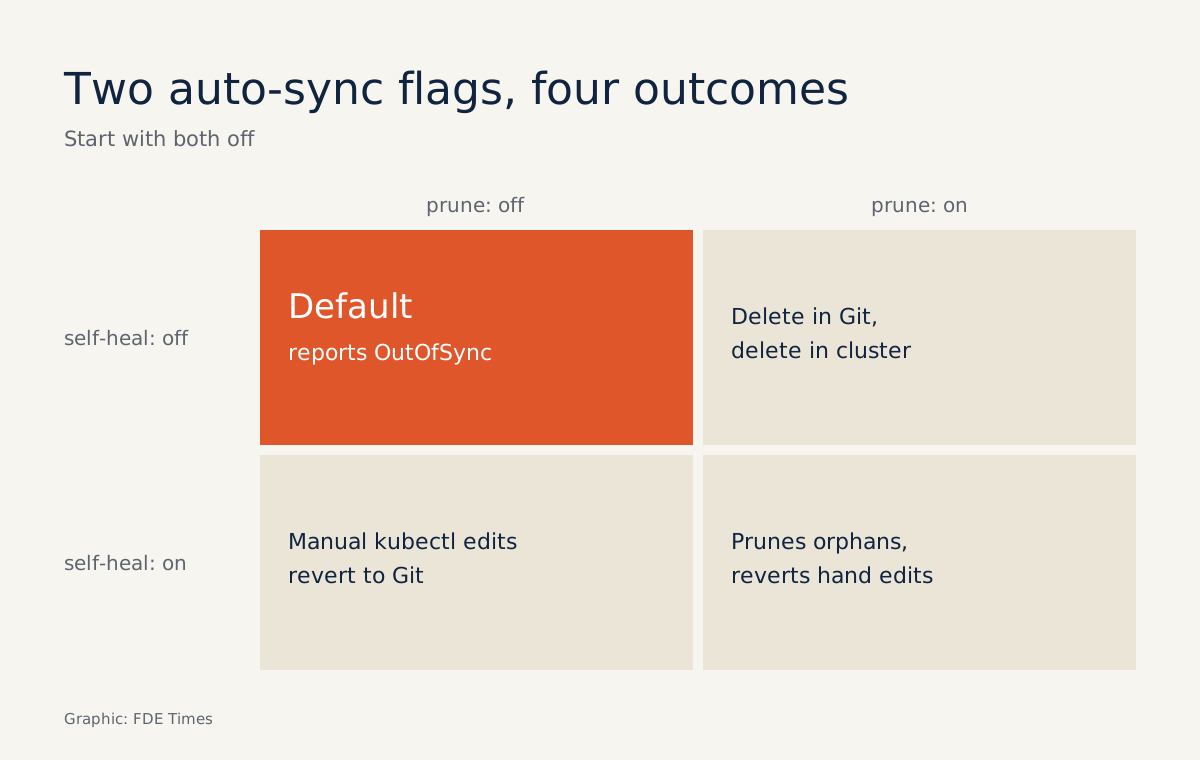
Enable auto-sync in Argo CD, remove a resource from Git, and that resource stays on the customer’s cluster unless you have deliberately enabled prune. Someone editing production by hand with kubectl will not trigger auto-sync either, unless you have enabled self-heal.
Those two defaults reveal how Argo CD is designed: it reports drift first, and fixes it only when you allow it to.
For an FDE, that is exactly what you want. You deploy into infrastructure you don’t own, usually spread across several clusters, which plenty of other people also touch. So you need to understand what the tool does, and what it doesn’t, before switching on any automation.
Git is the truth, the cluster is a copy
The official documentation describes Argo CD as a declarative, GitOps continuous delivery tool for Kubernetes. A Git repository holds the desired state of the application. At its core is the application controller: it continuously compares the live state with the target state in Git, marks the application OutOfSync when they differ, and can correct the drift if you configure it to.
Alongside the controller sits the API server, a gRPC/REST server that serves the Web UI, the CLI and CI/CD systems. It also manages repository and cluster credentials.
When should an FDE use it?
Picture a customer with four clusters: dev, staging and two production clusters in two regions. You deploy the same inference service to all four. With scripts and kubectl, three weeks later nobody can say with confidence which cluster is running which version.
The signals that call for Argo CD are clear: two or more clusters, several people with write access, and a customer who wants to know who changed what. When every change goes through Git, the commit history becomes the change log. The OutOfSync view then shows where reality has strayed from that log.
If the customer’s security team asks about maturity, the short answer is that Argo joined the CNCF on 26 March 2020 and reached Graduated status on 6 December 2022.
A minimal example: adding a fifth cluster without touching the manifest
Step one is to register clusters declaratively. Each cluster is a Kubernetes Secret, and the documentation requires that Secret to carry the label argocd.argoproj.io/secret-type: cluster. A minimal sketch looks like this:
apiVersion: v1
kind: Secret
metadata:
  name: prod-eu
  namespace: argocd
  labels:
    argocd.argoproj.io/secret-type: cluster
stringData:
  name: prod-eu
  server: https://<cluster-api-url>
  config: |
    { "<credentials>": "..." }
Cluster credentials are stored in a Secret, just like repository credentials. So do not commit this file to Git in plaintext. Encrypt it before committing, or keep the credentials out of the repository and load them into the Argo CD cluster only through a security process the customer has approved.
Step two is to write an ApplicationSet. This feature lets one manifest target many clusters. The cluster generator derives parameters from the clusters declared in Argo CD, so four Secrets produce four Applications:
apiVersion: argoproj.io/v1alpha1
kind: ApplicationSet
metadata:
  name: inference
  namespace: argocd
spec:
  generators:
    - clusters: {}
  template:
    metadata:
      name: 'inference-{{name}}'
    spec:
      project: default
      source:
        repoURL: https://git.example.com/customer/deploy.git
        targetRevision: main
        path: inference
      destination:
        server: '{{server}}'
        namespace: inference
      syncPolicy:
        automated: {}
The line automated: {} enables auto-sync with the two cautious defaults described at the start: no prune, no self-heal. Now the customer opens a fifth cluster. You add one labelled Secret, leave the ApplicationSet untouched, and the new cluster picks up the deployment on its own.
That is why the documentation recommends ApplicationSet for cluster bootstrapping. The alternative is app-of-apps, but the documentation states plainly that it is an admin-only tool. If you don’t hold admin rights on the customer’s Argo CD, the choice has largely been made for you.
Two defaults to settle with the customer
Back to the production cluster. Suppose that at 2am an on-call engineer uses kubectl to raise replicas from 3 to 6 to absorb load. The controller sees the cluster has drifted from Git and reports OutOfSync, but with self-heal off, a change on the cluster does not trigger auto-sync, so the 6 replicas stay.
The story doesn’t end there. Git still says 3 replicas, so, following GitOps logic, the next sync from Git, say when someone merges an unrelated commit or clicks Sync, reapplies the target state and returns the cluster to 3 replicas.
That can happen while load is still high. With self-heal on, the cluster would be pulled back to 3 straight away, and the 6 replicas would barely last.
So the right fix at 2am is a commit that changes the replica count in Git, not a kubectl command. Prune carries a similar trade-off. With prune on, a ConfigMap you delete from Git disappears from the cluster; with it off, the ConfigMap lingers as configuration debris.
These two flags are not yours to decide. Start with both off, watch the OutOfSync list for about a week, then bring that data to a meeting with the platform team. Be blunt about one more point: Argo CD manages credentials for every cluster it deploys to, so the cluster running Argo CD must be protected as the most sensitive asset in the system.
What are the common mistakes?
The most common is believing that deleting a file from Git removes the resource from the cluster. With default auto-sync, it is still there. Before telling the customer something has been “removed”, check the real cluster, or enable prune deliberately.
The second is assuming Argo CD will revert manual changes on its own. Without self-heal, it only reports OutOfSync. If nobody watches that view, the drift can sit there for weeks, until an unexpected sync wipes it out.
The third is committing a cluster Secret with plaintext credentials to be “fully GitOps”. The last is choosing app-of-apps without admin rights, then getting stuck mid-engagement waiting for permissions.
In what order should you learn it?
Start with one Application on one cluster, so you see the comparison loop and the OutOfSync state for yourself. Next come the auto-sync flags, then registering clusters with Secrets, and finally ApplicationSet with the cluster generator. Each step adds exactly one new concept.
When reading FDE job descriptions, look for the terms GitOps, Argo CD and multi-cluster. On your CV, don’t just write “used Argo CD”. Use your real numbers: how many clusters, and how adding a new one went from many manual steps to a single Secret.
On a customer site, people don’t remember how fast you deployed. They remember that you could answer “what is running in production?” without SSHing into anything.
Was this article useful?
Thanks for the feedback!