Inductive Automation's Ignition: a SCADA platform you can run on a laptop, two hours at a time
If your manufacturing customer runs Ignition, you can install the same software on your laptop before the first meeting. You just have to press reset every two hours.

In brief
- Ignition is built on SQL, Python, OPC UA and MQTT, so software engineers will find much of it familiar.
- The trial is fully featured. Its only limit is that the Gateway stops after two hours, and pressing Reset Trial keeps it running.
- Ignition is licensed per server, with unlimited tags and users. In discovery, ask the customer how many servers they run and which modules they have bought.
You don’t have to wait for access to the control room to understand a plant before bringing AI into it. Inductive Automation lets anyone download Ignition, server software the company calls an “unlimited” platform for enterprise integration and industrial applications.
The trial is fully featured. According to the company, its only limit is that the Gateway stops after two hours.
Ignition is not new. Steve Hechtman founded Inductive Automation in 2003 in Folsom, California, and Ignition launched in January 2010, replacing two older products, FactorySQL and FactoryPMI. Even so, don’t guess. Ask the customer early which SCADA system the plant runs.
If the answer is Ignition, you have an advantage FDEs rarely get. Most industrial systems sit behind the factory gate, but this one you can run on your laptop tonight. The sooner you get comfortable with it, the less of your first days on site go on learning the vocabulary.
Why software engineers find Ignition approachable
The company describes Ignition as built on open technologies such as SQL, Python, OPC UA and MQTT. You already use the first two every day. The other two are device-side connectivity protocols, and that is exactly where an AI project has to get its data.
According to the official documentation, the Vision module handles screens and HMIs on the plant floor, connecting to equipment over OPC.
Vision is only one of many modules, because Ignition is designed so that you get the features of the modules you install. When reading a customer’s architecture, don’t ask “what can Ignition do?” Ask “which modules does this plant have installed?”
Which way does the data travel to your model?
Imagine a customer wants to detect anomalies in the motors on a packaging line.
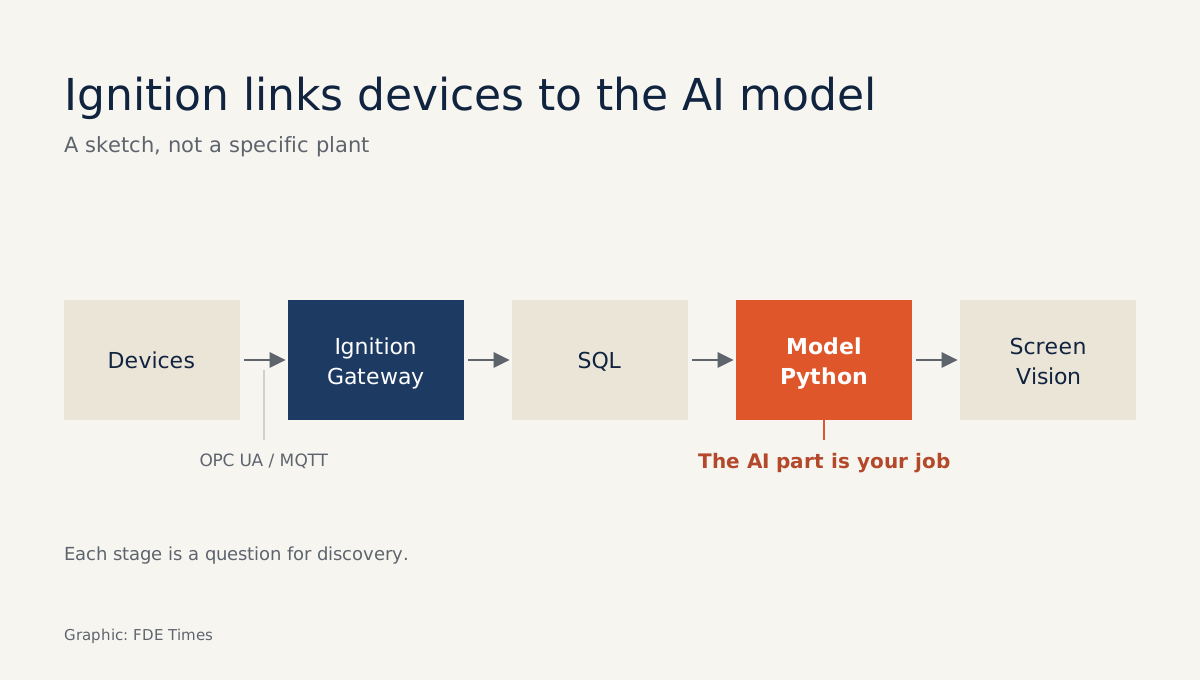
What follows is a planning sketch, not a description of any real plant’s configuration. Signals travel from the equipment, through OPC UA or MQTT, to the Ignition Gateway. The data then needs to land in a SQL database for your Python model to read, and the results go back to a Vision screen for operators to see.
The sketch is useful because each stage becomes a discovery question. Which protocol does the equipment speak? Which Gateway receives this line’s data? Is the data already written to SQL, or do you need to propose that? Who will be watching the screen that shows the results?
If you have commissioned a Gateway yourself, you will spend the first meeting asking these questions. If not, you will spend it asking what Gateway, Designer, tag and module mean.
A two-hour window on a laptop
The minimum requirements are light: a dual-core CPU, 4 GB of RAM and 10 GB of disk. Ignition runs on Windows, macOS 13 or later, and Linux (the company has tested it on Ubuntu). The download page lists the current version as 8.3.10.
Once installed, you commission the Gateway in a browser. By default HTTP uses port 8088 and HTTPS uses port 8043, so you only need to open localhost:8088.
Without a licence, the Gateway runs for two hours at a time. When the time is up, you press Reset Trial at the top of the Gateway page for another two hours. So break the work into blocks with clear stopping points: the first for commissioning and taking notes, the next for opening Designer and getting to know a Vision screen.
A first exercise: one table, one motor
This exercise practises the middle stretch of the sketch, from SQL to the model. Create a table motor_readings with four columns: ts, motor_id, current_a and temp_c. Then load it with synthetic data for a single motor, say one row a second for an hour, or 3,600 rows, deliberately planting a few temperature spikes.
Next, write a Python script that reads the table and flags rows where temp_c exceeds a threshold of your choosing. Suppose you planted 30 anomalous rows and the script catches only 20. Now you have a concrete number to talk about, and a real question to take to the customer: who sets the motor’s actual thresholds?
Once you are comfortable with the Gateway, the next step is to route the data through Ignition instead of loading it straight into the table, then show the alert flags on a Vision screen. By then you will have travelled the whole loop of the sketch on your own machine.
Three common mistakes when learning alone
The first is a port conflict. If another service on your machine already holds port 8088 or 8043, you can lose your first half hour just debugging, so check before you install.
The second is letting the two-hour mark cut off a step halfway through. Set yourself a timer a little before it, save your work, and only then press Reset Trial. The third is taking Maker Edition to a customer demo. It is a limited free edition for personal, non-commercial projects only.
Licensing decides how far a prototype can scale
Ignition is licensed per server, with no limit on tags or users. Each server also includes unlimited concurrent Designers at no extra charge. For an AI prototype, adding data points or viewers does not raise licence costs, but adding servers does.
So when planning to scale from one line to a whole plant, the first question should be how many more Gateways and modules are needed, not how many more tags. Ask it in discovery and you avoid an elegant technical proposal that runs into the operations department’s budget.
Limits worth stating plainly
The trial suits learning and short demos, not systems that must run continuously. Don’t read the word “unlimited” in the company’s slogan as a promise about AI. What the company describes is a platform, protocols, modules and licensing. The AI is your job; Ignition is where the data comes in and the results show up.
What to learn, in what order
Start with what you already have: SQL and Python. Then learn enough OPC UA and MQTT to draw the data path from device to Gateway. After that, commission a Gateway, open Designer, and build a simple Vision screen.
If you are aiming for an FDE role at a company building AI for manufacturing, that is the skill set worth practising before interviews. On your CV, don’t just write “knows Ignition”. Write one specific line about a personal project on Maker Edition: which data source you connected, what you displayed and what you debugged.
On the plant floor, operators trust people who speak the language of the systems they use every day. You can start learning that language in your first two-hour window.
Was this article useful?
Thanks for the feedback!