Dev Containers and GitHub Codespaces: one environment for the FDE team and the customer's team
The first day at a customer site is often lost to environment setup. One JSON file in the repo can get that day back for everyone in the room.

In brief
- devcontainer.json lives in the repo's .devcontainer folder, so the environment configuration is versioned and shared like code.
- An image tag can change; a digest cannot. Pin by digest so everyone gets exactly the same image.
- Codespaces runs the same configuration on a GitHub-managed virtual machine, with no Docker needed on the customer's laptop. Prebuilds make codespaces faster to create.
Every FDE has heard it on the first morning at a customer site: “It runs on my machine, so why not on yours?” What usually follows is half a day spent chasing Python versions, database drivers and an extension someone forgot to install.
Dev Containers fix exactly this, and the approach is simple. The whole environment is described in a file that sits in the repo. Everyone who opens the repo gets the same toolset, whether they work for you or for the customer.
For an FDE the benefit is concrete. You often work alongside the customer’s engineers, who do not know your stack and have no time to guess. If they can clone the repo and run their first command straight away, the joint session starts with the customer’s problem rather than a setup problem.
One JSON file describes the whole environment
Development Containers is an open specification under Microsoft’s name, published at containers.dev. It lets you add development tools and settings to a container, turning it into a complete development environment.
The most important file is devcontainer.json, the specification’s primary format. It holds the metadata and settings needed to build the dev container.
According to GitHub Docs, the configuration lives in the repo’s .devcontainer folder. That means the environment configuration is committed, reviewed and reverted like any other line of code.
GitHub Codespaces is the other half. Each codespace is a development environment running in a Docker container on a virtual machine operated by GitHub, and it reads the same configuration file.
Five steps to a shared environment
Imagine you are building a data-processing pipeline for a customer. Your team uses Macs; two of the customer’s engineers use company laptops. Instead of sending them a long README, you work through five steps.
Step 1. Create a .devcontainer folder at the root of the repo, with a devcontainer.json file inside it.
Step 2. Choose an image and pin it. The image property is the name of an image in a container registry, so this is where you lock the version. A tag can be pointed at a different image at any time, whereas a digest is immutable, as Adrian Mouat of Chainguard explains.
Step 3. Add the extensions the whole team needs. The finished file looks like this:
{
  "name": "customer-pipeline",
  "image": "mcr.microsoft.com/devcontainers/python@sha256:<your-verified-digest>",
  "customizations": {
    "vscode": {
      "extensions": ["ms-python.python"]
    }
  }
}
Replace <your-verified-digest> with the digest string from the registry for the exact image you tested. Using a tag for convenience is fine when you are starting out, but switch to a digest before handing the repo to the customer.
Step 4. In VS Code with the Dev Containers extension, run “Dev Containers: Reopen in Container” from the open repo folder. The editor builds the container from devcontainer.json and reopens the folder inside it.
Step 5. Ask a colleague who has never touched the repo to open it on their machine. Anything they have to install themselves goes into the file and gets committed. This is how you know the file is complete.
If your team runs many projects for many customers on the same stack, use one pinned image across all the repos. Each upgrade then means testing one image rather than many drifting environments.
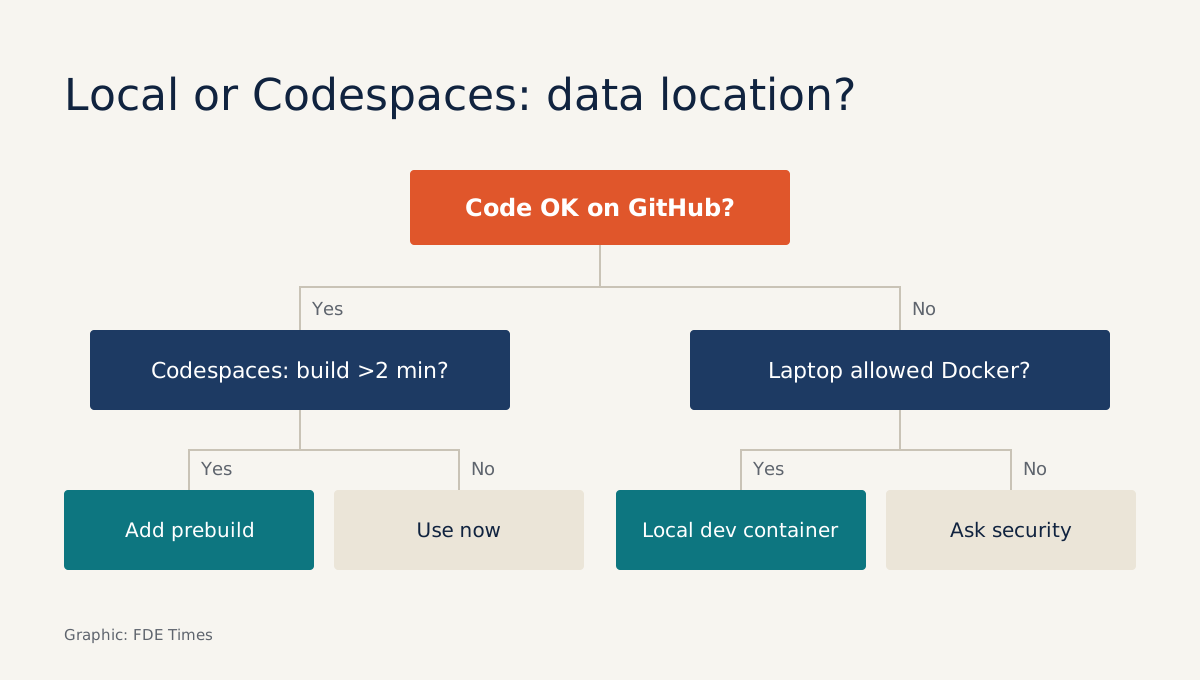
Local or Codespaces: the first question is where the data lives
Running a dev container locally requires Docker to be installed and configured on that machine, according to the VS Code documentation. Raise this with the customer in the first week, for two reasons.
Company laptops are often locked down against installing software, and Docker Desktop is free only for businesses with fewer than 250 employees and less than USD 10,000,000 in annual revenue, so a large customer team may need a paid plan.
Codespaces removes that step because the container runs on GitHub’s virtual machines. The trade-off is that the code, and possibly sample data, will sit on GitHub’s infrastructure.
For customers in finance or healthcare, that is a question for their security team, not one to answer on their behalf. The good news is that the same devcontainer.json runs in both places, so the choice is not permanent.
There is also a practical limit: speed. A large repo can take a while to build a codespace. GitHub offers prebuilds, which preinstall source, extensions and dependencies so new codespaces start faster. Time the first creation, and if it feels slow, turn on prebuilds.
Two mistakes that break a shared environment in the first week
The first is letting the image float on a tag. Two people opening the repo a month apart can get two different images, and the “identical environment” benefit disappears. The example in step 2 exists precisely to prevent this.
The second is more dangerous: putting secrets in devcontainer.json. The file is committed to the repo and visible to anyone with read access, so the customer’s API keys or database passwords must never appear in it. Keep only tool configuration in the file; credentials should come from a secrets store the customer’s security team has approved.
What to learn first, and how to show the skill
Start with the smallest thing that works: a pinned image and a list of extensions. Do not cram everything in on day one; let step 5 tell you what is missing.
For your career, this skill is easier to demonstrate than you might think. A portfolio repo with a .devcontainer folder shows a hiring manager that you think about the next person to use your code.
On a CV, one line on how long it took to onboard the customer’s engineers before and after the dev container is worth far more than listing Docker under skills, provided you have measured a real number. When a job description mentions “developer experience” or “onboard customer engineers”, that is the place to tell this story.
Good FDEs are remembered because customers can run the system themselves after they leave. A good devcontainer.json is the cheapest way to make that happen from day one.
Was this article useful?
Thanks for the feedback!
9 sources
- Development Containers
- devcontainers/spec: Development Containers Specification
- Dev Container metadata reference
- Introduction to dev containers - GitHub Docs
- What are GitHub Codespaces? - GitHub Docs
- About GitHub Codespaces prebuilds - GitHub Docs
- Developing inside a Container - Visual Studio Code
- How I learned to stop worrying and love the latest tag (Adrian Mouat, Chainguard) · 2026-02-11
- Docker Plans FAQs | Docker