Hand over a repo with secrets without waiting for the client's Vault
SOPS encrypts only the values, so git diffs stay readable, and the age keys that decrypt them stay with the client.
In brief
- SOPS encrypts each leaf value and leaves key names alone, so a git diff still shows which line changed.
- With age you need no KMS or Vault: encrypt for one or more recipients with the --age flag, SSH public keys included.
- Rules in .sops.yaml are checked in order and the first match wins, so the prod path must come before the general rule.
It is the last week of an engagement. The repo runs, the pipeline is green, and one question is holding up the handover: where do the database password and API keys live? The client says it will set up Vault “next quarter”. You can’t leave a plaintext .env file in the repo, and you can’t send secrets over chat.
SOPS and age handle this cleanly. SOPS is an editor for encrypted files, with support for YAML, JSON, ENV, INI and binary.
It can encrypt with AWS KMS, GCP KMS, Azure Key Vault, HuaweiCloud KMS, PGP and age. Pick age and you can skip every external key management service, including the Vault the client doesn’t have yet.
For an FDE, that is the difference between “handover done” and “handover whenever the client is ready”. The secrets travel with the repo in encrypted form, and only the people holding the keys can read them.
Two tools: who does what?
When the client’s security team asks whether the tools can be trusted, you have the answer ready: SOPS started at Mozilla in 2015, was donated to the CNCF as a Sandbox project in 2023, and is licensed under MPL-2.0.
age was designed by Filippo Valsorda and benjojo. It is a file encryption tool, a format and a Go library. Its philosophy is small explicit keys, no config options and UNIX-style composability. For whoever is handing over, “no options” is a feature: the client cannot misconfigure something that doesn’t exist.
The division of labour is clear. age handles the cryptography. SOPS understands the file’s structure: which parts are keys, which are values, and which values need hiding.
Encrypt the values, not the whole file
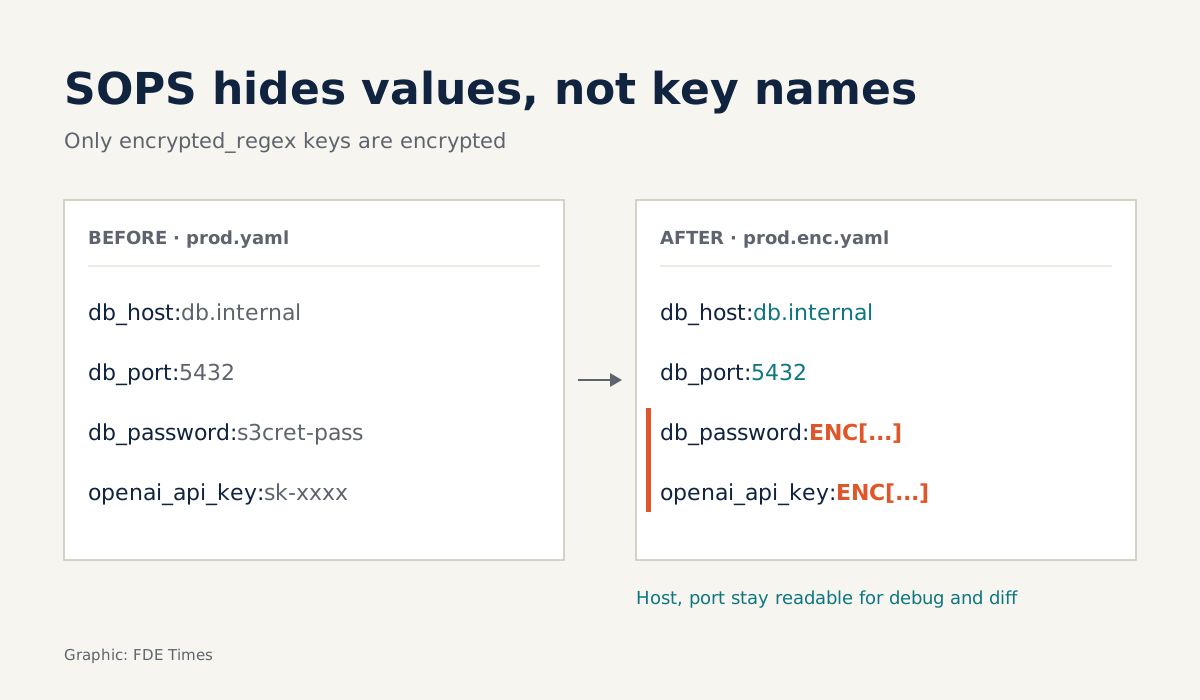
What sets SOPS apart from whole-file encryption is that it encrypts only leaf values, meaning values with no children, and leaves the key names in plaintext. Picture a four-line config/prod.yaml:
db_host: db.internal
db_port: 5432
db_password: s3cret-pass
openai_api_key: sk-xxxx
Before you encrypt, you need the public key of whoever will decrypt. SOPS accepts SSH public keys as age recipients, so the simplest route is to ask the client’s operations engineer for the SSH public key they already use.
The matching private key never leaves their machine and never goes into the repo. They keep it wherever they already keep their SSH keys; you only need the public half.
With the key in hand, encryption takes just the --age flag and no server (separate multiple recipients with commas, or set them in the SOPS_AGE_RECIPIENTS variable):
sops -e --age <client-public-key>,<your-public-key> \
  --encrypted-regex '^(db_password|openai_api_key)$' \
  config/prod.yaml > config/prod.enc.yaml
Thanks to encrypted_regex, only keys matching the regex are encrypted. The result looks roughly like this, with ENC[...] standing in for the shortened ciphertext:
db_host: db.internal
db_port: 5432
db_password: ENC[...]
openai_api_key: ENC[...]
Whoever holds the matching private key runs sops -d config/prod.enc.yaml to get the plaintext back. The client’s engineers can still read the host and port to debug without a key. Each time the port changes, git diff points to the db_port line, rather than a block of meaningless characters as with whole-file encryption.
SOPS also computes a MAC over all the values to detect values added or removed without authorisation. That makes it hard for someone without a key to quietly insert or delete a value in the encrypted file. Anyone who already has a key can still re-encrypt the file, though, so the recipient list is the thing to guard closely.
A .sops.yaml that is enough for a handover
So that nobody has to remember flags, put the rules in a .sops.yaml at the root of the repo:
creation_rules:
  - path_regex: config/prod/.*\.yaml$
    encrypted_regex: '^(db_password|openai_api_key)$'
    age: <client-ops-lead-key>,<your-key>
  - path_regex: .*\.yaml$
    encrypted_regex: '^(db_password|openai_api_key)$'
    age: <whole-dev-team-key>
Order is what matters here. Rules are checked one by one and the first match wins. Put the general .*\.yaml$ rule first and the prod files match it too, so production secrets get encrypted for the whole dev team, which is exactly what you wanted to avoid. Specific rules always go on top.
Limits to spell out to the client
A regex protects only the names it knows. If, six months on, someone adds a db_pass key while the regex matches only db_password, that value will sit in the repo in plaintext. Before handover, switch to a broader pattern or document the naming convention in the README.
The next limit is git history. A former recipient can still decrypt old commits even after you remove their key from .sops.yaml. Revoking someone’s access really means changing the secret itself, not just re-encrypting the file. On handover day, the last step should be to remove your own key from the list and let the client rotate the secrets.
And because there is no central server, there is no log of who read which secret. If the client needs that, Vault or a KMS is still the destination; SOPS is the bridge to it.
What to learn first, and what to put on your CV
Start with a warm-up: encrypt a YAML file with your own SSH key, change a value, look at the diff. Then write a multi-environment .sops.yaml. The whole thing takes an evening.
On your CV, instead of a generic “secrets management”, write “handed over repos with secrets encrypted using SOPS and age, with the client holding its own decryption keys”. That line shows you think about the day the client runs things alone, not just demo day.
A good engagement ends when the client can operate without calling you. A correctly ordered .sops.yaml does more for that than any long handover document.
Was this article useful?
Thanks for the feedback!