A PDF parsing tier costs 25 times more. When is it worth paying?
LlamaParse's Fast tier is enough for plain text, but tables with merged cells need a higher tier, so test the hardest pages before quoting a client.
In brief
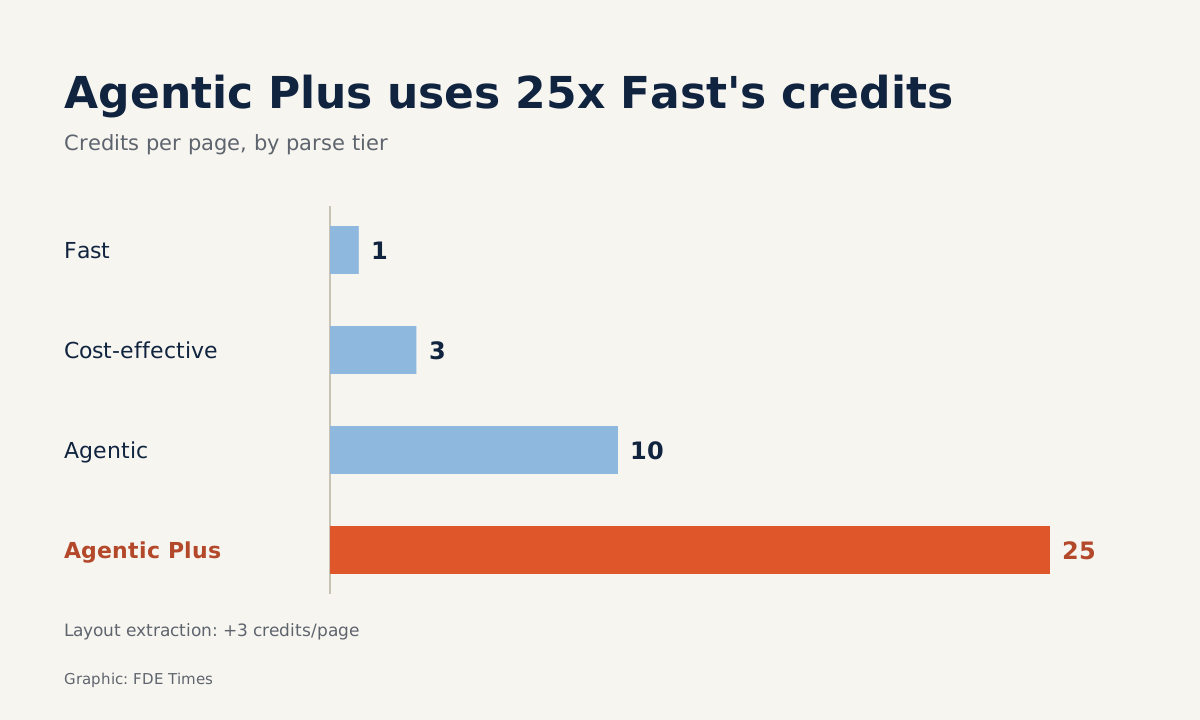
- Parse has four tiers, Fast, Cost-effective, Agentic and Agentic Plus, costing 1, 3, 10 and 25 credits a page respectively.
- Fast runs no AI model, so it cannot use custom prompts or read forms or charts. The docs call Agentic a good default for most workloads.
- Pipe tables cannot represent merged cells. Dense financial reports should run on Agentic Plus with tables output as HTML.
Picture a client handing you a financial report with a revenue table in which the “Q3” header is a merged cell spanning three columns. If the parser flattens that table into a pipe table, the merged cell disappears. Your RAG chatbot then answers fluently, but attributes the figures to the wrong columns.
The example shows that a wrong answer can originate at the very first step, when the PDF is turned into text, before the model or the vector store has done anything.
LlamaParse is one of the tools built specifically for this step. For an FDE, the question worth asking is not whether to use it, but which tier to use for which kind of document.
What is LlamaParse, exactly?
LlamaParse is a hosted document platform run by the LlamaIndex team. It is the new name for LlamaCloud, but the llama-cloud package, the client and the environment variables keep the old name. It is a small detail, but it can easily cost half a morning when the docs say one thing and the code imports another.
On this platform, Parse is the document-parsing product, designed for LLM pipelines. It takes PDFs, scans, tables and charts and returns markdown, text or JSON.
The docs say Parse supports more than 130 file types, including Office, HTML, images and EPUB. LlamaIndex launched LlamaParse on March 13th 2024 and presented JSON mode as the input for anyone wanting to build their own RAG strategy.
The company’s marketing page says LlamaParse can handle handwriting, checkboxes, charts and complex layouts. That is the vendor’s claim, so verify it on the client’s real documents before promising anything to anyone.
Four tiers, 25 times apart
Parse has four tiers. Fast is the cheapest and quickest, meant for text-only documents at high volume. Fast runs no AI model, so custom prompts, forms and chart extraction do not apply. The docs call Agentic a good default for most workloads, while Agentic Plus is for the hardest documents.
According to the official price list, a page costs 1 credit on Fast, 3 on Cost-effective, 10 on Agentic and 25 on Agentic Plus. Turning on layout extraction adds 3 credits a page, on any tier.
The pay-as-you-go plan charges $1.50 per 1,000 credits, and the free plan gives 10,000 credits a month. The Pro plan costs $500 a month with 400,000 credits included; usage beyond that is charged at $1.25 per 1,000 credits.
Take an example: a client has 20,000 pages of contracts and reports. Running everything on Fast uses 20,000 credits, about $30 on pay-as-you-go. Running everything on Agentic uses 200,000 credits, about $300. Agentic Plus uses 500,000 credits, about $750.
At 500,000 credits, the Pro plan is cheaper: $500 for the first 400,000 credits plus $125 for the remaining 100,000, about $625 in total. A quick calculation shows that if the client’s volume recurs monthly and exceeds roughly 333,000 credits, Pro becomes cheaper than pay-as-you-go, so put both options in the quote.
The gaps between the numbers are what to remember. Running the whole corpus on one tier means paying the price of the hardest page for even the easiest ones.
Test the hard pages first, settle the tier later
The docs advise choosing a tier by table difficulty: cost_effective for simple tables, agentic_plus for dense financial reports and complex tables. A practical approach on a client site is to split the document corpus into groups, such as emails and plain text, multi-page contracts and financial appendices. The first group runs on Fast, the last on Agentic Plus.
To split the groups on evidence, take a sample. Pick about 20 of the hardest pages, run them through Fast, Agentic and Agentic Plus, and compare the output with the original. The test costs 20 × (1 + 10 + 25) = 720 credits, less than a tenth of the free plan’s 10,000 monthly credits, so it can be done before the client signs anything.
When comparing, look straight at the tables. Parse preserves cell structure and can output tables as HTML because, according to the docs, pipe tables are simpler but cannot represent merged cells. If the client’s tables have merged cells, ask for HTML output and recheck the RAG answers on those very cells.
Which mistakes most often wreck a quote?
The most common mistake is quoting on Fast and then promising to read charts. Fast runs no AI model, so charts, forms and custom prompts are beyond it; if you need them, the quote must be priced on a higher tier from the start.
The second mistake sits in the spreadsheet: forgetting the 3 credits a page for layout extraction. On Fast, that surcharge takes the cost per page from 1 credit to 4, four times the figure you quoted.
The third mistake is treating marketing claims as verified specifications. The ability to read handwriting or checkboxes is self-reported by the vendor, so include it in a proposal only after testing it on the client’s real documents.
One question is not technical. This is a hosted platform, so you must ask the client’s security team whether documents may be sent to an external service at all. That question belongs in the first discovery session, not in week three.
What should you learn first?
Learn to evaluate parse output before learning the API. A small set of questions, each depending on exactly one cell in a table, will tell you whether the parser has preserved the data. The skill applies to every tool, not just LlamaParse.
When reading FDE job ads, phrases such as “document ingestion” or “unstructured data” signal that the job will involve exactly this problem. On a CV, do not just write “built RAG”. Write that you split a document corpus by difficulty, chose a parsing tier for each group and measured table accuracy before and after the choice.
Clients rarely remember which parser you used. What they remember is whether the number in the answer sat in the right column.
Was this article useful?
Thanks for the feedback!
7 sources
- LlamaParse (formerly LlamaCloud) | Developer Documentation
- Overview of Parse | Developer Documentation
- Parse Getting Started | LlamaParse Developer Documentation
- LlamaIndex Pricing
- Tables | Developer Documentation
- Launching the first GenAI-native document parsing platform · 2024-03-13
- AI Parsing Tool for AI-Ready Document Data | LlamaIndex