Your client won't open a notebook, so give them a Gradio demo
A few lines of Python let them test their own data; the catch is a share link that expires in a week and a model still running on your laptop.
In brief
- Gradio turns a Python function into a web demo. It requires Python 3.10 or later.
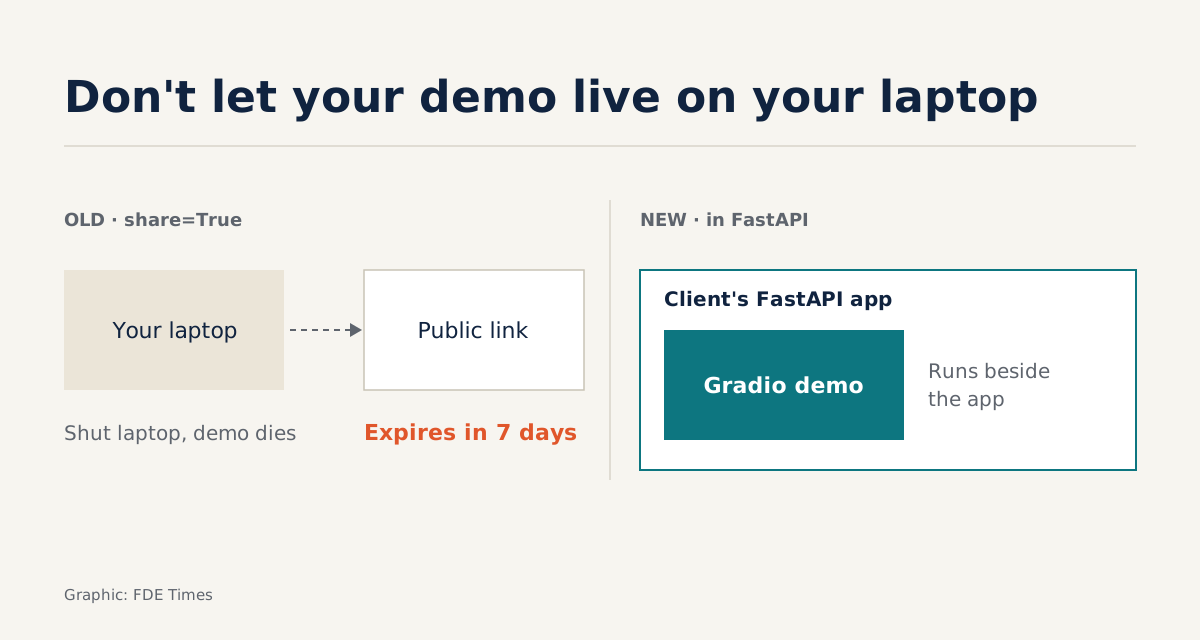
- share=True creates a public link while the model keeps running on your machine, and the link expires after a week.
- The same app can serve as an API, be mounted in FastAPI or run as an MCP server for agent demos.
Many FDE projects reach the same sticking point. The model or agent works in a notebook, but the decision-maker on the client side does not read notebooks. They need a box to type in, a button to press and a result they can see.
Gradio was built for exactly that moment. The official documentation describes it as an open-source Python library for quickly building a demo or web app for a model, an API or any Python function. The tagline on its home page promises a web interface for an ML model in minutes.
For an FDE, the value is not a pretty interface. The value is that the client gets to try the model on their own data instead of watching you click. That makes it worth knowing exactly what the tool can do, and where it will let you down.
One function, one interface, one link
Gradio requires Python 3.10 or later and installs with pip. Imagine you are working for an insurance company and have already written a function, classify_claim, that takes a description of a claim and returns a risk group. The interface takes only a few more lines:
import gradio as gr

def classify_claim(description: str) -> str:
    # call your model or agent here
    return "Medium risk"

demo = gr.Interface(fn=classify_claim, inputs="text", outputs="text")
demo.launch(share=True, auth=("insurer", "change-this-password"))
gr.Interface is the high-level API, suited to one-input, one-output demos like this one. Set share=True in launch() and Gradio creates a public URL while the model keeps running on your machine. The auth parameter takes a username and password pair, enough to keep a demo that uses the client’s private data from sitting exposed on the internet.
The last two lines of that code change the rhythm of the engagement. Before the meeting, you send the link to your contact at the client and ask them to paste in ten real claims. In the meeting, the conversation turns on the cases the model got wrong, not on slides.
The link lives seven days, and your machine must stay awake
That convenience hides two traps. The share link expires after a week. And because the model runs on your machine, closing the laptop kills the demo, just as your contact’s boss opens the link.
For a permanent link, Gradio’s guides point to Hugging Face Spaces, the platform run by the company that announced its acquisition of Gradio in December 2021. But before pushing anything to an external platform, ask the client’s security team where the data is allowed to go. Many clients will answer: nowhere.
For those clients, the better route is to mount the demo on a path inside a FastAPI app the client already runs. The demo then runs alongside their app. Whether the data stays inside the client’s systems depends on where that app is hosted, so ask where the client hosts it before promising anything.
The auth password is also only a basic layer of protection. Treat it as a lock on the meeting-room door, not as an access-control system.
When the demo has to grow up
Interface stops being enough when you need several steps, several fields or a custom layout. At that point Gradio offers a lower-level API, Blocks, which lets you arrange the interface and the data flow yourself. For an agent that needs to show the question, the intermediate steps and the final answer, Blocks is usually the better choice.
The demo is not only for people to click, either. Almost any Gradio app can be used as an API, so the client’s engineering team can call directly into the very thing they have just tried.
The feature that matters most to anyone building agents sits behind another parameter. Gradio can run an app as an MCP server, with every API endpoint automatically becoming an MCP tool. The claim classifier above can be both an interface for people and a tool for the client’s agent to call.
What to learn first
A sensible order is Interface, then launch() with share and auth, then calling the app as an API, and only then Blocks and MCP. Gradio is licensed under Apache-2.0 and its source lives in the gradio-app organisation on GitHub, so when the documentation is unclear you can go straight to the code.
If you want to show you can build quick prototypes for clients, Gradio is a cheap way to do it. A public repo with a working demo, plus one sentence saying whom the demo helps decide what, is more convincing than “proficient in Python” on a CV.
Do not mistake the demo for the product. Its job is to get the meeting to the real question, where the model goes wrong and whether the client can live with it, as early as possible.
Was this article useful?
Thanks for the feedback!