Reading an unfamiliar Apache NiFi flow on day one at a client
Three building blocks, one full queue and the history of each record are enough to get you through your first NiFi incident.
In brief
- NiFi was built to automate the flow of data between systems, and every flow comes down to FlowFiles, Processors and Connections
- Every Connection is a queue: once it hits its threshold, the processor upstream stops being scheduled
- Kafka suits small messages, while NiFi often sits in front of it as the gateway that takes data in
NiFi started life at the US National Security Agency (NSA) under the name Niagarafiles. In November 2014 it entered the Apache Incubator through the NSA’s technology transfer program, and on July 20, 2015 it became a top-level Apache project.
More than a decade on, the project still ships regularly: the official release notes list 2.12.0, released on September 13, 2026, as the latest version.
A tool that lives this long tends to end up deep inside a company’s infrastructure. The NiFi homepage itself mentions uses in security, observability, event streams and even generative AI pipelines. When you arrive at a client to build an agent or a RAG system, the data you need may already be running through a NiFi flow someone else built.
You don’t need to become a NiFi expert. You do need to be able to read that flow, ask the right questions, and know when not to propose yet another tool.
Three building blocks are enough to read an unfamiliar flow
NiFi’s overview documentation states its purpose plainly: to automate the flow of data between systems. Everything in a flow comes down to three building blocks. A FlowFile is a piece of data in motion. A Processor is where the real work happens: routing, transforming, sending. A Connection is the queue that links processors together.
Behind them sits the Flow Controller, the component that brokers the hand-off of FlowFiles between processors and manages the threads. Because a Connection is a queue, the components at either end can run at different speeds. But every queue has a capacity, and the next section shows what happens when it fills up.
When you open an unfamiliar flow, follow the data: find the first processor that takes data in, trace each Connection, and note every branch. This hand-drawn map is what you check the client’s documentation against.
A small flow, step by step
Take a hypothetical example. A client receives documents from partners through a REST endpoint. Cloudera, a major NiFi vendor, describes this very pattern: standing up an endpoint so outside parties can send data in. Some documents are invoices that need to reach the accounting system; others are small logs that need to go to Kafka.
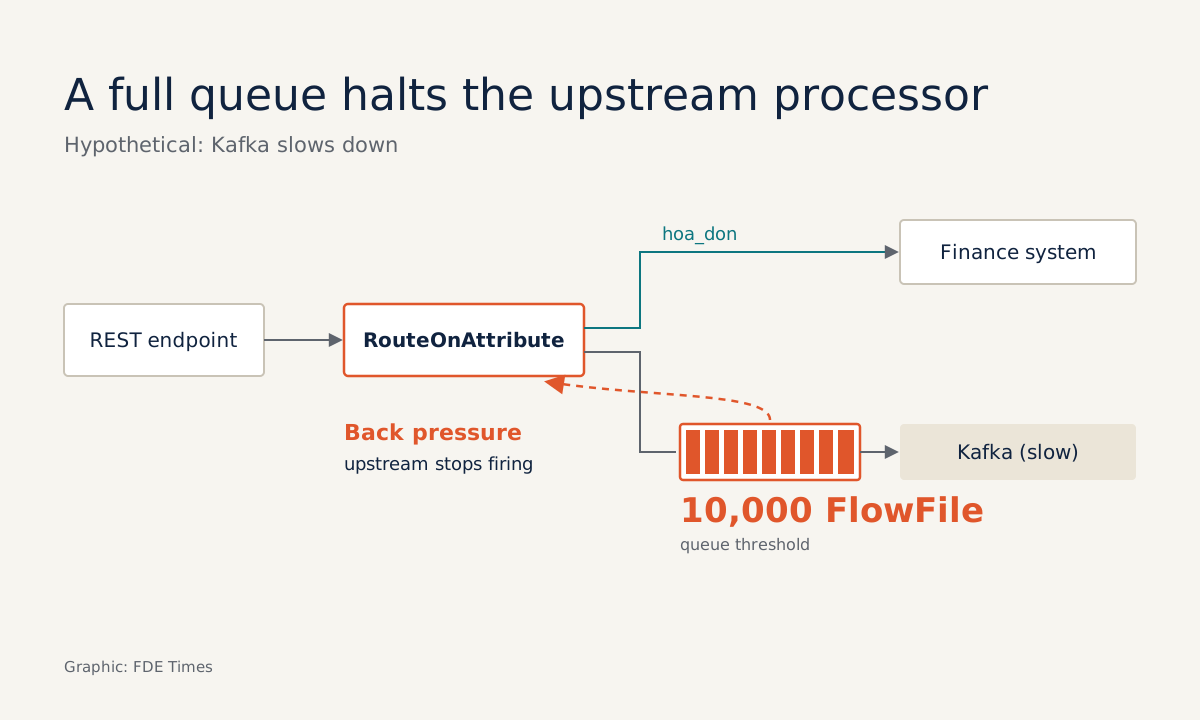
The branch uses RouteOnAttribute. This processor is only valid once you add at least one user-defined property, and each property becomes a relationship with its own name. Add a property called “invoice” and you immediately get an “invoice” branch to connect to the processor that writes to the accounting system. Everything else goes down the Kafka branch.
Now suppose Kafka slows down. The queue in front of the processor that sends to Kafka gradually fills, and, following the example in the User Guide, once it reaches a threshold of 10,000 FlowFiles the processor upstream stops being scheduled. That is back pressure: the upstream side pauses and waits for the downstream side rather than continuing to push more work in.
This design matches Cloudera’s advice: NiFi should act as the ingestion gateway because it supports many protocols, while Kafka suits small messages better than large files. If the client plans to push large PDF files straight into Kafka, that is a question worth raising.
Two mechanisms you will rely on when debugging
The NiFi documentation treats guaranteed delivery as a core philosophy, even at very large scale. The foundation of that guarantee is a write-ahead log and a content repository, both persisted durably.
The other mechanism is provenance. NiFi records the history of every FlowFile, and because content is immutable, each event points to the exact data as it was at that moment. When a client says “our record disappeared,” the first step is to look up that record’s provenance, before you read any code.
There is a limit to spell out to the client, though: once content has been removed from the repository, the ability to replay it is limited too. If the incident happened last week, don’t promise you can rerun it.
Where it is easy to overpromise
Environment-specific configuration goes through a Parameter Context. Each Process Group can be assigned only one Parameter Context, although one context can be shared across many groups. When the client wants to move a flow from dev to prod, check right away how they have split their contexts, because that is where values from one environment easily leak into another.
NiFi cannot replace everything either. Cloudera says it can replace ETL in some cases and can run batch, but not in every case. For data generated on devices or remote servers there is MiNiFi, an agent that runs at or close to the data source, available in C++ and Java versions.
One question to ask in your first week: which version line is their cluster running? NiFi 2.0.0 was only officially released on November 4, 2024, so the documentation and experience you draw on must match that exact line.
What to learn first, and what to put on your CV
A sensible learning order is the three building blocks, then back pressure, then provenance, and only then Parameter Context. The first three help you debug; the last helps you deploy.
When reading FDE job postings, watch for terms such as NiFi, MiNiFi, data flow or ingestion. They signal that the role will touch existing data infrastructure as well as building models.
On a CV, a specific line such as “diagnosed stuck data using provenance and tuned back pressure thresholds in front of Kafka” is worth more than listing “NiFi” under skills.
An agent can only use the data that reaches it. At a client that already runs NiFi, the first map you should draw is that flow, before you write your first prompt.
Was this article useful?
Thanks for the feedback!