Arcade.dev wants agents to act with each user's own permissions
The API call is the easy part; the hard questions are whose token an agent uses, what it may do and who holds it.
In brief
- Arcade sits between the agent and external systems, so the agent acts as the user rather than through a shared account.
- Permissions are enforced through the customer's existing OAuth flows and identity provider; credentials never pass through the model.
- To use it well, learn OAuth 2.0 and scope design before the SDK.
Every agent demo can send an email. The trouble starts when the customer asks whose permissions that email was sent with. If the answer is “a shared token configured in the environment file”, the meeting with the security team usually ends there.
Arcade.dev was built for exactly that moment. Its homepage calls the product an actions runtime for AI agents in the enterprise, a layer between the agent and every system the agent touches. The core promise is delegated authorization: the agent acts as its user and never exceeds the scope it has been granted.
For an FDE, this is not an infrastructure detail. It is often what decides whether an agent reaches production with real data or stays in a sandbox for good.
A shared token is a security debt
Arcade’s funding announcement in March 2025 described the problem bluntly: agents cannot act on behalf of users because systems demand personal authentication. Some of the founding team previously worked on auth at Okta, so it is no surprise they see the agent problem as an identity problem.
The familiar shortcut is to create a service account with broad permissions and let the agent use it for everyone. It works, but every action in the logs carries a single identity, and the agent can touch data the person giving the instruction was never allowed to see.
One shared token
- The agent carries the permissions of a broad account
- Logs do not show who actually gave the instruction
- Leak one token and you leak access to the whole system
Delegated authorization
- The agent carries the user's own permissions
- Each tool uses only the scopes that were granted
- Users sign in themselves; tokens are managed separately
What does Arcade do between the agent and Gmail?
Arcade’s documentation says it handles OAuth and manages each user’s tokens, API keys and secrets. Permissions are enforced through the OAuth flows and identity provider the customer already has, so there is no need to build a parallel authorization system.
The central concept is scope. According to the documentation, a scope is what a user has allowed another party, here the agent, to do on their behalf; each tool needs specific scopes, such as gmail.send. When the user has not granted permission, Arcade asks them to authorize the tool and orchestrates the OAuth 2.0 flow.
On coverage, the homepage advertises more than 8,000 permission-controlled tools, plus MCP servers you build or bring yourself. That figure comes from the vendor, so check the specific tools the customer needs rather than trusting the total.
Tracing a single request
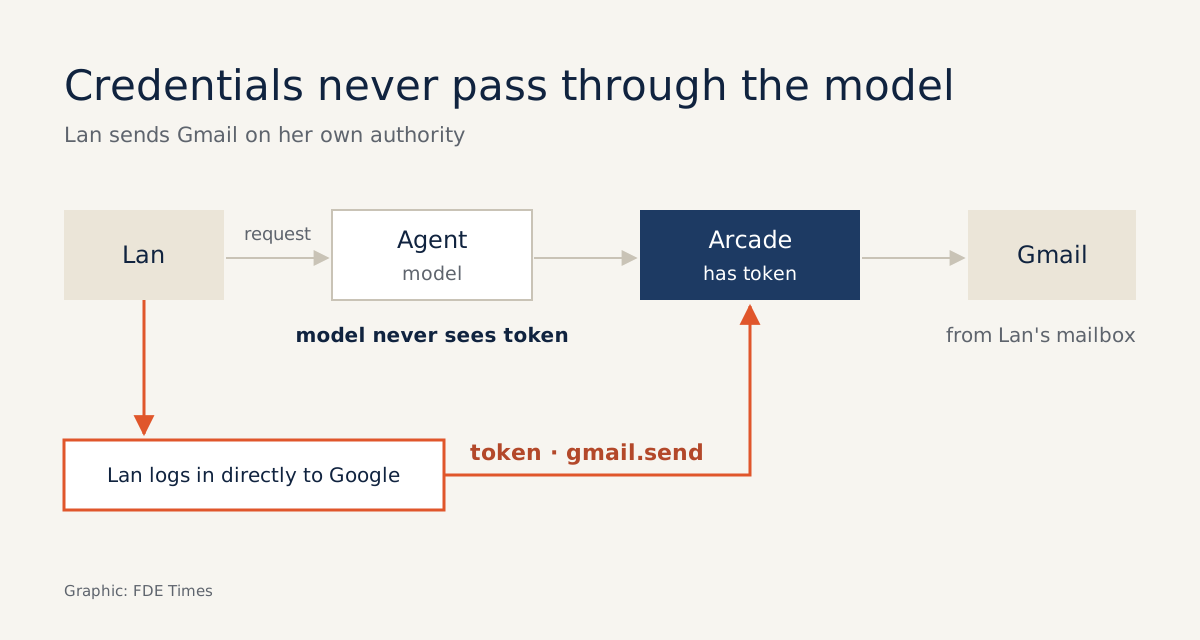
Imagine deploying an agent to support a sales team. One employee, call her Lan, types: “Send the customer a thank-you email after this morning’s demo.” The agent decides to call the Gmail send tool, which needs the gmail.send scope.
The first time, Lan has not granted that permission, so Arcade asks her to authorize it. With the URL elicitation mechanism that Arcade and Anthropic brought to MCP, the server can open a secure sign-in page in Lan’s browser, where she signs in directly with Google. According to SiliconANGLE, this flow keeps credential data from ever passing through the model itself.
From then on, the email goes out from Lan’s mailbox, within the gmail.send scope. If a colleague uses the same agent, they must grant their own permissions. The agent cannot read Lan’s mailbox just because it once sent mail on her behalf.
What does Arcade not solve?
Delegated authorization answers “what is the agent allowed to do”, not “is the agent doing it right”. An agent with a valid gmail.send scope can still send the wrong content to the right recipient. Evals and confirmation steps before sensitive actions remain your job.
Because Arcade relies on the customer’s OAuth and identity provider, the quality of the deployment depends on that infrastructure. If the customer has not agreed who may grant what, the tool will not sit down with the identity team to sort it out for you. Designing the minimum scope for each tool is also still a technical decision you are accountable for.
Three mistakes that can wreck the design
The first is requesting broad scopes for convenience. If a tool only needs to send mail and you ask for full mailbox access, you have thrown away the benefit of delegated authorization. Keep a small table: one row per tool, and next to it the narrowest scope that does the job.
The second is letting tokens leak where they should not be. The sign-in flow may keep credentials out of the model, but your code can still accidentally print a token to a debug log or paste it into a prompt while debugging. Before handover, search the logs and prompt history for anything that looks like a token.
The third is falling back to a shared account just to make the demo quicker. That demo becomes the version the customer remembers, and you will have to explain everything again once the security team gets involved.
What to learn before opening the SDK
Learn OAuth 2.0 thoroughly: the authorization code flow, scopes and how tokens are refreshed. Then learn enough MCP to understand how tools are described and called. With those two foundations, Arcade becomes a convenience layer rather than a black box.
For your career, this skill deserves a clear line on your CV. Instead of “built an agent with Gmail integration”, write “designed per-user authorization for an agent, with a minimum scope per tool and no credentials in the model’s context”.
When an FDE job posting mentions identity, OAuth or security review, use it as the starting point for your interview questions: which systems does their agent touch, and with whose permissions?
At your next customer meeting, do not open with what the agent can do. Open with whose permissions the agent will act under, because that is the first question the security team will ask.
Was this article useful?
Thanks for the feedback!