Moving client data is not proof it all arrived. rclone check is
One command-line tool syncs SFTP, S3 and GCS and produces a file-by-file reconciliation report, provided you understand how each end handles hashes.
In brief
- rclone sync makes the destination identical to the source and can delete data, so always run --dry-run first
- rclone check compares sizes and hashes without changing either side; --combined prints a per-file report
- SFTP has no built-in checksums, an S3 multipart ETag is not an MD5, and GCS stores MD5 natively
At sign-off, the hardest question is rarely “is the transfer done?” It is “how do you know no files are missing?”
Picture the answer being a screenshot of a file count. It tells the client nothing about which files match and which do not. rclone gives you a better answer: a reconciliation report covering every path, produced by a single command.
rclone is a command-line program by Nick Craig-Wood, released under the MIT licence, that syncs files and directories between many cloud storage providers. The project’s home page lists two things among its core features: it always checks MD5 and SHA1 hashes to ensure integrity, and it compares hashes to find missing or extra files.
For an FDE, this is exactly the part of the job that tends to be underrated. Client data arrives over SFTP and lands in S3 or GCS, and everything downstream (pipelines, models, dashboards) is only as trustworthy as that first transfer.
A sync command can delete data
Imagine a logistics client that drops daily export files on an SFTP server, while your system reads from a GCS bucket. Once you have declared two remotes, call them client-sftp and dest-gcs, the basic command looks like this:
rclone sync client-sftp:/exports dest-gcs:client-data/exports --dry-runrclone sync makes the destination match the source, which means any file present at the destination but not at the source may be deleted. The official documentation says plainly that this can cause data loss and recommends testing first with --dry-run or --interactive/-i. Make it a reflex: the first run is always a dry run; read the output, then drop the flag.
From the second run onwards it is far cheaper. Sync skips files that are already identical on both ends, comparing size and modification time or MD5SUM, so you can rerun it daily without transferring everything again.
For GCS inside a client’s environment, you do not need to open a browser for an OAuth login. When configuring the remote, rclone lets you point to a service account credentials file, which suits headless servers or machines provided by the client.
The reconciliation report is what the client needs
After the sync, run the check:
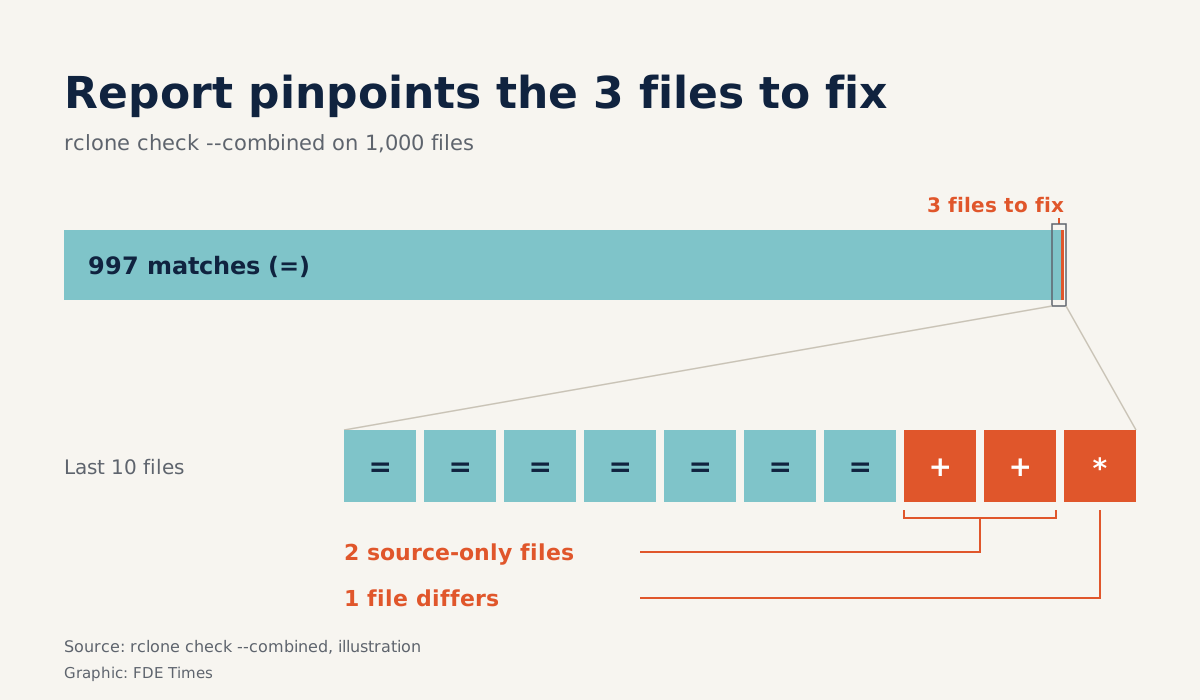
rclone check client-sftp:/exports dest-gcs:client-data/exports --combined reconciliation.txtrclone check compares sizes and hashes (MD5 or SHA1) between source and destination, and changes neither side. The --combined flag writes a diff-style report with one symbol per path: = means identical, + only in the source, - only in the destination, * present on both but different, and ! an error.
Suppose a directory holds 1,000 files and the report shows 997 = lines, 2 + lines and 1 * line. “999 files transferred” sounds nearly complete, but the report tells you exactly which three files need attention and why. That is what you attach to the sign-off email, not a screenshot.
Hashes differ at each end
The catch is that check is only as strong as the hashes both ends share. The three storage types in this example handle hashes very differently:
| Backend | Hashes available? | What to know when reconciling |
|---|---|---|
| SFTP | No built-in checksums | Only computable if the account has shell access; rclone tries md5sum, md5, rclone md5sum |
| S3 | Not guaranteed | For multipart uploads, the ETag is no longer an MD5; rclone stores its own MD5 in metadata, which can be disabled for large objects |
| GCS | Yes, MD5 stored natively | Hash comparison needs no extra step |
With SFTP, rclone tries the three commands on the remote machine in turn and uses the first one that works. If the client provides only an SFTP account without a shell, there will be no hash to compare. This is a question to ask during discovery, before promising any reconciliation.
With S3, objects uploaded in multiple parts have an ETag that is not an MD5, so rclone has to rely on the MD5 it writes into metadata itself. If that feature is disabled for large objects, those multipart objects will have no MD5 to compare. Do not assume it is there.
When the two ends share no hash, rclone check --download compares the data content directly instead of relying on hashes. Reserve this flag for pairs such as shell-less SFTP to S3, where hash comparison cannot work.
What to learn first, and what to put on your CV
A sensible order: declare remotes, run sync with a dry run, read the --combined report, then learn the hash table for each backend you meet often. Do not skip the last step, because it decides whether your report can be trusted.
Common mistakes when moving client data:
- Running
syncstraight away without a dry run, when the command can delete files at the destination. - Believing an S3
ETagis always an MD5, when multipart uploads break that assumption. - Promising hash-based reconciliation with an SFTP source before asking whether the account has shell access.
- Treating a sync that finished without errors as proof, instead of also running
check.
On your CV, do not just write “migrated data to GCS”. Write how you proved completeness: hash-based reconciliation, a per-file report, the number of discrepancies found and resolved.
Clients do not remember how fast you moved their data. They remember the missing file nobody noticed until much later.
Was this article useful?
Thanks for the feedback!