The best vector database is often the one the client already runs
Every new service brings backups, monitoring and someone on call, so if the client already runs Postgres, pgvector is the one to try first.
In brief
- If the client already runs Postgres, try pgvector first: vectors sit next to the data and get ACID, JOINs and point-in-time recovery.
- With an approximate index, pgvector applies filters after the index scan, so a query can return fewer results than you asked for. Qdrant has payload indexes that filter during the search itself.
- If the client already uses Elasticsearch for keyword search, use the knn query on the existing cluster for hybrid search, but you still need an embedding pipeline and a way to combine scores.
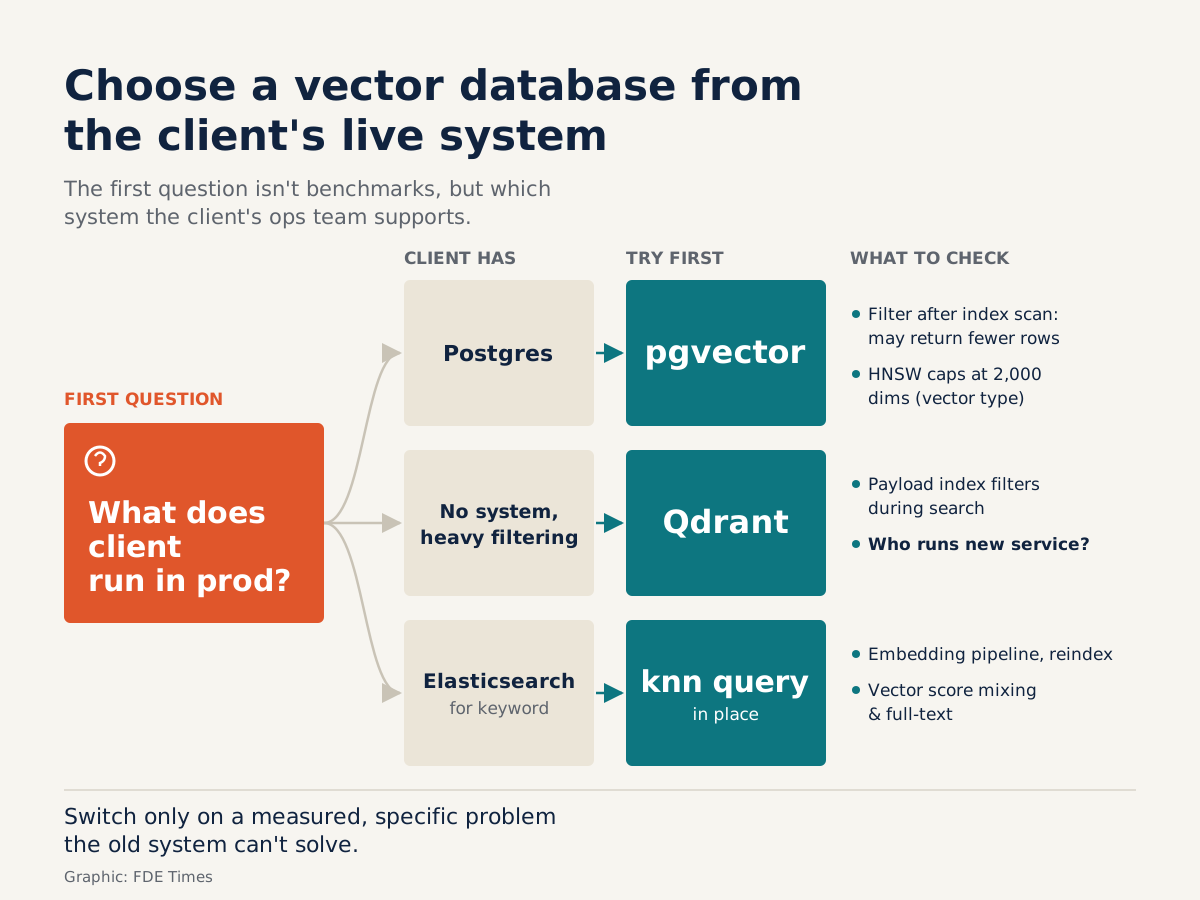
Engineers new to a client site often want to compare benchmarks, read the leaderboards and recommend a “purpose-built” vector database. There is a simpler question to ask first: what systems does the client already operate? The answer usually settles most of the decision.
The reason is practical. Every new service brings backups, monitoring, access control and someone on call when it goes down. For an FDE, choosing a vector database is mostly a matter of fitting into the client’s existing infrastructure; raw performance is only part of it. Below are three common options and when to use each.
Client already runs Postgres? Try pgvector first
The official repository describes pgvector as an open-source extension for vector similarity search in Postgres. Its biggest advantage is where it lives. Vectors are stored right next to the business data, so they inherit ACID, point-in-time recovery and JOINs, as the README lists.
Picture an insurance company with its policies table in Postgres. You add an embedding column to the clauses table. From then on, a single query can find the passages closest in meaning and JOIN to the customers table to fetch the name and policy status.
There is no sync pipeline between two systems, so there is no risk of the data drifting apart in two places.
One detail is worth knowing: by default pgvector performs exact nearest neighbor search, and the README states plainly that this gives perfect recall. Approximate indexes exist only when you create them, and there are two kinds. HNSW builds a multilayer graph, while IVFFlat divides the data into lists.
HNSW offers a better speed-recall trade-off, at the cost of longer build times and more memory.
So the sensible process is to run exact search first to get a “reference answer”. Only then create the HNSW index and measure how many results in the two top 10s still match. That number tells you how much recall you traded for speed, and you can show it to the client.
Two traps that can wreck a demo
The first trap is filtering. With an approximate index, pgvector applies the filter after scanning the index. As a result, a query can return fewer results than you expect.
Picture a multi-tenant system. You ask for the 10 nearest documents belonging to one small customer. The HNSW index retrieves a set of nearest candidates across the whole dataset and only then filters by tenant. If that set contains just 3 documents from this tenant, the user gets 3 rows instead of 10.
The user concludes that the chatbot “found nothing”, while the documents are sitting in the database.
The second trap is dimensions. pgvector can store vectors of up to 16,000 dimensions, but HNSW is much stricter: for the vector type, it can index only up to 2,000 dimensions. If the client’s embedding model produces longer vectors, you can still store them but cannot build HNSW on the vector type.
Check this number when you choose the model, not on the day you load real data.
When Qdrant is worth adding a new service
Qdrant uses a client-server model, with APIs over HTTP and gRPC, so it can be called from almost any language. The unit of data is a point, made up of a vector and an optional metadata payload.
In the multi-tenant case above, what sets Qdrant apart from pgvector is the payload index. You create indexes on specific fields such as tenant_id, and the filter is applied during the search itself. Qdrant does not wait until the search finishes and then filter, as pgvector’s approximate indexes do. Qdrant also supports hybrid retrieval, combining dense vectors for search by meaning with sparse vectors for keyword search.
Qdrant is therefore worth considering when filtering is a core requirement, for example multi-tenant setups with very many small tenants, and the client is willing to run one more service. If nobody is on call for that service, the technical advantage becomes an operational burden.
Client already has Elasticsearch: use the existing cluster
If the client runs Elasticsearch for keyword search, Elastic’s documentation shows that dense vectors are queried with the knn query. That means you can add vector search to the cluster already in production. Elastic also describes how to combine vectors with full-text search for hybrid search.
Picture an equipment distributor that keeps its technical documentation in Elasticsearch. A technician types: “PX-220 pump makes a loud noise on startup”. The code PX-220 is something full-text search matches exactly, while “makes a loud noise on startup” needs a search by meaning, because the documentation might say “abnormal noise”.
With vectors alone, results can drift to a different pump model with a similar description. With keywords alone, the system misses passages that use different wording. Hybrid search handles both halves, but only if the two sets of scores are combined correctly.
Do not assume this is just a matter of adding a field. You still need a pipeline that generates embeddings for both existing and new documents, you may have to reindex existing data, and you must choose how to combine vector scores with full-text scores. The advantage lies elsewhere: the cluster already has indexes, access control and people who run it, so the risk is lower than standing up a new system.
The first thing to do is collect about 20 real questions that contain both a product code and a natural-language description. Run full-text alone, knn alone and then hybrid, and see which approach puts the right document at the top.
| Client already has | Try first | What to check |
|---|---|---|
| Postgres | pgvector | Filtering after the index scan, HNSW’s 2,000-dimension limit |
| Nothing yet, needs heavy filtering | Qdrant | Who will operate the new service |
| Elasticsearch for keyword search | knn query on the existing cluster | Embedding pipeline, reindexing, how to combine vector and full-text scores |
What to learn first
If you have only one week, learn pgvector, because a great many clients use Postgres. Focus on three things: comparing exact search with HNSW, reproducing the filter bug that returns too few results, and reading the dimension limits closely. Then set up Qdrant with a payload index to see the same filtering problem solved a different way.
When reading FDE job descriptions, look for phrases such as “integrate with existing data infrastructure” or “RAG in production”. On a CV, “used vector database X” says little.
A line such as “measured recall between exact search and HNSW; found and fixed a filter bug that returned too few results in a multi-tenant system” shows a hiring manager that you have worked with real data.
The best vector database for a project is usually the one the client already knows how to keep running. Move to something else only when you can measure a specific problem the existing system cannot solve.
Was this article useful?
Thanks for the feedback!