At a client site, the hardest agent question is who clicks approve
LangGraph's interrupt function stops an agent just before a refund, waits minutes or overnight for a human reviewer, then resumes from exactly the same point.
In brief
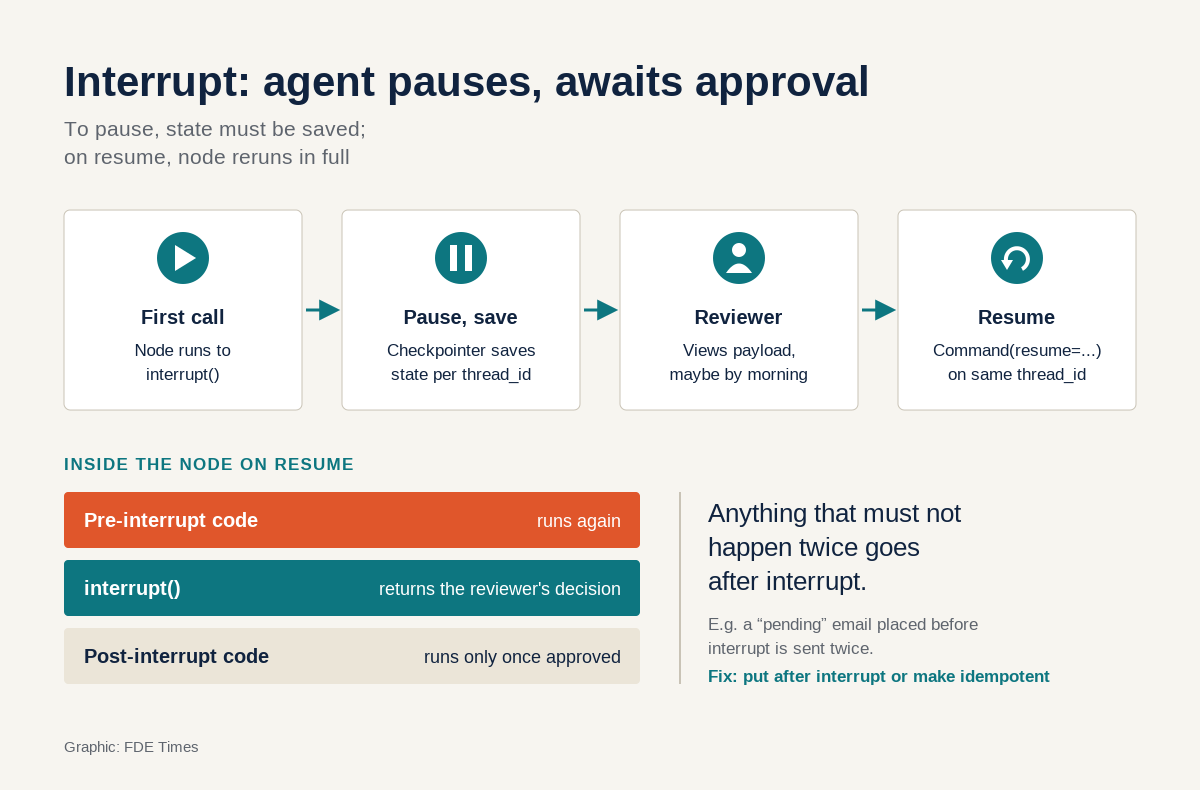
- The interrupt function pauses the graph at a point you choose, waits for external input, then receives the reviewer's decision through Command(resume=...).
- Interrupt requires a checkpointer, and production needs a durable one; thread_id decides whether you continue an existing thread or start a new one.
- On resume, the node runs again from the top, so every non-idempotent operation must come after interrupt.
An agent you have deployed for a client has drafted a refund and is one step from sending it. The person responsible on the client’s side wants to check it before any money leaves the account, sometimes within minutes, sometimes not until the next morning.
The LangChain team spelled out the reason for this on its official blog on December 14, 2024: agents can be powerful, but they are not perfect. LangGraph’s interrupt function grew out of that observation, and according to the LangChain team it was designed to run in production.
For an FDE, this is no minor technical detail. When an agent touches a client’s money or real systems, build in a place for a human to say “wait” from day one, before the client has to ask for it.
What LangGraph is, and what it is not
LangGraph describes itself as a low-level orchestration framework for building, managing and deploying stateful, long-running agents. It is built by LangChain Inc, the team behind LangChain, but it can be used without LangChain. The code is released under the MIT license.
“Low-level” deserves a careful reading. LangGraph does not hand you a ready-made agent. It hands you parts to assemble yourself: a graph of steps, the state that flows through each step, and places to stop.
The developers emphasize two benefits: durable execution, meaning agents survive failures and can run for a long time, and human-in-the-loop, meaning agent state can be inspected and modified at any point during a run.
Three pieces for one pause point
According to the official documentation, interrupt lets you pause the graph at specific points and wait for external input before continuing. Pausing requires somewhere to store state, so the documentation requires a checkpointer and recommends a durable one for production.
The checkpointer saves each thread’s state as checkpoints. The same mechanism serves several purposes: conversational memory, human-in-the-loop, time travel and fault tolerance. The third piece is thread_id: reuse an existing value and you continue from that checkpoint; use a new value and you start a brand-new thread with empty state.
How does the reviewer’s decision get in? The value you pass to Command(resume=...) becomes the return value of the interrupt call itself. From inside the node, interrupt looks like an ordinary function call: you call it, it waits, and what comes back is the reviewer’s decision.
A minimal approval node
The documentation says the most common use of interrupt is pausing before a consequential action to ask for approval. The snippet below is an illustrative example complete enough to run: a one-node graph, an in-memory checkpointer, a first call that stops at interrupt, and a second call that resumes with the same thread_id.
from typing import TypedDict
from langgraph.graph import StateGraph, START, END
from langgraph.checkpoint.memory import InMemorySaver
from langgraph.types import interrupt, Command

class State(TypedDict):
    amount: int
    result: str

def execute_refund(state):
    print("Refund issued:", state["amount"])

def approve_refund(state: State):
    decision = interrupt({
        "action": "refund",
        "amount": state["amount"],
    })
    if decision == "approve":
        execute_refund(state)   # runs only AFTER approval
    return {"result": decision}

builder = StateGraph(State)
builder.add_node("approve_refund", approve_refund)
builder.add_edge(START, "approve_refund")
builder.add_edge("approve_refund", END)

# InMemorySaver is for local testing only; production needs a durable checkpointer
graph = builder.compile(checkpointer=InMemorySaver())

config = {"configurable": {"thread_id": "refund-request-001"}}

# First run: the graph pauses at interrupt and state is saved under the thread_id
result = graph.invoke({"amount": 100}, config=config)
print(result["__interrupt__"])   # payload waiting for the reviewer

# When the reviewer clicks the button, call again with the SAME config (same thread_id)
graph.invoke(Command(resume="approve"), config=config)
The approval interface can be whatever the client already uses. Your job is to take the payload from interrupt, show it to the right person, and send the decision back through Command(resume=...) with the correct thread_id. Send it to a new thread_id by mistake and you get an empty thread, not the pending refund.
The trap sits in the code above interrupt
The documentation is explicit: on resume, the node runs again from the beginning, so every line of code before interrupt runs one more time. The rule that follows is to keep non-idempotent operations out of the code before interrupt.
Say you place a call that emails “your request is awaiting approval” just before interrupt. The reviewer approves, the node runs again, and the customer gets a second email. Swap the email for a write to the accounting system and the same bug is enough to cost the whole project its credibility.
The simplest fix is to move the email below interrupt, or take it out of the node and let the approval interface handle notifications. If it has to stay above, make it idempotent: for example, record against the thread_id that the email has been sent, and check that marker before sending again.
When should you choose LangGraph?
Consider LangGraph when the client’s process has clear steps, includes actions that cannot be undone, and has an accountable reviewer who is not sitting there waiting. Long-running execution and persisted state are what let an agent wait overnight without losing its work in progress.
The price is that you decide a lot yourself, because this is a low-level tool: picking a durable checkpointer for production, managing a thread_id tied to each business request, and auditing every node for lines that will re-run. If the workflow is a single question-and-answer turn that nobody needs to approve, most of this power will go unused.
What to learn first, and how to put it on a CV
A sensible order has three stages: the checkpointer and thread_id, then the interrupt and Command(resume=...) pair, and finally the lesson about nodes re-running. The first two are mechanics; the last is what separates people who have run it for real from people who have only read the docs.
When reading job descriptions for FDE or AI engineer roles, look for phrases such as “human-in-the-loop”, “stateful agent” or “long-running workflow”. On a CV, rather than writing “used LangGraph”, state which action you put an approval gate in front of, where state was stored, and how you handled resume.
Clients rarely ask how smart your agent is. They ask where it will stop, and who is allowed to let it continue.
Was this article useful?
Thanks for the feedback!