With Fluent Bit, the ten-line config is the easy part
Log rotation, offsets and buffering decide whether your logs reach the client's monitoring stack intact, especially on the night that stack goes down.
In brief
- Fluent Bit is an Apache 2.0 agent and a graduated CNCF project that runs in resource-constrained environments.
- Tail plus the OpenTelemetry output is the fastest way to get a handed-over app's logs into the client's existing Collector.
- Default to filesystem buffering and a DB file for offsets, and accept that some logs may be delivered twice.
Fluent Bit’s homepage says the tool has been deployed more than a billion times. For an FDE, the more useful question is how to use it to get the logs of the application you hand over into the place the client already watches.
The problem is a familiar one. You hand over an application, perhaps an agent, a data-processing service or a nightly job, and it writes logs to a file. The client’s operations team does not want to open yet another dashboard just for you. They want those logs sitting alongside everything else they monitor.
Fluent Bit solves this without asking the client to change their stack. The ten lines of config are the easy part, though. The hard part is what happens when logs rotate, when the agent restarts and when the client’s backend stops accepting data.
Why it is safe to put inside a client’s system
According to the official docs, Fluent Bit is an open-source telemetry agent that handles logs, metrics, traces and profiles. Eduardo Silva, part of the Fluentd team at Treasure Data, created it in 2014 as a lightweight processor for resource-constrained environments. Today it is a graduated CNCF project within the Fluentd ecosystem.
For an FDE, two details matter more than raw speed. The repository is licensed under Apache 2.0, so the client’s legal team rarely objects when you package it into a deployment.
Graduated status also gives you a quick answer when someone asks whether anyone maintains the thing. As of 2026-11-23, the latest stable release listed on the homepage is v5.2.0.
A minimal pipeline from log file to the client’s Collector
Take a hypothetical case. Your application writes logs to /var/log/myapp/. The client already runs an OpenTelemetry Collector behind an internal gateway, otel-gw.internal, which accepts OTLP/HTTP on port 4318 but rewrites the log path to /ingest/v1/logs instead of the default.
[SERVICE]
    storage.path  /var/lib/fluent-bit/buffer

[INPUT]
    Name          tail
    Path          /var/log/myapp/*.log
    DB            /var/lib/fluent-bit/tail.db
    storage.type  filesystem

[OUTPUT]
    Name      opentelemetry
    Match     *
    Host      otel-gw.internal
    Port      4318
    logs_uri  /ingest/v1/logs
The Tail input follows text files much like tail -f and accepts wildcards in the path, so the application code stays untouched. The OpenTelemetry output takes host and port separately.
The standard ports are 4318 for HTTP and 4317 for gRPC, and the default log path is /v1/logs, which logs_uri can override. That logs_uri line is exactly what newcomers tend to miss when the client’s gateway uses its own path.
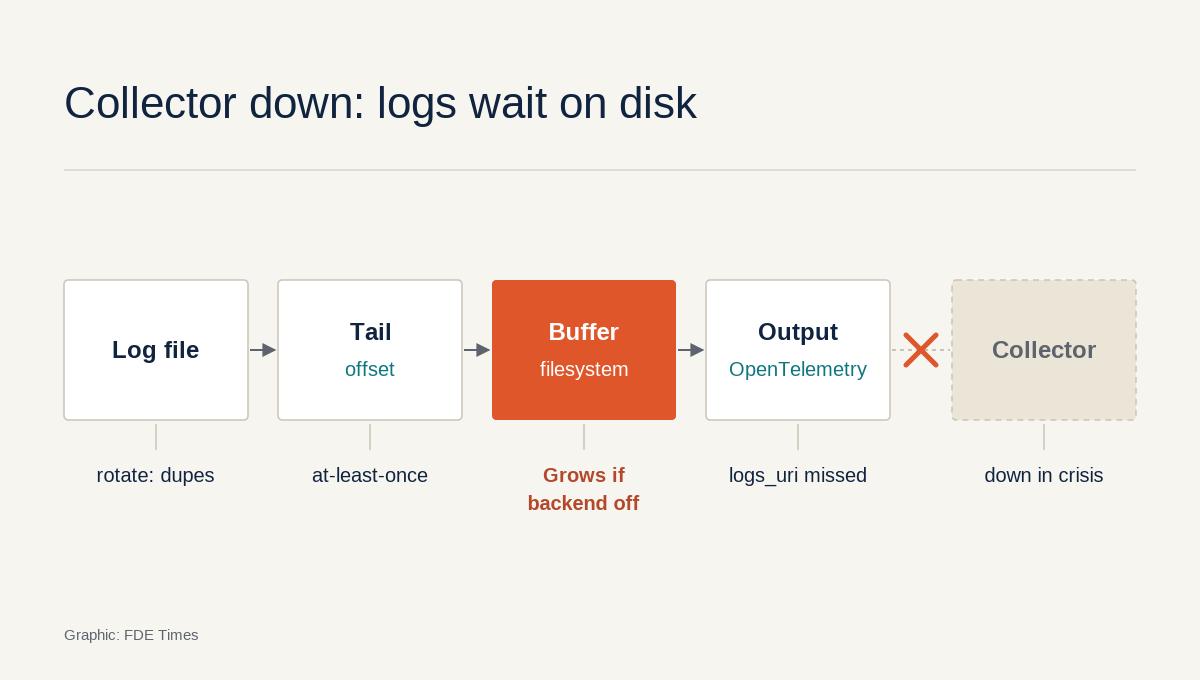
The DB line is not decoration either. The file stores inode=offset pairs, so after a restart Fluent Bit resumes where it left off rather than rereading from the start. The docs note that each instance of the plugin needs its own DB file.
Lost or duplicated logs come from three places
The first is the offset. If the agent shuts down abruptly, the docs describe delivery as at-least-once: some lines may be sent again. As a result, error-count queries on the client’s backend can drift slightly upward after each incident, and it is better to tell the operations team in advance than to let them discover it.
The second is log rotation. Tail handles rotation, including logrotate’s copytruncate mode, but the docs warn that this mode can still lose logs. More dangerous is a Path pattern that also matches rotated files.
In the example above, *.log does not match app.log.1. But if the client configures rotation to produce app-20261123.log, Fluent Bit will reread the old file and generate duplicates.
The third is stack traces. A Python or Java exception spans several lines, and without configuration each line becomes a separate record. Since version 1.8, Tail has multiline support in its core, so for the Python application in the example the input can gain one line:
[INPUT]
    Name              tail
    Path              /var/log/myapp/*.log
    DB                /var/lib/fluent-bit/tail.db
    storage.type      filesystem
    multiline.parser  python
The parser name has to match the application’s language, and it should be checked against the Tail page in the docs for the version the client runs. Before handover, deliberately throw a real exception and check on the client’s backend whether it shows up as one record or as fragments.
Memory or filesystem: choose by the client’s risk
In-memory buffering is faster and lighter on resources, but according to the docs it is more prone to data loss. Filesystem buffering requires a global storage.path in the service section, and it protects data better when the client’s backend cannot accept it.
The storage.path line only tells the agent where the buffer directory lives. The example above also sets storage.type filesystem on the input, intending that input to buffer to disk; check the Buffering page to confirm the setting takes effect, then verify it by watching for new files in the buffer directory while the Collector is switched off.
That makes filesystem the sensible default in a client environment. The client’s Collector is most likely to go down during an incident, which is also when your application’s logs are most valuable.
Agree with the client on where the buffer directory sits and how much disk it may use, because it grows for as long as the backend refuses data.
What to learn first, and what to put on your CV
Start with the parts that cause the most incidents: first Tail, with its DB file and Path pattern, then buffering, and only then the output. The OpenTelemetry output is a few lines; the other two decide whether logs arrive complete.
When reading FDE job postings, look for requirements about integrating with the client’s observability systems or mentions of OpenTelemetry. Where they appear, this skill belongs on your CV. A line saying “configured Fluent Bit” persuades less than a concrete sentence on how you fed logs into a client’s existing Collector and dealt with duplicates after rotation.
Clients rarely praise a log pipeline that runs smoothly. But if your logs are missing from the dashboard on the night of an incident, they will remember it for a long time.
Was this article useful?
Thanks for the feedback!