Client banned Docker? One alias saves half your deployment
The other half depends on user permissions, network ports and systemd on the client's machine, and all of them should be checked before you arrive on site.
In brief
- Podman has no daemon, so ordinary users can run containers without going through any root-owned process
- Most users only need alias docker=podman, but rootless mode requires subuid/subgid and cannot bind ports below 1024
- Quadlet turns containers into systemd services managed with systemctl, provided the machine runs cgroup v2
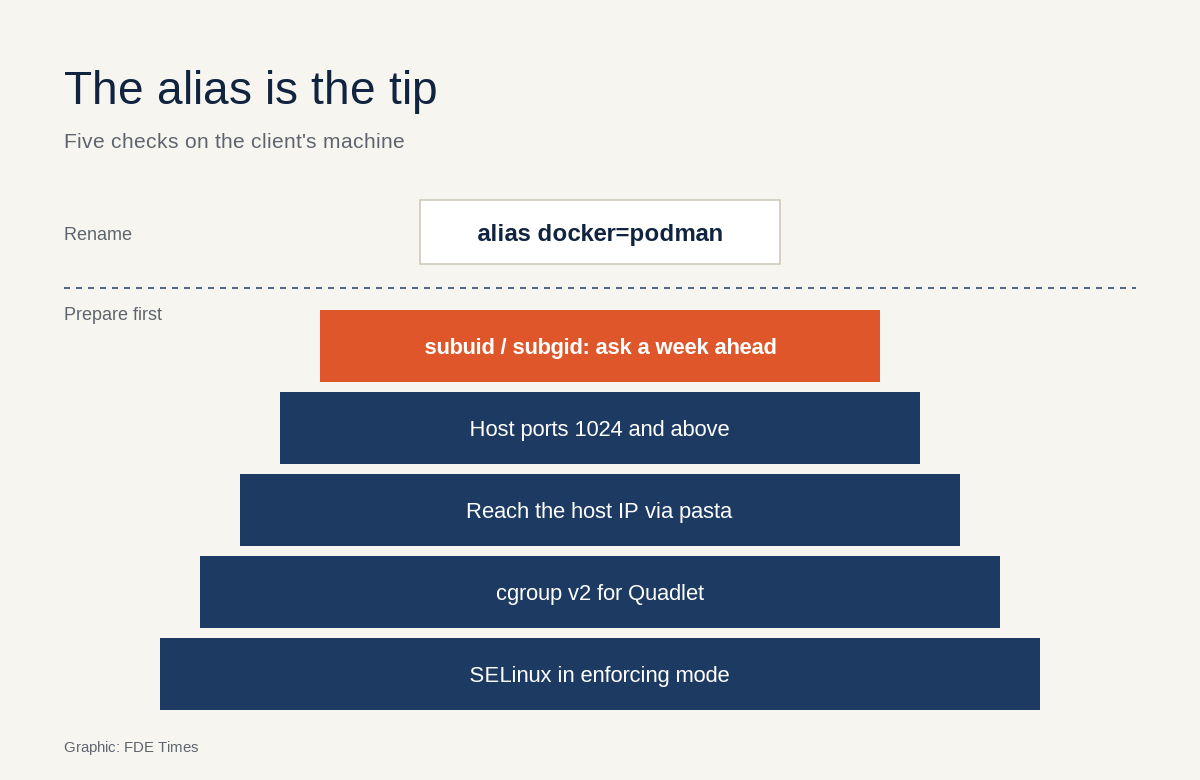
Podman’s official documentation contains a sentence that every FDE who has had Docker blocked by a client’s security team should know by heart: most users can simply set alias docker=podman and run without any problems. The promise is nearly true, and the “nearly” is what decides how your deployment goes.
Your README, Makefile and demo scripts were almost certainly written around the docker command. The client’s machine, meanwhile, is usually a Linux VM run by the infrastructure team, with an account that has no root access and a policy that forbids any daemon running as root.
Knowing just enough about Podman lets you deploy on schedule without rewriting all of your tooling.
Why the security team will sign off
Podman’s man page calls it a simple, daemonless tool with a full-featured container engine.
Red Hat explains the security reasoning behind that design: without a daemon, ordinary users can run containers without having to interact with a daemon owned by root.
Podman containers can run as root or as an unprivileged user. In rootless mode, an analysis by Dimitris Vagiakakos on NVISO Labs points to the most important mechanism: user IDs inside the container are mapped to other, unprivileged user IDs on the host.
According to NVISO, this mapping helps limit the damage if a container escape occurs.
Containers created by an ordinary user are also invisible to other users, and Podman running as root cannot see or manage them either. Those three points belong in your email to the security team: no root daemon, remapped UIDs, and each user’s containers isolated from everyone else’s.
A trial deployment, step by step
Take a hypothetical case: you bring the image of an inference API to a client’s VM. The API listens on port 80, and you log in with an account that has no sudo. Before running anything, check whether the user has been granted subordinate UID/GID ranges:
grep "$USER" /etc/subuid /etc/subgidRootless mode needs many UIDs and GIDs per user. The project’s documentation warns that if /etc/subuid and /etc/subgid are not set up, podman commands are likely to fail, and that this is common at companies using identity providers that do not manage those two files.
If the command returns nothing, open a ticket with the client’s admin the week before. Do not wait until the morning you arrive on site.
Only then come the alias and the run command:
alias docker=podman
docker run -d -p 8080:80 my-inference-api
Port 8080 is the choice because rootless Podman cannot create containers that bind to ports below 1024. If the client needs port 80 or 443, ask beforehand whether their load balancer or reverse proxy can forward from a higher port.
The third trap is harder to spot. Since Podman 5.0, pasta has been the default networking tool for rootless containers, and it has a known limitation when a container connects to the host’s own IP address. If your API calls a database on the same machine via the host IP, test that exact connection as early as possible.
Who keeps the containers alive once you have gone home?
No daemon also means no process that restarts containers after the machine reboots. Podman solves this with systemd: Red Hat describes the integration between the two as a way to generate control units for containers so they run in the background without a separate daemon.
You place a file describing the container in the rootless user’s ~/.config/containers/systemd/, Quadlet generates a unit file, and that unit is started and managed with systemctl like any other systemd service. The machine must use cgroup v2, so check in advance:
stat -fc %T /sys/fs/cgroup # cgroup2fs means cgroup v2One more caveat before you make promises to the security team. NVISO stresses that SELinux-based isolation only works on machines where SELinux is installed, enabled and in enforcing mode. On a VM with SELinux turned off, leave this layer of protection out of your argument.
Five questions for the infrastructure team before the visit
The trial deployment above boils down to a short checklist:
| Question for the client | Why ask |
|---|---|
Does the user have ranges in /etc/subuid and /etc/subgid? |
Without them, podman commands are likely to fail |
| Must the service listen on a port below 1024? | Rootless mode cannot bind these ports |
| Does the container call any service via the host’s own IP? | This kind of connection hits a known pasta limitation |
| Does the machine run cgroup v2? | Quadlet requires cgroup v2 |
| Is SELinux in enforcing mode? | SELinux isolation only applies then |
A self-test: for the last client VM you worked on, answer these five questions without logging in. Any you cannot answer are the ones to put to the client’s infrastructure team in your next email.
What to learn first, and how to show it on a CV
The order to learn it in: set up a Linux VM, create a user without sudo, grant subuid/subgid, rerun your old scripts through the alias, then move one container to Quadlet. Most of the errors you would meet on a client’s site show up in this exercise, at a far lower cost.
When reading FDE job postings, look for phrases such as on-prem, customer infrastructure or security constraints: that is where this skill gets paid. On a CV, a specific line such as “deployed services with rootless Podman and systemd on client machines without root access” carries far more weight than the word “Docker” sitting alone in the skills section.
Clients who ban Docker rarely ban containers. They ban a root process they cannot control, and the FDE who understands that difference will be the first to get code into production.
Was this article useful?
Thanks for the feedback!
7 sources
- Podman documentation (docs.podman.io)
- podman(1) man page, docs.podman.io
- Shortcomings of Rootless Podman (rootless.md), containers/podman
- What is Podman? (Red Hat) · 2026-01-28
- podman-systemd.unit(5), docs.podman.io
- Rootless Containers with Podman (Dimitris Vagiakakos, NVISO Labs) · 2026-02-03
- containers/podman (GitHub)