Pandera: write DataFrame schemas that stop bad customer data at the start of the pipeline
On a customer site, the first CSV you receive rarely matches its documentation. A small open-source library shows you exactly which column is wrong.

In brief
- Pandera is an open-source project from Union.ai, MIT-licensed, written and maintained by Niels Bantilan.
- Schemas are written as classes that subclass DataFrameModel, but runtime validation requires the check_types decorator.
- When data is wrong, the error names the column, the failed check and the offending value, which is enough for an FDE to ask the customer a precise question.
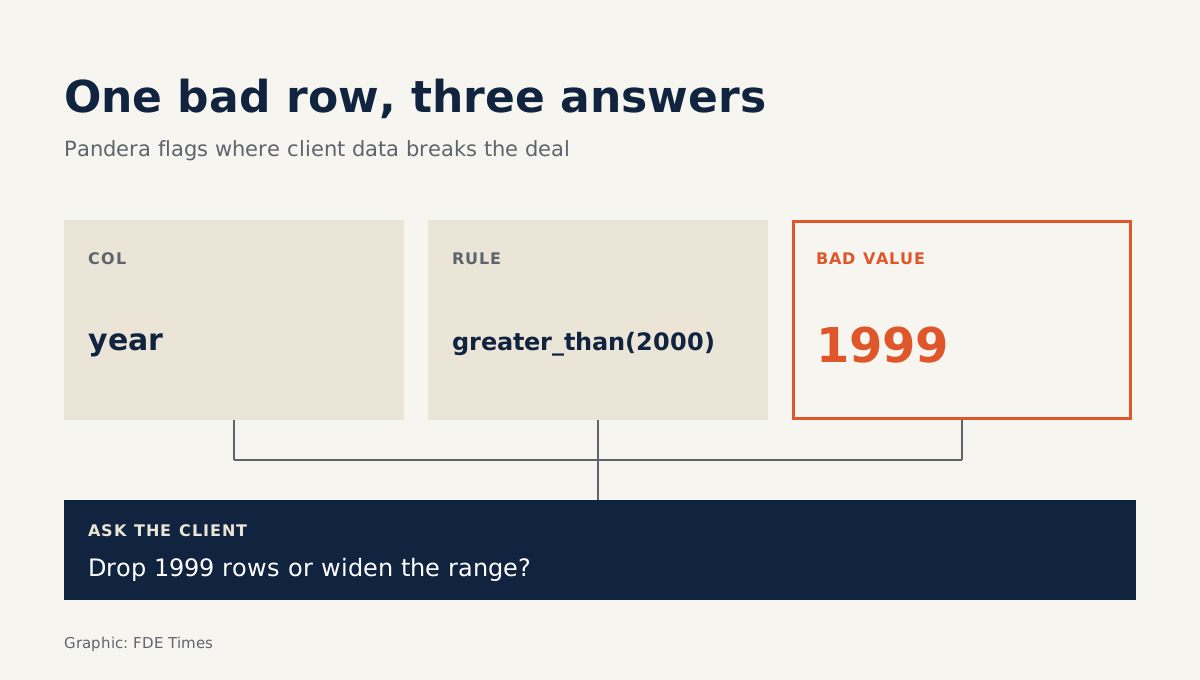
A value of 1999 in a year column usually goes unnoticed. Then, a week later, a customer report comes out with the wrong numbers and the team spends two days tracing it back. Pandera helps you catch this kind of error at the start: when data fails validation, the library reports the exact column, the exact rule that was broken and the exact value that broke it.
For an FDE, this matters more than it does for a product engineer. At your own company, you control the data sources. On a customer site, the opposite is true: the data passes through someone else’s systems, is exported with someone else’s tools, and the documentation is usually older than the data itself.
The unionai-oss/pandera repository describes itself as a lightweight statistical data testing library, written and maintained by Niels Bantilan, with the aim of making data processing pipelines more readable and robust. The quickest way to understand it is to write a schema.
What does a schema look like?
Imagine the customer is a retail chain that sends you an orders file. The contract says only data from after 2000 is in scope. Your job is to turn that sentence into code, so the pipeline rejects a bad file on its own instead of quietly processing it.
With pandas, install it with pip install 'pandera[pandas]'. Then declare the schema in a pydantic-like style: write a class that subclasses DataFrameModel, with each column as a class attribute.
import pandas as pd
import pandera.pandas as pa
from pandera.typing import DataFrame, Series

class Orders(pa.DataFrameModel):
    order_id: Series[str]
    year: Series[int] = pa.Field(gt=2000)

@pa.check_types
def load_orders(df: DataFrame[Orders]) -> DataFrame[Orders]:
    return df

raw = pd.DataFrame({"order_id": ["A1", "A2"], "year": [2021, 1999]})
load_orders(raw)
When this code runs, the second row is stopped. The Pandera documentation shows a similar error message: the year column fails the greater_than(2000) validator, and the failure case is 1999. In a single line you have all three pieces of information: which column, which rule, which value.
First trap: annotations check nothing by themselves
Many newcomers assume that writing DataFrame[Orders] in the function signature is enough. It is not. The Pandera documentation is clear that the check_types() decorator is required for the DataFrame to be validated at runtime, so without the @pa.check_types line in the example above, the 1999 value would slip through with no warning at all.
This mistake is dangerous because the code looks reassuring. A reviewer sees the type annotation, sees the schema, and assumes the data is protected. When auditing a pipeline on a customer site, check whether the decorator is actually attached to the functions that take data in, not merely whether a schema exists.
Second trap: assuming the schema covers everything
A schema guards only the rules you write down. In the example above, year has the condition gt=2000, while order_id is declared with a type and no other constraint. If the final report also depends on a revenue column you have not put in the class, that column is unprotected, even though the pipeline still runs “green”.
The way to avoid this is to work backwards from the output: list the columns the numbers you send the customer depend on, then check that each one has a rule in the schema.
Third trap: an upgrade changes validation behaviour
On PyPI, the latest release of Pandera is 0.35.0, so the library has not yet reached 1.0. With a library still at 0.x, expect that the API may change between releases.
So when you bring Pandera into a customer’s repository, pin the version in the dependencies file. You do not want a reinstalled environment to make your schema validate differently without anyone noticing.
The error message is the question for the customer
Pandera’s greatest value for an FDE comes after the error appears. A sentence such as “there is a problem with your data” goes nowhere. A sentence such as “the year column contains the value 1999, while the agreed scope is after 2000; would you like us to drop this row or widen the scope?” is one the customer can answer the same day.
The schema therefore does two jobs at once. It is a technical guardrail in the code, and it is also a record of what you and the customer agreed about the data. When the customer changes their mind, you edit one line in the class, and the commit history shows clearly who agreed to what, and when.
What to learn first?
Start with the smallest thing that works: one DataFrameModel for the customer’s most important table, plus check_types on the first load function. There is no need to cover every column yet.
In career terms, this skill is easy to demonstrate. On a CV, instead of writing “experienced with pandas”, you can describe how you placed schema validation at the entry point of a customer’s data pipeline, and name the kinds of errors it caught. When a job description mentions “data quality” or “messy customer data”, that is the place to tell this story in an interview.
Every first week on a customer site will turn up a 1999 somewhere. The question is whether you catch it at the load step, or when the customer asks why the report is wrong.
Was this article useful?
Thanks for the feedback!