Docling: turning client PDFs and tables into Markdown for RAG, locally
Many RAG demos break while the documents are being read, before the model is ever called. This open-source toolkit, started at IBM Research, is built for that stage.

In brief
- Docling uses DocLayNet for layout analysis and TableFormer to rebuild table structure, so tables and reading order survive the conversion to Markdown.
- It runs locally on ordinary hardware and works in air-gapped environments. That settles the question when a client's documents are sensitive.
- HybridChunker splits by structure first, then by tokens, and repeats table headers in each chunk. Docling ships integrations with LangChain, LlamaIndex, Crew AI and Haystack.
Picture your first week on a client site. You are handed a folder of supplier contracts as PDFs, each with a multi-column price table, and one condition: the documents may not leave the internal servers.
Whichever model you pick, the RAG demo will still give wrong answers if the PDF-reading step flattens the price table into a string of text with the columns jumbled together.
Docling targets exactly this failure. It is an open-source package started by the AI for knowledge group at IBM Research Zurich.
The project’s technical report on arXiv, published on 19 August 2024 by IBM authors including Auer, Lysak, Nassar, Dolfi, Staar and colleagues, describes it as an easy-to-use, self-contained, MIT-licensed tool. In April 2025 IBM contributed Docling to LF AI & Data, part of the Linux Foundation.
For an FDE this stage matters because it sits at the start of the pipeline. Ingestion rarely gets attention, yet every answer downstream depends on it. Whoever owns this stage is often the one who saves the demo.
What does Docling do differently from an ordinary PDF reader?
A standard text extractor only reads characters by their position on the page. Docling tries to understand what the page looks like, using two specialised models: DocLayNet analyses the layout, and TableFormer takes the detected table regions and reconstructs their structure.
As a result, according to the project’s GitHub page, Docling understands page layout, reading order and table structure. Because it understands structure, it can produce real Markdown: headings stay headings and tables stay tables.
There is another reason it suits client work. The technical report says Docling runs on ordinary hardware, and the official documentation states explicitly that it can run locally for sensitive data and in air-gapped environments.
So at your first meeting with the client’s security team, you can answer “does the data leave the building?” on the spot.
A minimal example: from PDF to Markdown
The official guide shows it takes only a few lines of Python: create a DocumentConverter, convert the document, then call export_to_markdown():
from docling.document_converter import DocumentConverter

source = "supplier_contract.pdf"
converter = DocumentConverter()
doc = converter.convert(source).document
print(doc.export_to_markdown())
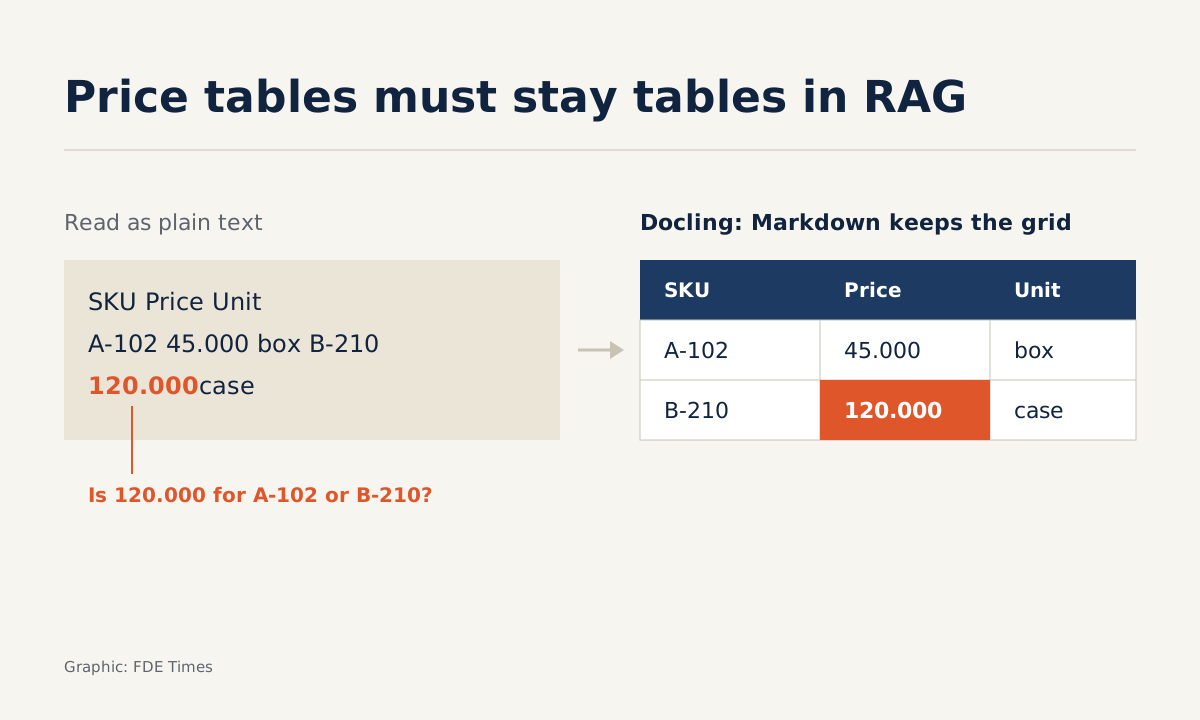
Back to the price table in the contract. Imagine a three-column table (item code, unit price, unit). Read as plain text, it can come out as one unbroken line like this:
Item code Unit price Unit A-102 45.000 box B-210 120.000 cartonLooking at that line, an LLM has no reliable way to tell whether 120.000 is the price of A-102 or B-210. What you want to see after running Docling is a Markdown table with rows and columns intact:
| Item code | Unit price | Unit   |
|-----------|------------|--------|
| A-102     | 45.000     | box    |
| B-210     | 120.000    | carton |
The figures above are only illustrative, but the check is real. Do not stop once the code runs: open the Markdown output and go through each table, checking that every item code sits next to the right unit price and that units have not slipped into the neighbouring column.
Markdown is not the only export format; the official documentation also lists HTML, WebVTT and DocLang. Markdown is the one that suits dropping straight into a prompt and checking by eye.
Checking one table is easy; measuring a batch is what convinces
Checking by eye only works for a handful of files. When the client asks “how well does it read tables?”, you need a number across a batch of their own documents.
The simplest approach: pick a sample of tables, retype a reference version of each by hand, then count how many come out with the right number of rows and columns and every cell in the right place.
Say the sample has 40 tables and 31 pass: the preservation rate is 31/40, or 77.5%. Run the same sample through the extractor the client uses today and you immediately have a “before and after” pair.
A pass/fail rate has a weakness: a table that is off by a single cell counts as a complete failure. For a finer measure, use TEDS (Tree-Edit-Distance-based Similarity), a metric proposed in a 2019 study for the table recognition problem.
TEDS compares a predicted table with the reference on both row and column structure and the content of each cell, and returns a similarity score; average it across the samples to get a score for the batch. Report both numbers to the client: the share of perfect tables, because it is easy to grasp, and the TEDS score, to show whether the errors are severe or minor.
Chunk by structure, not by character count
Conversion is only half the job. Cutting a document into 500-character pieces is the easiest way to split the price table you just preserved, or to separate a clause from its heading.
Docling’s HybridChunker handles this. It splits along the document’s hierarchical structure first, then refines with a tokenizer, usually the one matching your embedding model: it splits only oversized chunks and merges small adjacent ones, so that each chunk fits within the token limit the model accepts.
from docling.chunking import HybridChunker

chunker = HybridChunker()
for i, chunk in enumerate(chunker.chunk(dl_doc=doc)):
    print(i, chunk.text[:80])
For long tables that must be split across several chunks, Docling by default repeats the table header row at the top of each chunk. When you print the output, that is exactly what to check: the second chunk of the price table should still begin with “Item code | Unit price | Unit”.
You do not have to write glue code for the next step either. Docling ships integrations with LangChain, LlamaIndex, Crew AI and Haystack, so if the client has already built a stack on one of these frameworks, Docling replaces only the ingestion stage.
Don’t promise anything before testing on the worst documents
A specialised model is still a model. A skewed, blurry scan with a stamp over the table is likely to make layout analysis and table recognition much harder than a PDF exported from Word.
So do not commit to an accuracy figure on a slide. Ask the client for the worst documents they have, run them through Docling, measure table preservation as described above and show them the real results, including what is still wrong.
Running locally has a cost too: compute is now your problem rather than an external API’s. With thousands of documents, measure processing time on the client’s own servers before promising a rollout schedule.
What to learn first, and what to put on your CV
Learn in this order: converting PDF to Markdown, reading the output to spot broken tables, building a reference set of tables to measure against, and only then HybridChunker and framework integrations. Reading the technical report on arXiv helps you understand what DocLayNet and TableFormer do, so you can explain why a table was misread.
When reading job descriptions, watch for phrases such as “document ingestion”, “unstructured data” or “on-prem deployment”; they signal that the company faces exactly this problem.
On a CV, a line with a number carries far more weight than “experience with RAG”, for example: “built a local ingestion pipeline for table-heavy documents, raising the share of tables with correct structure from X% to Y% on a sample checked against reference tables”.
Clients remember the FDE whose RAG demo worked on their own messy PDFs and who could prove it with numbers, not the one who picked the newest model. Docling is one of the shortest routes to doing that.
Was this article useful?
Thanks for the feedback!
8 sources
- Docling Technical Report · 2024-08-19
- GitHub - docling-project/docling
- Index - Docling (official docs)
- Index - Docling (official usage docs)
- Chunking - Docling
- Docling: An open-source tool kit for advanced document processing · 2025-05-29
- AI Workflows Get New Open Source Tools to Advance Document Intelligence, Data Quality, and Decentralized AI · 2025-04-29
- Image-based table recognition: data, model, and evaluation · 2019-11-25