Node-RED: bridging OPC UA and Modbus to MQTT on a customer's factory floor
Wiring the nodes takes an afternoon. A forgotten division or an unsecured editor can still ruin the first demo on the shop floor.

In brief
- MQTT uses the built-in in/out nodes; Modbus and OPC UA need separate packages, followed by a Node-RED restart
- Modbus registers are only 16-bit integers, so raw values usually have to be scaled against the register map before publishing
- The editor has no security by default, so enable adminAuth and HTTPS before leaving Node-RED on a factory network
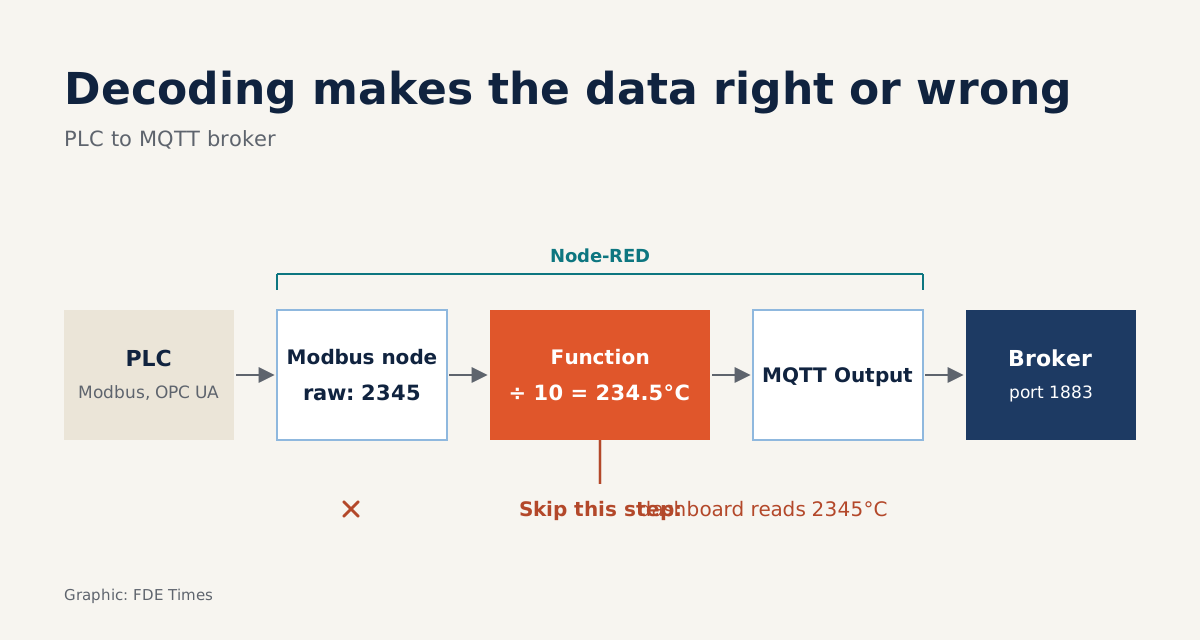
A temperature sensor read over Modbus may return the number 350. FlowFuse uses exactly this example to point out that the real temperature is 35.0°C. Picture the first demo on the shop floor with a dashboard reporting the furnace at 350 degrees: one forgotten division is enough to sink it.
If you are an FDE deploying a data or AI product for a manufacturing customer, the first question is almost always the same: how do we get readings out of the PLC? The equipment speaks Modbus or OPC UA; your system wants MQTT.
Node-RED is a quick way to build that bridge. It is a flow-based programming tool with roots in IBM’s Emerging Technology Services group, and its editor runs in the browser: you wire nodes together instead of writing a service from scratch. But it has a few traps worth knowing about before the day you go on site.
What comes built in, and what must be installed?
MQTT is built in. The Node-RED cookbook shows how to use the MQTT in or MQTT out node, together with a config node that defines the broker. If a local broker is running, set the host to localhost and keep port 1883. A secured broker needs extra configuration.
The device side has to be installed. FlowFuse notes that Node-RED does not ship with Modbus nodes. The node-red-contrib-modbus package supports both Modbus TCP and serial, and can be installed through the Palette Manager or with npm install. For OPC UA, the node-red-contrib-opcua package is built on the node-opcua library and is installed with npm in the Node-RED directory.
The official documentation has one easily forgotten detail: after installing a package, you must restart Node-RED before it picks up the new nodes. If you are working on a customer’s live gateway, warn the operators about that restart in advance.
Modbus: one register, one division
According to Chipkin’s guide, a Modbus register is just a 16-bit integer, with no unit and no decimal point. The meaning of the number lives in the device’s register map. When that map lists a resolution of 0.1, you divide the raw value by 10.
Imagine the customer’s register map contains a line like this: furnace 1 sensor, one holding register, 16-bit integer, resolution 0.1, unit °C. The Modbus node reads 350. Publish that number as it is and the dashboard will show the furnace at 350 degrees.
So the minimal flow has four stages. The Modbus node reads the register, a function node scales it, MQTT out publishes it to a structured topic, and finally the broker receives the data. The snippet below is illustrative only and assumes the raw value is already in msg.payload:
// Factor taken from the register map: resolution 0.1 → divide by 10
const raw = msg.payload;          // e.g. 350
msg.payload = raw / 10;           // 35.0 (°C)
msg.topic = "factory/furnace-1/temperature";
return msg;
The 10 in that code does not come from nowhere. It comes from the register map, and you have to ask the customer for that map for every device.
32-bit floats: two registers, in an order the vendor decides
The harder part is 32-bit floats. Each value occupies two registers, and Chipkin notes that each vendor orders those two registers in its own way. You only decode correctly when you match the order used by that particular device.
Take a worked example: 35.0 written as a standard 32-bit float is 0x420C0000. If the device sends the high word first, the Modbus node reads two integers, [16908, 0], because 0x420C equals 16908. The illustrative snippet below combines the two registers into 4 bytes and reads them back as a floating-point number:
// Assumes the register map says: 32-bit float, high word first
const [hi, lo] = msg.payload;     // e.g. [16908, 0]
const buf = Buffer.alloc(4);
buf.writeUInt16BE(hi, 0);
buf.writeUInt16BE(lo, 2);
msg.payload = buf.readFloatBE(0); // 35
return msg;
With a vendor that sends the low word first, the payload will be [0, 16908]. Run the same code on it and you get a tiny number close to zero instead of 35. The fix is simply to swap the two write lines, but you have to know the order, either from the register map or by testing against a known value.
When the data mixes types or needs byte swapping, FlowFuse suggests the buffer-parser node rather than hand-written code. Whichever route you take, check the result against the customer’s HMI screen before trusting the number.
OPC UA: endpoint, READ, then MQTT
FlowFuse’s step-by-step guide for OPC UA is short. Drag an OpcUa-Client node into the flow, click the “+” next to the Endpoint field and enter the URL of a running OPC UA server. If the server has no security enabled, the policy can be left as None.
Next, choose the READ action type, then wire the node’s output to an mqtt out node pointing at the broker. After those three steps, values read from the server reach the MQTT topic.
A policy of None is only suitable for testing. So before the site visit, sit down with the plant engineers to list the endpoints, the variables you need and their units, and ask whether the server has security enabled. That list is the real work; wiring the nodes is far lighter.
Four common mistakes on site
These four mistakes are worth printing out and taking on every trip:
| Mistake | What happens | How to avoid it |
|---|---|---|
| Publishing raw values | The dashboard shows 350 instead of 35.0°C | Scale against the register map; for 32-bit floats, match the vendor’s register order |
| Leaving the editor on default settings | Anyone on the network can edit the flows | Uncomment adminAuth in settings.js, then switch to HTTPS |
| Missing packages on an OT network with no internet | The Modbus or OPC UA nodes cannot be installed on site | Prepare the packages and test the install before the site visit |
| Old Node.js | The Modbus package will not run | The package needs Node.js 22 or later and Node-RED 4 or later; Node-RED recommends Node 24.x |
The second mistake deserves more detail. Node-RED’s security documentation states plainly that the default editor is unprotected and is only suitable for trusted networks. In a factory, that means anyone who can reach the network can modify flows connected to the equipment.
The third mistake comes from how installation works. Whether you use the palette or npm, the package has to be downloaded. If the customer’s OT network cannot reach the internet, discovering this on the day of the visit is too late.
The fourth is also worth checking remotely: Node-RED 5.x requires at least Node.js 22, so an old gateway may need upgrading first.
What to learn first, and what to put on your CV?
Learn MQTT first (topics, brokers, naming conventions), then how Modbus stores data in registers, and leave OPC UA for last. Along the way, read settings.js carefully so you know where the security settings live.
In job descriptions, phrases such as OT/IT integration, MQTT or PLC data signal that the role will need exactly this kind of bridge. On a CV, a concrete line such as “built Modbus and OPC UA to MQTT bridges, scaled registers against the register map, enabled adminAuth and HTTPS” is far more convincing than “IoT experience”.
You can practise the whole chain on a laptop. Use an inject node emitting 350 in place of a real device, pass it through the function node above and publish 35.0 to a local broker on port 1883. Then inject [16908, 0] through the float decoder, change it to [0, 16908] to see what a wrong result looks like, and finally enable adminAuth and log back in to the editor.
Node-RED is not the glamorous part of a factory AI project. But if the data passing through it carries the wrong units, every model downstream is wrong too.
Was this article useful?
Thanks for the feedback!
10 sources
- About : Node-RED
- Securing Node-RED : Node-RED
- How to Bridge Modbus to MQTT: Step-by-Step Guide · 2026-08-13
- Modbus Scaling & Data Conversion Guide · 2026-03-12
- BiancoRoyal/node-red-contrib-modbus (GitHub)
- node-red-contrib-opcua : Node-RED Library
- Bridging OPC UA Data to MQTT with Node-RED (2026) · 2026-06-03
- Supported Node versions · 2026-06
- Adding nodes to the palette : Node-RED
- Connect to an MQTT Broker, Node-RED Cookbook