Where OpenFGA blocks documents before a client's agent reads them
The check sits after retrieval and before the LLM, and choosing pre- or post-filtering decides whether an agent misses valid documents or makes extra requests.
In brief
- OpenFGA requires the permission check to happen after retrieval and before documents reach the LLM, whichever approach you choose.
- Post-filtering uses BatchCheck, with at most 50 checks per call by default. Pre-filtering uses ListObjects, with at most 1,000 results by default.
- When permissions live in Confluence or SharePoint, you need a permission sync pipeline, and you must look closely at caching when access is revoked.
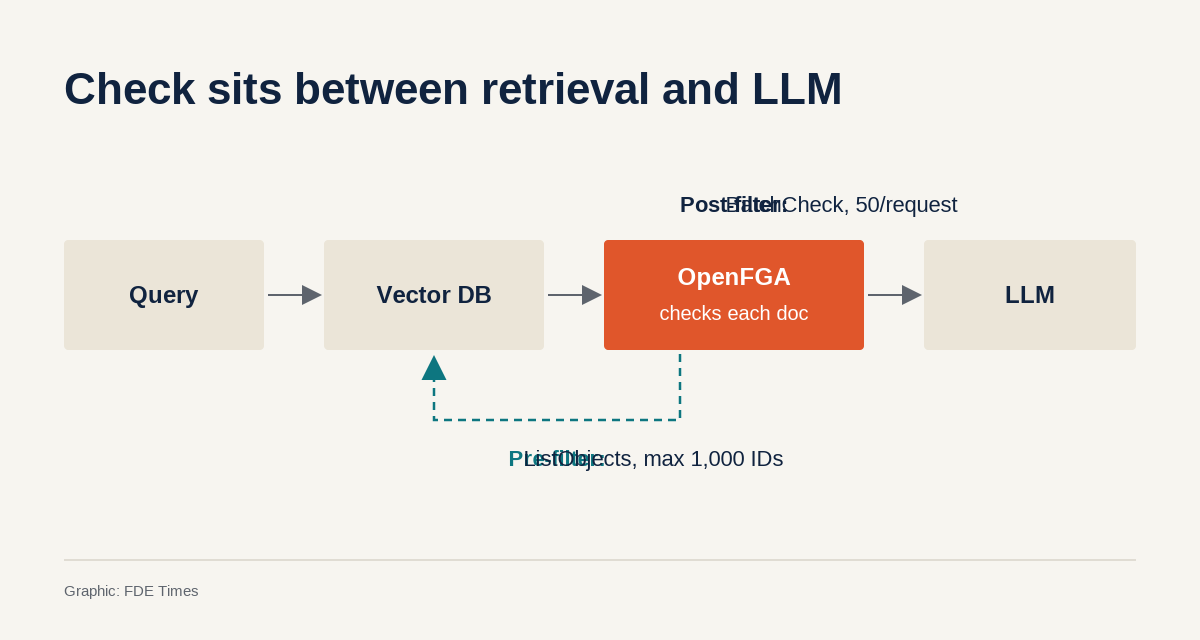
OpenFGA’s RAG Authorization documentation settles on a rule that fits in one sentence: whichever approach you choose, the permission check must happen after retrieval and before documents reach the LLM. That sentence shapes the architecture of every agent allowed to read a client’s internal documents.
An FDE should be able to answer one question before the first demo: if a salesperson asks the agent a question, can the agent quote from HR’s payroll file? If the vector database knows nothing about permissions, the answer is yes. OpenFGA is one way to answer “no” and prove it with a test.
What is OpenFGA, and why does it suit agents?
The official repository describes OpenFGA as a high-performance, flexible authorization engine built for developers, inspired by Google Zanzibar and released under the Apache-2.0 license.
The project was originally developed by Auth0/Okta, open-sourced in June 2022 and then donated to the Cloud Native Computing Foundation. On November 11, 2025, the CNCF Technical Oversight Committee voted to accept it at the Incubating level.
OpenFGA uses relationship-based access control (ReBAC). Permissions are stored as tuples describing relationships between users and objects. The engine answers one very narrow question: does this person have this permission on this document?
For agents, OpenFGA’s documentation on task-based authorization adds a further principle: an agent starts with no permissions and receives only the permissions the current task needs. At a client site, that principle persuades a security team more readily than any slide.
One model, one tuple, one BatchCheck
The fastest way to understand a tool is to build the smallest version yourself. Below is a minimal model with only users, documents and a single viewer relation.
model
  schema 1.1

type user

type document
  relations
    define viewer: [user]
Then write a single tuple, meaning “user linh may view document q3-quote”:
user:linh viewer document:q3-quoteNow put the check exactly where the documentation requires it: right after the vector database returns a list of IDs, before the context for the LLM is assembled. A sketch with the JavaScript SDK:
// docIds: the document IDs the vector database just returned
const { result } = await fga.batchCheck({
  checks: docIds.map((id) => ({
    user: `user:${userId}`,
    relation: "viewer",
    object: `document:${id}`,
  })),
});

// only permitted documents go into the LLM's context
const allowedIds = result
  .filter((r) => r.allowed)
  .map((r) => r.request.object);
With the tuple above, q3-quote gets through when linh asks, and not when anyone else does. Write tests for exactly those two cases before writing another line.
Pre-filtering or post-filtering?
The code above is post-filtering: query the vector database first, then check the results against OpenFGA, using BatchCheck to check many documents in one request. The alternative is pre-filtering: call ListObjects to get every document ID the user can access, then use that list as a metadata filter in the vector search.
Each approach comes with a default number to remember. By default, a single BatchCheck call holds at most 50 checks; the figure is configurable on the server, and the documentation says the SDK splits larger batches automatically. ListObjects returns at most 1,000 results by default.
Running the real numbers
Take a hypothetical client with a large Confluence instance, where the agent retrieves 120 passages per question. With post-filtering, 120 checks exceed the default of 50, so the SDK splits them into three calls: 50, 50 and 20.
If the person asking can see only a small part of the space, perhaps only a few dozen passages make it through. So retrieve more than the LLM actually needs, then measure how many remain after filtering.
Now switch to pre-filtering for a department head who can view 4,000 pages. ListObjects stops at the default 1,000 results, so the metadata filter contains only a quarter of the pages that person is allowed to see.
The agent will answer “not found” for a real document the person is permitted to read. This bug leaks no data, but it erodes a client’s trust almost as quickly.
Those two calculations make the choice fairly clear. When each person can see few documents, pre-filtering is leaner. When each person can see a great many, post-filtering is safer. Count at the client before choosing.
Two places production breaks
The first is where permissions come from. When documents and permissions live in external systems such as Google Drive, Confluence or SharePoint, you need a pipeline that syncs content into the vector database and permissions into OpenFGA.
In that setup, the sync pipeline writes the tuples, not your application. That is one more system to build and run, so put it in the estimate from the start.
The second is caching. With caching enabled and MINIMIZE_LATENCY mode in use, a tuple change that was just written may not yet be reflected if OpenFGA serves the result from cache. The direct consequence: an employee whose access was just revoked can still get answers drawn from old documents for as long as the cache entry is valid.
HIGHER_CONSISTENCY mode bypasses the cache and queries the database directly. For sensitive documents, trading extra latency for the freshest result is usually the sensible choice.
What to learn first, and what to put on a CV
Learn in this order: the relationship model and tuples, then Check and BatchCheck, then ListObjects and its limit, and finally the consistency modes. Do not start with a Confluence sync pipeline, because that part is specific to each client.
If an FDE job posting mentions “fine-grained authorization”, “ReBAC” or “Zanzibar”, have a concrete permission-check example ready to walk through in the interview. On a CV, a line such as “per-document authorization for a RAG pipeline, with revocation tests” carries far more weight than “experience with security”.
If the client’s security team asks about the payroll file, you do not need a slide. Run a single test showing that the file never reaches the agent’s context.
Was this article useful?
Thanks for the feedback!