Why Shopify has broken its own test network on purpose since 2014
Toxiproxy, its open-source TCP proxy, turns latency and timeouts into CI tests, so an FDE can show a client the failure handled rather than promise it.
In brief
- Shopify has run Toxiproxy in every development and test environment since October 2014 to prove with tests that its applications have no single point of failure.
- Linux tools such as nc are not cross-platform and need root, which makes them awkward in tests and CI; Shopify wrote Toxiproxy, a TCP proxy, to do the job instead.
- The HTTP API has no authentication by default; since version 2.13.0 an optional bearer token is available through TOXIPROXY_AUTH_TOKEN.
Since October 2014, every development and test environment at Shopify has run through a proxy built to break the network on purpose. The tool is called Toxiproxy, its source lives at github.com/Shopify/toxiproxy, and it is still under active development: version 2.13.0 shipped on October 14, 2026.
The README describes it as a framework for simulating network conditions and states its aim plainly: use tests to prove that an application has no single point of failure. That is also a constant worry for a forward deployed engineer. Code that runs smoothly on a laptop will soon have to survive on a client’s network, where you control nothing.
When a client asks “what happens if our database is slow?”, saying “we handle timeouts” lands very differently from opening a running test and showing them. Toxiproxy gives you that test ahead of time.
Why a few Linux commands are not enough
You can simulate a bad network with Linux tools such as nc. The README points out two problems: they are not cross-platform and they require root. On a laptop you can work around that, but the moment you put them in CI or in a test suite shared by the whole team, they get in the way.
So Shopify took a different route: a TCP proxy that sits between the application and its dependency. In an engineering blog post on January 29, 2015, Shopify’s Simon Eskildsen wrote that building Toxiproxy was one of the first steps as the team expanded its resiliency tooling, and that every resiliency integration test they wrote from then on used it.
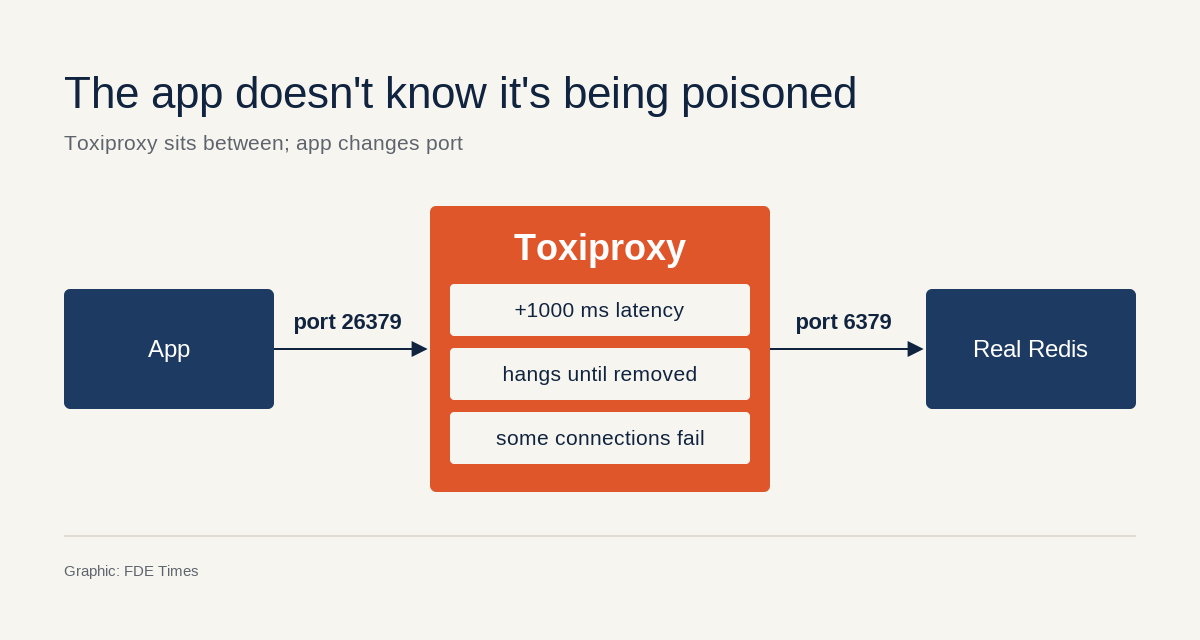
The application never needs to know it is being poisoned. It simply connects to a different port.
Two commands to slow Redis down by a second
The README gives a compact example with Redis. First, create a proxy named redis that listens on port 26379 and forwards to the real Redis on port 6379. Then attach a latency toxic of 1000 ms to that proxy.
toxiproxy-cli create -l localhost:26379 -u localhost:6379 redis
toxiproxy-cli toxic add -t latency -a latency=1000 redis
All that remains is to point the application at localhost:26379 instead of 6379 and run the tests. Watch how the application reacts: does the request hang, fail in the right place, or quietly return empty data? That answer is what you need to know before you go on site.
One detail is easy to misread. The latency toxic affects only one direction of the data flow. The README is explicit: for symmetric delay across the round trip, you have to add latency to both upstream and downstream. If you are reproducing a VPN link that is slow in both directions, one toxic will not do it.
The order to reproduce failures: slow, stalled, then flaky
Latency is the easiest failure to reproduce, so start there. The next step should be the timeout toxic, which stops all data. With timeout set to 0, the connection stays open while data is dropped until you remove the toxic.
This is the most dangerous scenario: the socket still looks alive, so many clients simply wait forever. Only once both delay and stalls are covered by tests should you move on to intermittent failures, the hardest kind to catch.
Real failures on a client site rarely hit every connection. Toxiproxy has a common parameter, toxicity, that sets the percentage of connections a toxic affects. With it you can simulate flaky behavior, the kind that tends to break hastily written retry logic.
What a test with a clear assertion looks like
Docker’s blog, in a post by Eddú Meléndez on March 9, 2023, has an example whose reasoning is worth copying. A latency of 1600 ms ± 100 ms is injected on the path from PostgreSQL back to the client. The reactive code sets a 50 ms timeout, so the test catches a TimeoutException.
The lesson lies in how deliberately the two numbers are paired: the delay is dozens of times larger than the timeout, so only one outcome is possible. Sketched in Reactor style, the core of such a test looks roughly like this, with the timeout and the assertion in the same line of logic:
StepVerifier.create(repository.findAll().timeout(Duration.ofMillis(50)))
    .expectError(TimeoutException.class)
    .verify();
The test does not ask whether the application runs; it asserts that exactly the right kind of error appears. If you work in Java, Testcontainers ships a Toxiproxy module for simulating network failures between your code and a container; the module’s documentation says it is well suited to testing client-side resilience features.
Where the tool can hurt you
The first trap concerns security. Toxiproxy’s HTTP API has no authentication by default and can create proxies to any upstream, so the README warns against exposing it to an untrusted network.
On a client’s servers or staging environment, this matters a great deal. Since version 2.13.0 there has been optional bearer-token authentication through the TOXIPROXY_AUTH_TOKEN variable. Turn it on as soon as Toxiproxy leaves your laptop.
The second trap is harder to spot. According to the README, some MySQL clients prefer a local Unix domain socket regardless of the port you pass. Traffic then bypasses the proxy, the test stays green, and you conclude the application handles failure well. Each time you attach a toxic, run a reverse check: switch on a heavy toxic and confirm the test goes red.
What to learn first, and how to show employers
Do not build a full failure matrix on day one. One important dependency, one test with latency larger than the code’s timeout, one assertion that the application returns a clear error instead of hanging: that is enough for the first week. The rest follows in order, slow, stalled, flaky.
If an FDE job posting mentions reliability or deploying into client infrastructure, that is where this experience belongs in the interview. On a CV, “knows Toxiproxy” says little. Write which integration tests you built for network failures and what bugs they caught before production.
On a client site, however much documentation you hand over, what the client remembers most is the time the system stayed up when their network misbehaved.
Was this article useful?
Thanks for the feedback!