Troubleshoot.sh redacts passwords, not your client's secrets
The built-in redactors are only one layer, so FDEs still have to write their own and read every bundle before the client sends it.
In brief
- Troubleshoot packs diagnostics from a client's cluster into a single tar.gz file, and data leaves the cluster only when the client sends that file.
- Built-in redactors are on by default and cover common patterns, but the official documentation says plainly that they are not exhaustive.
- Custom redactors run only with support bundles, not with preflight; on Replicated Embedded Cluster v3, a bundle created while the cluster is unreachable gets built-in redactors only.
Troubleshoot’s own documentation states that its built-in redactors cover only common patterns and are “not exhaustive”. Users are told to check the results against the data in their own environment. For a tool whose job is to carry logs out of a client’s cluster, that is the line an FDE should read first.
The warning lands squarely on FDEs. You sit between two parties: the product team needs logs to fix bugs, and the client has trusted you with access to its systems. Send one bundle with a database connection string left in it and months of carefully built trust can go with it.
What does the tool do?
The troubleshoot.sh site describes Troubleshoot as a kubectl plugin that provides diagnostic tools for Kubernetes applications, contributed by Replicated. The GitHub README calls it a framework for collecting, redacting and analyzing diagnostic information. The code is licensed under Apache 2.0, and the latest version on the releases page is v0.134.4, published on November 5, 2026.
It ships as two plugins for two different moments. kubectl preflight runs before installation to check whether the cluster meets the requirements. kubectl support-bundle runs after installation and gathers diagnostic data into a tar.gz file.
What clients care about most is where the data goes. Replicated’s documentation says no data leaves the cluster unless the end customer chooses to share the tar.gz file. The final decision therefore rests with the client, and you should make that clear on the first call.
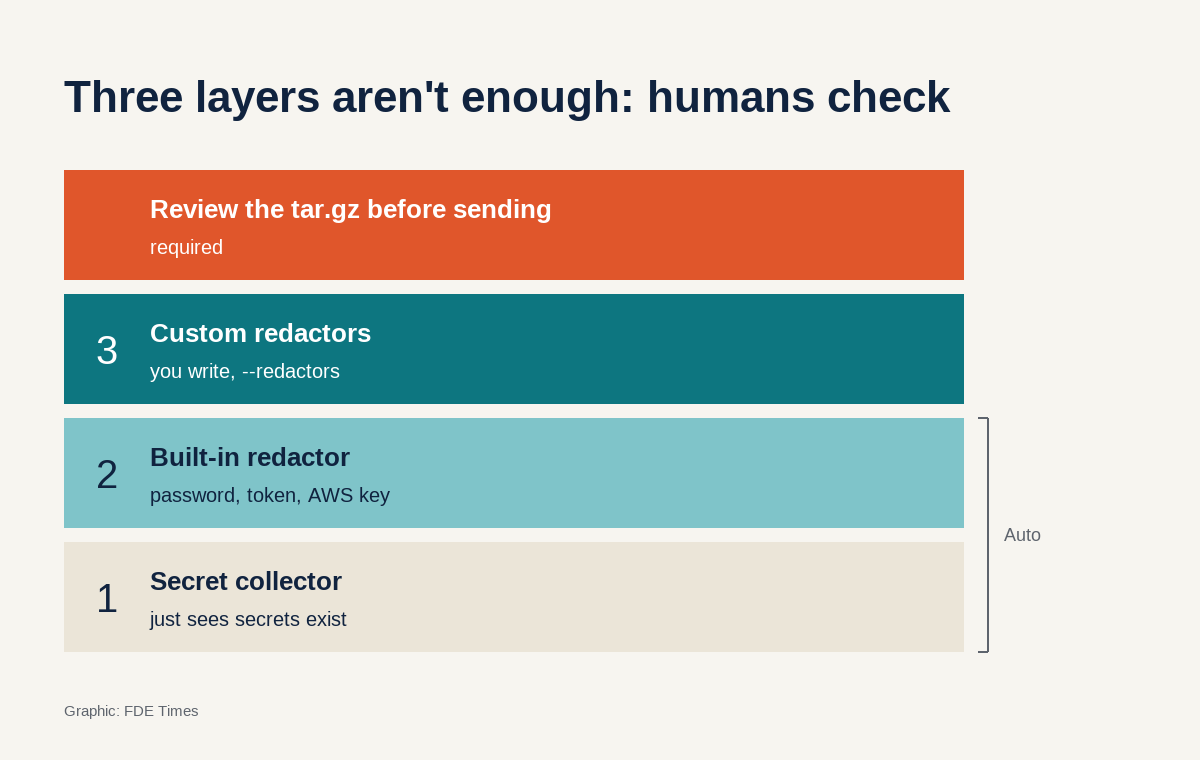
Two automatic layers and one you write yourself
The first layer sits in collection itself. The default secret collector does not capture key values: includeValue and includeAllData both default to false. The bundle knows which secrets exist but does not contain what is in them.
The second layer is the set of built-in redactors, which are switched on automatically. They combine regex matching with YAML paths (yamlPath) that point straight at the fields to mask, covering patterns such as environment variables holding passwords, tokens, AWS keys and database connection strings.
In the CLI code, the --redact flag defaults to true. You can turn it off, but there is almost never a reason to do so in a client’s environment.
The third layer does not come for free: a custom redactor you write yourself, a YAML spec that can use fixed values, regex or yamlPath. Values listed under values are replaced with ***HIDDEN***. You pass the spec with the --redactors flag when creating the bundle.
A concrete case: internal names in the logs
Take a banking client that names its internal hostnames after confidential projects, and those names appear throughout the application logs. No built-in regex will catch them, because on the surface they are ordinary strings. A bundle run with the default configuration will carry every one of those names out of the cluster.
A sensible approach has four steps. Run kubectl support-bundle against the client’s staging environment, unpack the tar.gz file and grep for the strings the client considers sensitive. Write a custom redactor that masks those patterns and run again with --redactors. Then open the new bundle together with the client and check it before anything is sent.
There is a trap in the redactor-writing step. The documentation warns against putting sensitive data in the redactor spec itself.
List the confidential project names verbatim in a YAML file, commit it to your team’s repo, and you have leaked the very thing you meant to hide.
Prefer regexes that describe the shape of a string, or let the client keep any redactor file that contains literal values.
If a bundle has already been created and something slipped through, the CLI on the main branch has a redact subcommand that applies further redaction to an existing bundle, specified with the --bundle flag. It is useful when reproducing a bug takes time and you do not want the client to start over.
Limits to spell out to the client up front
Custom redactors apply only to support bundles. According to Replicated’s documentation, preflight runs only the built-in redactors. If a client also sends preflight output out of the cluster, your custom redactors will not have touched it.
The second case is harder to spot. On Replicated Embedded Cluster v3, if the client creates a bundle while the cluster is unreachable, the bundle contains only host-level data and is redacted only by the built-in redactors. The documentation advises against relying on custom redactors to keep a value out of every bundle. And a broken cluster is precisely when a client most needs to send one.
So do not promise a client that the tool will mask everything. Treat the two automatic layers and your own redactors as a safety net, and make a human read of the tar.gz file before sending mandatory. “Data leaves the cluster only when you send it” means something only if the client knows what it is sending.
What to learn first, and what to put on your CV
Start by reading the contents of a real bundle, directory by directory, before learning to write collector specs. Knowing what a bundle holds tells you what needs masking. Next come regex and yamlPath, the two things that decide how precise your custom redactors are.
On your CV, do not just write “used Troubleshoot”. Describe the process you built, from grepping sample bundles and writing custom redactors to the step where the client reviews the bundle before sending. A recruiter who knows the job will see both Kubernetes skills and care with client data.
The tool gathers the logs. Deciding what is allowed to leave the client’s cluster is still your responsibility.
Was this article useful?
Thanks for the feedback!
12 sources
- Troubleshoot - Kubernetes Diagnostics | Troubleshoot
- replicatedhq/troubleshoot: Preflight Checks and Support Bundles Framework for Kubernetes Applications
- troubleshoot/LICENSE at main · replicatedhq/troubleshoot
- supportbundle package - github.com/replicatedhq/troubleshoot/pkg/supportbundle - Go Packages · 2026-11-05
- About preflight checks and support bundles
- Built In Redactors
- Redactors
- Redactor custom resource (Replicated Docs)
- Configure Embedded Cluster (Beta)
- cmd/troubleshoot/cli/root.go (replicatedhq/troubleshoot, main)
- cmd/troubleshoot/cli/redact.go (replicatedhq/troubleshoot, main)
- Secret