Cosign deprecated --offline, yet it still verifies without a network
The trick is the bundle attached to each image, plus a trusted root file that someone has to keep current on the far side of the air gap.
In brief
- Cosign can verify entirely offline using the Sigstore bundle that cosign sign attaches to the image, plus a local copy of the trusted root.
- Since v3.0.3 the --offline flag has been deprecated: the current approach is cosign save while you still have a network, then cosign verify --local-image --trusted-root on the client side.
- Use v3.1.3 or later, or v2.6.5 if you are still on the 2.x line, to get the fix for a verification bypass involving old-style bundles.
The changelog for Cosign v3.0.3 contains one very short line: the --offline flag is now deprecated. Skim it and you might conclude the project has given up on environments without a network. Yet the same release added protobuf bundle support to save and load, the two commands every air-gapped workflow depends on.
Cosign can still verify offline. The method has simply changed. If you are an FDE shipping software to a client on an isolated network, the guides you find online telling you to pass --offline=true may already be out of date. Knowing the current method lets the client check what you deliver for themselves, without having to take your word for it.
A small tool with a big organization behind it
Cosign lives in the sigstore/cosign repository under the Apache-2.0 license, and describes itself as a code signing and transparency tool for containers and binaries. Sigstore, the project that houses it, is backed by the Open Source Security Foundation (OpenSSF) at the Linux Foundation. When the client’s security team asks where the tool comes from, that is the shortest answer you have.
The feature that matters most to an FDE is in the README: Cosign can verify entirely offline by checking the Sigstore bundle that cosign sign attaches to the image in the registry. The bundle holds the certificate, the transparency log entry with its inclusion proof, and an RFC 3161 timestamp if there is one. With that material and a local copy of the trusted root, verification needs no network.
When you need it
Take a hypothetical case: you are deploying an inference service for a factory, and its Kubernetes cluster cannot reach the internet. Security wants to be sure the image on the USB stick is the one your team built, and that nobody has tampered with it on the way. Signing with Cosign and letting the client run the verification command themselves turns a promise into something they can check.
Four commands for one offline delivery
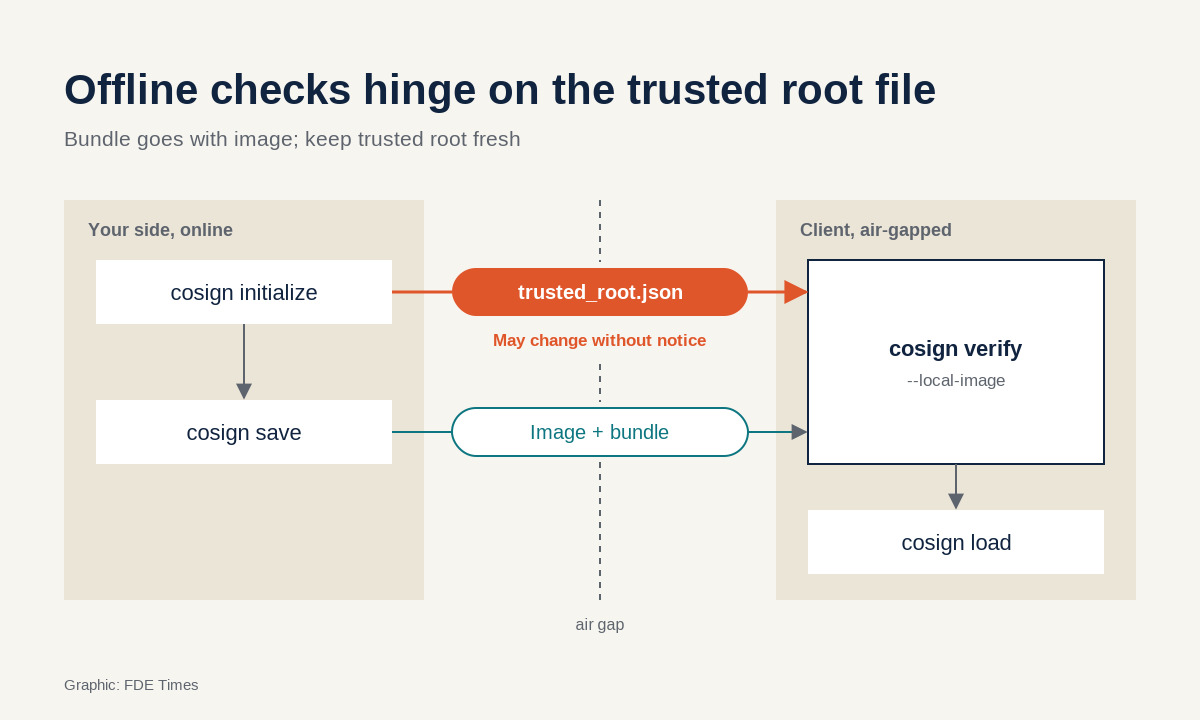
The first part runs on your side, while you are still online. The README runs cosign initialize to fetch the latest TUF root, then uses cosign save to write the signed image to disk. The documentation states plainly that save must be done with a network connection.
# Your side, online
cosign initialize
cosign save $IMAGE_NAME --dir ./delivery
You then carry the ./delivery directory and the trusted root file over to the client. There, cosign verify is pointed at the directory with --local-image, along with --trusted-root, which takes a Sigstore TrustedRoot JSON file. If you signed keyless, you must also specify the signer’s identity and the OIDC issuer.
# Client side, offline
cosign verify --local-image ./delivery \
  --trusted-root ./trusted_root.json \
  --certificate-identity <signer-identity> \
  --certificate-oidc-issuer <oidc-issuer>
Once verification passes, cosign load --dir ./delivery $IMAGE pushes the signed image from disk into the client’s internal registry. Run verify before load, so the client’s registry only ever receives something that has been checked.
The fragile part is the trusted root file
The hardest part is operational rather than the commands themselves. With Sigstore’s public instance, a verifier in an air-gapped environment has to obtain the trusted root file from the production TUF repository. The README warns that the file’s contents can change without notice, and that if you are not using TUF you have to build your own mechanism to keep the offline copy current.
So during discovery, ask straight away who on the client side is responsible for bringing a fresh trusted root across the air gap. If the client runs its own Sigstore infrastructure without TUF, cosign trusted-root create lets them assemble keys and trust material into a trusted root file themselves. Even so, the documentation still recommends TUF for distributing updated keys to clients.
Versions matter more than you think
Announcing Cosign v3 on October 8, 2025, Zach Steindler said --new-bundle-format and --trusted-root are now enabled by default, and that the project would start removing older functionality in preparation for v4.
As of v3.0.5, --local-image works with --new-bundle-format for both v2 and v3 signatures. If the machine that signs and the client machine that verifies run mismatched versions, the workflow above can break where you least expect it.
The stronger reason to upgrade is security. Version 3.1.3 fixes GHSA-fx35-mq7g-6g98, a vulnerability that allowed verification to be bypassed with an unexpected public key in an old-style bundle, and the fix was backported to v2.6.5.
A verification tool that can be bypassed is worse than none at all, because it gives the client a false sense of security.
What to learn first
Understand what a Sigstore bundle contains and why the trusted root determines trust before you memorize flags. Then rebuild the workflow above on a machine with its network cut, because only once the cable is unplugged do you find out which step is quietly calling out.
On the career side, when you read FDE job postings, phrases such as “air-gapped”, “on-prem” or “supply chain security” signal that this skill will come up. On a CV, a specific line such as “delivered signed images into isolated environments, with clients verifying them via cosign verify --local-image” carries far more weight than “experienced in security”.
Air-gapped clients trust nothing that comes through their gate. Hand them a command to check for themselves, and they will trust you faster than any slide deck could manage.
Was this article useful?
Thanks for the feedback!
9 sources
- GitHub - sigstore/cosign: Code signing and transparency for containers and binaries
- Sigstore documentation: Overview
- Cosign README (nhánh main)
- cosign load (tài liệu CLI)
- cosign verify (tài liệu CLI)
- Cosign v3 is now available - Sigstore Blog · 2025-10-08
- cosign CHANGELOG.md
- Releases · sigstore/cosign
- Configuring Cosign with Custom Components - Sigstore