The Miro workshop is won the day before the client logs in
A three-frame board, a rehearsal and a second pair of hands let an FDE map a client's process and agree priorities in one 90-minute session.
In brief
- Miro has built-in facilitation tools for workshops: a timer, Voting, Private Mode, hide/reveal frames and Bring Everyone to Me.
- Split the work into two steps: map the process with a story map, then prioritise with votes and a 2x2 matrix.
- Rehearse beforehand, have a second person handle the board, and write the questions on the board for latecomers.
Every discovery session hits a silence at some point. The client has five people in the room, each describes the process differently, and the most senior person usually has the last word. A carefully built Miro board avoids this: everyone writes, everyone votes, and everyone watches the same clock.
FDEs meet this situation in their first week on site. You need two things: an understanding of the client’s current process, and a sense of what they want fixed first. Relying on email back and forth can take weeks. A structured workshop can settle both in a single sitting.
Does Miro have what a workshop needs?
Miro launched in 2011 as RealtimeBoard. Co-founder and CEO Andrey Khusid built it so that his design firm could share ideas with remote clients. That is close to the position of an FDE today.
Miro’s facilitation guide lists the built-in tools: a timer, Bring Everyone to Me (which pulls everyone’s screen to where you are on the board) and hide/reveal frames (which keep part of the board hidden until it is needed).
Miro recommends using the timer to cap each activity and remembering to leave time for breaks. The timer is visible to the whole group, so everyone knows how many minutes remain.
The two features that matter most for agreeing priorities are Voting and Private Mode. According to Miro, Voting lets everyone give input at once, rather than waiting to raise hands in turn. Private Mode is recommended for sensitive or evaluative activities, because people offer more perspectives when their input is anonymous.
Example: 90 minutes with an invoice-processing team
Suppose you are deploying an agent that reads invoices for the accounts department of a distribution company. You build three frames the day before.
Frame 1 uses the user story map template. It is based on the technique Jeff Patton popularised in 2005. Patton defines story mapping as a way of telling the story of an entire product or feature.
Here, the “story” is the journey of an invoice, from the moment it lands in the inbox to the moment payment is approved. Over 25 timed minutes, each person adds sticky notes to each step, recording where they often have to work by hand or wait.
Writing down pain points is an evaluative activity, so this is the moment to turn on Private Mode. Because input is anonymous, staff will still write “matching against the purchase order takes the whole afternoon” even with the department head in the session.
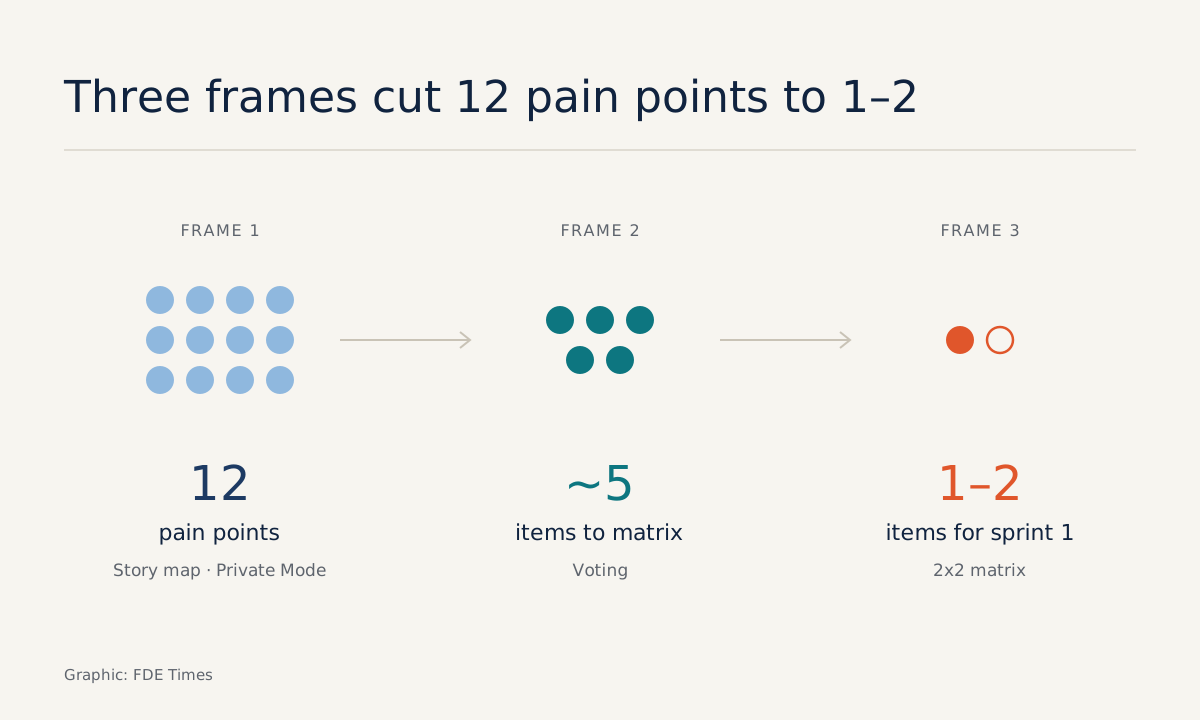
Frame 2 stays hidden with hide/reveal until frame 1 is finished. You group the notes, say into 12 pain points, then open Voting. The 2021 Voting update lets the facilitator choose which objects on the board can be voted on, and results appear a few seconds after the session ends.
You select only the 12 pain-point notes, so nobody votes for a heading or an arrow by mistake. The whole room votes at once, so nobody waits to see which item the boss picks first.
Frame 3 is the 2x2 Prio Matrix template. The horizontal axis is importance, the vertical axis is difficulty. The bottom-right quadrant holds the high-impact items that take less effort.
The template guides the group to discuss and place items along the horizontal axis first, and only then along the vertical. You bring only the five or so items with the most votes into the matrix. The difficulty axis is where you, the engineer, have the most say.
Both sides leave with the same picture: the current process, the pain points that were voted on, and one or two items in the bottom-right quadrant to tackle in the first sprint.
A smooth session depends on the day before
The example above works only because everything was set up in advance. The day before the session, finish five tasks in this order.
First, build all three frames and hide frames 2 and 3 with hide/reveal, so the client cannot see the next step before the previous one is done. Next, write each activity’s question in large type at the top of its frame. The dxw team in the UK found that putting the question on the board helps latecomers catch up.
Third, plan the schedule with the timer: 25 minutes for process mapping, a slot for voting, a slot for the matrix, and a break in the middle, as Miro advises.
Fourth, assign a second person to operate the board. dxw found that remote workshops run more smoothly when someone is tasked with responding quickly on Miro, and they found the timer very useful.
Finally, rehearse. Miro recommends a full dry run of the workshop, especially when there is a co-facilitator. Twenty minutes of practice with a colleague is enough to expose the small mistakes that would cost you credibility in front of a client.
Common mistakes and how to avoid them
Most mistakes in running a Miro workshop come not from the software but from how it is used. The table below collects the easiest ones to make.
| Mistake | What happens | How to avoid it |
|---|---|---|
| Treating the vote as the decision | The top-voted item touches a system you have no access to yet | Always run voted items through the 2x2 matrix |
| Letting every object on the board be voted on | Votes land on headings and arrows, and the results get noisy | Select only the pain-point notes when you open Voting |
| Open input with the boss present | Staff hesitate to write down real pain points | Turn on Private Mode for pain points and evaluation |
| Designing an overly long voting activity | It exceeds the limits of a Voting session | Check the limits in the version you are using |
| Skipping the rehearsal | Forgetting to grant edit access, accidentally revealing a hidden frame | Do a 20-minute dry run with your co-facilitator |
The first mistake deserves the most attention. Miro describes Voting as a way to help facilitators gauge the group’s sentiment quickly and easily. Sentiment is not feasibility, which is why the matrix step must never be skipped.
As for limits, in the 2021 release each person had at most 99 votes and each voting session lasted at most 99 minutes. These numbers may have changed, so check again before building a long activity.
What to learn first?
Start with the timer and Bring Everyone to Me. These two tools set the pace for the whole session. Then learn how to select objects for Voting, and only after that move on to the story map. The hardest skill is not in the software at all: it is framing a question narrow enough for each frame.
For your career, if the FDE job ads you are targeting mention discovery or working directly with customers, a workshop like this belongs on your CV. Don’t just write “proficient in Miro”.
Record the workshop’s outcome: how many pain points were gathered, which item was chosen first, and which deployment it led to. A screenshot of the board with client details removed is strong evidence in an interview.
Clients will not remember which template you used. They will remember that, for the first time, the whole room agreed on what to do first.
Was this article useful?
Thanks for the feedback!
9 sources
- About Miro | Miro
- Facilitating Workshops with Miro | Miro
- Meeting Facilitation Best Practices | Miro · 2026-05-01
- Easily involve teams in decision-making with our improved Voting · 2021-10-14
- 2x2 Prio Matrix Template | Miro
- User Story Map Templates & Examples | Miro
- How Scrum Masters use Miro for user story mapping · 2018-01-10
- YOW Talk: User Story Mapping · 2014-12-08
- Improving remote workshops (dxw) · 2019-10-15