Loom for FDEs: a five-minute video instead of a midnight meeting
When the client is on the other side of the world, the best handoff is often a short video they open at the start of their day, with a few lines of text to refer back to later.

In brief
- Loom records your screen and voice so you can send clients updates without finding a shared time slot
- The free plan allows 25 videos per person, each up to 5 minutes: enough to try it, not necessarily enough for a whole engagement
- Open the video with the result, end it with what the client needs to do, and add a few lines of text
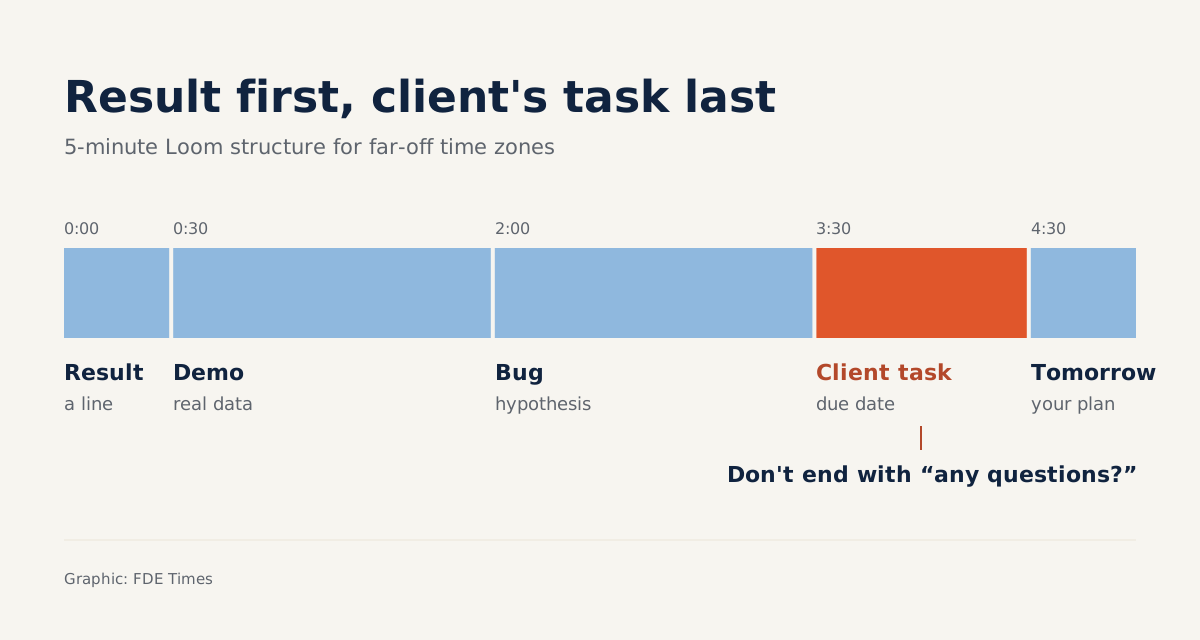
Loom’s free plan gives each person 25 videos, each up to 5 minutes long. That sounds like an irritating limit. But for an FDE updating a client half a world away, five minutes is a discipline worth keeping.
Loom, a free screen-recording tool for Mac and PC that Atlassian acquired in 2023, was built for exactly this: record your screen, talk while you record, then send the video message to a colleague or client.
For an FDE, the problem is rhythm, not tooling. When the client is in another time zone, every question that waits for the next shared meeting stalls the deployment by another cycle. A good video walkthrough lets the client keep working without waiting for you to wake up.
When should you record instead of meeting?
Loom’s own site names the difficulty plainly: getting everyone together at the same time takes a lot of effort, especially across time zones. Loom presents asynchronous video as something that both replaces and supports live meetings, letting viewers watch whenever they like. The word “supports” is the part to remember.
Record when information mostly flows one way: demoing what you just built, explaining why you chose an approach, showing how to rerun a step. Atlassian’s blog says Loom uses async video for major milestones and roadmap updates. On the client side, that maps to finishing a deployment milestone or a change of plan.
You should still meet when you need to renegotiate scope, deliver bad news, or reach a decision that several parties must agree on. Video moves information quickly. It does not help two sides reach agreement.
What do five minutes actually look like?
Picture this: your working day ends just as the client’s team goes to bed. The data ingestion pipeline you built for them has just completed its first run on real data, but there is still a bug in the reconciliation step. Tomorrow morning they need to know three things: what ran, what didn’t, and what they have to do.
| Timestamp | Content | Purpose |
|---|---|---|
| 0:00–0:30 | One sentence on the result: the pipeline ran, one reconciliation bug remains | Someone who watches only the first half-minute still knows where things stand |
| 0:30–2:00 | Share the screen and show data flowing through each step | Prove it with something actually running, not just a description |
| 2:00–3:30 | Point to the bug and your hypothesis about the cause | The client understands why the work isn’t finished |
| 3:30–4:30 | One thing the client needs to do, with a deadline | Turn the video into action |
| 4:30–5:00 | What you will do over the next day | The client knows when the next update is coming |
This structure fits the free plan’s 5-minute limit exactly, and that is no accident. If you can’t say it in five minutes, you usually haven’t worked out what you want the client to do.
The bad version usually opens with a greeting
Now picture the wrong version of the same video. It opens with “Hi everyone, today I just want to give a quick update”, spends two minutes recapping project context the client already knows, shares the screen and scrolls through code. The reconciliation bug comes up only in minute four, and it ends with “let me know if you have any questions”.
Someone on the client side opens the video at the start of their day, between a batch of emails. They may well close it before minute four, without knowing what they need to do. The fix is simple: delete all the greeting and context, put “the pipeline ran, one reconciliation bug remains” in the first second, and replace the closing pleasantry with one specific task and a deadline.
Atlassian’s blog argues that video messages are faster and more personal than text alone. That comparison implicitly concedes that video should accompany text, not replace it.
Under the video link, write three to five lines: the result, the decision the client needs to make, a link to the ticket. When someone needs to look it up later, they will search for those lines; nobody rewatches the whole video.
Limits to plan for before you hit send
Do the quota maths first. If you send one update video per working day, the free plan’s 25 videos run out in about five weeks, far shorter than many engagements. Before your whole handoff process depends on Loom, ask your company or the client whether they already have a paid plan.
The bigger risk is data. Anything on your screen ends up in the video, and that video is stored on a third-party service. Before recording a client’s real data, ask about their policy, mask sensitive columns, or demo on a sanitised copy of the data.
Finally, video does not replace handoff documentation. Runbooks, configuration and architecture decisions still have to be written down. Video is an explanatory layer on top that helps readers of the documentation understand it faster.
What to practise first, and how to show employers
The first skill to practise is not pressing record but writing a five-line script before you record. Then rewatch the video as someone on the client side: if you hit a term only your team would understand, record it again. Do this a few times and your written updates will get tighter too.
If the FDE job descriptions you are targeting mention working with clients across time zones or asynchronous communication, don’t just write “strong communicator” on your CV. Attach a five-minute video walkthrough, built on the structure above, to a GitHub project. Interviewers will see straight away how you hand off work, instead of having to take your word for it.
With a client on the far side of the clock, sometimes the best meeting is the one nobody has to stay up late to attend.
Was this article useful?
Thanks for the feedback!