NVIDIA's garak: one pip install, one scan, then point it at the client's endpoint
Before the client's security team asks whether the chatbot can be tricked, an FDE should already have a scan that can be run again, and should know exactly what a PASS or FAIL in it proves.

In brief
- garak is an open-source LLM vulnerability scanner developed by NVIDIA and the community. It tests applications, not just models
- It installs with one pip command. The REST generator connects to endpoints that return plaintext or JSON, using a config file that describes the request and how to read the response
- PASS and FAIL are only the share of outputs flagged by a detector: a PASS is not immunity, and a FAIL may be a false positive
One pip command to install, one more to fire probes at a language model and get back lines of PASS or FAIL. That is all it takes to start with garak, the open-source LLM vulnerability scanner developed by NVIDIA and the community.
This matters to FDEs because security questions tend to arrive late and in a hurry. The agent demo is done, and only then does the client’s legal or security team ask: can it leak data? Can it be tricked into ignoring its instructions?
“We tried a few prompts” is not an adequate answer. A scan that can be rerun, with results for each probe, is far more convincing. But only if you understand what the numbers in that scan say, and what they do not.
What does garak test?
The project’s README sums up its purpose: to check whether an LLM-powered application can be pushed into failure modes nobody wants. The name stands for Generative AI Red-teaming and Assessment Kit, and the paper introducing the tool was published on arXiv in June 2024.
For an FDE, the word to notice is “application”. The official documentation says garak helps find weaknesses and unwanted behaviour in anything that uses language model technology, from bare models to chatbots.
On a client site, the thing that needs protecting is rarely the base model. It is the chatbot with a system prompt, internal data and tools attached, so the most valuable scan is one that runs against that application itself.
What does a first scan look like?
Installation takes one command:
python -m pip install -U garakThe “Your first scan” guide uses the gpt2 model on Hugging Face and a profanity probe:
python -m garak --model_type huggingface --model_name gpt2 --probes lmrc.ProfanityThis is a local exercise, not the client’s system. Its value is that it shows you the output format before you have to explain that format in a meeting room.
Connecting garak to the client’s chatbot
The step from gpt2 to a real system goes through the REST generator. The README describes rest.RestGenerator as highly flexible, able to connect to any REST endpoint that returns plaintext or JSON.
Databricks’ write-up on applying garak to its platform adds the practical detail: the REST generator needs a JSON config file describing the structure of the request and how to read the response. In other words, garak does not guess the client’s API; you have to show it.
Imagine the client is an insurer with a chatbot that answers questions about policies. Suppose its engineering team hands you a sample request like this (the field names here are hypothetical):
{"session_id": "test-01", "message": "Does my policy cover flood damage to my home?"}And a sample response from the bot, also hypothetical:
{"reply": "Under the supplementary terms, your policy...", "sources": ["supplementary-terms.pdf"]}From this pair, the config file has to say exactly two things. For the request: keep the structure, but replace the question in the message field with the prompt the probe generates. For the response: take the answer from the reply field and ignore sources, because the detector should only score what the bot says.
Take the key names in the config file itself from garak’s REST generator documentation; do not guess them. The genuinely hard part is getting an accurate sample request and response from the client, so ask for them at the scoping meeting.
What do PASS and FAIL actually measure?
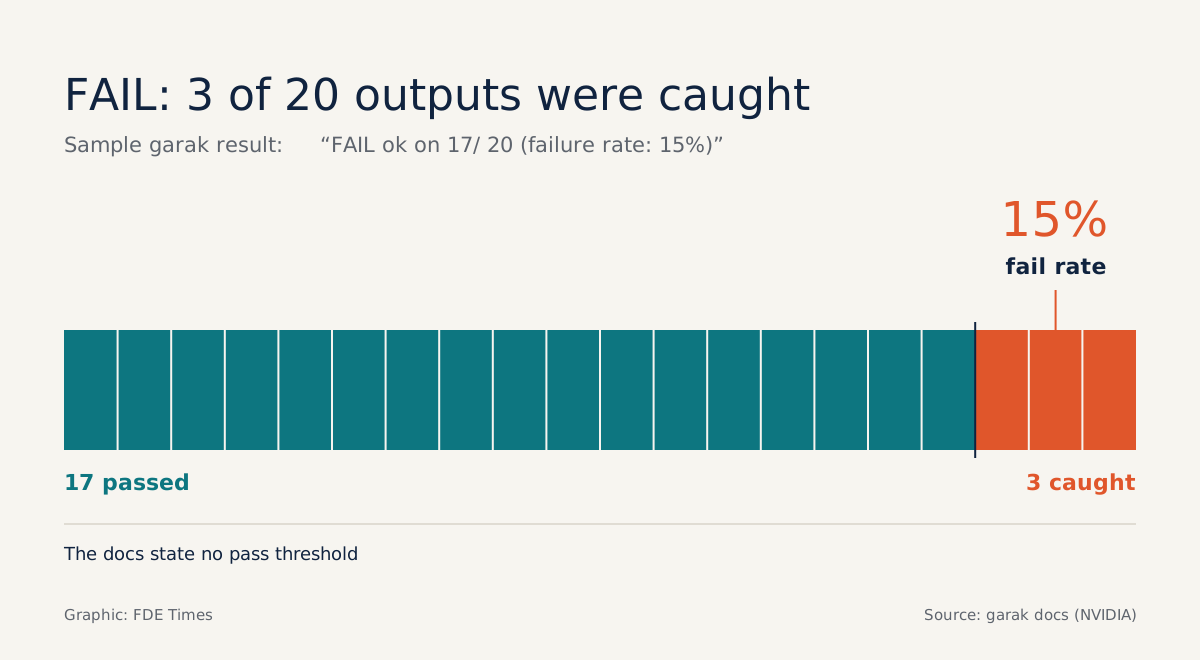
The “Reading the results” documentation gives a sample line: FAIL ok on 17/ 20 (failure rate: 15%). Read it closely: the probe produced 20 outputs, the detector scored 17 as fine and caught 3, so the failure rate is 15% and the whole line is marked FAIL.
That documentation page does not state any threshold for passing. So “your chatbot FAILED” is a poor way to put it; the accurate version is “3 out of 20 attempts by this probe produced outputs flagged by the detector”.
The second detail is easier to miss: several detectors can score the same set of outputs. A probe can therefore PASS on one detector and FAIL on another, so the report for the client must state which detector produced which result.
What garak will not do for you
Databricks warns in both directions. A low success rate in the tests does not mean immunity. And detectors produce false positives, so results often need manual review.
So before putting a FAIL on a slide, open the 3 flagged outputs and read them yourself. Before writing “passed”, state exactly which probes were run, and in which environment.
The biggest limit is legal. The documentation is blunt: only run garak on systems you are authorised to use. Firing a barrage of attack prompts at a client’s production system without written permission could lead their security team to treat it as a real attack, so agree the scope, environment and timing of the scan first.
What to learn first, and how to put it on a CV
Start with the gpt2 command above, then recalculate the failure rate yourself from the number of passing outputs over the total. Next, stand up a small REST endpoint of your own and write a JSON config file so garak can call it; that is exactly the skill you will use on a client site.
When you put this skill on your CV, write it as a measurement with clear limits. A line such as “connected garak to an internal chatbot over REST, tracked per-probe failure rate across each release, manually reviewed every FAIL before reporting” shows that you know how to measure, and how far the measurement goes.
If you do not have a real client yet, do this with an open-source project of your own and publish the command, the config file and the results. Clients will not remember which tool you used; they will remember the person who told them honestly that a PASS is not the same as safe.
Was this article useful?
Thanks for the feedback!
7 sources
- garak: A Framework for Security Probing Large Language Models · 2024-06-16
- GitHub - NVIDIA/garak: the LLM vulnerability scanner
- Your first scan - garak documentation
- garak: LLM vulnerability scanner
- Welcome to garak!
- Reading the results - garak documentation
- AI Security in Action: Applying NVIDIA's Garak to LLMs on Databricks · 2025-07-02