Mermaid: draw data-flow diagrams as text so the handover doc survives the first sprint
Architecture diagrams go stale quickly, and the people taking over a project need them most. A diagram written as text in the repo gets updated in the same pull request as the code.
In brief
- Mermaid turns text into diagrams. GitHub renders them directly in issues, pull requests, wikis and Markdown files, and GitLab supports them too.
- For an FDE, the biggest gain is that the diagram is updated in the same pull request as the code, so the handover README is less likely to drift from the real system.
- Start with flowcharts. Architecture diagrams are still in beta, and the Mermaid version can differ from one platform to another.
Two weeks before handover, you open the design doc and find that the architecture diagram is still a screenshot from the first workshop. It shows a queue that has since been dropped and an API the customer has renamed. The source file sits on the laptop of someone who has left the project, so nobody can fix it.
The people behind Mermaid wrote this problem straight into the official repo: diagramming and documentation eat up precious developer time, and then go out of date fast.
Knut Sveidqvist, a Swedish software architect, created Mermaid in 2014 to make documentation easier. Its core is still open source under the MIT licence.
For an FDE, this is everyday work. You go into a customer’s systems, connect the data, build an agent or a pipeline, then leave. The customer’s engineering team has to run the rest themselves, and they can understand only what is in the handover documentation.
Why do text diagrams last longer?
Mermaid reads Markdown-style text descriptions and builds diagrams from them: change the text and the diagram changes with it. There is no separate image or design file to keep. The diagram is just a few lines of text in the same repo as the code.
GitHub renders Mermaid diagrams in issues, Discussions, pull requests, wikis and Markdown files, which are exactly where design docs and handover READMEs live. When a colleague changes a processing step, they update the description line in the same pull request, and the reviewer sees both changes in one diff.
One data flow, six lines of text
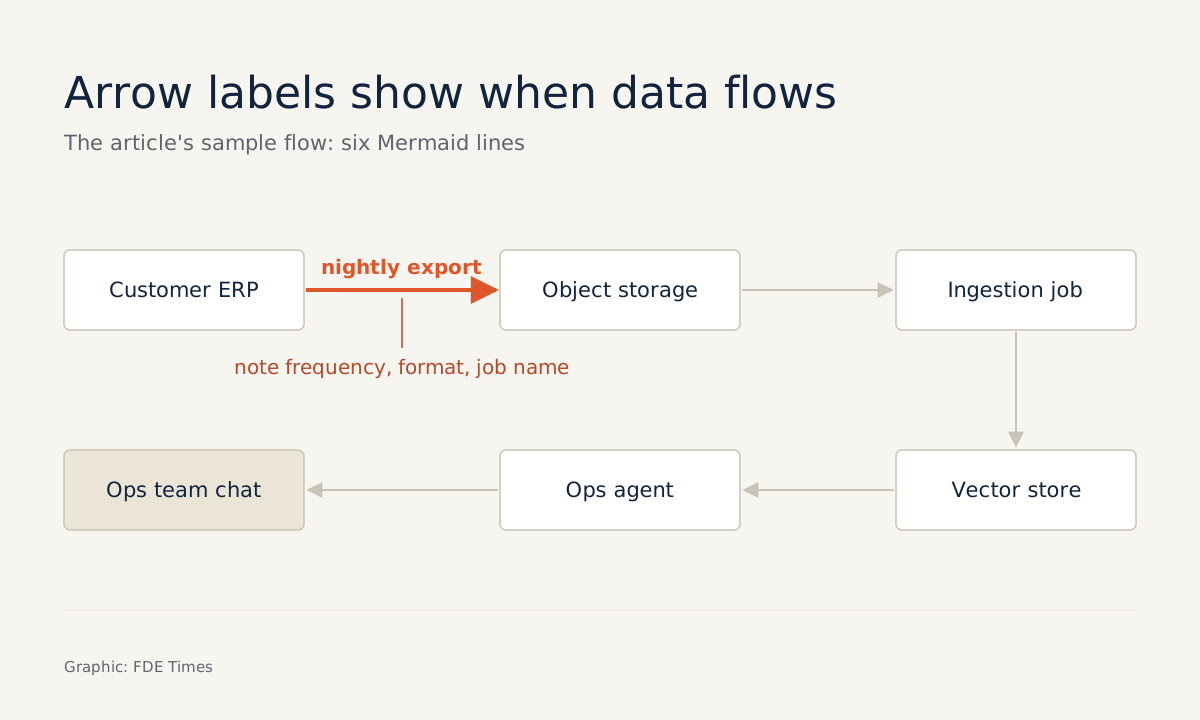
Imagine you are deploying a question-answering assistant for the operations team of a logistics company. Data is exported from the ERP every night, lands in storage, passes through an ingestion job that updates a vector store, and finally the agent reads from there.
On GitHub, you put the diagram in a code block tagged with the language mermaid:
flowchart LR
    ERP[Customer ERP] -->|nightly export| S3[(Object storage)]
    S3 --> ING[Ingestion job]
    ING --> VS[(Vector store)]
    VS --> AG[Ops agent]
    AG --> UI[Ops team chat]
A flowchart has two building blocks: nodes are the shapes, and edges are the arrows or connecting lines. The first line sets the direction of the diagram. LR means left to right, which suits a data flow because readers can follow the source on the left and the output on the right.
The most valuable detail is the label on the arrow, such as “nightly export” above. The person taking over needs to know where the data flows, and also when. Put the frequency, format or job name on the edge, so the customer’s operations team does not have to track you down with questions after you have left the project.
A common error: one missing vertical bar
Say you make a hurried edit to the first line before handover and lose the bar that closes the label:
ERP[Customer ERP] -->|nightly export S3[(Object storage)]An edge label must sit between two vertical bars. The fix is to add back exactly one character:
ERP[Customer ERP] -->|nightly export| S3[(Object storage)]Do not let the person taking over be the first to find out. Paste the description into the Mermaid Live Editor, the tool GitLab recommends for learning Mermaid and debugging diagrams. If the diagram will not render, compare it line by line with the last working version; the error is usually in the line you just changed.
The second error is harder to spot because the diagram still renders normally: a node with only an abbreviation such as ING and no text in brackets. The node ID is there to make writing quicker; the text in brackets is what the customer’s team reads. A diagram full of internal abbreviations is as hard to follow as an outdated screenshot.
Limits: versions and beta features
Mermaid has a dedicated architecture diagram type, available since v11.1.0, for showing relationships between services and resources in cloud or CI/CD deployments. It sounds like a perfect fit for handover documentation. But the official documentation states clearly that this diagram type is still in beta, so its syntax may change.
The second risk is which platform renders the diagram. GitHub advises checking which Mermaid version it is running to make sure your syntax is supported, by putting the info command in a mermaid block. GitLab also renders Mermaid in Markdown and states support for Mermaid version 12.
If the customer uses a different platform from the one you wrote on, a diagram that relies on newer features may not render the way it does on your machine. That is why handover docs should use flowcharts. Use architecture only once you have checked that it renders correctly on the customer’s own repo.
What to learn first, and how to show it on a CV
Start with flowcharts: nodes, edges, edge labels and the LR direction. That is enough to draw most of the data flows you will meet at customers. Get into the habit of running every change through the Live Editor before committing, just as you run tests before pushing code.
On the career side, handover documentation is something recruiters rarely see but every FDE has to write. A portfolio repo whose README carries a data-flow diagram updated across many commits shows that you thought about the people who will run the system after you leave. In an interview, open that diagram and walk through each edge.
Next time you find the “Architecture” section of a design doc holding nothing but a screenshot, do not redraw it in a drag-and-drop tool. Write six lines of text and commit them with the code.
Was this article useful?
Thanks for the feedback!