Label Studio: one Docker command so the client's experts can build their own golden dataset
Your eval is only as trustworthy as the answers signed off by the client's best domain experts. This open-source tool lets them sign off without touching a line of code.

In brief
- Label Studio is HumanSignal's open-source platform for data labeling, AI evaluation and human-in-the-loop work, and it runs with a single docker run command.
- The golden-set workflow is template, two annotators, review of disagreements, ground truth locked, then wired into eval; several of those steps need the paid edition.
- For an FDE, the biggest value is an interface simple enough for the client's domain experts to label on their own, without going through an engineer.
On an AI project at a client site, the person who knows the right answer is almost never the person writing the code. It is usually a legal specialist, a doctor or a customer-support shift lead. They cannot open a notebook, and they should not have to.
If you want them to sit down and label two hundred samples, you need to hand them an interface that is easy enough to use. That is the gap Label Studio was built to fill: HumanSignal describes it as an open-source platform for data labeling, AI evaluation and human-in-the-loop workflows.
For an FDE, the fact that the tool is open source and runs from a container has practical weight. You can stand it up on a machine inside the client’s infrastructure, so sensitive data need not leave it.
The job FDEs most often do with this tool is building a golden dataset (golden set): a set of samples whose answers have been confirmed by experts. Both eval and any later fine-tuning depend on it.
When do you need it?
The clearest sign is when meetings with the client start circling the question “is this model answer right or wrong?” and nobody has a consistent answer. What is missing at that point is not a better model but a set of answers locked by people who know the trade.
HumanSignal’s documentation warns that without reviewing the quality of labeled data, weak labels can slip into model training. For eval the cost is higher still: you will be scoring the model with a broken ruler without knowing it.
Label Studio can also connect to ML models, both so a model can propose labels for humans to approve and to evaluate the model. The same instance can therefore follow you from building data to scoring.
A golden set in an afternoon
Imagine you are building an email-reply assistant for an insurer’s support team. The afternoon’s goal: 200 real emails, each with an intent label that the team lead agrees is correct.
Step one: start the server. The official installation docs and the image page on Docker Hub give the same docker run command. Split across lines for readability, it looks like this:
docker run -it \
  -v $(pwd)/golden-set:/label-studio/data \
  -p 8080:8080 \
  heartexlabs/label-studio:latest
The command opens port 8080 and mounts a local folder at /label-studio/data, so the data survives when the container stops. The docs name the folder mydata; here it is renamed golden-set to make it easier to recognise. Without Docker, you can install it with pip install label-studio.
Step two: create the project and the interface. Open localhost:8080, create an account and sign in. All labeling happens inside a project, so create one first.
When configuring the project, you can pick a ready-made template as a starting point and then edit it. Take the text classification template and replace the label list with intents named by the team lead. Use the client’s words, not the engineer’s.
Step three: two experts label independently on the same 200 emails. The documentation notes that clusters of tasks with low agreement may indicate confusing tasks, and that inter-annotator agreement can be used to settle ground truth.
Note: setting the number of annotators per sample (overlap) is available only in the paid edition. On Community, create two projects with the same data, have each expert work in one, then compare the two sets of labels with a script.
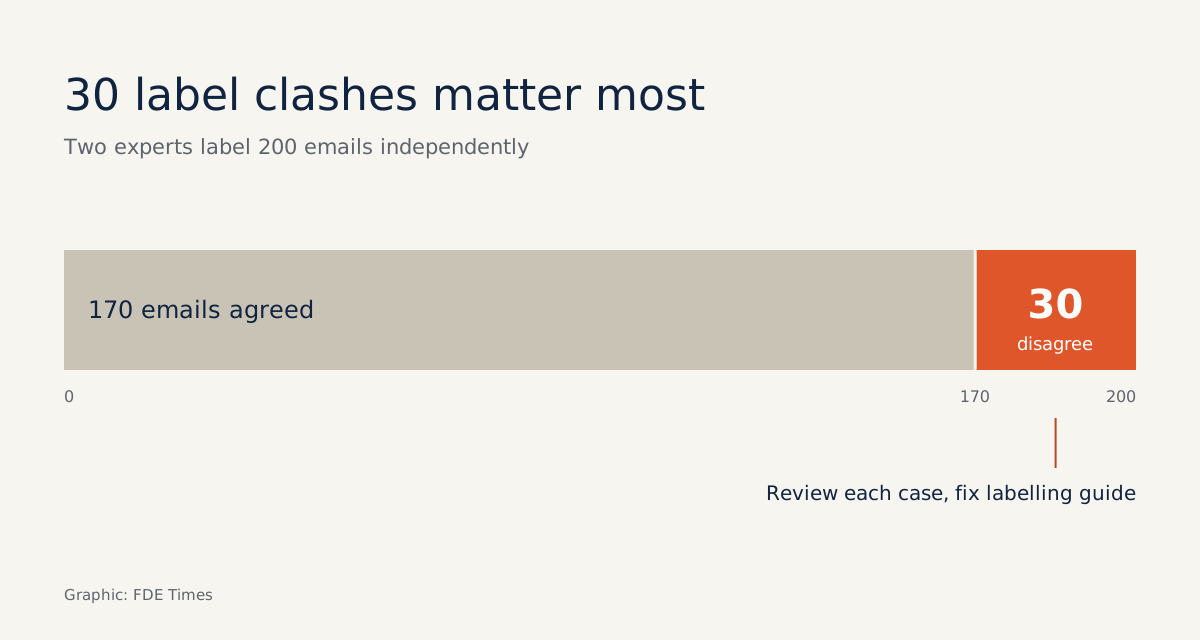
Suppose the two agree on 170 emails and disagree on 30. Those thirty disagreements are the most valuable thing you collect all day, because they show where the label definitions are still vague.
Step four: review the disagreements, then lock the ground truth. Sit with both experts, go through each case, revise the guidelines, and only then mark the final answer. One revised guideline line might read: “An email that both asks about the premium and asks to cancel the policy: label it Cancel policy, because that is what must be handled first.”
The feature for marking an annotation as part of the ground-truth set is also in the paid edition. On Community, record the locked answers in the comparison script from step three, so that file becomes the source of truth instead of the interface.
Step five: wire it into eval. From the first samples onward, write a small script that converts the labeling output into the format your eval suite reads; do not leave it to the end. The simplest approach is for each JSONL line to keep just three fields: task ID, text and gold label.
{"task_id": 17, "text": "I want to cancel my policy, and why has my premium gone up this month?", "gold_label": "Cancel policy"}
{"task_id": 18, "text": "Could you tell me when my next premium payment is due?", "gold_label": "Premium question"}
When running eval, the script only needs to have the model read text, compare its answer with gold_label, and keep task_id to trace back to the right email in Label Studio. Keeping task_id means you can reopen a case the model got wrong right in front of the expert.
Which limits should you tell the client about up front?
The biggest limit is the edition. According to Label Studio’s edition comparison page, overlap, reviewer assignment and ground-truth marking all belong to the paid edition; the guide to measuring inter-annotator agreement also states that it requires a paid product.
The two-project-and-script workaround still works, but make that clear to the client before promising a workflow.
The next limit: each task can have only one annotation set as ground truth. If an email has two equally acceptable readings, you are forced to pick one, so decide in advance whether you will score by exact match or by rubric.
High agreement is also a signal, not proof. Two people trained the same way can be wrong in the same way, so do not report the agreement figure as if it were accuracy.
The final trap is pre-labeling. Having a model propose labels for people to review saves time on training data. But for a golden set used to score that very model, reviewers are easily steered by the model’s suggestions, so have experts label from scratch, at least for the eval set.
What to learn first, and what to put on your CV
The first thing to learn is not configuration syntax but how to write labeling guidelines: a definition for each label, examples at the boundaries, and rules for the hard cases. The tool only records the experts’ judgement; the guidelines are what shape it.
Then practise the full loop: stand up an instance, edit a template, label with two people, review the disagreements and wire the results into an eval script. Knowing exactly how far the Community edition goes is a skill too, because it decides what you promise the client.
When writing a CV or interviewing for an FDE role, a line such as “built a labeling workflow with two client experts, 200 samples, raising agreement after two rounds of guideline revisions” shows you can turn domain knowledge into measurable data. In job descriptions, look for phrases such as “golden dataset”, “human evaluation” or “annotation workflow”.
The model will be replaced several times over a project’s life. A golden dataset signed off by the client’s own experts stays useful through every one of those changes.
Was this article useful?
Thanks for the feedback!
9 sources
- Open Source Data Labeling and AI Evaluation | Label Studio
- Label Studio Documentation — Install and Upgrade Label Studio
- heartexlabs/label-studio - Docker Hub
- Getting Started With Label Studio: A Step-By-Step Guide
- Set up your labeling project
- Compare Label Studio Editions
- Review annotations in Label Studio
- How to Measure Inter-Annotator Agreement and Build Human Consensus with Label Studio
- Integrate Label Studio into your machine learning pipeline