marimo: client notebooks that no longer break on cell order
Each notebook is a plain Python file that reruns itself along the dependencies between cells, and it can be packaged as a web app that shows only the results to people who don't read code.

In brief
- marimo saves notebooks as plain Python files and reruns cells along their dependencies, so there is no hidden state as in Jupyter.
- `marimo run` turns a notebook into a web app that hides the code by default and shows only results, which suits non-technical viewers.
- Sandbox mode records the Python version and package list at the top of the file, but pinning exact versions still needs a lockfile.
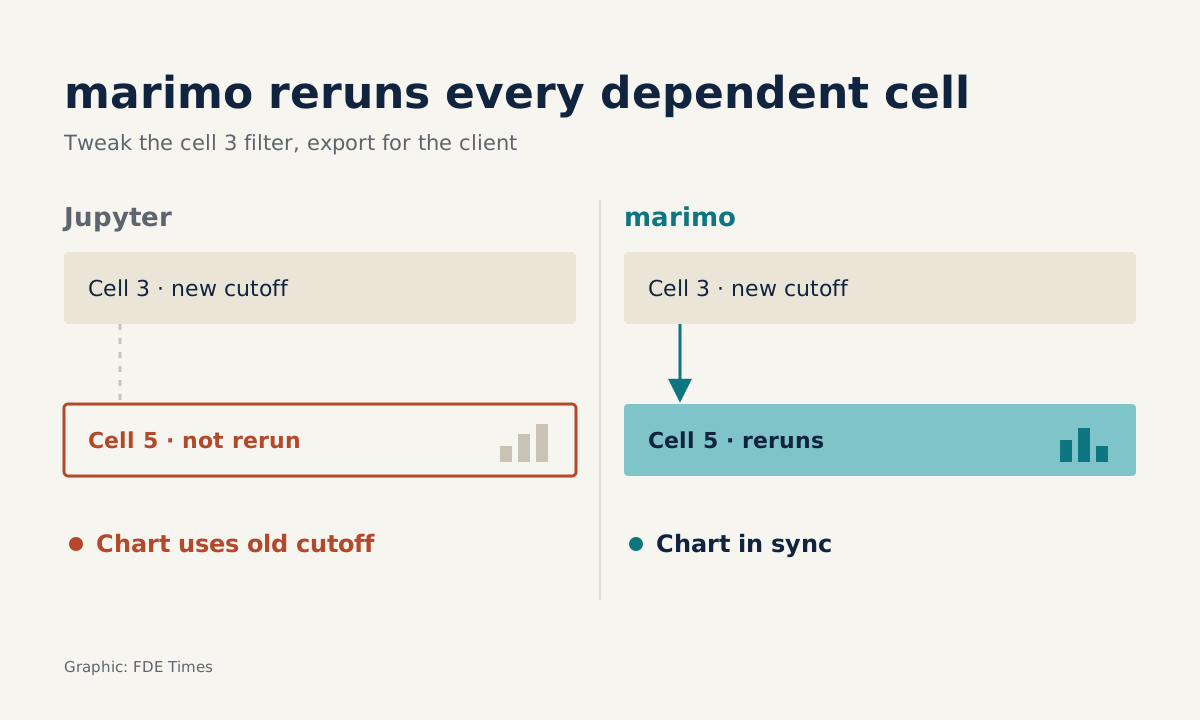
A Jupyter notebook sent to a client usually breaks somewhere nobody can see: the order in which you ran the cells. marimo, the open-source notebook from Marimo (founded in 2022), works differently. Each notebook is a plain Python file, and when you run a cell, the cells that depend on it rerun automatically.
For an FDE, that difference decides the quality of what you hand over. The analysis you deliver has to rerun when next month’s data arrives, when someone else on the team takes it over, and when the client asks where a number came from.
The official site describes marimo as a notebook that keeps the feel of working in a notebook while having the properties of a Python program. Rerunnable, transferable, every number traceable to its source: these are things we demand of a program, not of a draft.
Jupyter’s real problem is hidden state
marimo’s guide for migrating from Jupyter says plainly that Jupyter notebooks easily accumulate “hidden state”, and hidden bugs with it. The same guide points to the risk of cells being run out of order. When that happens, the results on screen can easily stop matching the code you are looking at.
Imagine you are analysing customer churn for a delivery company. Cell 3 filters by region; cell 5 draws the chart. You change the filter threshold in cell 3, forget to rerun cell 5, then export the file and send it. The chart in that file was drawn from the old threshold.
marimo blocks this at the level of how code runs. When a cell runs, marimo reruns every cell that references that cell’s variables. The project’s README sets out three commitments: no hidden state, deterministic execution, and built-in package management.
A minimal loop: from notebook to client app
Sticking with the delivery company, you open the notebook in an isolated environment with uvx marimo edit --sandbox churn.py. uv is the sandbox’s default backend and installs packages from PyPI. The Python version and package list are written to a comment block at the top of the file, following the PEP 723 standard, so the notebook carries its own environment.
You write three cells: load the data, filter by threshold, draw the chart. When you change the threshold, the chart updates itself, and you don’t have to remember which cells need rerunning. Because the file is plain Python rather than JSON, committing it to Git produces a diff that reads like ordinary code, and the reviewer sees exactly the threshold line that changed.
When it is time to deliver, you run marimo run churn.py. This presents the notebook as an app and starts a web server to serve it. By default the app lays out only the outputs and hides the code, so the client’s operations manager sees just the charts and tables.
If the report needs to run monthly, the README notes that marimo notebooks also run as scripts and accept command-line arguments. The same file is then the exploratory draft, the scheduled job and the presentation app.
Jupyter
- Stored as .ipynb JSON
- Cell execution order lives in the user’s head
- Hidden state builds up easily
marimo
- Stored as a plain .py file, diffable in Git
- Dependent cells rerun automatically
- Runs as a script or a web app
Which limits should you raise with the client first?
The first is package versions. The sandbox documentation states that the PEP 723 block stores package requirements, but exact versions require a lockfile. If the client will rerun the analysis six months from now and needs the same numbers, create a lockfile from the start.
The second is infrastructure. marimo run starts a web server, but where that server runs, who can access it and which machine holds the client’s data are your deployment work. Agree these points with the client’s IT team before promising that “they can just open the link”.
The third is vendor risk, which enterprise clients often ask about. CoreWeave announced its acquisition of Marimo on 30 October 2025 and committed that marimo notebooks will remain free and open source under a permissive licence. The project uses the Apache-2.0 licence, which is enough to answer the legal department’s questions.
Finally, marimo has a command-line tool to convert .ipynb notebooks into its format. An old notebook that only worked thanks to hidden state may reveal bugs after conversion, though. That is a good thing, but set aside time to review it before sending the new version to the client.
What to learn first, and how to show it on a CV
Learn to think in dependencies first: which variables each cell defines and which it uses. Once that is second nature, sandbox and marimo run are just two commands. Learning uv alongside is worthwhile too, since it is the sandbox’s default backend.
For your portfolio, a public repo with a .py notebook, a dependency block at the top of the file and a commit history with clean diffs is more concrete evidence than “proficient in Python” on a CV.
The CV line should describe what you delivered, not just the tools. A template to adapt: “Delivered a customer churn analysis as a marimo notebook kept in Git, with its environment recorded in the file and a lockfile; the client viewed results in a code-hidden app and reran it monthly as a parameterised script.”
In interviews, be ready to tell the story of one time you turned an analysis into something the client could rerun themselves, including the hidden-state bug you found along the way. That story shows the interviewer you think about the recipient, not just your own machine.
Clients rarely remember which notebook you used. What they remember is whether last month’s number matches this month’s.
Was this article useful?
Thanks for the feedback!