Nango: when to hand customer OAuth and API sync to a shared layer, and when to build your own
Writing an OAuth flow takes an afternoon. The hard part is keeping dozens of connectors running when some providers revoke the old refresh token the moment they issue a new one, and some APIs return HTTP 200 for a failed authentication.

In brief
- What Nango sells is per-provider maintenance: by Nango's own count, 16% of commits to its provider configurations are bug fixes.
- Rolling your own token refresh breaks easily: Airtable, Atlassian and many other providers revoke the old refresh token as soon as they issue a new one.
- Before recommending it to a customer, check three things: the licence is the Elastic License, self-hosting is in the Enterprise plan, and cost grows with the number of connections.
According to a technical post Nango published in August 2026, 16% of the commits to its provider configurations are bug fixes. The figure comes from the vendor itself, a company that runs the authentication layer for more than 1,000 APIs.
Even so, it shows that integration is not a write-once job: every new provider is one more thing to look after indefinitely.
Picture yourself as an FDE whose customer wants its agent to read Jira, write to Airtable and listen for webhooks from a CRM. Day one goes quickly, but by week three connections start dying without raising an error. Looking after connections from day two onwards is exactly the work Nango wants to take off your hands.
What does Nango actually take on?
According to the official documentation, Nango handles OAuth, API keys, token refresh, scopes, permissions and credential storage. This is precisely the part teams usually build themselves. Beyond authentication, Nango covers three more jobs. The first is sync: keeping data from external APIs fresh inside a product, a RAG pipeline or a change-detection workflow.
Functions serve on-demand reads and writes (actions). Provider webhooks pass through Nango and are then forwarded or handled by a function, so you do not have to stand up a separate endpoint for each provider.
An example: how token rotation breaks everything
Suppose you have written your own Atlassian connector. Two workers both notice that the access token is about to expire and both send a refresh request. Worker A receives a new token pair, and at that moment the old refresh token that worker B is holding is revoked.
B’s request fails, and if your code overwrites the credential with B’s result, the connection is dead. The end user has to reconnect from scratch.
This is not a rare scenario. Nango notes that many providers, including Airtable and Atlassian, revoke the old refresh token as soon as they issue its replacement.
To get this right yourself, you need a lock per connection, atomic token writes and a retry mechanism. “Many” also means not all, so you have to check this behaviour provider by provider.
There is a subtler trap: authentication failures do not always look like failures. Some APIs return HTTP 200 even when authentication has failed. A home-grown client that only checks the status code will report that all is well, while the sync is in fact pulling back empty data.
When to use Nango, and when to build your own?
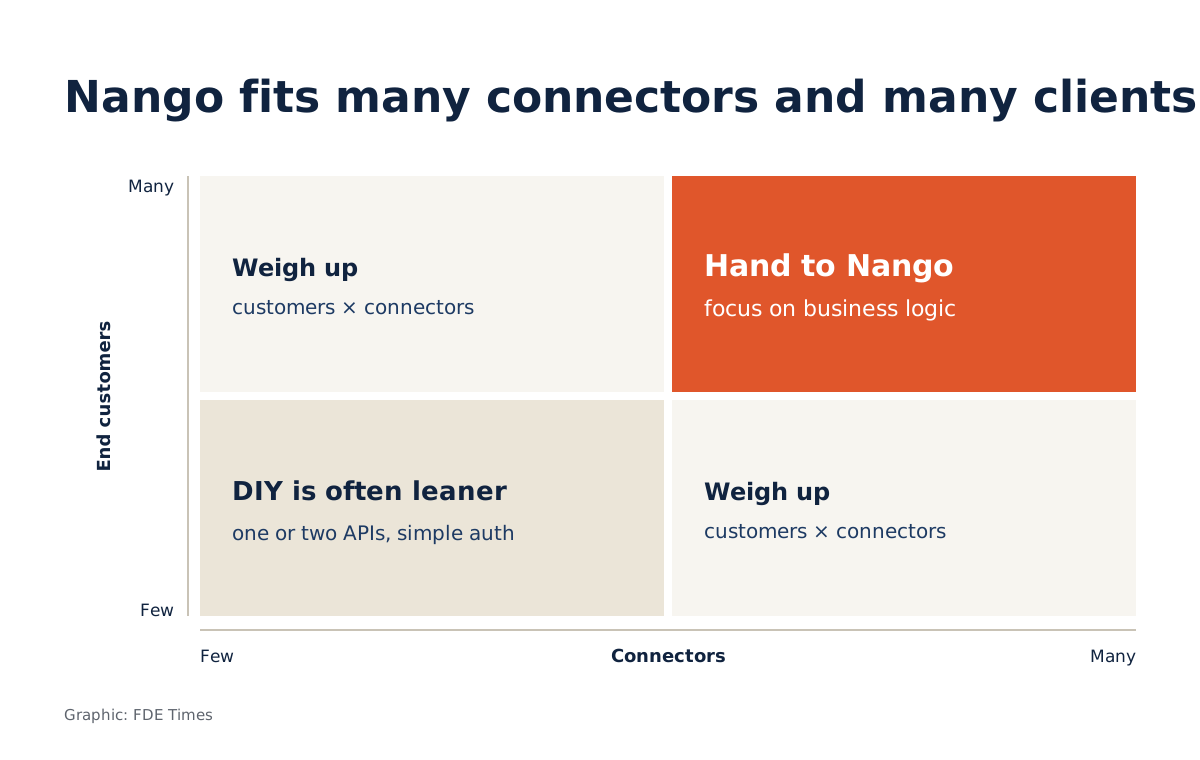
Nango fits best when there are many providers and many end customers connecting. At that point the per-provider maintenance, exactly what Nango sells, outweighs the cost of learning and depending on a platform.
If the customer’s agent needs ten connectors and each needs sync and webhooks, handing this layer to Nango lets you put your time into business logic.
Conversely, if the customer needs only one or two internal APIs, or a single provider with simple authentication, building it yourself is usually leaner. Even with many connectors, three points should make you pause.
The first is the licence. Nango uses the Elastic License, and although the README calls the project open source, this licence is not OSI-approved, so the customer’s legal team will want to read it closely.
The second is where it runs. According to the pricing page, running Nango inside the customer’s own infrastructure is part of the Enterprise plan. If the customer requires data to stay within its infrastructure, raise this in the first working session.
The last is cost. The free plan has hard limits, while the usage-based plan starts at $50 a month with $50 of credit, charging $0.29 per connection, $0.72 per compute hour and $0.5 per GB of data transferred.
Run the numbers
Suppose the customer’s product has 50 end customers, each connecting 10 connectors. That is 500 connections, or 500 × 0.29 = $145 in connection fees, before compute and data transfer. If the number of end customers grows to 500, that becomes 5,000 connections and $1,450.
The calculation shows that the deciding variable is not the number of connectors but the number of end customers multiplied by the number of connectors. Set that figure against the engineering hours the customer’s team currently spends fixing connectors, and check the pricing page again before putting it in a proposal, because prices can change.
The 16% figure and the failure modes above describe the right kind of risk, but do not treat them as measurements from your customer’s systems.
What to learn first?
Learn OAuth thoroughly before learning any tool. You need to understand the authorization code flow, the difference between access and refresh tokens, how token rotation works, and how to detect authentication failures hidden behind a 200 response.
With that foundation, you can judge what work Nango is actually saving you, and handle a broken connection yourself out of hours.
For your career, when reading FDE job descriptions, look for phrases such as “integrations”, “connectors” or “agent tools”. They signal a team carrying exactly this load. On your CV, do not just write “integrated Jira”.
Write how you handled token rotation, how you caught hidden authentication failures, and why you chose to use a shared layer or not. Hiring managers need to see judgement in choosing between buying and building, not just familiarity with one more tool.
At the customer site, the first question to ask is not whether to use Nango, but how many connectors and how many end customers will be connecting next year.
Was this article useful?
Thanks for the feedback!