Your first GitLab pipeline at a client can fail with flawless YAML
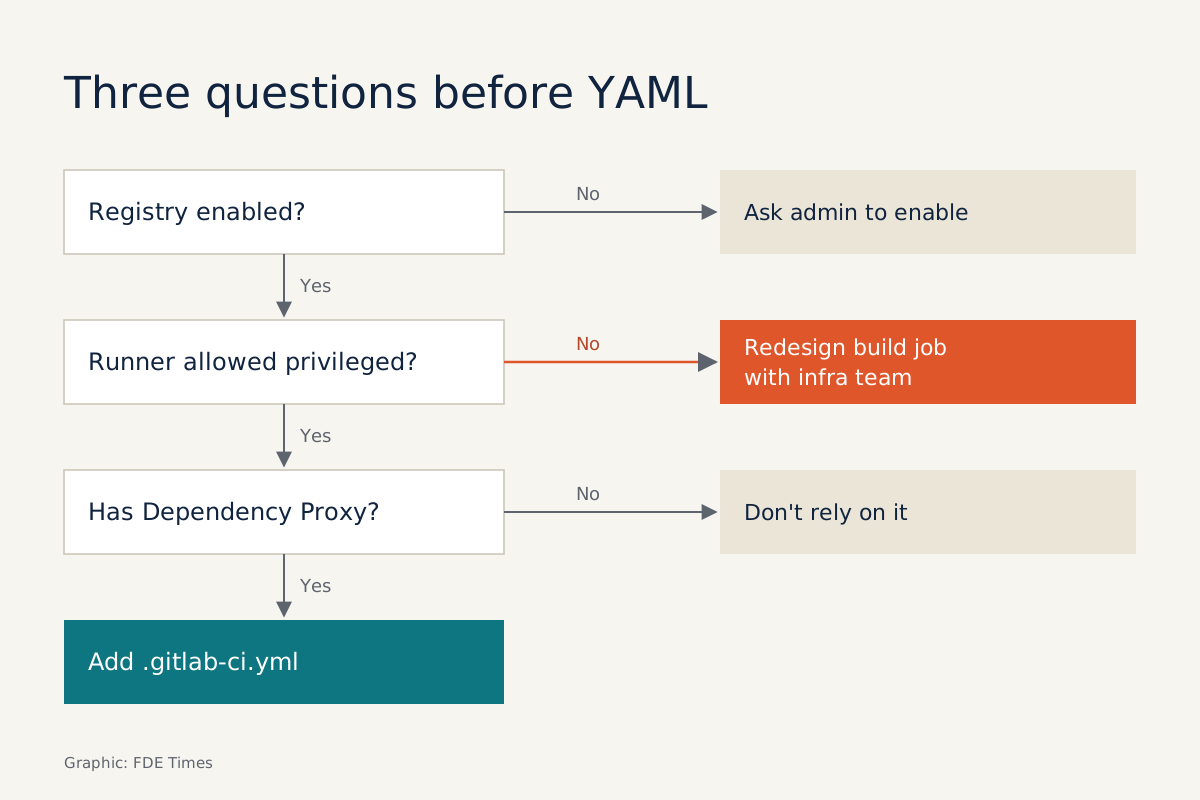
On self-managed instances the usual culprit is a registry never enabled or a runner barred from privileged mode, so ask before you write.
In brief
- The pipeline lives in .gitlab-ci.yml. The order of stages decides which jobs run first, and rules decide whether the pipeline and each job are created at all.
- On self-managed GitLab, the registry is enabled automatically only with the built-in Let's Encrypt integration. Otherwise the client's admin must configure it.
- Docker-in-Docker needs privileged mode, so ask the security team before writing an image build job.
An FDE arriving at a client rarely gets to choose the CI tool. Companies that already host GitLab themselves usually want everything to run inside their own infrastructure: code, pipelines, images.
The valuable skill, then, is reading the client’s GitLab quickly and writing a pipeline that works in the first week. You will touch three pieces: the pipeline file, the runners and the registry. Each has its own sticking points on a self-managed instance.
A pipeline is one file, but order is what matters
The pipeline is declared in .gitlab-ci.yml. If you do not declare stages, GitLab uses the default set .pre, build, test, deploy, .post. The order of entries in stages decides which jobs run first.
There are two layers of conditions. workflow:rules decides whether the pipeline is created at all, and if no rule matches, the pipeline does not run. Job-level rules decide whether each individual job is created.
Imagine you are deploying a RAG API for the client’s data team. You want the pipeline to run only on the main branch, with tests first, then an image built and pushed to the registry, and deployment last:
workflow:
  rules:
    - if: $CI_COMMIT_BRANCH == "main"

stages: [test, build, deploy]

unit-test:
  stage: test
  image: python:3.12
  script:
    - pip install -r requirements.txt
    - pytest -q

build-image:
  stage: build
  image: docker:27.3
  services:
    - docker:27.3-dind
  variables:
    DOCKER_TLS_CERTDIR: "/certs"
  script:
    - echo "$CI_JOB_TOKEN" | docker login "$CI_REGISTRY" -u "$CI_REGISTRY_USER" --password-stdin
    - docker build -t "$CI_REGISTRY_IMAGE:$CI_COMMIT_SHORT_SHA" .
    - docker push "$CI_REGISTRY_IMAGE:$CI_COMMIT_SHORT_SHA"

deploy:
  stage: deploy
  image: alpine:3.20
  script:
    - ./deploy.sh "$CI_COMMIT_SHORT_SHA"
Run it in your head. A commit to the feature/chunking branch creates no pipeline, because the only rule does not match. If you are waiting for a pipeline that never appears, the first place to look is workflow:rules, not the runner.
The build job logs in with GitLab’s predefined variables rather than a hard-coded address such as gitlab.customer.local:5050. Port 5050 is only the default when the registry is enabled automatically through the Let’s Encrypt integration. If the client’s admin configured the registry by hand, the host and port may well differ.
Image names still follow the registry/namespace/project pattern, so the name tells you which project an image belongs to. The docker image version is pinned and TLS is enabled, as GitLab recommends when using Docker-in-Docker.
Which runner will run your jobs?
A YAML file runs nothing on its own. Jobs are executed by runners, the agents that run the GitLab Runner application. It is open-source software, MIT-licensed and developed in the open in the gitlab-org/gitlab-runner project.
Runners come in three scopes: instance, group and project. A project runner suits a project that needs its own configuration, credentials and security controls. For an FDE handling a client’s sensitive data, that is usually the one to ask for. Self-managed runners support three executors: Shell, Docker and Kubernetes.
The Docker executor runs each job in its own container, isolated from other jobs. Images are pulled according to the pull policy set in config.toml, which defaults to always.
Count them in the sample pipeline. Three jobs use three images, plus the build job’s docker:27.3-dind service, for four images. With the always policy, every push to main means four pulls, and that number multiplies quickly when the whole team is committing. GitLab’s dependency proxy can ease pressure from Docker Hub rate limits.
When job volume is high, the Kubernetes executor is worth considering, and two public cases show why. CERN moved its runners from Docker machine, a tool Docker has stopped developing, to Kubernetes, scaling from 0 to 100 pods on demand across more than 20 nodes.
SeatGeek replaced fixed-size runners on Nomad with the Kubernetes executor, using one disposable pod per job. It migrated more than 600 repositories, doubled the number of concurrent jobs and cut average wait time from 16 seconds to 2.
Three traps on self-managed GitLab
The first trap is the registry. On an Omnibus installation, the registry is enabled automatically on port 5050 only when the built-in Let’s Encrypt integration is used. Otherwise, an admin has to configure and enable it. Do not write a docker push job before you know whether the registry is running.
The second trap is privileged mode. The build-image job above uses Docker-in-Docker, which requires the runner to run in privileged mode. GitLab warns that this mode effectively disables the container’s security mechanisms and exposes the host to privilege escalation.
At a bank or a hospital, the answer may well be no. In that case the image build job has to be redesigned with the client’s infrastructure team, and you should know this before committing to a delivery date.
The third trap is tier-dependent features. GitLab’s comparison table lists some features, such as the Dependency Proxy for the Container Registry, Geo and disaster recovery, as available only in certain Self-Managed tiers. Ask the client which tier they run before relying on them.
GitLab’s Solutions Architects warn that optimising runner resources for one team can shift repetitive chores onto developers. The question they suggest is worth carrying with you: does this fix create repetitive work for anyone?
For an FDE the question carries even more weight. Once you leave, the client is the one who has to live with that pipeline.
What to learn first
Learn in the order you will meet things at the client. Start with stages and rules syntax because, as the feature/chunking example shows, “pipeline didn’t run” errors usually start here. Next, learn how to register a project runner with the Docker executor. Finally, learn to read config.toml and to name images according to the registry’s pattern.
When interviewing for an FDE role, ask directly how much the company’s clients tend to self-host their tools. The answer tells you whose infrastructure you will be working in, and shows the interviewer you understand the real job.
On a CV, one specific line carries more weight than a list of tools, for example: “wrote a three-stage GitLab pipeline running on a dedicated project runner, and agreed privileged mode with the client’s security team before building images”.
At a client site, the first pipeline is also a test of whether you understand their infrastructure. Ask carefully about the registry, runners and privileged mode before writing the first line of YAML.
Was this article useful?
Thanks for the feedback!
11 sources
- Runners | GitLab Docs
- CI/CD YAML syntax reference | GitLab Docs
- GitLab container registry administration | GitLab Docs
- GitLab container registry | GitLab Docs
- Docker executor | GitLab Runner docs
- Use Docker-in-Docker | GitLab Docs
- GitLab Runner project (gitlab-org/gitlab-runner)
- Self-Managed Feature Comparison | GitLab
- GitLab Runners and Kubernetes: A Powerful Duo for CI/CD · 2023-12-06
- CI Runner Re-architecture (SeatGeek Chairnerd) · 2024-11-26
- A story of runner scaling | GitLab Blog · 2022-06-29