E2B isolates agent-generated code, but the route to the internet is open by default
Before promising a client's security team that an agent's code cannot go anywhere, you have to close the door that E2B leaves ajar at creation.

In brief
- E2B runs AI-generated code in isolated cloud sandboxes, separate from your machine and the client's.
- Sandboxes have outbound internet by default; to isolate the network, you must configure it and verify it yourself.
- Paused sandboxes keep their state indefinitely, so you need an explicit process for destroying them.
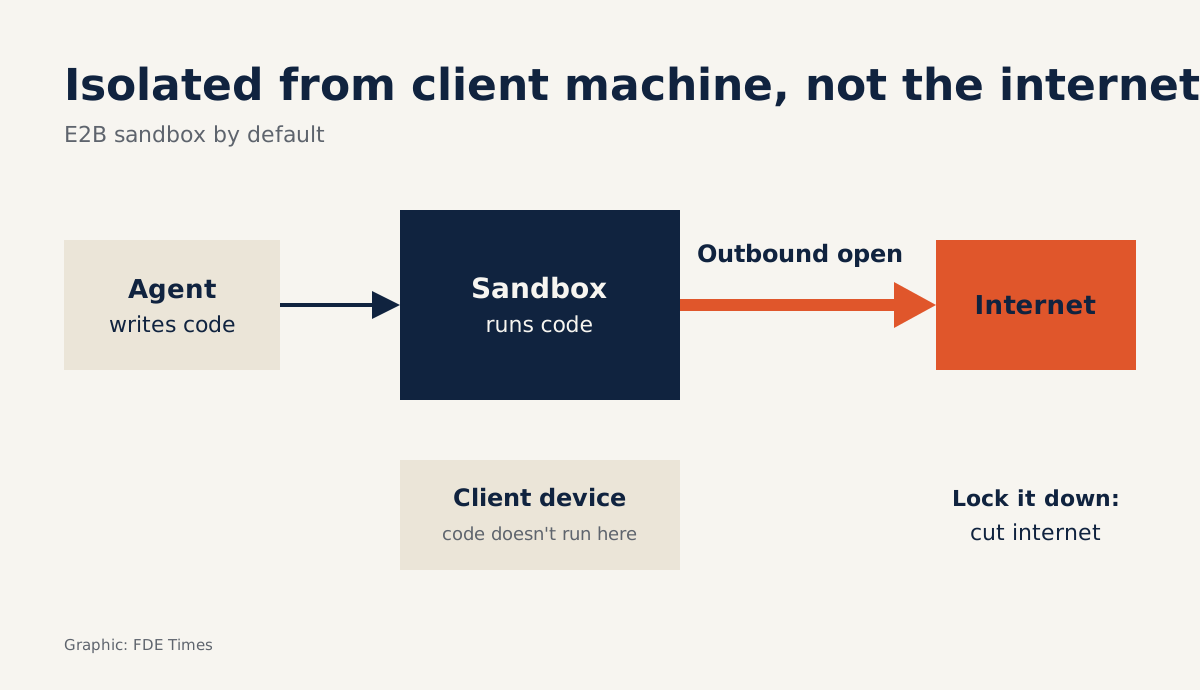
Every E2B sandbox has a route to the internet by default. That detail sits in the official documentation of a tool built to run code in a separate environment.
So an FDE cannot promise a client’s security team that code has nowhere to go once it is inside a sandbox. Your agent writes code nobody has read, and that code needs somewhere to run. E2B answers the question “where does it run?”; the question “where is the code allowed to go?” remains yours.
What does this tool actually do?
E2B describes itself as open-source infrastructure for running AI-generated code in isolated sandboxes in the cloud. The main repo uses the Apache-2.0 licence.
Take a typical case. The client is a logistics company that wants an agent to reconcile invoices: the agent reads a file, writes its own Python, runs it, sees an error and fixes it. If that loop runs on your laptop or on one of the client’s machines, a single bad line of code could delete the wrong file or touch an internal system.
That is the moment to reach for E2B: the code has not been read by a person, it runs through many iterations, and you do not want to ask for permissions on the client’s infrastructure just for a proof of concept. If the code has already been reviewed and must sit next to data on an internal network, the problem is a different one, and a cloud sandbox may not be the answer.
Try it: invoice reconciliation with the network off
Step 1: close the network. When you create the sandbox, turn off allowInternetAccess; this is equivalent to setting denyOut to 0.0.0.0/0, which blocks every outbound route. Keep this piece of configuration, because it is your first piece of evidence.
Step 2: prove the network is closed. Write a short script that calls a public address you know is working, then run it on your machine and in the sandbox. Your machine should succeed and the sandbox should fail; if the sandbox gets through, stop immediately. Keep both logs, because the control log shows the failure comes from the network rules and not from the target address.
Step 3: bring the data in. Only now should you move a client-approved sample into the sandbox, say a CSV file of 200 anonymised invoice rows. Count again inside the sandbox: there must be exactly 200 rows. Keep that number along with the client’s written consent.
Step 4: run the agent’s code. Have the Python written by the agent run on the file you just brought in. It might return a file recording 188 matched invoices and 12 mismatched, still totalling 200. Keep the exact code and the output file so the client’s staff can check them.
This design has a consequence that is easy to miss. With the internet off, an agent placed inside the sandbox cannot call an external model API either. So keep the agent loop outside: the agent writes code on your side, and the sandbox only runs that code.
Suppose the real reconciliation job takes 3 hours. A sandbox can run continuously for at most 1 hour on the Hobby plan and 24 hours on the Pro plan, so on Pro this job finishes in one go.
On Hobby you have to use pause, because each pause resets the runtime clock while the state stays intact. If you pause at every 50th minute to be safe, the job splits into segments of 50, 50, 50 and 30 minutes, which means three pauses. Your code must therefore be able to stop midway and carry on, so test that early.
On cost, E2B charges $0.000014 per vCPU-second. Two vCPUs running for 3 hours come to 21,600 vCPU-seconds, or $0.3024 for the CPU alone.
The Hobby plan comes with $100 of one-time credit and allows 20 concurrent sandboxes. Counting CPU alone, that covers more than 330 runs of this job, so Hobby suits a proof of concept using fake data or a client-approved sample.
Before doing real work with a client, check whether the plan you are on can pass their security review. Technically, Pro is worth considering when a job cannot stop midway, or when you need more than 20 sandboxes at once.
Where can code in the sandbox still go?
In the example above, the code does not run on the client’s machine. But unless you change the configuration, it still has a way to send data out to the internet, and the contents of a malicious invoice could steer the agent straight down that route.
NVIDIA’s AI Red Team ranks indirect prompt injection as the main threat to agent tools. It treats blocking outbound traffic as a mandatory control, because that stops data being pushed out or a remote shell being opened. E2B offers three options, each suited to a different stage.
| Configuration | Where the sandbox can go | Use when |
|---|---|---|
| Default | Has outbound access to the internet | Demos with fake data |
| Internet off | No outbound connections at all | Code processes client data and does not need to call out |
| Allow/deny rules | Follows the rules; allow always beats deny | Code must call a few fixed destinations |
The last row is the easiest to get wrong, because allow always beats deny. Suppose an allow rule covers every address of a partner carrier, while a deny rule targets that carrier’s test server at 203.0.113.50. The code can still reach 203.0.113.50, so write narrow allow rules rather than relying on deny to patch the gap.
Domain names are declared in allowOut, so the formula easiest to justify is to block everything and then open only the exact hostnames you need. Test in both directions: the opened destination must be reachable, and any other destination must fail. Where possible, turning the internet off entirely remains the easiest option to justify to the client’s security team.
NVIDIA also advises that sandboxes should not inherit the host’s credentials and should receive only secrets granted explicitly. In the reconciliation case, the code only needs to read one file, so the simplest answer is to grant no secrets at all.
The limits to tell the client up front
The biggest limit comes from where the code runs: the sandbox is in the cloud. Putting client data into a sandbox means the data has left their infrastructure, and an open-source licence does not by itself answer the question of where the data lives. Raise this at the first meeting; do not leave it until the final week.
The second limit gets less attention. A paused sandbox keeps its entire state indefinitely. That is convenient for long jobs, but a forgotten sandbox can hold client data long after the contract ends, so destroying sandboxes must be part of the handover process.
The third limit is scale: the Pro plan allows at most 100 concurrent sandboxes. If your design gives each end user a sandbox, compare this number with your concurrent users before making promises about scalability.
If you are asked about the virtualisation layer, do not rush to answer. AWS’s Firecracker runs workloads in microVMs using Linux KVM, and the NSDI 2020 paper describes it maintaining strong security isolation in Lambda and Fargate.
But the E2B documents cited here do not confirm which virtualisation layer E2B uses, so do not assume it is Firecracker; ask E2B to confirm directly.
What to learn first, and what to put on your CV
The sensible order is to start with the network, not with how to call the E2B API. The harder part is looking at an agent and being able to say what it reads, what it writes and where it calls. After that comes the skill of designing jobs that can stop midway and carry on without corrupting the results.
When reading a job description, if you see phrases such as code execution or sandboxing, ask the interviewer: where does the agent’s code run, and where is it allowed to call? On your CV, do not just write “used E2B”. Write that you ran agent-generated code in a sandbox with outbound traffic turned off, with tests confirming the code could not call out and a process for destroying sandboxes at handover.
Clients rarely need to hear that your sandbox is safe. They need to see the log line showing it was blocked when it tried to get out.
Was this article useful?
Thanks for the feedback!
7 sources
- GitHub - e2b-dev/E2B
- Internet access - E2B Documentation
- Sandbox - E2B Documentation
- E2B Pricing
- GitHub - firecracker-microvm/firecracker
- Firecracker: Lightweight Virtualization for Serverless Applications (NSDI '20) · 2020-02
- Practical Security Guidance for Sandboxing Agentic Workflows and Managing Execution Risk · 2026-01-30